1. Introduction
This manual provides detailed instructions for the safe and effective use, maintenance, and care of your VGR V-370/V-371 Professional Electric Foil Shaver. Please read this manual thoroughly before first use and keep it for future reference.
The VGR V-370/V-371 electric foil shaver features a triple-blade system designed for efficient shaving. It includes an LED display for battery status, USB charging capability for convenience, and an IPX5 waterproof rating for versatile use. A built-in pop-up trimmer allows for precise detailing.
2. Safety Information
While specific safety information was not provided in the product data, it is crucial to observe general safety precautions when using any electrical appliance, especially one that comes into contact with water.
- Do not immerse the charging cable or adapter in water.
- Keep the appliance away from children.
- Ensure the shaver is fully dry before connecting it to the charger.
- Do not use the shaver if the blades or foils are damaged, as this may cause injury.
- Only use the provided charging cable and adapter.
- If the appliance malfunctions, discontinue use immediately and contact customer support.
3. Product Overview and Components
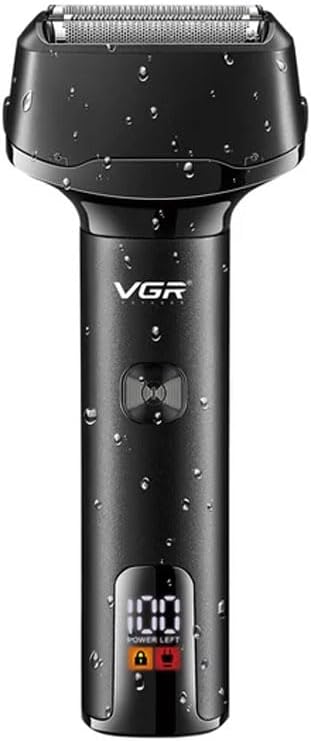
Figure 1: Front view of the VGR V-370/V-371 electric foil shaver, showcasing its sleek design, water-resistant exterior with droplets, and the clear LED display indicating 100% power remaining. The power button is visible below the VGR logo.

Figure 2: Detailed view of the shaver head, highlighting the triple-blade system and double hypoallergenic foils designed for a close and comfortable shave. Arrows indicate the direction of hair cutting.

Figure 3: Comparison of V-370 (green) and V-371 (black) models, illustrating their respective LED indicators. The V-370 shows 'Working' (white light) and 'Charging' (red light), while the V-371 displays 'Power Left' percentage, 'Travel Lock Remind' (lock icon), and 'Charging Indicator' (plug icon). Both models support USB charging.

Figure 4: The VGR V-371 shaver presented alongside its retail packaging, providing a view of the product's overall design and the box it comes in.
4. Setup and Charging
4.1 Initial Charge
Before using your VGR shaver for the first time, it is recommended to fully charge it. This ensures optimal battery performance and longevity.
- Ensure the shaver is turned off.
- Connect the provided USB charging cable to the shaver's charging port.
- Plug the other end of the USB cable into a compatible USB power source (e.g., wall adapter, computer USB port).
- The LED display (V-371) will show the charging progress, or a red indicator light (V-370) will illuminate.
- Once fully charged, the V-371 display will show "100" or the V-370 indicator will turn white or off. Disconnect the shaver from the charger.
4.2 Travel Lock (V-371 only)
The V-371 model features a travel lock function to prevent accidental activation. To activate or deactivate:
- To activate: Press and hold the power button for 3 seconds. A lock icon will appear on the LED display.
- To deactivate: Press and hold the power button for 3 seconds. The lock icon will disappear.
5. Operating Instructions
5.1 Shaving
For optimal results, ensure your skin is clean and dry before shaving. The shaver can be used for both wet and dry shaving due to its IPX5 waterproof rating.
- Press the power button to turn on the shaver.
- Hold the shaver at a right angle (90 degrees) to your skin.
- Move the shaver in short, circular motions or straight strokes against the direction of hair growth.
- Apply gentle pressure; excessive pressure is not necessary and can cause irritation.
- For a closer shave, stretch your skin with your free hand.
- After shaving, press the power button to turn off the shaver.
5.2 Using the Pop-up Trimmer
The integrated pop-up trimmer is ideal for shaping sideburns, mustaches, and detailing around the beard area.
- Turn on the shaver.
- Locate the pop-up trimmer switch (usually on the back or side of the shaver body).
- Slide the switch upwards to engage the trimmer.
- Use the trimmer to define edges or trim longer hairs before shaving.
- After use, slide the switch downwards to retract the trimmer.
6. Maintenance and Cleaning
Regular cleaning ensures optimal performance and extends the lifespan of your shaver.
6.1 Daily Cleaning
- Turn off the shaver and disconnect it from any power source.
- Remove the shaver head by gently pulling it upwards.
- Tap out any loose hair clippings from the shaver head and the main body.
- Rinse the shaver head and the inner cutting unit under running water. The IPX5 rating allows for easy rinsing.
- Allow all parts to air dry completely before reattaching the shaver head.
6.2 Deep Cleaning and Lubrication (Monthly)
- After daily cleaning, apply a small drop of lubricating oil (not included, but recommended for shaver blades) to the foils and cutting blades.
- Run the shaver for a few seconds to distribute the oil.
- This helps maintain blade sharpness and smooth operation.
6.3 Replacing Blades and Foils
For continued optimal performance, it is recommended to replace the shaver foils and blades every 12-18 months, depending on usage. Replacement parts can be purchased from authorized VGR retailers.
- Turn off the shaver and disconnect it from any power source.
- Remove the old shaver head.
- Carefully align the new shaver head with the shaver body and press down until it clicks into place.
7. Troubleshooting
| Problem | Possible Cause | Solution |
|---|---|---|
| Shaver does not turn on. | Battery is depleted. Travel lock is activated (V-371). | Charge the shaver. Deactivate the travel lock by pressing and holding the power button for 3 seconds. |
| Shaver pulls hair or shaves poorly. | Blades/foils are dull or dirty. Insufficient charge. | Clean the shaver head thoroughly. Consider replacing blades/foils if they are old. Ensure the shaver is fully charged. |
| Shaver is not charging. | Charging cable or adapter is faulty. Charging port is dirty. | Try a different USB cable or power source. Clean the charging port gently with a dry brush. |
| Excessive noise or vibration. | Shaver head is not properly attached. Internal component issue. | Reattach the shaver head securely. If the problem persists, contact customer support. |
8. Specifications
- Brand: VGR
- Models: V-370, V-371
- Head Type: Foil
- Number of Blades: 3
- Blade Material: Stainless Steel
- Waterproof Rating: IPX5
- Power Source: Battery Powered (Rechargeable)
- Charging: USB Interface (Fast Charging)
- Special Features: LED Display (V-371), Pop-up Trimmer, Travel Lock (V-371)
- Recommended Uses: Professional, Hair and Beard
- Product Dimensions: 30 x 30 x 35 cm
- Item Weight: 300 Grams
- Country of Origin: China
9. Warranty and Support
Information regarding specific warranty terms and customer support contact details was not provided in the product data. Please refer to the product packaging or the retailer's website for warranty information and customer service contacts.
For general inquiries or technical assistance, you may visit the official VGR website or contact your point of purchase.


