
Introduction
Welcome to the user manual for your new Aheaplus Bar Cabinet. This versatile cabinet is designed to enhance your home bar or living space with its integrated power outlets, vibrant LED lighting, and intelligent storage solutions. Please read this manual thoroughly before assembly and use to ensure safe operation and optimal performance.
Safety Information
IMPORTANT SAFETY INSTRUCTIONS
- Always unplug the cabinet when not in use.
- Do not overload the shelves or place heavy objects on the top of the cabinet.
- Keep the cabinet away from heat sources and flammable materials.
- Do not attempt to repair or modify the electrical components yourself.
- Always follow the assembly instructions carefully to avoid injury.
- Use caution when adjusting the shelves to prevent pinch points.
Product Features
The Aheaplus Bar Cabinet is engineered with several key features to provide convenience and style:
- Integrated Power Outlets: Equipped with 3 AC outlets and 2 USB ports (5V/2A) for convenient charging of devices and powering appliances. The power cord is 6.56 feet long.
- Dynamic LED RGB Lighting: Features LED lights with over 60,000 color options and multiple flashing modes. Includes a music sync function to change light colors with sound and music rhythm, perfect for creating ambiance.
- Ample and Adjustable Storage: Offers a top open shelf for display, a double-layer storage cabinet with two doors, and adjustable shelves with 3 height options. Includes wine racks for up to 10 bottles and glass racks for 8 upside-down glasses.
- Versatile Design: Can function as a coffee bar, wine cabinet, or sideboard buffet cabinet, suitable for kitchens, dining rooms, and living rooms.
- Durable Construction: Made with high-quality wooden materials and X-support for stability and durability.

Figure 1: Overview of the Aheaplus Bar Cabinet, showcasing its design and various features.
Specifications
| Attribute | Detail |
|---|---|
| Brand | Aheaplus |
| Model | B0CVVS665C |
| Color | Rustic Brown |
| Product Dimensions | 13.8"D x 47.2"W x 39.3"H |
| Item Weight | 58 pounds |
| Material | Wood |
| Mounting Type | Freestanding |
| Power Outlets | 3 AC Outlets, 2 USB Ports (5V/2A) |
| Power Cord Length | 6.56 feet |
| LED Lights | RGB, 60,000+ colors, music sync |
| Wine Bottle Capacity | Up to 10 bottles |
| Glass Holder Capacity | Up to 8 glasses |
| Assembly Required | Yes |
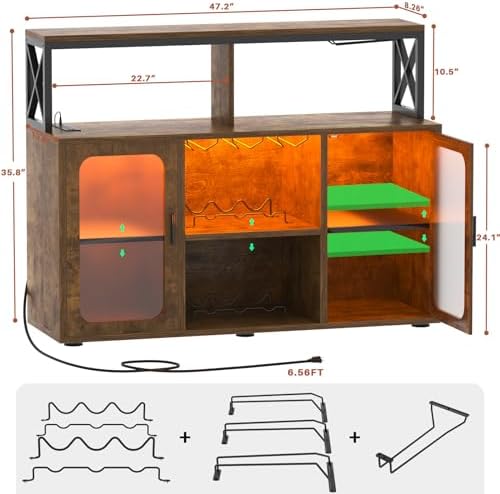
Figure 2: Detailed dimensions of the Aheaplus Bar Cabinet.
Package Contents
Please verify that all components are present before beginning assembly. Refer to the included assembly guide for a detailed list of parts and hardware.
- Cabinet Panels (various sizes)
- Hardware Pack (screws, dowels, cam locks, etc.)
- Wine Racks
- Glass Holders
- Adjustable Shelves
- LED Light Strip with Controller
- Power Outlet Unit with USB Ports
- Assembly Instructions Manual
Setup and Assembly
The Aheaplus Bar Cabinet is designed for straightforward assembly. All necessary hardware and tools are included, and parts are clearly labeled.
- Unpack and Identify: Carefully unpack all components and lay them out on a clean, soft surface to prevent scratches. Identify each part using the labels and the provided assembly diagram.
- Assemble Frame: Follow the step-by-step instructions in the included manual to assemble the main frame of the cabinet. Ensure all connections are secure.
- Install Shelves and Racks: Insert the wine racks and glass holders into their designated slots. Install the adjustable shelves at your desired height.
- Mount Doors: Attach the cabinet doors, ensuring they open and close smoothly.
- Install Electrical Components: Securely install the power outlet unit into its designated cutout. Attach the LED light strip according to the instructions, ensuring proper connection to the power source.
- Final Placement: Once assembled, place the cabinet on a stable, level surface.
For detailed visual instructions, please refer to the separate assembly guide provided in your package.
Operating Instructions
Power Outlets and USB Ports
The integrated power strip allows you to conveniently power and charge your devices.
- Plug the cabinet's main power cord into a standard 120V AC wall outlet.
- Use the 3 AC outlets for small appliances like coffee makers, juicers, or decorative lights.
- Use the 2 USB ports (5V/2A) to charge mobile phones, tablets, or other USB-powered devices.
- Caution: Do not exceed the maximum power rating of the outlets.

Figure 3: Close-up view of the integrated power outlets and USB ports.
LED RGB Lighting System
The LED lighting system offers a customizable ambiance for your bar cabinet.
- Power On/Off: Use the remote control or the dedicated button on the light strip controller to turn the lights on or off.
- Color Selection: Choose from over 60,000 colors using the remote control or a compatible mobile application (if applicable, refer to LED light manual for app details).
- Mode Selection: Select various flashing modes or static color options to suit your mood or occasion.
- Music Sync Function: Activate the music sync feature to allow the lights to change color and intensity in rhythm with ambient sound or music.
- Brightness Adjustment: Adjust the brightness level to create the desired lighting effect.
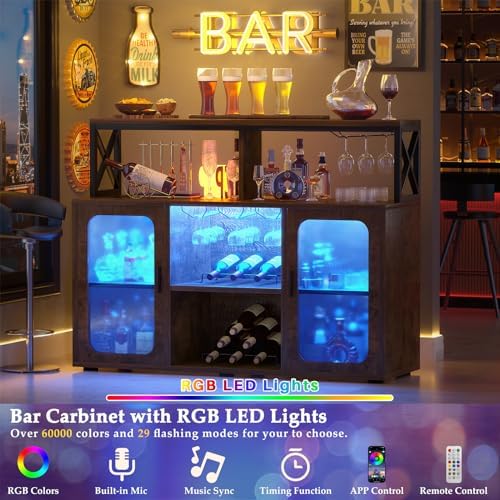
Figure 4: The bar cabinet illuminated by its versatile LED RGB lighting.
Maintenance
Regular maintenance will help keep your Aheaplus Bar Cabinet in excellent condition.
- Cleaning: Wipe surfaces with a soft, damp cloth. Avoid harsh chemicals or abrasive cleaners that could damage the finish.
- Dusting: Regularly dust the cabinet to prevent buildup, especially around electrical components.
- Spills: Immediately clean up any spills to prevent staining or damage to the wood.
- Electrical Components: Ensure the power outlets and LED lights are free from dust and debris. Do not attempt to clean them with liquids while plugged in.
- Hardware Check: Periodically check all screws and fasteners to ensure they are tight. Retighten if necessary.
Troubleshooting
| Problem | Possible Cause | Solution |
|---|---|---|
| LED lights not turning on | Not plugged in; loose connection; remote battery dead | Ensure power cord is securely plugged in. Check all light strip connections. Replace remote battery. |
| Power outlets not working | Cabinet not plugged in; circuit breaker tripped; overloaded | Verify cabinet is plugged into a live outlet. Check household circuit breaker. Unplug some devices to reduce load. |
| Cabinet feels wobbly | Uneven floor; loose fasteners | Adjust cabinet leveling feet (if present) or place shims under legs. Retighten all assembly screws. |
| Doors not aligning | Improper hinge adjustment | Adjust door hinges according to assembly manual instructions. |
Warranty and Support
Aheaplus provides lifetime customer support for this product. If you encounter any issues or have questions, please do not hesitate to contact our experienced customer service team.
Contact Information: Please refer to the contact details provided in your product packaging or visit the official Aheaplus website for support.
For information regarding protection plans, please refer to your purchase documentation.