
1. Introduction
This instruction manual provides important information for the safe and efficient use of your Medion 40084099 280 Watt power adapter. This charger is specifically designed for use with Medion Erazer Defender P40 (NP70SND) and Deputy P50 (NP50SND) laptop models. Please read this manual thoroughly before using the product and retain it for future reference.
2. Safety Information
Observe the following safety precautions to prevent damage to the product or personal injury:
- Use the charger only with compatible Medion laptop models as specified.
- Do not expose the charger to moisture, rain, or extreme temperatures.
- Avoid dropping or subjecting the charger to strong impacts.
- Ensure the power outlet voltage matches the charger's input requirements (100-240V).
- Do not disassemble or attempt to repair the charger. Refer servicing to qualified personnel.
- Keep the charger away from heat sources and ensure adequate ventilation during use.
- Disconnect the charger from the power outlet when not in use for extended periods.
3. Package Contents
Verify that all items are present in the package:
- 1x Medion 40084099 280 Watt Power Adapter
- 1x 3-pole C13 Power Cable

Image 1: The Medion 280 Watt power adapter, displaying its technical specifications label.

Image 2: The 3-pole C13 power cable included with the adapter.
4. Setup Instructions
Follow these steps to connect your power adapter:
- Connect the Power Cable: Insert the 3-pole C13 power cable into the corresponding port on the power adapter. Ensure it is firmly seated.
- Connect to Power Outlet: Plug the other end of the 3-pole C13 power cable into a standard electrical wall outlet (100-240V, 50/60Hz).
- Connect to Laptop: Locate the power input port on your Medion Erazer Defender P40 or Deputy P50 laptop. Insert the square-shaped connector from the power adapter into this port. Ensure the connector is fully inserted.
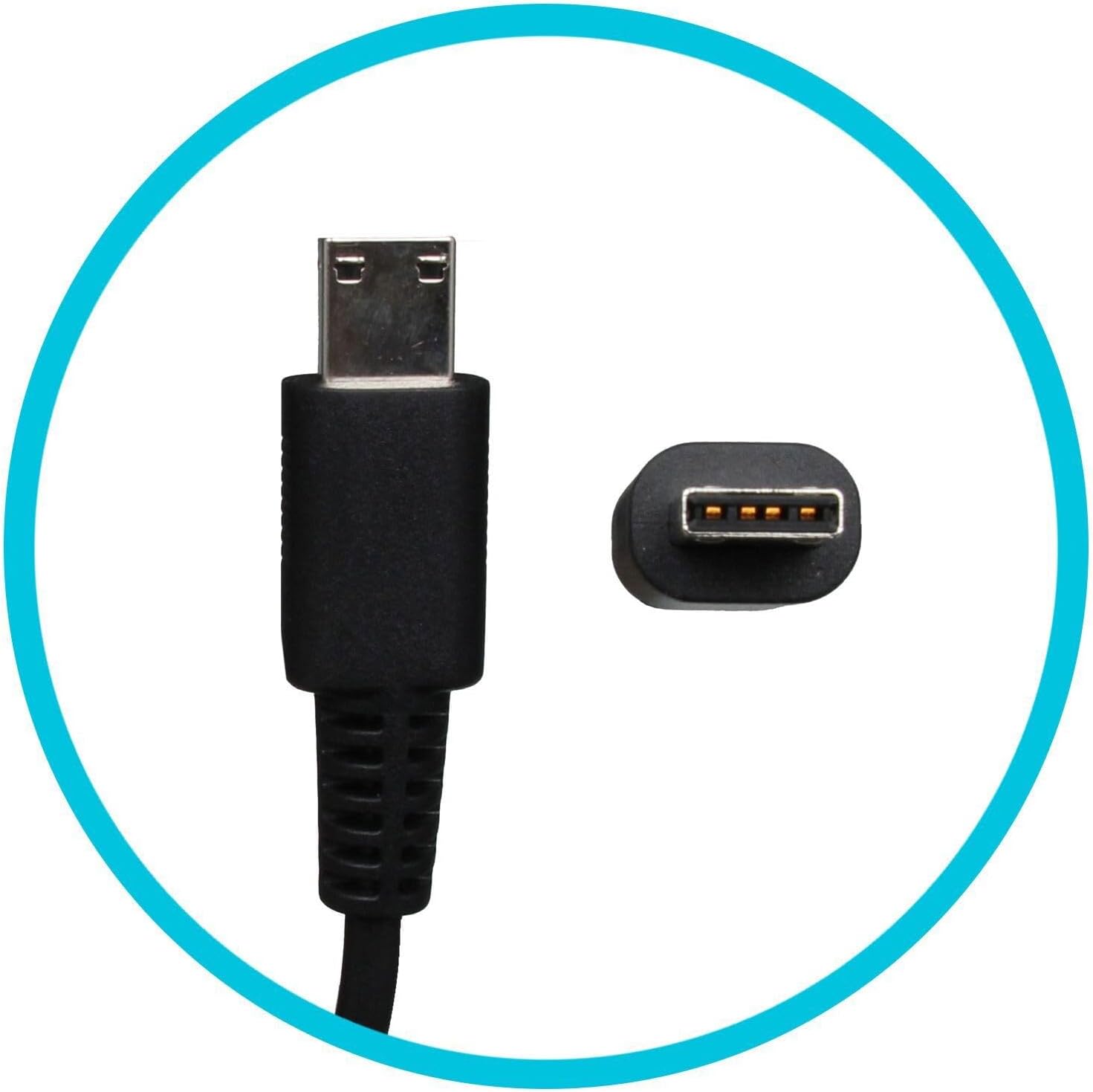
Image 3: Detail of the square-shaped power connector designed for compatible Medion laptops.
5. Operating Instructions
Once connected, the power adapter will automatically begin charging your laptop's battery and/or powering the laptop directly. No additional user interaction is typically required for basic operation.
- The laptop's charging indicator light (if present) should illuminate, indicating that power is being supplied.
- You can use your laptop while it is connected to the power adapter.
- To disconnect, first unplug the connector from the laptop, then unplug the power cable from the wall outlet.
6. Maintenance and Care
Proper care extends the life of your power adapter:
- Cleaning: Disconnect the adapter from all power sources before cleaning. Use a soft, dry cloth to wipe the exterior. Do not use liquid cleaners or solvents.
- Storage: Store the adapter in a cool, dry place when not in use. Avoid wrapping the cables too tightly to prevent damage.
- Handling: Do not pull on the cable to disconnect the adapter. Always grasp the plug or connector directly.
- Inspection: Periodically inspect the cables and connectors for any signs of wear, fraying, or damage. Discontinue use if damage is observed.
7. Troubleshooting
If you encounter issues with your power adapter, consider the following common solutions:
- Laptop not charging:
- Ensure all cables are securely connected to the adapter, wall outlet, and laptop.
- Try plugging the power cable into a different wall outlet to rule out a faulty outlet.
- Verify that the adapter is the correct model for your laptop.
- Adapter feels hot:
- It is normal for power adapters to become warm during operation.
- Ensure the adapter is in a well-ventilated area and not covered. Excessive heat could indicate a problem; discontinue use if it becomes unusually hot to the touch or emits smoke/odor.
- Loose connection:
- If the connector feels loose in the laptop port, inspect both the connector and the port for damage. A damaged port or connector may require professional repair.
If problems persist after attempting these steps, contact Medion customer support or a qualified service technician.
8. Specifications
| Model Number | 40084099 |
| Brand | MEDION |
| Input Voltage | 100-240V AC, 50/60Hz |
| Output Voltage | 20V DC |
| Output Current | 14.0A |
| Output Power | 280W |
| Energy Efficiency | VI |
| Plug Type (Laptop) | Square, 180° straight, 12.5 mm length |
| Cable Length (Charger to Laptop) | 1.00 m |
| Dimensions (L/W/H) | 180 mm / 85 mm / 35 mm |
| Compatible Laptops | Medion Erazer Defender P40 (NP70SND), Medion Deputy P50 (NP50SND) |

Image 4: Top view of the Medion 280 Watt power adapter, showing its compact design.
9. Warranty and Support
For warranty information, please refer to the documentation provided with your original laptop purchase or visit the official Medion website. For technical support or service inquiries, please contact Medion customer service directly.
Medion Official Website: www.medion.com


