Introduction
Thank you for choosing the Melitta CI Touch F630-111 Automatic Coffee Maker. This manual provides essential information for the safe and efficient operation, maintenance, and care of your new appliance. Please read these instructions carefully before first use and keep them for future reference.
Safety Instructions
Always observe the following safety precautions to prevent injury or damage to the appliance:
- Ensure the appliance is connected to a properly grounded power outlet.
- Do not immerse the appliance, power cord, or plug in water or other liquids.
- Keep children away from the appliance during operation due to hot surfaces and liquids.
- Unplug the appliance before cleaning and when not in use for extended periods.
- Do not operate the appliance if the power cord or plug is damaged, or if the appliance malfunctions or has been damaged in any way.
- Use only original Melitta spare parts and accessories.
Product Overview
Familiarize yourself with the components of your Melitta CI Touch coffee maker.

Figure 1: Front view of the Melitta CI Touch F630-111 automatic coffee maker, showing the display, coffee spout, and drip tray.

Figure 2: Side view of the Melitta CI Touch F630-111, highlighting the water tank and overall compact design.
Key Components:
- Touch Display: For selecting beverages and navigating menus.
- Coffee Spout: Height-adjustable for various cup sizes.
- Two-Chamber Bean Container: Allows selection between two types of coffee beans.
- Integrated Grinder: Super-quiet steel cone grinder.
- Removable Brewing Unit: For easy cleaning.
- Milk System: External milk container for milk-based specialties.
- Water Tank: Removable for refilling.
Setup
1. Unpacking and Placement:
- Remove all packaging materials.
- Place the coffee maker on a stable, level, and heat-resistant surface.
- Ensure adequate ventilation around the appliance.
2. Initial Rinse:
- Fill the water tank with fresh, cold water.
- Place a container under the coffee spout.
- Follow the on-screen instructions for the initial rinsing process.
3. Filling the Bean Container:

Figure 3: Pouring whole coffee beans into the two-chamber bean container located at the top of the machine.
- Open the lid of the two-chamber bean container.
- Pour whole coffee beans into the desired chamber(s).
- Close the lid securely.
4. Setting up the Milk System:
- Connect the milk hose to the coffee maker and the external milk container.
- Fill the milk container with fresh, cold milk.
Operating Instructions
1. Turning On/Off:
- Press the power button to turn the machine on or off. The display will guide you through the start-up or shut-down process.
2. Selecting a Beverage:

Figure 4: A hand touching the display to select a coffee beverage, showing the intuitive interface.
- Use the touch display to select your desired coffee specialty (e.g., Espresso, Café Crème, Cappuccino, Latte Macchiato).
- Adjust the coffee strength and volume as prompted on the display.
3. Adjusting Coffee Thickness and Grinding Degree:

Figure 5: A hand operating the rotary knob to navigate menus and adjust settings, such as coffee thickness or grinding degree.
- Access the settings menu via the touch display or rotary knob.
- Select "Coffee Thickness" or "Grinding Degree" to customize your preference.
- The grinding degree can be adjusted directly on the grinder inside the bean container (refer to specific instructions in the full manual for precise adjustment).
4. Double Cup Mode:
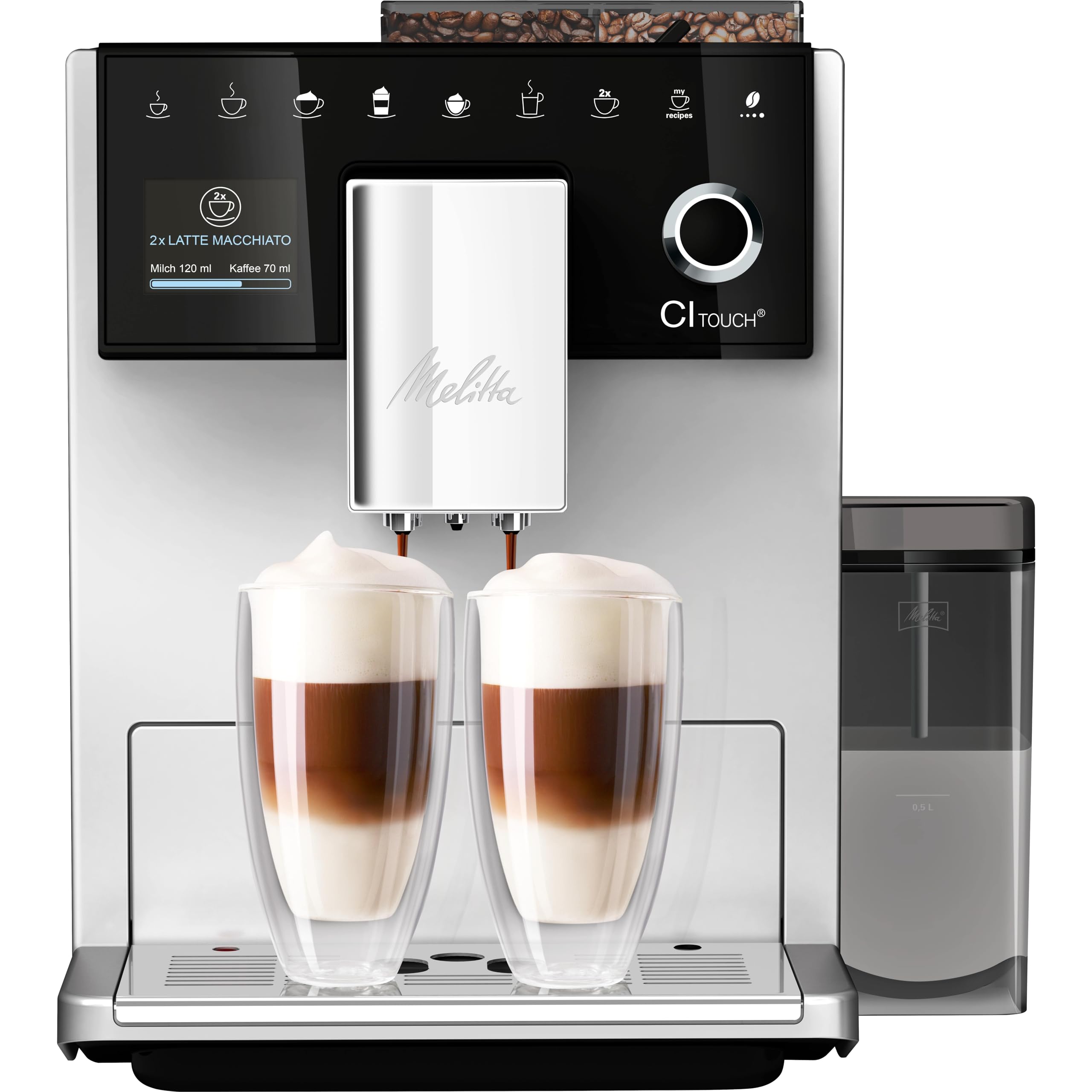
Figure 6: The Melitta CI Touch brewing two latte macchiatos into tall glasses, demonstrating the double cup mode functionality.
- For two servings, select the "2x" option on the display before choosing your beverage.
- Place two cups under the coffee spout.
Maintenance and Cleaning
1. Cleaning the Brewing Unit:
- The brewing unit is removable for easy cleaning.
- Switch off the machine and unplug it.
- Remove the brewing unit according to the instructions in the full manual.
- Rinse thoroughly under running water. Allow to air dry before reinserting.
2. Cleaning the Milk System:
- The Melitta CI Touch features an easy steam cleaning function for the milk system.
- The external milk container and its components are dishwasher safe.
- Perform regular cleaning cycles as prompted by the machine or after each milk preparation.
3. Emptying Drip Tray and Coffee Grounds Container:
- Empty and clean the drip tray and coffee grounds container daily or when indicated by the machine.
4. Descaling:
- The machine will prompt you when descaling is required.
- Use a suitable descaling agent recommended by Melitta and follow the on-screen instructions carefully.
Troubleshooting
If you encounter issues with your Melitta CI Touch, refer to the following common problems and solutions:
| Problem | Possible Cause | Solution |
|---|---|---|
| No coffee is dispensed. | Water tank empty, brewing unit blocked, or coffee beans empty. | Refill water tank, clean brewing unit, or refill coffee beans. |
| Coffee is too weak or too strong. | Incorrect coffee strength setting or grinding degree. | Adjust coffee strength on the display or modify the grinding degree. |
| Milk does not froth properly. | Milk system dirty, milk too warm, or milk type unsuitable. | Clean the milk system thoroughly, use cold milk, or try a different type of milk. |
| Machine displays an error message. | Internal malfunction or maintenance required. | Refer to the specific error code in the full manual or contact customer support. |
For more detailed troubleshooting, please consult the comprehensive manual or contact Melitta customer support.
Specifications
- Brand: Melitta
- Model Name: Melitta CI Touch (F630-111)
- Color: Silver
- Product Dimensions: 18.5"D x 10.04"W x 13.39"H
- Coffee Maker Type: Espresso Machine
- Operation Mode: Fully Automatic
- Voltage: 230 Volts
- Capacity: 1.8 Liters (Water Tank)
- Coffee Input Type: Whole Beans
- Special Features: Integrated Coffee Grinder, Milk Frother, Programmable, Two-Chamber Bean Container, One Touch Display
- Item Weight: 20.4 pounds
- Manufacturer: Melitta Europa GmbH & Co. KG
Warranty and Support
Your Melitta CI Touch F630-111 Automatic Coffee Maker comes with a manufacturer's warranty. Please refer to the warranty card included with your product for specific terms and conditions.
For technical support, spare parts, or service inquiries, please visit the official Melitta website or contact their customer service department. Keep your proof of purchase handy when contacting support.
Melitta Official Website: www.melitta.com


