
ODK ZJZ-SCJSC
ODK L-Shaped Desk User Manual
Model: ZJZ-SCJSC | Brand: ODK
1. Introduction
Welcome to the user manual for your new ODK L-Shaped Desk. This desk is designed to provide a versatile and efficient workspace for home offices, gaming setups, and workstations. Featuring ample storage, integrated power outlets, and dynamic LED lighting, it enhances both productivity and ambiance. Please read this manual carefully to ensure proper assembly, operation, and maintenance of your desk.

Figure 1.1: The ODK L-Shaped Desk, showcasing its monitor shelf, integrated power strip, and storage drawers.
2. Key Features
- Ample Storage Space: Equipped with a monitor stand, CPU stand, two open shelves, and four fabric drawers, providing extensive storage for books, files, and office supplies. The comfortable monitor stand is designed to reduce back and neck strain by promoting better sitting posture.
- Integrated Power Outlets & USB Ports: Features two power outlets and two USB charging ports, allowing convenient charging for your electronic devices such as smartphones, gaming equipment, or Bluetooth devices while you work or play.
- Immersive Gaming Atmosphere: Comes with LED lighting offering 10 colors and 10 lighting modes. The memory function ensures the LED lights retain the last setting when powered on.
- Reversible L-Shaped Design: The L-shaped configuration fits perfectly into room corners, maximizing limited space. Its classic color scheme complements various room styles, including bedrooms, living rooms, offices, dorms, and gaming rooms.
- Easy Assembly: Detailed instructions and clearly labeled parts are included for straightforward assembly.

Figure 2.1: Detail of the four fabric storage drawers, designed to keep your desktop neat and tidy.

Figure 2.2: The integrated RGB LED strips and recessed power strip, offering convenient power and customizable lighting.
3. Components and Dimensions
Before assembly, please verify that all components listed in the packaging are present and undamaged. Refer to the detailed parts list and diagrams provided in your assembly guide for specific component identification. The desk's modular design allows for reversible L-shaped configurations to suit your space.
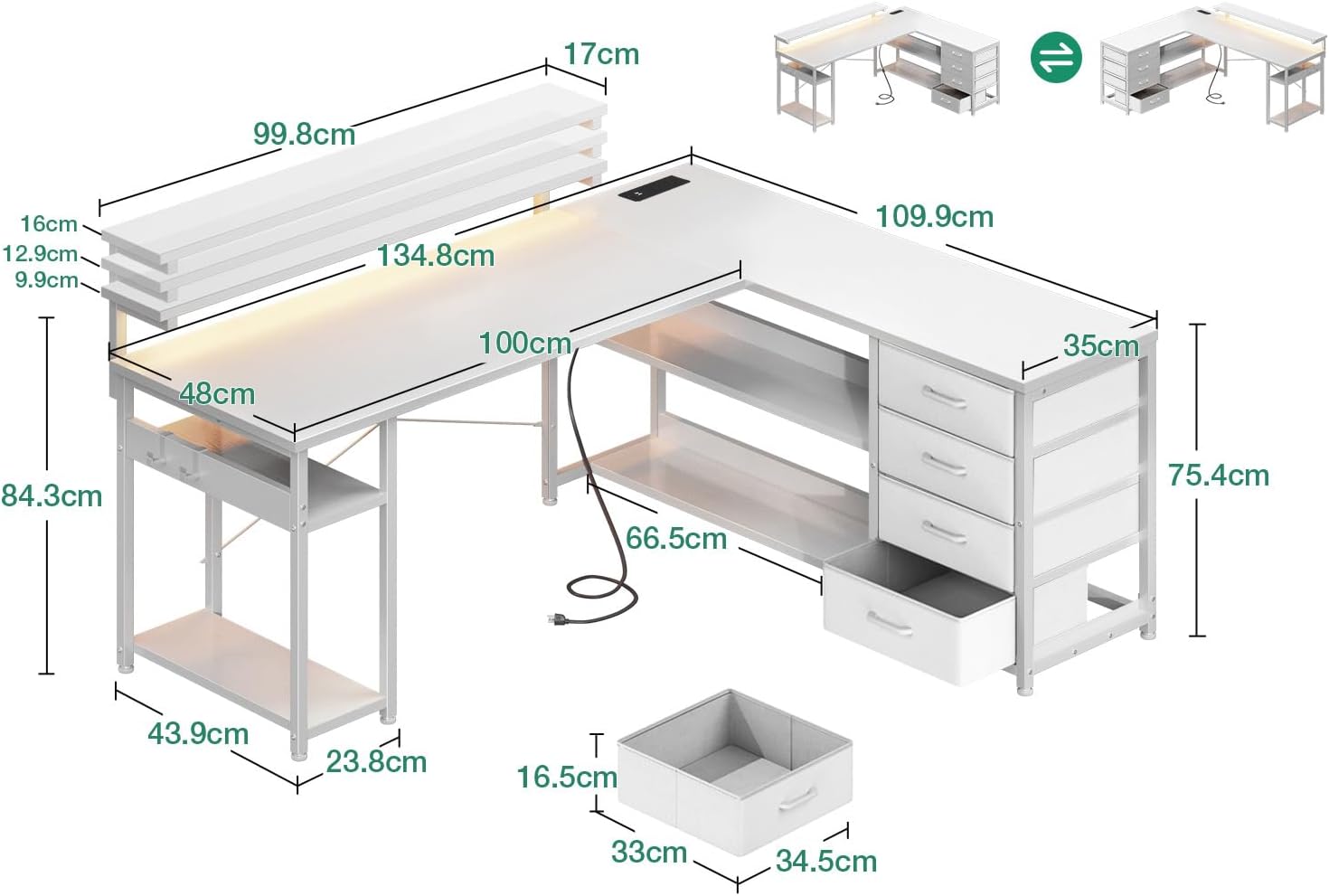
Figure 3.1: Dimensional overview of the ODK L-Shaped Desk, illustrating its various sections and reversible setup options.
Approximate Dimensions:
- Overall (L x W x H): 155 cm x 110 cm x 89 cm
- Desk Surface Depth: 48 cm
- Monitor Shelf Height: 16 cm (above main desk surface)
- Drawer Unit Dimensions: 35 cm (width) x 75.4 cm (height)
4. Setup and Assembly
Your ODK L-Shaped Desk is designed for straightforward assembly. We recommend having a clear, spacious area for assembly and, if possible, a second person to assist. All necessary tools and hardware are typically included.
Assembly Steps:
- Unpack and Verify: Carefully unpack all components and compare them against the parts list in your assembly guide. Ensure no parts are missing or damaged.
- Identify Orientation: Decide which L-shaped configuration (left or right) best suits your space. The desk is reversible, allowing flexibility. Pay close attention to the diagrams for correct part orientation.
- Assemble Frame: Begin by assembling the metal frame components according to the numbered steps in the instruction manual. Secure all screws firmly but do not overtighten until the entire frame is assembled.
- Attach Desk Surfaces: Mount the main desk surfaces and the monitor shelf to the assembled frame.
- Install Storage Units: Insert the fabric drawers into their designated compartments. Assemble the CPU stand and open shelves as instructed.
- Connect Electronics: Install the recessed power strip and connect the LED light strip as per the electrical connection instructions.
- Final Tightening: Once all parts are in place and aligned, fully tighten all screws.
Tip: If you encounter any difficulties or have questions during assembly, refer to the detailed diagrams in the included instruction booklet. For missing or damaged parts, please contact customer support.
5. Operating Instructions
5.1. LED Lighting System
The ODK L-Shaped Desk features an integrated LED lighting system to enhance your workspace or gaming environment.
- Power On/Off: The LED lights are controlled via a switch or button, typically located near the power strip.
- Change Colors/Modes: Use the control interface to cycle through 10 different colors and 10 lighting modes.
- Memory Function: The system includes a memory function that saves your last selected color and mode, so it will automatically resume that setting when turned on again.
5.2. Integrated Power Outlets and USB Ports
The desk is equipped with a recessed power strip for convenient access to power.
- Power Outlets: Plug your devices (e.g., monitor, laptop charger, printer) directly into the two standard power outlets. Ensure the desk's main power cord is plugged into a wall outlet.
- USB Charging Ports: Use the two USB ports to charge your smartphones, tablets, or other USB-powered devices. These ports provide 5V/2A output.
Caution: Do not overload the power strip. Always ensure that the total power consumption of connected devices does not exceed the rated capacity of the power strip.
6. Maintenance
Proper care and maintenance will extend the life of your ODK L-Shaped Desk.
- Cleaning: Wipe the desk surfaces with a soft, damp cloth. Avoid using harsh chemicals or abrasive cleaners, as they may damage the finish. For the fabric drawers, spot clean with a mild detergent and allow to air dry.
- Dusting: Regularly dust all surfaces, including the LED strip and power outlets, to prevent dust buildup.
- Tighten Fasteners: Periodically check and tighten all screws and fasteners to ensure the desk remains stable and secure.
- Avoid Excessive Weight: Do not place excessively heavy items on the desk or shelves beyond their recommended weight capacity.
- Protect from Liquids: Avoid spilling liquids on the desk, especially near the power outlets and LED strip. Use coasters for drinks.
7. Troubleshooting
If you encounter any issues with your ODK L-Shaped Desk, please refer to the following common solutions:
- Missing or Damaged Parts: If any parts are missing, damaged, or scratched upon arrival, please do not hesitate to contact our customer support team immediately. Provide your order details and a description of the issue.
- Assembly Difficulties: Review the assembly instructions carefully, paying close attention to diagrams and part numbers. Ensure all parts are oriented correctly. If you are still stuck, consider watching an assembly video if available online or contacting support.
- LED Lights Not Working: Check if the power cord for the desk is securely plugged into a wall outlet. Ensure the LED strip is properly connected to the power strip. If issues persist, contact customer support.
- Power Outlets/USB Ports Not Functioning: Verify that the desk's main power cord is plugged in and the wall outlet is active. Check for any tripped circuit breakers. Ensure devices are properly plugged into the outlets/ports.
- Desk Wobbles: Ensure all screws and fasteners are fully tightened. Check that the desk is placed on a flat, even surface. Adjust any leveling feet if present.
8. Specifications
| Attribute | Value |
|---|---|
| Brand | ODK |
| Model Number | ZJZ-SCJSC |
| Color | White |
| Product Dimensions (L x W x H) | 155 x 110 x 89 cm |
| Item Weight | 27.2 Kilograms |
| Special Features | Reversible, LED Lights, Power Outlets, USB Ports, Monitor Shelf, Drawers |
| Material (Frame) | Metal |
| Material (Top) | Wood (Particle Board with Veneer) |
| Style | Classic |
| Desk Design | Computer Desk (L-Shaped) |
9. Warranty and Support
ODK is committed to providing high-quality products and excellent customer service. Your L-Shaped Desk comes with a commitment to customer satisfaction.
If you receive a damaged, missing, or scratched computer desk, please do not hesitate to contact us. Our professional customer support team is dedicated to helping you resolve any issues within 24 hours. Please have your purchase details ready when contacting support.
For further assistance or inquiries, please visit our official website or contact us through the platform where you purchased the product.
Related documentsZJZ-SCJSC


Ask a question about this manual
Ask about setup, troubleshooting, compatibility, parts, safety, or missing instructions. Manuals+ will review the question and use this page’s manual context to help answer it.