
SIAGO Electric Standing Desk (48 x 24 Inch Black)
SIAGO Electric Standing Desk Adjustable User Manual
Model: 48 x 24 Inch Black Electric Standing Desk
1. Introduction
Thank you for choosing the SIAGO Electric Standing Desk. This manual provides essential information for the safe assembly, operation, and maintenance of your new adjustable height desk. Please read this manual thoroughly before assembly and retain it for future reference.

Figure 1.1: The SIAGO Electric Standing Desk, 48 x 24 Inch Black model.
2. Important Safety Information
To ensure safe operation and prevent damage, please adhere to the following safety guidelines:
- The maximum weight capacity for this desk is 200 pounds (90.7 kg). Do not exceed this limit.
- Assembly requires caution. It is recommended to assemble the desk with the assistance of another person.
- The desk features an electric lifting mechanism. Handle with care and ensure no obstructions are present during height adjustments.
- Always ensure the desk is stable and secure before use.
- Exercise caution when adjusting the height to prevent injury to yourself or others, and to avoid damage to objects placed on or near the desk.
- Keep children and pets away from the desk during operation. The control panel includes a child lock feature for added safety.
- Do not sit or stand on the desk surface.
- Only use the provided power adapter and components.
- Disconnect power before cleaning or performing any maintenance.
3. Package Contents
Before beginning assembly, verify that all components are present and undamaged. If any parts are missing or damaged, please contact customer support.
- Desktop (48 x 24 Inch, Black)
- Desk Legs (Alloy Steel)
- Motor and Lifting Mechanism
- Control Panel with LED Display
- Cable Management Tray
- Headphone/Bag Hooks (2)
- Assembly Hardware (screws, bolts, tools if included)
- Power Adapter and Cable
- User Manual (this document)
4. Setup and Assembly
The SIAGO Electric Standing Desk is designed for quick and straightforward assembly, typically completed within 30 minutes. All holes are pre-drilled, and accessories are clearly labeled.
- Unpack Components: Carefully remove all parts from the packaging and lay them out on a clean, flat surface. Check against the package contents list.
- Attach Legs to Desktop: Position the desktop upside down. Align the desk legs with the pre-drilled holes on the underside of the desktop. Secure them using the provided screws. Ensure the connection area is firm for stability.
- Install Motor and Control Panel: Follow the specific instructions in the included assembly guide to attach the motor and the control panel to the desk frame. Ensure all cables are securely connected.
- Install Cable Management and Hooks: Attach the cable management tray and the headphone/bag hooks to the designated areas on the underside of the desk. These help maintain an organized workspace.
- Connect Power: Once fully assembled, connect the power adapter to the desk and then to a power outlet.
- Initial Setup: Before first use, perform an initial calibration as per the detailed assembly manual to ensure proper height adjustment functionality.

Figure 4.1: Illustration of the quick 30-minute installation process.
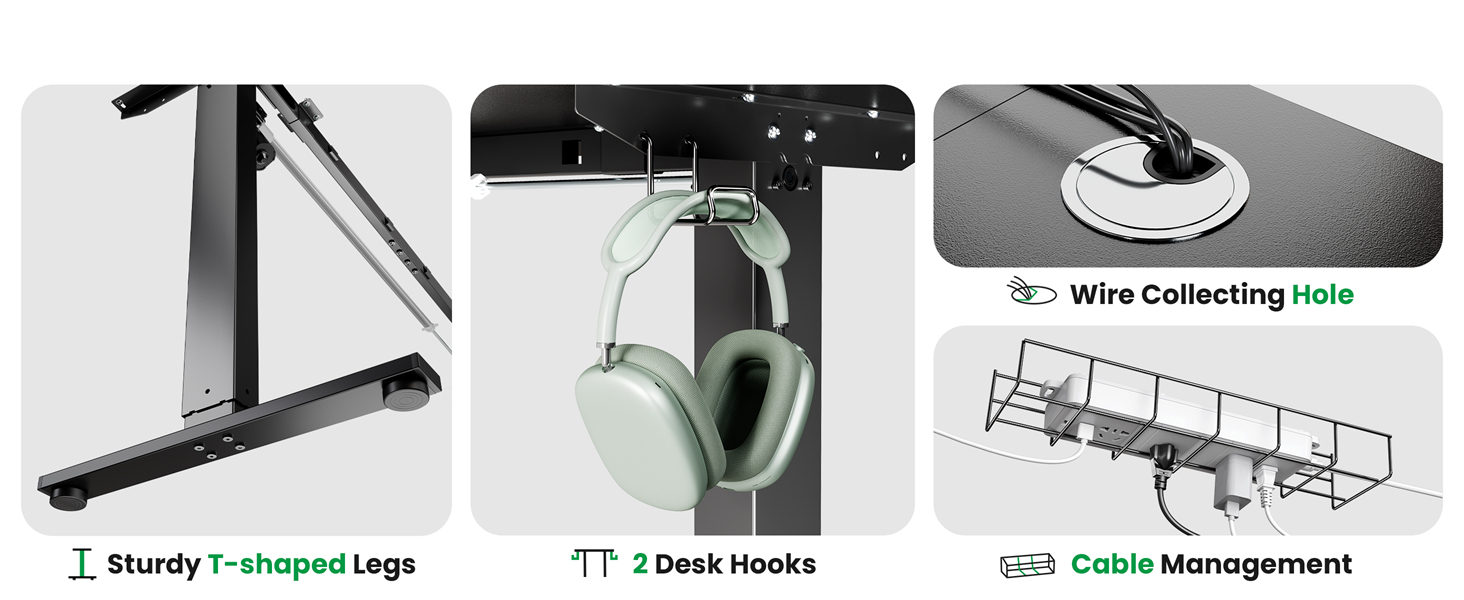
Figure 4.2: Details of the desk's sturdy T-shaped legs, integrated hooks, and cable management system.
5. Operating Instructions
Your SIAGO Electric Standing Desk features an intuitive control panel for effortless height adjustments and memory presets.
5.1 Control Panel Functions

Figure 5.1: The Smart Multifunction Keypad.
- Up/Down Buttons (+/-): Press and hold to smoothly raise or lower the desk to your desired height. The desk operates quietly (under 45 dB).
- LED Display: Shows the current height of the desk in inches.
- Memory Presets (1, 2, 3):
- To save a height: Adjust the desk to the desired height, then press the 'M' button followed by the desired preset number (1, 2, or 3). The display will confirm the save.
- To recall a height: Simply press the corresponding preset number (1, 2, or 3). The desk will automatically move to the saved position.
- Child Lock (M & +/-): To activate the child lock, press and hold the 'M' button and the '+' button simultaneously for a few seconds until the display indicates the lock is active. To deactivate, repeat the process. This prevents accidental adjustments.
5.2 Height Adjustment Range
The desk offers an adjustable height range from 27.95 inches (71 cm) to 45.67 inches (116 cm), allowing for comfortable sitting and standing positions.

Figure 5.2: Ergonomic height adjustment for sitting and standing.
6. Maintenance
Regular maintenance ensures the longevity and optimal performance of your SIAGO Electric Standing Desk.
- Cleaning: Wipe the desktop and frame with a soft, damp cloth. Avoid abrasive cleaners or harsh chemicals that could damage the finish. Ensure the desk is unplugged before cleaning.
- Cable Management: Periodically check and organize cables using the integrated cable management tray to prevent tangles and damage.
- Fastener Check: Every few months, inspect all screws and bolts to ensure they are tight. Re-tighten if necessary to maintain stability.
- Motor Inspection: Listen for any unusual noises during operation. If you notice any issues, discontinue use and contact customer support.
7. Troubleshooting
If you encounter any issues with your SIAGO Electric Standing Desk, refer to the following common problems and solutions:
| Problem | Possible Cause | Solution |
|---|---|---|
| Desk does not move. | Power cable disconnected; Child lock activated; Overload. | Check power connection; Deactivate child lock (M + '+'); Reduce weight on desk (max 200 lbs). |
| Desk moves unevenly or makes unusual noise. | Loose connections; Obstruction; Motor issue. | Check all assembly connections; Remove any obstructions; Contact customer support if issue persists. |
| Height presets not working. | Presets not saved correctly. | Re-save your desired height presets (adjust to height, press 'M', then 1/2/3). |
| Desk stops mid-adjustment. | Overload protection activated; Thermal protection activated. | Reduce weight; Allow motor to cool down for 20 minutes before resuming operation. |
If the problem persists after attempting these solutions, please contact SIAGO customer support for further assistance.
8. Product Specifications
| Feature | Detail |
|---|---|
| Brand | SIAGO |
| Model Name | Electric Standing Desk |
| Product Dimensions (D x W x H) | 24"D x 48"W x 46"H (Max Height) |
| Color | Black |
| Minimum Height | 27.95 Inches |
| Maximum Height | 45.67 Inches |
| Maximum Weight Recommendation | 200 Pounds (90.7 kg) |
| Base Material | Alloy Steel |
| Top Material Type | Wood (Eco-friendly P2-Grade) |
| Lifting Mechanism | Electric |
| Noise Level | Under 45 dB |
| Memory Presets | 3 |
| Assembly Required | Yes (Recommended 2 people) |
| Included Components | Cable Management Tray, Integrated Hooks |
| UPC | 768523980512 |

Figure 8.1: Detail of the desk's robust construction for unshakable stability.

Figure 8.2: The desk's lifting capacity and durability testing.

Figure 8.3: Features of the high-quality desktop material.
9. Warranty and Customer Support
SIAGO is committed to providing quality products and excellent customer service.
9.1 Warranty Information
The SIAGO Electric Standing Desk comes with a 1-Year Limited Warranty covering manufacturing defects and machine service. For detailed warranty terms, please refer to the documentation included with your purchase or contact customer support.
9.2 Customer Support
For any questions, concerns, or technical support regarding your SIAGO standing desk, please contact us through Amazon:
- Login to your Amazon Account.
- Navigate to "Your Orders".
- Find the order ID for your SIAGO Electric Standing Desk.
- Click "Contact Seller".
SIAGO aims to reply within 24 hours and offers 30-day free returns.

Figure 9.1: SIAGO's commitment to customer service and support.
Related documentsElectric Standing Desk (48 x 24 Inch Black)


Ask a question about this manual
Ask about setup, troubleshooting, compatibility, parts, safety, or missing instructions. Manuals+ will review the question and use this page’s manual context to help answer it.