
1. Introduction
Thank you for choosing the CREWORKS 38x38cm Digital Control Heat Press Machine. This manual provides essential information for the safe and efficient operation, maintenance, and troubleshooting of your new heat press. Please read these instructions thoroughly before use and retain them for future reference.
2. Safety Instructions
- Always connect the machine to a grounded power outlet.
- Keep hands and clothing clear of the heating plate during operation to prevent burns. The machine operates at high temperatures.
- Do not operate the machine in wet conditions or with wet hands.
- Ensure adequate ventilation in the work area.
- Unplug the machine from the power source when not in use or before cleaning and maintenance.
- Do not attempt to modify or repair the machine yourself. Contact qualified service personnel for assistance.
- The machine features an automatic shut-off after 30 minutes of inactivity for enhanced safety.
3. Product Components
Familiarize yourself with the main parts of your heat press machine:
- Handle: For opening and closing the heating plate.
- Pressure Adjustment Knob: To set the desired pressure for transfers.
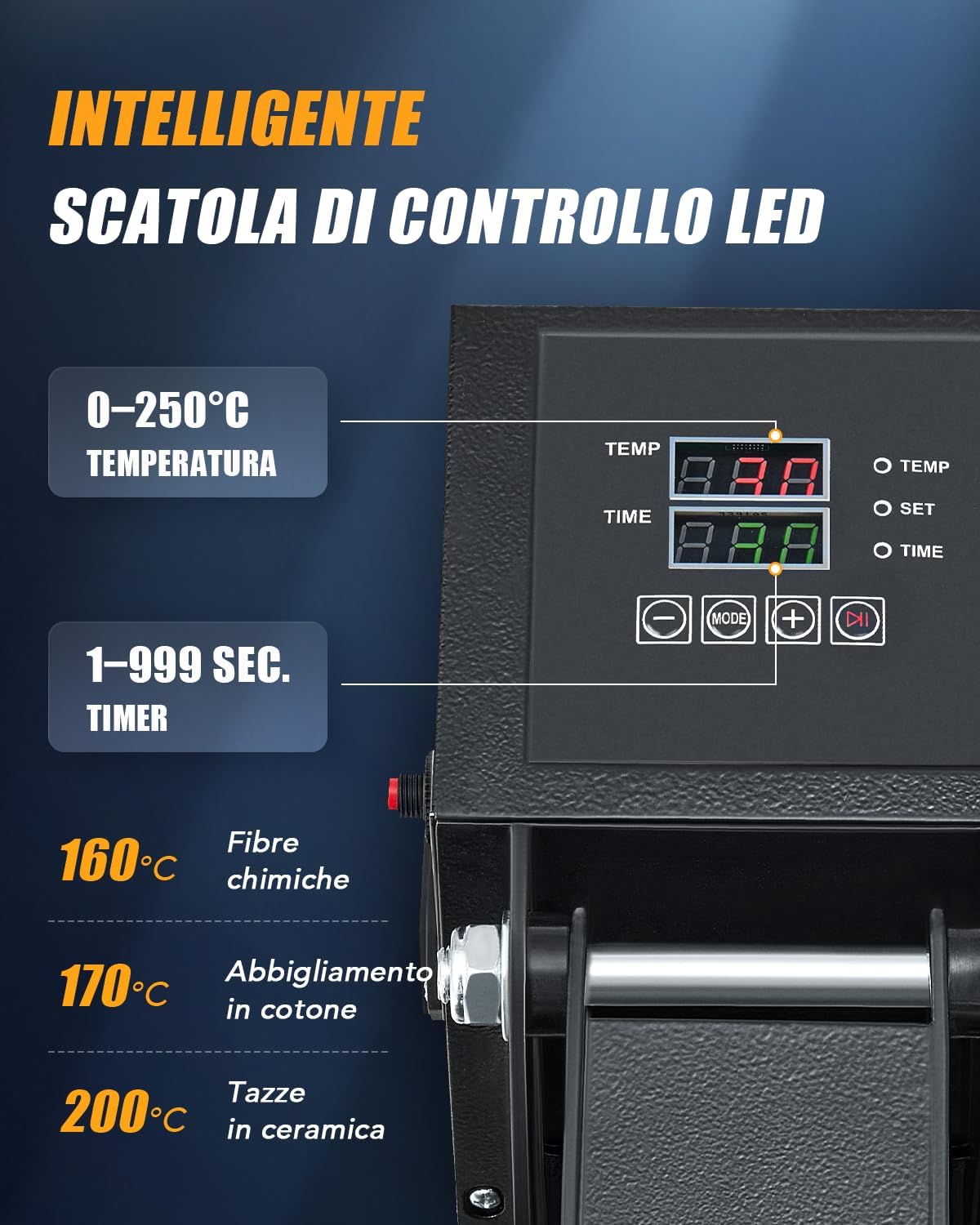
- Digital Control Display: Shows and allows adjustment of temperature and time.
- Heating Plate: The upper plate that heats up and applies pressure.
- Heat-Resistant Mat: Placed on the base plate to protect materials.
- Pull-out Base Plate: The lower plate where items are placed, designed to slide out for easy loading.
- Power Switch: To turn the machine on/off.

4. Setup
- Unpack: Carefully remove all components from the packaging.
- Placement: Place the heat press on a stable, heat-resistant surface in a well-ventilated area. Ensure there is enough space around the machine for safe operation.
- Power Connection: Connect the power cord to a grounded electrical outlet.
- Initial Inspection: Before first use, inspect the machine for any visible damage.
5. Operating Instructions
5.1. Control Panel Overview
The digital control panel allows precise adjustment of temperature and time:

- Temperature Setting: Adjustable from 0-250°C (0-480°F). Use the '+' and '-' buttons to set the desired temperature.
- Time Setting: Adjustable from 1-999 seconds. Use the '+' and '-' buttons to set the desired time.
- Mode Button: To switch between temperature and time settings.
5.2. Adjusting Pressure
The pressure adjustment knob on top of the heating plate allows you to customize the pressing force for different materials and transfer types.

- Turn clockwise to increase pressure.
- Turn counter-clockwise to decrease pressure.
5.3. Heat Transfer Process
- Turn on the machine using the power switch.
- Set the desired temperature and time using the digital control panel. Allow the machine to preheat until the set temperature is reached.
- Pull out the base plate using the handle.
- Place your material (e.g., T-shirt) onto the heat-resistant mat on the pull-out base. Ensure it is flat and smooth.
- Position your transfer design (e.g., HTV, sublimation paper) onto the material.
- Slide the base plate back into position.
- Lower the heating plate using the handle until it locks into place, applying pressure.
- The timer will start automatically. Once the time elapses, the machine will beep.
- Lift the heating plate using the handle.
- Carefully pull out the base plate and remove your transferred item. Be cautious as the item will be hot.
5.4. Versatile Applications
This heat press is suitable for various items and materials:

5.5. Even Heat Distribution
The machine features dual heating tubes for efficient and uniform heat transfer across the entire 38x38cm plate.

5.6. Official Product Video
6. Maintenance
- Cleaning: Ensure the machine is unplugged and completely cooled before cleaning. Wipe the heating plate with a soft, damp cloth. Do not use abrasive cleaners or solvents.
- Storage: Store the heat press in a dry, dust-free environment when not in use.
- Regular Checks: Periodically check all screws and connections to ensure they are secure.
7. Troubleshooting
| Problem | Possible Cause | Solution |
|---|---|---|
| Machine does not power on | Power cord not connected; Power switch off; Outlet issue | Check power cord connection; Turn on power switch; Test outlet with another device |
| Uneven heat transfer | Incorrect pressure; Heating plate not fully closed; Faulty heating element | Adjust pressure knob; Ensure plate is fully closed; Contact support if issue persists |
| Design not adhering | Incorrect temperature/time; Insufficient pressure; Wrong material type | Adjust temperature/time settings; Increase pressure; Verify material compatibility with transfer type |
8. Specifications
| Feature | Detail |
|---|---|
| Model | 38x38cm Heat Press |
| Brand | CREWORKS |
| Power | 1400W |
| Platen Size | 38x38cm |
| Temperature Range | 0-250°C (0-480°F) |
| Timer Range | 1-999 seconds |
| Dimensions (L x W x H) | 38.5 x 42 x 46.5 cm |
| Weight | 17 kg |
| Material Composition | Metal, Aluminum, Silicone |

9. Warranty and Support
For warranty information and customer support, please refer to the purchase documentation or contact your retailer. Keep your proof of purchase for any warranty claims.


