
Product Overview
The Yottamaster DS03CS is a versatile 10-in-1 USB C Hub that integrates an M.2 NVMe SSD enclosure. This device expands the connectivity of your USB-C enabled laptop or device, offering multiple ports for data transfer, display output, power delivery, and network access, alongside a storage solution for NVMe M.2 SSDs.

Image: Front and side view of the Yottamaster DS03CS USB C Hub with M.2 NVMe SSD Enclosure.
Package Contents
Please verify that all items are present in the package:
- One USB-C Hub with M.2 NVMe Enclosure
- One external silicone case
- One 10Gbps USB C to C cable
- One silicone thermal pad
- One screwdriver
- One user manual
Setup Instructions
1. SSD Installation (for M.2 NVMe SSD Enclosure)
This enclosure is designed exclusively for NVMe M-Key M.2 SSDs (PCIe-based) up to 8TB, compatible with sizes 2230, 2242, 2260, and 2280. It does not support M.2 SATA-based SSDs, M.2 PCIe AHCI SSDs, or any SSDs from Mac.
- Unscrew the cover: Use the provided screwdriver to carefully remove the cover of the enclosure.
- Attach the silicone sticker: Apply the silicone thermal pad to your M.2 NVMe SSD. This helps with heat dissipation.
- Insert the hard disk: Gently insert the M.2 NVMe SSD into the slot and secure it with the buckle.
- Screw back the cover lid: Replace the cover and fasten it with the screws.

Image: Step-by-step guide illustrating the installation of an M.2 NVMe SSD into the enclosure.
2. Connecting the Hub to Your Device
Connect the Yottamaster DS03CS hub to your laptop or compatible device using the provided USB C to C cable. The hub is plug-and-play and driver-free for Windows, Mac OS, and Android systems.

Image: The Yottamaster DS03CS hub connected to a laptop, demonstrating its use with an external monitor and other peripherals.
Operating Instructions
The Yottamaster DS03CS provides 10 distinct functions through its various ports:
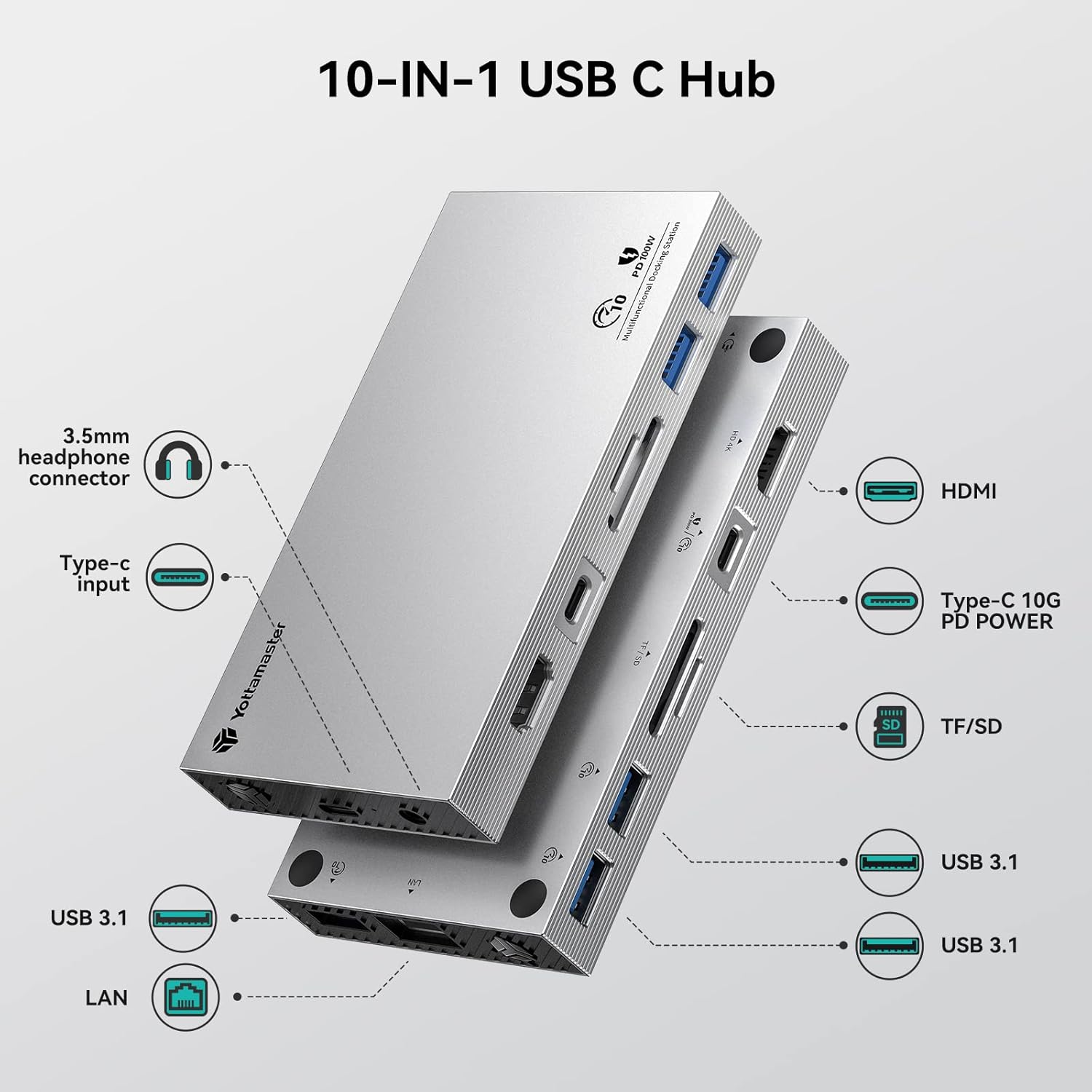
Image: A detailed diagram highlighting each of the 10 ports on the Yottamaster DS03CS and their respective functions.
- HDMI Port: Connect an external display (HDTV, monitor, or projector) to mirror or extend your screen. Supports 4K resolution at 30Hz.
- USB 3.1-A Ports (x3): These ports support data transfer speeds up to 10Gbps. Connect USB devices such as external hard drives, flash drives, keyboards, and mice.
- USB-C PD100W Port: This port supports both data transfer and Power Delivery 3.0, allowing fast charging of your laptop up to 100W (20V/5A). Ensure your power adapter supports PD.
- SD/TF Card Slots: Transfer files from SD and TF (Micro SD) cards. Note that TF and SD cards cannot be used simultaneously. The card reader supports USB 2.0 speeds.
- Gigabit Ethernet (RJ45) Port: Provides a stable wired network connection with transfer rates up to 1000Mbps, compatible with 10/100 Ethernet standards.
- 3.5mm Audio In&Output Combo: Connect headphones or speakers for audio output, or a microphone for audio input.
- M.2 NVMe SSD Slot: Functions as a portable SSD with data transfer speeds up to 10Gbps, depending on the SSD and USB connection.
Data Transfer
The USB A ports, USB C port, and the built-in M.2 NVMe SSD slot utilize the USB 3.2 Gen2 protocol, supporting 10Gbps data transfer. This provides significantly faster speeds compared to USB 3.0. Actual transfer speeds may vary based on the SSD speed and the type of USB connection used.
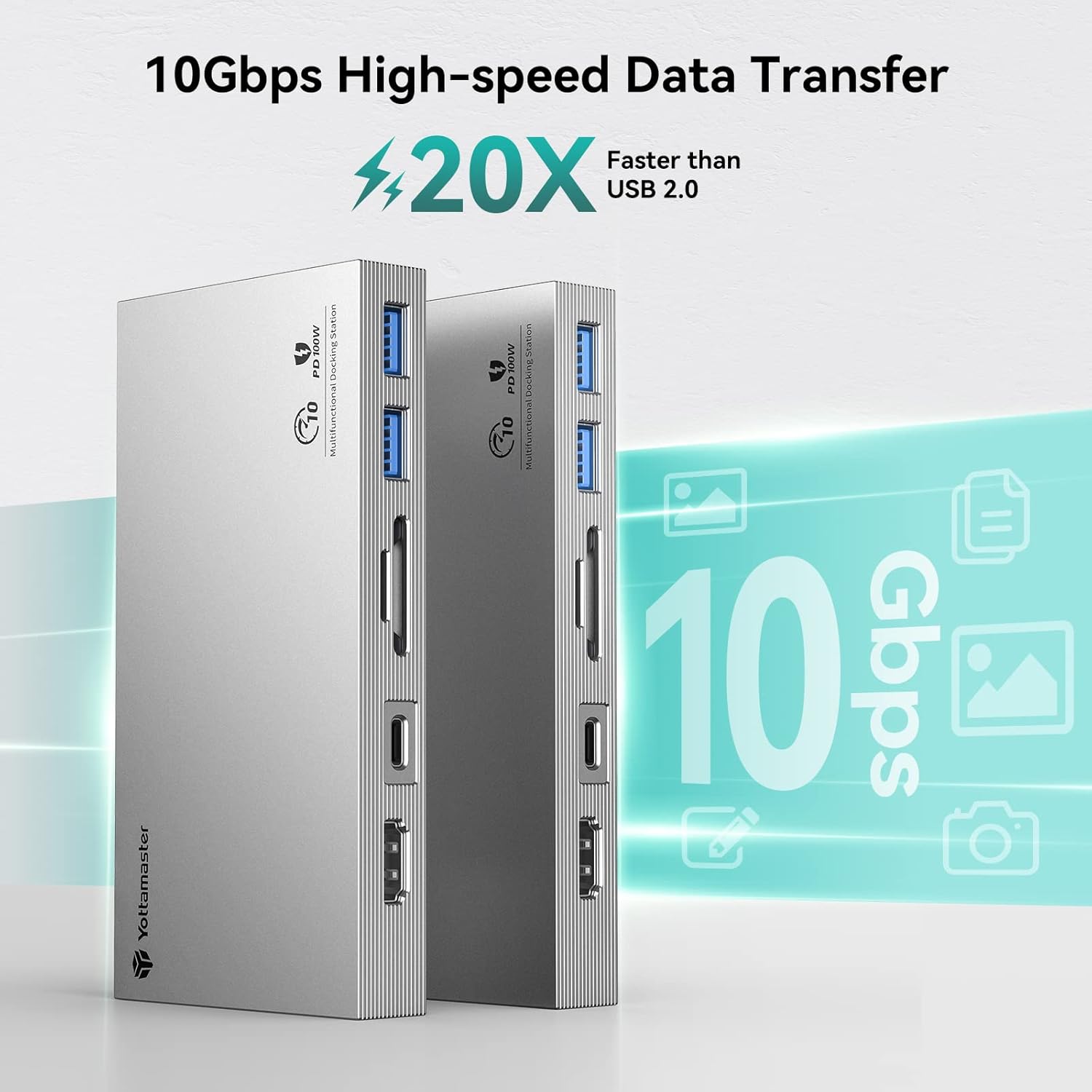
Image: Visual representation of the 10Gbps high-speed data transfer capability of the hub.
Display Output
The HDMI port allows you to connect an external display for extended or mirrored desktop modes. Enjoy content on a larger screen with 4K@30Hz resolution.

Image: A laptop connected to an external monitor through the Yottamaster DS03CS, demonstrating 4K@30Hz display output.
Power Delivery
The USB-C PD port supports up to 100W power delivery, enabling fast charging for compatible laptops. Connect your laptop's original power adapter to this port to charge your laptop while using the hub's other functions.

Image: The Yottamaster DS03CS hub connected to a power adapter, illustrating its 100W fast charging capability.
Maintenance
To ensure optimal performance and longevity of your Yottamaster DS03CS hub, follow these maintenance guidelines:
- Cleaning: Use a soft, dry cloth to wipe the exterior of the device. Avoid using liquid cleaners or solvents, as they may damage the aluminum finish or internal components.
- Storage: When not in use, store the hub in a cool, dry place away from direct sunlight and extreme temperatures.
- Handling: Handle the device with care to prevent physical damage. Avoid dropping or subjecting it to strong impacts.
- Ventilation: Ensure the hub's ventilation holes are not obstructed to allow for proper heat dissipation, especially during prolonged use or heavy data transfer.
Troubleshooting
If you encounter issues with your Yottamaster DS03CS, refer to the following common problems and solutions:
- Device not recognized:
- Ensure the USB-C cable is securely connected to both the hub and your host device.
- Try connecting the hub to a different USB-C port on your host device.
- Restart your computer or host device.
- SSD not detected:
- Verify that the SSD is correctly installed in the enclosure and secured.
- Confirm that your SSD is an NVMe M-Key M.2 SSD (PCIe-based). SATA-based M.2 SSDs are not supported.
- For new SSDs, ensure they are initialized and formatted in your operating system's Disk Management (Windows) or Disk Utility (Mac OS).
- Slow data transfer speeds:
- Ensure your host device's USB-C port supports USB 3.2 Gen2 (10Gbps) for optimal speeds.
- The actual transfer speed may vary depending on the speed of the SSD and the type of USB connection used.
- Avoid using long or low-quality USB-C cables, which can degrade performance.
- HDMI display issues:
- Check the HDMI cable connection between the hub and the monitor.
- Ensure your host device's USB-C port supports DisplayPort Alternate Mode (DP Alt Mode).
- Adjust display settings in your operating system.
- SD/TF card not working:
- Ensure only one card (SD or TF) is inserted at a time, as simultaneous use is not supported.
- Check if the card is inserted correctly and fully.
- Test the card in another device to rule out card malfunction.
- Power Delivery (PD) not charging:
- Ensure your power adapter is connected to the hub's PD USB-C port and is a PD-compatible charger.
- Verify that your laptop supports charging via USB-C PD.
- Check the power adapter's wattage; it should be sufficient for your laptop's charging requirements.
Specifications
| Brand | Yottamaster |
| Model Number | DS03CS |
| Hardware Interface | USB Type C |
| Number of Ports | 10 (excluding host connection) |
| Total USB Ports | 4 (3x USB-A 3.1, 1x USB-C PD) |
| Data Transfer Rate | 10 Gigabits Per Second (USB 3.2 Gen2) |
| HDMI Output | 4K@30Hz |
| Power Delivery | Up to 100W (20V/5A) |
| Ethernet | Gigabit (10/100/1000Mbps) |
| Card Reader | SD/TF (USB 2.0 speeds, not simultaneous) |
| Audio Port | 3.5mm Audio In&Output Combo |
| M.2 NVMe Enclosure | Supports NVMe M-Key M.2 SSDs (PCIe-based) up to 8TB (2230/2242/2260/2280) |
| Compatible Devices | Laptops, Desktops, Card Readers, Digital Cameras |
| Operating System | Android, Windows 10, Mac OS |
| Enclosure Material | Aluminum |
| Item Weight | 20 Grams |
Warranty Information
The Yottamaster DS03CS comes with an 18-month warranty from the date of purchase. This warranty covers manufacturing defects and malfunctions under normal use. Please retain your proof of purchase for warranty claims.
The warranty does not cover damage caused by:
- Improper installation or operation
- Unauthorized modifications or repairs
- Accidental damage, misuse, or neglect
- Natural disasters or external factors
Customer Support
For technical assistance, warranty claims, or any questions regarding your Yottamaster DS03CS, please contact Yottamaster customer support. Refer to the contact information provided on the product packaging or the official Yottamaster website.
When contacting support, please have your product model number (DS03CS) and proof of purchase readily available.