
1. Introduction
1.1 Product Overview
The InFocus Core II INL178 is a 3D DLP Projector from the Quantum Laser Core II Series, designed for reliable and high-performance projection. This projector utilizes environmentally friendly laser technology, eliminating the need for lamps and filters, which contributes to maintenance-free operation and a lower cost of ownership. It supports continuous 24/7 operation and offers flexible installation options for various environments.
Key features include 4000 lumens brightness, Full HD (1920x1080) native resolution with 4K support, HDR compatibility, and a high contrast ratio of up to 3,500,000:1. The projector is built with an IP6X dust resistance rating, ensuring durability and consistent performance.

Figure 1: Front angled view of the InFocus Core II INL178 Projector, showcasing the lens and Quantum Laser branding.
1.2 What's in the Box
Please check that all items listed below are included in your package:
- INL178 DLP Projector
- IR Remote Control (batteries not included)
- Power Adapter
- HDMI Cable
- User Manual (this document)
2. Safety Information
Please read all safety instructions carefully before using the projector. Failure to follow these instructions may result in fire, electric shock, or other injuries.
- Electrical Safety: Always connect the projector to a grounded power outlet. Do not overload power strips or extension cords. Disconnect the power cord during lightning storms or when unused for long periods.
- Heat and Ventilation: Ensure adequate ventilation around the projector. Do not block ventilation openings. Avoid placing the projector on soft surfaces that may block airflow. Do not operate in enclosed spaces without proper air circulation.
- Laser Safety: This product uses a laser light source. Do not look directly into the projector lens when the projector is on. Avoid pointing the projector at people's eyes.
- Handling: Handle the projector with care. Avoid dropping or subjecting it to strong impacts. Do not attempt to open or service the projector yourself; refer all servicing to qualified service personnel.
- Environment: Do not expose the projector to rain, moisture, or extreme temperatures. Keep it away from water and other liquids.
3. Product Features
The InFocus Core II INL178 projector incorporates advanced technologies for superior performance and ease of use:
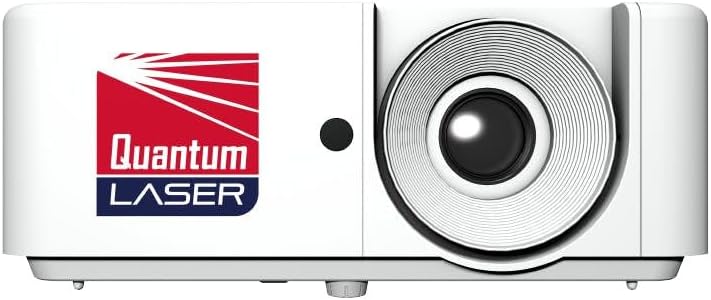
Figure 2: Front view of the InFocus Core II INL178 Projector, highlighting the main lens and branding.
- Quantum Laser Technology: Features a solid-state laser light source, providing up to 30,000 hours of laser life. This technology eliminates the need for lamps and filters, reducing maintenance and environmental impact.
- High Brightness and Contrast: Delivers 4000 lumens of brightness and a dynamic contrast ratio of up to 3,500,000:1, ensuring clear, vibrant, and detailed images even in well-lit environments.
- Full HD with 4K Support: Projects native Full HD (1920 x 1080) resolution images and supports 4K input via HDMI 2.0 (HDCP 2.2), offering stunning visual clarity.
- HDR Compatibility: High Dynamic Range (HDR) support enhances image depth perception and provides more lifelike texture details.
- 3D Ready: Capable of displaying 3D content, offering an immersive viewing experience.
- SuperSmartProject Suite: Includes power-saving and optimization features such as instant power on/off, signal power on, auto power-off, 10-step illumination reduction, and Dynamic Black optimization to enhance viewing while conserving energy.
- Flexible Installation: Supports front, rear, and ceiling placement, as well as floor-to-ceiling and ceiling-to-floor projection. It allows full 360-degree placement across the horizontal axis and both landscape and portrait modes, suitable for diverse installation needs.
- IP6X Dust Resistance: Provides outstanding dust resistance for 24/7 maintenance-free operation in various environments.
- Connectivity: Equipped with multiple ports including HDMI, USB, Ethernet, and RS232 for versatile device connections and control.
4. Setup
4.1 Projector Placement
The INL178 projector offers extensive flexibility for placement. Consider the following options:
- Front Projection: Place the projector on a table or stand in front of the screen.
- Rear Projection: Place the projector behind a translucent screen.
- Ceiling Mount: Mount the projector upside down on the ceiling. Ensure proper ventilation and secure mounting.
- Floor Mount: Place the projector on the floor, projecting upwards.
- 360-Degree Placement: The projector can be rotated 360 degrees along its horizontal axis.
- Portrait Mode: The projector can be oriented vertically for portrait-style displays.
Ensure the projector is placed on a stable, level surface or securely mounted. Maintain adequate distance from walls or other objects to allow for proper airflow around the ventilation openings.
4.2 Connecting Devices
The INL178 provides various connection ports on its rear panel:

Figure 3: Rear panel of the InFocus Core II INL178 Projector, illustrating HDMI, VGA, RS232, USB, Audio In/Out, and DC In ports.
- HDMI (x2): Connect to Blu-ray players, laptops, gaming consoles, or other HDMI-enabled devices for high-definition video and audio.
- VGA In (x1): Connect to computers or older devices using a VGA cable.
- RS232: For remote control and monitoring solutions in corporate installations.
- USB: Connect a USB device for instant image projection from a PC or MacBook.
- Audio In/Out: Connect external audio sources or output audio to external speakers.
- DC In: Connect the provided power adapter to power the projector.
After connecting your devices, connect the power adapter to the projector's DC In port and then to a power outlet.
5. Operating Instructions
5.1 Powering On/Off
- Power On: Press the power button on the projector or the remote control. The projector features "Instant Power On" for quick startup.
- Power Off: Press the power button again. The projector features "Instant Power Off" for rapid shutdown.
- Auto Power-Off: The projector can be configured to automatically power off after a period of inactivity or no signal.
5.2 Basic Operation and Menu Navigation
Use the included IR remote control to navigate the projector's on-screen display (OSD) menu. The remote allows you to select input sources, adjust picture settings, and access advanced features.
- Source Selection: Use the "Source" button on the remote to cycle through available input sources (HDMI 1, HDMI 2, VGA, USB).
- Menu Access: Press the "Menu" button to open the OSD. Use the arrow keys to navigate and "Enter" or "OK" to select options.
- Picture Adjustments: Within the OSD, you can adjust settings such as Brightness, Contrast, Color, Tint, Sharpness, and Aspect Ratio.
- Keystone Correction: Adjust the image shape if the projector is not perfectly perpendicular to the screen.
- 3D Mode: Activate or deactivate 3D display mode when playing 3D content.
6. Maintenance
The InFocus Core II INL178 projector is designed for low maintenance due to its laser light source and IP6X dust resistance. However, regular cleaning is recommended to ensure optimal performance and longevity.
6.1 Cleaning the Projector
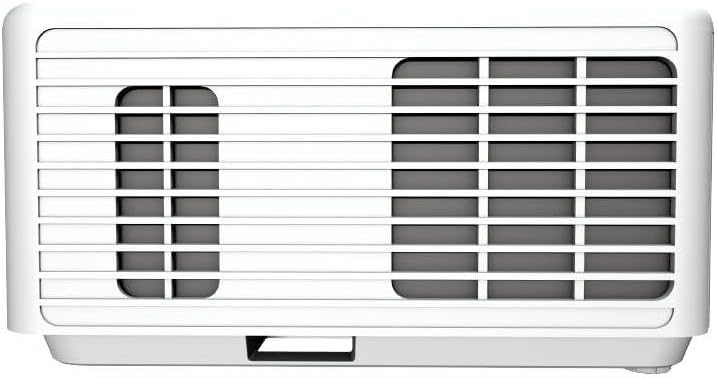
Figure 4: Side view of the InFocus Core II INL178 Projector, showing the ventilation grilles for heat dissipation.
- Exterior: Gently wipe the projector casing with a soft, dry, lint-free cloth. For stubborn marks, slightly dampen the cloth with water. Avoid using abrasive cleaners or solvents.
- Lens: Use a lens cleaning cloth or a soft brush to remove dust from the projector lens. For smudges, use a lens cleaning solution specifically designed for optical surfaces. Do not touch the lens with your fingers.
- Ventilation Openings: Periodically check the ventilation openings for dust accumulation. Use a soft brush or compressed air (held at a distance) to clear any blockages. Ensure the projector is powered off and unplugged before cleaning.
6.2 Lamp and Filter-Free Design
One of the significant advantages of the Quantum Laser Core II Series is its lamp-free and filter-free design. This means there is no need for lamp replacements or filter cleaning/replacement, significantly reducing maintenance requirements and operating costs.
7. Troubleshooting
If you encounter issues with your projector, refer to the following common troubleshooting steps:
| Problem | Possible Cause | Solution |
|---|---|---|
| No image on screen |
|
|
| Image is blurry or out of focus |
|
|
| Remote control not working |
|
|
| Image is distorted (trapezoid shape) |
|
|
8. Specifications
Technical specifications for the InFocus Core II INL178 3D DLP Projector:
| Model Number | INL178 |
| Display Technology | DLP |
| Light Source | Laser |
| Brightness | 4000 Lumens |
| Native Resolution | 1920 x 1080 (Full HD) |
| Supported Resolution | Up to 4K (via HDMI 2.0) |
| Contrast Ratio | 3,500,000:1 |
| Laser Life | Up to 30,000 hours |
| Special Features | 3D-Ready, High Dynamic Range (HDR), Laser |
| Connectivity Technology | Ethernet, HDMI (x2), USB, VGA In, RS232, Audio In/Out |
| Dust Resistance | IP6X |
| Product Dimensions | 10.9 x 8.5 x 4.6 inches |
| Item Weight | 6.39 pounds |
9. Warranty and Support
For warranty information and technical support, please refer to the warranty card included with your product or visit the official InFocus website. You can typically find support resources, FAQs, and contact information for customer service there.
Online Resources: www.infocus.com


