
Introduction
Thank you for choosing the Nitecore EDC35 Torch. This manual provides detailed instructions for the proper setup, operation, maintenance, and troubleshooting of your device. Please read this manual thoroughly before use to ensure optimal performance and safety.

Image: Front view of the Nitecore EDC35 Torch, showcasing its compact design and textured body.
Package Contents
Upon unpacking, please verify that all items listed below are present:
- Nitecore EDC35 Torch (with built-in battery)
- Belt Clip
- USB-C Charging Cable
- Holster
- Lanyard
Setup and Initial Use
Charging the Battery
The Nitecore EDC35 features a built-in 21700 Li-ion battery with a 6000 mAh capacity. Before first use, it is recommended to fully charge the device.
- Locate the USB-C charging port on the torch. This port is typically protected by a rubber cover to ensure water resistance.
- Open the rubber cover and connect the provided USB-C charging cable to the port.
- Connect the other end of the USB-C cable to a USB power source (e.g., a USB wall adapter, computer USB port, or power bank).
- The power indicators on the torch will illuminate to show the charging status. Charging is complete when all indicators are solid.
- Once charging is complete, disconnect the cable and securely close the rubber cover to maintain the IP68 waterproof rating.

Image: The power level display on the Nitecore EDC35, showing four indicator lights representing battery charge levels.
- Power Level Display:
- • • • • (4 Constant-on): 75% – 100%
- • • • (3 Constant-on): 50% – 75%
- • • (2 Constant-on): 25% – 50%
- • (1 Constant-on): 0% – 25%
Attaching the Belt Clip and Lanyard
The included belt clip and lanyard can be attached for convenient carrying options.
- Belt Clip: Slide the belt clip onto the body of the torch until it sits securely in the designated groove.
- Lanyard: Thread the lanyard through the lanyard hole located at the tail cap of the torch.
Operating Instructions
Basic Operation: Power On/Off and Brightness Levels
The EDC35 features a tactical tail button for intuitive control.
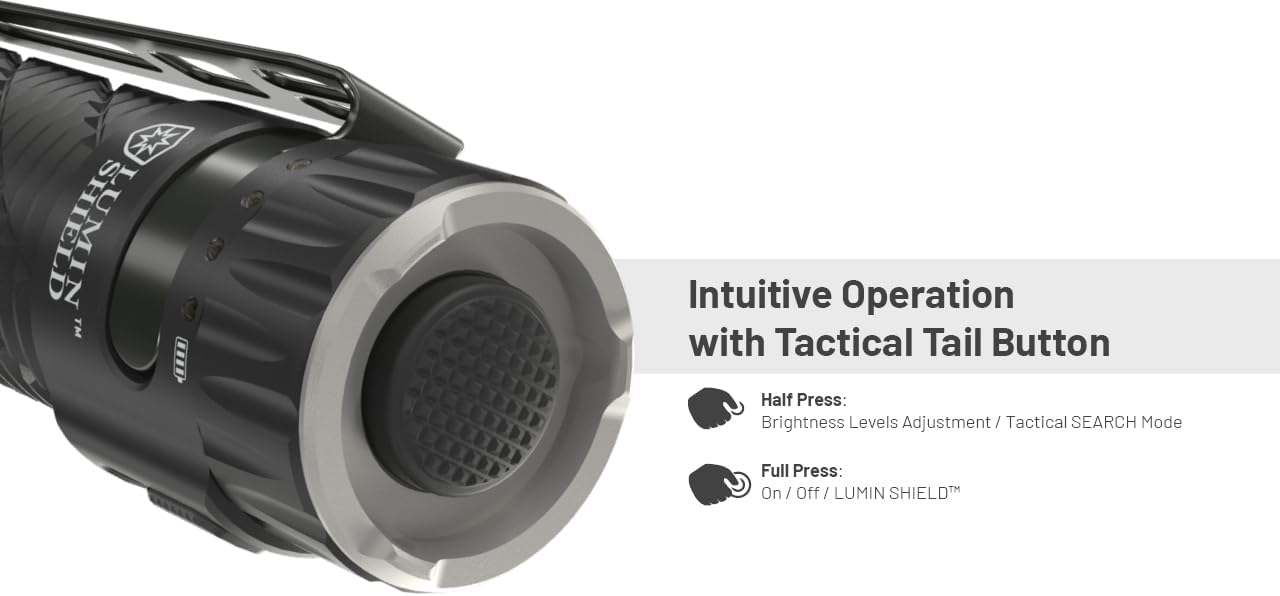
Image: Close-up of the Nitecore EDC35's tactical tail button, illustrating half-press and full-press functions.
- Half Press: Adjusts brightness levels or activates Tactical SEARCH Mode.
- Full Press: Turns the flashlight On/Off or activates LUMIN SHIELD™.
- To Turn On/Off: Fully press the tactical tail button until a click is heard.
- To Adjust Brightness: When the flashlight is on, half-press the tactical tail button repeatedly to cycle through brightness levels (ULTRALOW, LOW, MID, HIGH). Release the button to select the desired level.
Special Modes: LUMIN SHIELD™ and Tactical SEARCH
LUMIN SHIELD™ (5000 Lumens Instant Defense)
This mode provides an instant, broad light wall for self-defense or immediate high-intensity illumination.
- Activation: From any status (except Full Lockout Mode), full press and hold the tactical tail button to activate LUMIN SHIELD™. Release to turn off.
- The 9 LED cores work instantly to create a 5000-lumen broad light output.

Image: Illustration of the Nitecore EDC35 activating LUMIN SHIELD™ mode, projecting a wide 5000-lumen beam for instant defense.
Tactical SEARCH Mode (3000 Lumens Lightsaber)
This mode provides a powerful, long-range spotlight for searching or identifying distant objects.
- Activation: From any status (except Full Lockout Mode), half-press and hold the tactical tail button to activate Tactical SEARCH Mode. Release to turn off.
- The main core produces a maximum output of 3000 lumens, reaching a distance of 550 meters.

Image: A person using the Nitecore EDC35 in Tactical SEARCH mode, projecting a focused 3000-lumen beam over a long distance of 550 meters.
Mechanical Lockout System
The EDC35 features a mechanical lockout system to prevent accidental activation.
- To Lock: Rotate the tail cap clockwise until it is fully tightened. This physically disconnects the circuit.
- To Unlock: Rotate the tail cap counter-clockwise slightly until the flashlight can be operated.
Maintenance
- Cleaning: Periodically clean the body of the flashlight with a soft, damp cloth. Avoid using abrasive cleaners or solvents.
- O-rings: Inspect the O-rings regularly for wear and tear. Replace them if damaged to maintain the waterproof rating. Lubricate O-rings with silicone grease as needed.
- Charging Port: Ensure the USB-C charging port cover is always securely closed when not charging to prevent water and dust ingress.
- Storage: Store the flashlight in a cool, dry place. For long-term storage, it is recommended to charge the battery every 3-6 months to prolong its lifespan.
Troubleshooting
If you encounter issues with your Nitecore EDC35 Torch, please refer to the following common solutions:
- Flashlight not turning on:
- Ensure the mechanical lockout system is disengaged (tail cap slightly loosened).
- Check the battery level using the power indicators and recharge if necessary.
- Ensure the tail cap is fully tightened for proper electrical contact.
- Dim or flickering light:
- The battery may be low; recharge the device.
- Clean the contact points between the tail cap and the body with a clean cloth.
- Charging issues:
- Ensure the USB-C cable is properly connected to both the torch and the power source.
- Try a different USB-C cable or power adapter.
- Ensure the charging port is free of debris.
If problems persist, please contact Nitecore customer support for further assistance.
Specifications

Image: Technical data table for the Nitecore EDC35, detailing brightness, runtime, beam distance, and peak beam intensity for various modes.
| Brand | Nitecore |
| Model | EDC35 |
| Light Source Type | LED |
| Light Output Maximum | 5000 Lumens (LUMIN SHIELD™) |
| White Brightness | 3000 Lumens (SEARCH Mode) |
| Power Source | Battery Powered (Built-in 21700 Li-ion) |
| Battery Capacity | 6000 mAh |
| Voltage | 3.6 Volts |
| Material | 7000 Series Military Grade Aluminum Alloy |
| Water Resistance Level | IP68 (Waterproof and Submersible) |
| Impact Resistance | 2 meters |
| Product Dimensions | 4.88"D x 1.02"W x 1.26"H |
| Item Weight | 171 Grams (approx. 6 ounces) |
| Special Features | LUMIN SHIELD™, Tactical SEARCH momentary lighting, Mechanical Lockout, USB-C Charging |

Image: The Nitecore EDC35 flashlight, highlighting its construction from 7000 series military-grade aluminum alloy for enhanced durability and grip.
Warranty and Support
Warranty Information
Nitecore products are typically covered by a warranty against defects in materials and workmanship. Please refer to the official Nitecore website or your purchase documentation for specific warranty terms and conditions, including duration and claim procedures. Keep your proof of purchase for warranty service.
Customer Support
For technical assistance, warranty claims, or any other inquiries, please contact Nitecore customer support through their official website or the contact information provided with your product packaging.
Official Nitecore Website: www.nitecore.com


