
1. Introduction
Welcome to the user manual for your AWEI T58 Wireless Bluetooth Earbuds. These earbuds are designed to provide a high-quality audio experience with advanced features such as Bluetooth 5.3 connectivity, active noise cancellation for calls, and an IPX6 waterproof rating. This manual will guide you through the setup, operation, and maintenance of your new device to ensure optimal performance and longevity.
2. Package Contents
Please check the package for the following items:
- AWEI T58 Wireless Bluetooth Earbuds (Left and Right)
- Charging Case
- USB-C Charging Cable
- User Instructions (This manual)
3. Product Overview
The AWEI T58 earbuds feature an ergonomic in-ear design for comfortable wear and sensitive touch controls for easy operation. The charging case provides extended battery life and includes LED indicators for charging status.
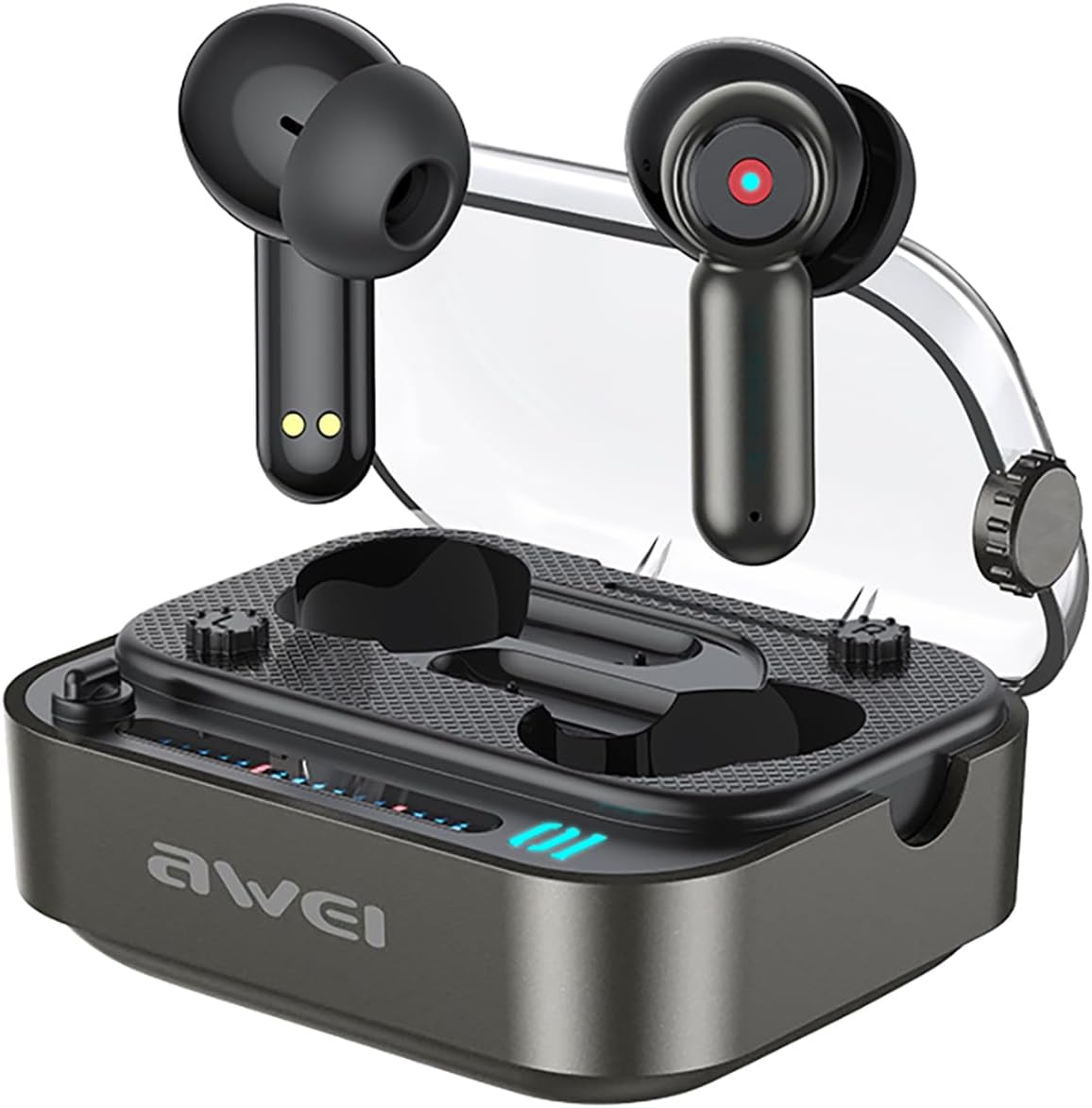
Image: The AWEI T58 Wireless Bluetooth Earbuds resting in their charging case with the lid open.

Image: A diagram illustrating the touch-sensitive area on the earbud for various controls.
4. Setup
4.1 Charging the Earbuds and Case
Before first use, fully charge the charging case and earbuds. Connect the provided USB-C charging cable to the charging port on the case and a power source. The LED indicators on the case will show the charging status. A full charge for the case takes approximately 1.5 hours.
Image: The AWEI T58 charging case displaying its LED ambient lights, which indicate charging status.
4.2 Pairing with Your Device
- Ensure the earbuds are charged.
- Open the charging case. The earbuds will automatically power on and enter pairing mode.
- On your device (smartphone, tablet, laptop), enable Bluetooth.
- Search for available Bluetooth devices and select "AWEI T58" from the list.
- Once connected, you will hear a confirmation tone, and the earbuds will be ready for use.
The AWEI T58 utilizes Bluetooth 5.3 technology for a stable and efficient connection with a range of up to 10 meters.

Image: A visual representation of the AWEI T58 earbuds wirelessly connecting to a smartphone, highlighting Bluetooth 5.3 technology.
5. Operating Instructions
5.1 Power On/Off
- Power On: Open the charging case, and the earbuds will automatically power on.
- Power Off: Place the earbuds back into the charging case and close the lid. They will automatically power off and begin charging.
5.2 Music Control
- Play/Pause: Tap either earbud once.
- Next Song: Triple tap the right earbud.
- Previous Song: Triple tap the left earbud.
- Volume Up: Double tap the right earbud.
- Volume Down: Double tap the left earbud.
5.3 Call Control
- Answer/End Call: Tap either earbud once.
- Reject Call: Press and hold either earbud for 2 seconds.
5.4 Voice Assistant
- Activate Voice Assistant: Press and hold either earbud for 2 seconds (when not on a call).
5.5 Active Noise Cancellation (ANC) for Calls
The AWEI T58 earbuds feature ANC calling noise cancellation technology to ensure clearer voice transmission during calls.
6. Maintenance
6.1 Waterproofing (IPX6)
The earbuds are rated IPX6 waterproof, meaning they are protected against high-pressure water jets from any direction. This makes them suitable for use during workouts or in light rain. However, they are not designed for submersion in water.

Image: The AWEI T58 earbuds and charging case depicted with water splashes, demonstrating their IPX6 waterproof capability.
6.2 Cleaning and Storage
- Clean the earbuds and charging case regularly with a soft, dry, lint-free cloth.
- Avoid using abrasive cleaners or solvents.
- Ensure the charging contacts on both the earbuds and the case are clean and dry before charging.
- Store the earbuds in their charging case when not in use to protect them and conserve battery life.
6.3 Battery Life Management
The earbuds provide approximately 7 hours of continuous playback on a single charge. The 300mAh charging case extends the total playtime to about 35 hours in dual-ear mode. By alternating between single-ear use, the total playtime can reach up to 70 hours.
7. Troubleshooting
If you encounter any issues with your AWEI T58 earbuds, please refer to the following common solutions:
- No Sound: Ensure the earbuds are properly paired and connected to your device. Check the volume level on both the earbuds and your device.
- Pairing Failure: Make sure the earbuds are charged and within range of your device. Turn off Bluetooth on your device, then turn it back on and try pairing again. If issues persist, try resetting the earbuds (refer to manufacturer's website for specific reset instructions if needed).
- Charging Issues: Verify that the USB-C cable is securely connected to both the charging case and the power source. Ensure the charging contacts on the earbuds and case are clean.
- Intermittent Connection: Ensure there are no obstructions between the earbuds and your device. Move closer to your device to reduce interference.
For further assistance, please contact customer support or refer to the official Awei website.
8. Specifications
| Feature | Specification |
|---|---|
| Model | T58 |
| Brand | Awei |
| Connectivity Technology | Wireless (Bluetooth 5.3) |
| Ear Placement | In Ear |
| Form Factor | In Ear |
| Noise Control | Active Noise Cancellation (ANC) for calls |
| Water Resistance Level | IPX6 Waterproof |
| Speaker Size | 13mm |
| Earbud Battery Life | 7 Hours (continuous use) |
| Total Playtime (with Case) | 35 Hours (dual-ear mode), 70 Hours (single-ear alternating) |
| Charging Case Battery | 300mAh |
| Charging Time (Case) | 1.5 Hours |
| Charging Port | Type-C |
| Wireless Range | Up to 10 meters |
| Control Type | Touch Control |
| Material | Plastic with Silicone/Rubber Ear Caps |
| Item Weight | 150 g |
| Included Components | Wireless Bluetooth Headset, Charging Case, USB-C Charging Cable, User Instructions |
9. Warranty and Support
For warranty information and customer support, please refer to the documentation provided with your purchase or visit the official Awei website. Keep your proof of purchase for any warranty claims.


