
CANDY CSO 686TWM6-80
Candy Smart Pro Inverter 8 kg 1600rpm Washing Machine
User Manual
Introduction
Thank you for choosing the Candy Smart Pro Inverter Washing Machine. This appliance is designed to provide efficient and convenient laundry care with its innovative Speed-Drive Motor and Quick&Clean system, allowing for a full load wash in as little as 39 minutes. This manual provides essential information for the safe and effective use, installation, operation, maintenance, and troubleshooting of your new washing machine. Please read it thoroughly before first use and keep it for future reference.
Safety Information
Always follow basic safety precautions when using electrical appliances to reduce the risk of fire, electric shock, and injury to persons. This appliance is intended for domestic use only. Do not allow children to play with the appliance. Ensure the appliance is disconnected from the power supply before performing any maintenance or cleaning. Do not operate the machine if it is damaged. Refer to the installation section for proper electrical and plumbing connections.
Setup and Installation
1. Unpacking
Carefully remove all packaging materials from the washing machine. Ensure no parts are left inside the drum or attached to the exterior. Keep packaging materials away from children.
2. Removing Transit Bolts
Before operating the machine, it is crucial to remove the transit bolts located at the rear of the appliance. These bolts secure the drum during transport and must be removed to prevent damage during operation. Store the bolts for future transport if needed.
3. Levelling the Machine
Place the washing machine on a firm, flat surface. Adjust the adjustable feet at the bottom of the machine until it is perfectly level. Use a spirit level to ensure accuracy. Proper levelling reduces vibration and noise during operation.
4. Connecting Water Supply and Drain Hose
Connect the water inlet hose to a cold water tap with a 3/4" thread. Ensure the connection is tight to prevent leaks. Position the drain hose into a suitable standpipe or sink, ensuring it is securely fixed and not kinked. The drain hose should be positioned at a height between 60 cm and 100 cm from the floor.
5. Electrical Connection
Plug the appliance into a grounded electrical outlet. Ensure the voltage and frequency match the specifications on the rating plate of the machine. Do not use extension cords or multiple adapters.

Figure 1: Product Dimensions. The machine measures approximately 85 cm in height, 60 cm in width, and 54 cm in depth, providing guidance for placement and installation.
Operating Instructions
1. Control Panel Overview
The control panel features a program selector dial, function buttons, and a digital display. Familiarize yourself with the various symbols and indicators for different wash programs and options.

Figure 2: Front view of the Candy Smart Pro Inverter washing machine, showcasing the main control panel, detergent drawer, and drum door.
2. Loading Laundry
Open the washing machine door. Ensure the drum is empty. Load laundry loosely into the drum, making sure not to overload it. An 8 kg capacity allows for substantial loads. Close the door firmly until it clicks.

Figure 3: The washing machine with its door open, revealing the spacious drum ready for laundry. The door opens wide for easy loading and unloading.
3. Adding Detergent
Pull out the detergent dispenser drawer. Add the appropriate amount of detergent to the main wash compartment and fabric softener to its designated compartment. Refer to your detergent packaging for recommended dosages.

Figure 4: The detergent drawer pulled out, showing the compartments for pre-wash, main wash detergent, and fabric softener. The 'MAX' indicator helps prevent overfilling.
4. Selecting a Program
Turn the program selector dial to choose the desired wash program (e.g., Cotton, Synthetics, Delicates, Quick Wash). The display will show the default temperature and spin speed for the selected program. You can adjust these settings using the corresponding buttons.

Figure 5: Close-up of the control panel, highlighting the 'SmartPro Inverter' branding and the digital display with program settings like temperature and spin speed.
5. Starting a Wash
Press the 'Start/Pause' button to begin the wash cycle. The machine will automatically detect the load and adjust water levels and cycle duration if the 'Kg Detector' function is active. The innovative Speed-Drive Motor ensures efficient and quiet operation.
6. Smart Features and App Connectivity
This washing machine features smart connectivity, allowing you to control and monitor it via the Candy simply-Fi app on your smartphone. Download the app and follow the instructions to pair your device. This enables remote control, access to additional programs, and energy consumption monitoring.

Figure 6: A smartphone demonstrating the Candy simply-Fi app, which allows users to control and monitor the washing machine remotely, including energy consumption tracking.
Maintenance
Regular maintenance ensures the longevity and optimal performance of your washing machine.
1. Cleaning the Detergent Drawer
Periodically remove the detergent drawer and rinse it under running water to remove any detergent or softener residue. This prevents blockages and ensures proper dispensing.
2. Cleaning the Filter
Locate the filter at the bottom front of the machine. Place a shallow container underneath to catch any water. Unscrew the filter cover and carefully remove the filter. Clean any lint, debris, or small objects. Reinsert and secure the filter cover.
3. Cleaning the Drum
Run a maintenance wash cycle (e.g., a hot wash with no laundry and a descaling agent or washing machine cleaner) regularly to prevent the build-up of detergent residue and limescale inside the drum.
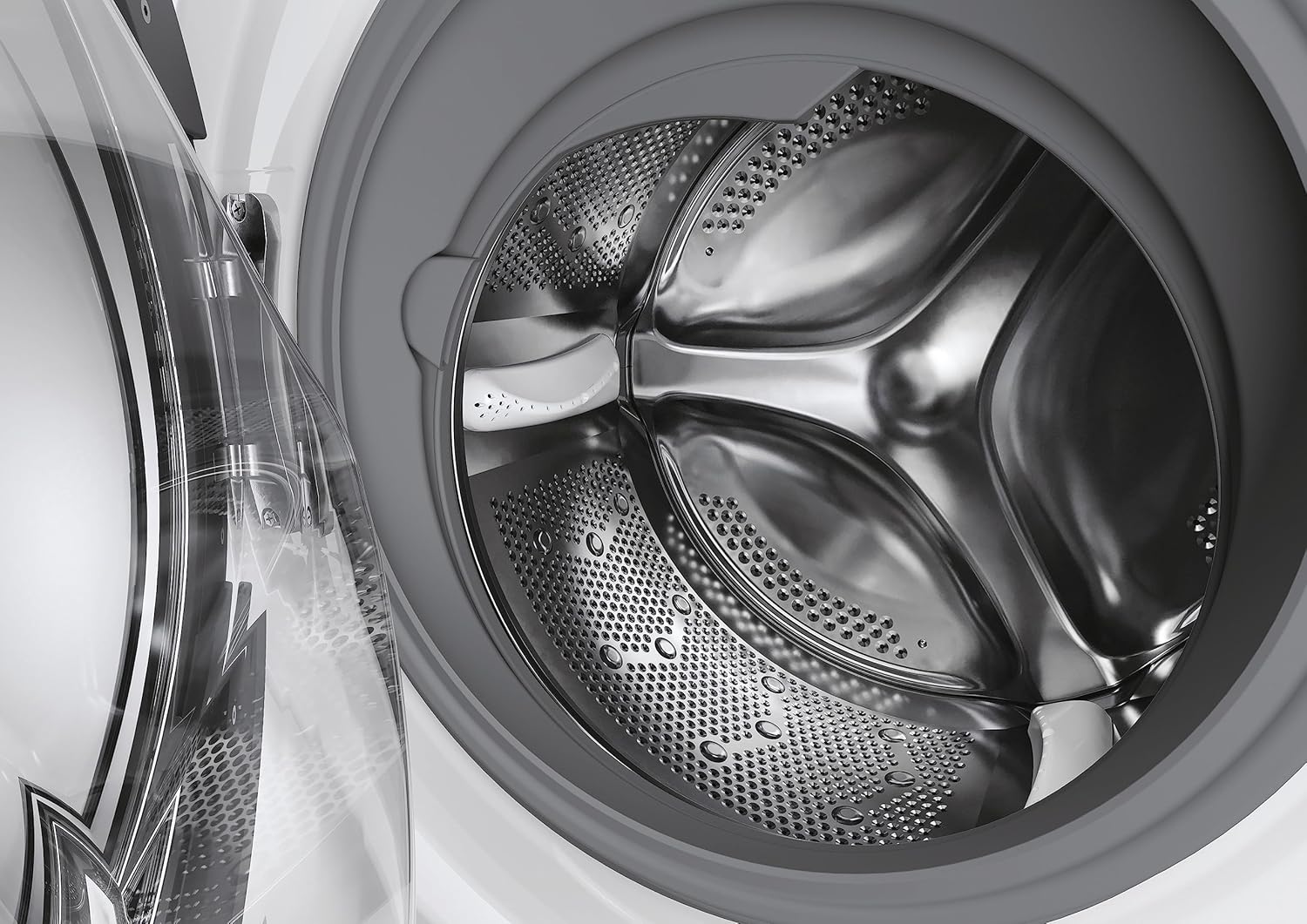
Figure 7: A detailed view of the stainless steel drum, designed for effective washing and durability. Regular cleaning helps maintain its pristine condition.
4. External Cleaning
Wipe the exterior of the machine with a soft, damp cloth. Do not use abrasive cleaners or solvents that could damage the surface.
Troubleshooting
If you encounter issues with your washing machine, refer to the following common problems and solutions before contacting service.
- Machine not starting: Ensure the power cord is securely plugged in, the door is fully closed, and the 'Start/Pause' button has been pressed. Check if there's a power outage.
- Excessive vibration/noise: Verify that the transit bolts have been removed and the machine is properly levelled. Ensure the load is balanced inside the drum.
- Water leakage: Check all hose connections for tightness. Inspect the drain hose for kinks or blockages. Ensure the detergent drawer is not overfilled.
- Poor wash results: Ensure you are using the correct amount and type of detergent for the load and water hardness. Do not overload the machine. Select the appropriate wash program for the fabric type.
- Machine displaying an error code: Consult the full user manual (if provided separately) or the manufacturer's website for a list of error codes and their corresponding solutions.
Specifications
| Feature | Specification |
|---|---|
| Brand | CANDY |
| Model | CSO 686TWM6-80 |
| Product Dimensions (HxWxD) | 85 x 60 x 53 cm |
| Capacity | 8 Kilograms |
| Annual Energy Consumption | 43 Kilowatt Hours |
| Maximum Rotational Speed | 1600 RPM |
| Noise Level (Spin) | 78 dB |
| Installation Type | Freestanding |
| Colour | White |
| Access Location | Front Load |
| Voltage | 240 Volts |
| Material Type | ABS |
| Item Weight | 64 kg |
| Special Features | Inverter |
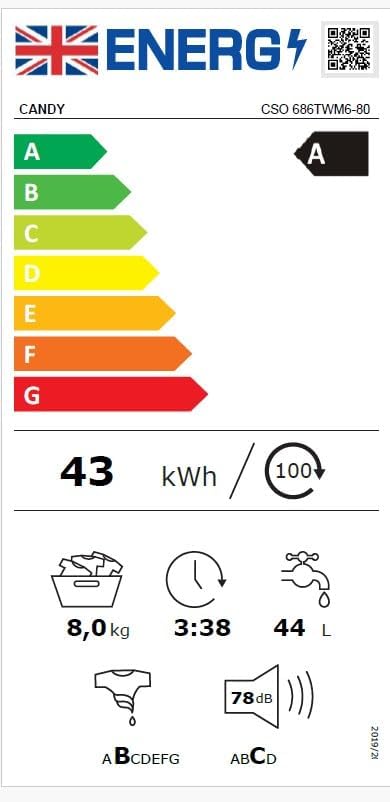
Figure 8: EU Energy Label for the Candy Smart Pro Inverter washing machine (Model CSO 686TWM6-80), indicating an A-class energy rating and other key performance metrics.

Figure 9: Product Information Sheet providing detailed technical specifications and compliance information for the Candy CSO 686TWM6-80 washing machine.
Warranty and Support
Your Candy Smart Pro Inverter Washing Machine comes with a manufacturer's warranty. Details regarding the warranty period and terms are typically provided in the physical user manual included with your appliance or can be found on the official Candy website. For technical support, spare parts, or service requests, please contact Candy customer service or an authorized service center. Ensure you have your model number (CSO 686TWM6-80) and serial number ready when contacting support.
Related documentsCSO 686TWM6-80


Ask a question about this manual
Ask about setup, troubleshooting, compatibility, parts, safety, or missing instructions. Manuals+ will review the question and use this page’s manual context to help answer it.