
Introduction
Thank you for purchasing the NGS Roller Fury 1 Portable Bluetooth Speaker. This manual provides essential information for the safe and efficient use of your device. Please read it thoroughly before operating the speaker and retain it for future reference.

Image: Front view of the NGS Roller Fury 1 Black portable Bluetooth speaker, showcasing its compact design and textured finish.
Package Contents
Ensure all items are present in the box:
- NGS Roller Fury 1 Portable Bluetooth Speaker
- USB Cable
- Installation Guide
Product Overview
Familiarize yourself with the various components and controls of your NGS Roller Fury 1 speaker.

Image: The NGS Roller Fury 1 speaker with icons illustrating its key features: IPX6 water resistance, Bluetooth 5.0 connectivity, True Wireless Stereo (TWS) functionality, and extended portable playtime.
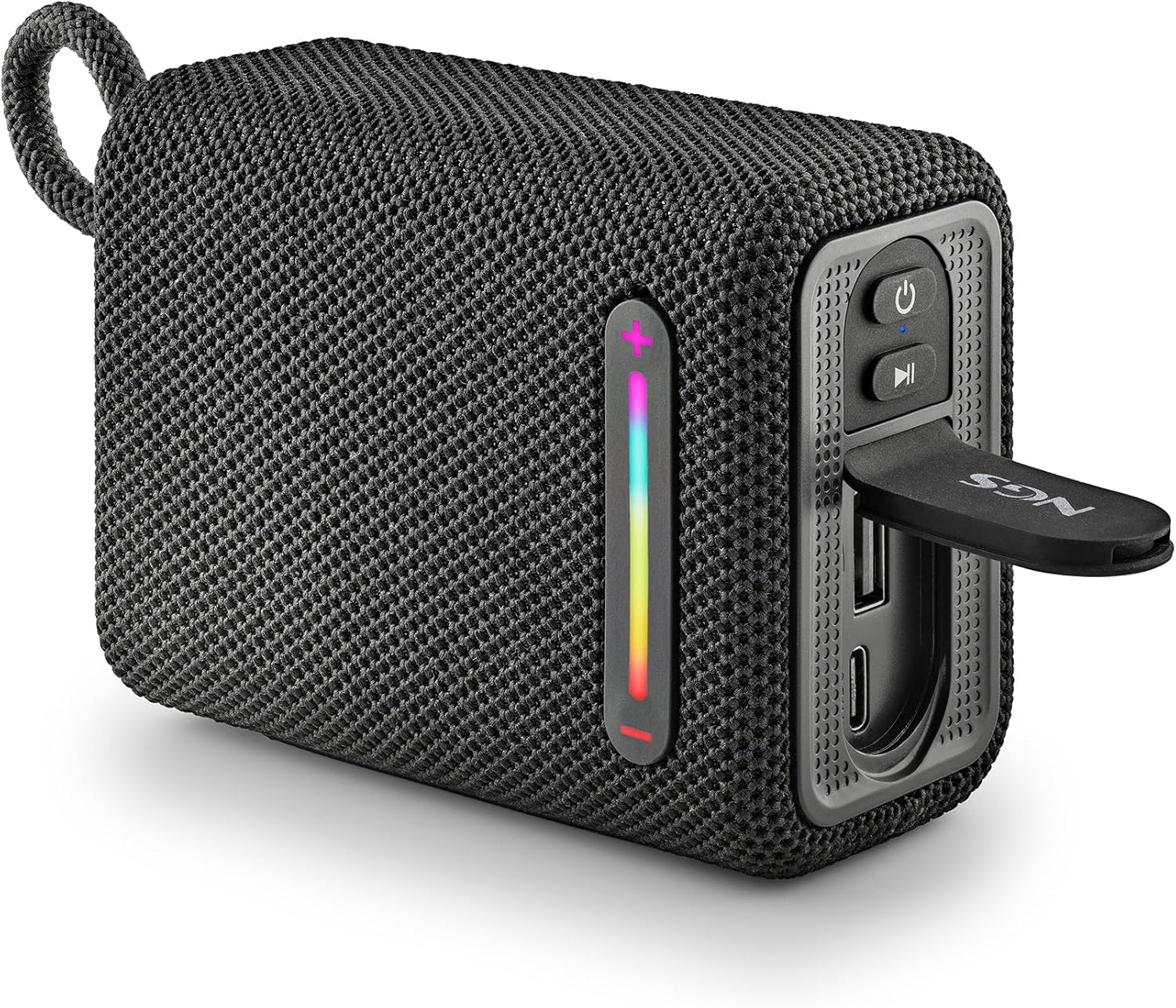
Image: Side view of the NGS Roller Fury 1 speaker, highlighting the control panel. This panel includes buttons for power, play/pause, and volume adjustment. Below these, a protective flap covers the USB and AUX input ports, ensuring water resistance.
Control Panel:
- Power Button: Press and hold for approximately 3 seconds to turn the speaker ON or OFF.
- Play/Pause Button: Press to play or pause audio.
- Volume Up (+): Short press to increase volume. Long press to skip to the next track.
- Volume Down (-): Short press to decrease volume. Long press to skip to the previous track.
- Mode Button (M): Press to switch between Bluetooth, USB, and FM Radio modes.
Ports:
- USB-C Charging Port: For charging the speaker.
- USB-A Input: For playing music from a USB flash drive.
- AUX Input (3.5mm): For connecting external audio devices via an audio cable.
Indicators:
- RGB Light Strip: Indicates various statuses (e.g., charging, battery level, pairing mode) and provides ambient lighting.
Setup
1. Charging the Speaker
Before first use, fully charge the speaker. Connect the provided USB cable to the speaker's USB-C charging port and to a compatible USB power adapter (not included) or a computer's USB port.
- The RGB light strip will indicate charging status.
- A full charge takes approximately 3-4 hours.
- Battery life is approximately 9 hours at moderate volume.
2. Powering On/Off
Press and hold the Power Button for approximately 3 seconds to turn the speaker ON or OFF.
3. Bluetooth Pairing
- Turn on the speaker. It will automatically enter Bluetooth pairing mode, indicated by a flashing light on the RGB strip.
- On your smartphone, tablet, or other Bluetooth-enabled device, enable Bluetooth and search for available devices.
- Select "NGS Roller Fury 1" from the list of devices.
- Once paired, the speaker will emit a confirmation sound, and the RGB light will change to a steady pattern.
4. True Wireless Stereo (TWS) Pairing
To achieve a stereo sound experience, you can pair two NGS Roller Fury 1 speakers together.
- Ensure both speakers are turned ON and not connected to any other Bluetooth device.
- On one of the speakers (this will be the primary speaker), press and hold the Mode Button (M) for 2-3 seconds until you hear a pairing tone.
- The two speakers will automatically search for and connect to each other. Once connected, you will hear a confirmation sound.
- Now, connect your Bluetooth device to the primary speaker as described in the "Bluetooth Pairing" section. Both speakers will play audio in stereo.
5. USB Audio Input
Insert a USB flash drive containing MP3 audio files into the USB-A port. The speaker will automatically switch to USB mode and begin playing music. Use the volume and track control buttons to manage playback.
6. AUX Input
Connect an external audio device (e.g., MP3 player, laptop) to the speaker's 3.5mm AUX input port using a 3.5mm audio cable (not included). The speaker will automatically switch to AUX mode. Control playback from your connected device.
Operating Instructions
Volume and Track Control
- Increase Volume: Short press the Volume Up (+) button.
- Decrease Volume: Short press the Volume Down (-) button.
- Next Track: Long press the Volume Up (+) button.
- Previous Track: Long press the Volume Down (-) button.
- Play/Pause: Short press the Play/Pause button.
RGB Light Modes
The speaker features an RGB light strip with different lighting effects. Press the Mode Button (M) briefly to cycle through available light modes or to turn the lights off.
Water Resistance (IPX6)
The NGS Roller Fury 1 is IPX6 water resistant, meaning it can withstand powerful water jets. This makes it suitable for outdoor use and near water. However, it is not designed to be submerged in water. Ensure the protective flap covering the charging and input ports is securely closed to maintain water resistance.
Maintenance
Cleaning
Wipe the speaker with a soft, damp cloth. Do not use abrasive cleaners, alcohol, or chemical solvents, as these may damage the surface.
Storage
When not in use for extended periods, store the speaker in a cool, dry place, away from direct sunlight and extreme temperatures.
Battery Care
- To prolong battery life, fully charge the speaker at least once every three months, even if not in regular use.
- Avoid exposing the battery to extreme heat or cold.
- Do not attempt to replace the battery yourself. Contact qualified service personnel.
Troubleshooting
| Problem | Possible Cause | Solution |
|---|---|---|
| Speaker does not turn on. | Battery is depleted. | Charge the speaker using the provided USB cable. |
| No sound. | Volume is too low or muted. Device not properly connected. | Increase the volume on both the speaker and the connected device. Re-pair Bluetooth or re-connect AUX/USB. |
| Bluetooth pairing fails. | Speaker is already connected to another device. Device Bluetooth is off. Speaker is out of range. | Ensure the speaker is in pairing mode. Turn off Bluetooth on other devices. Move the speaker closer to your device (within 10 meters). |
| TWS pairing fails. | Speakers are already connected to other devices. | Ensure both speakers are disconnected from other Bluetooth devices before initiating TWS pairing. |
| Poor sound quality. | Bluetooth interference or low battery. | Move closer to the connected device. Charge the speaker. |
Specifications

Image: The NGS Roller Fury 1 speaker displaying its compact dimensions (10cm length, 7.5cm height) and indicating the USB input and AUX input ports. The RGB light strip is also visible on the side.
| Feature | Detail |
|---|---|
| Brand | NGS |
| Model Name | Roller Fury 1 |
| Output Power | 15W |
| Connectivity Technology | Bluetooth 5.0, USB, AUX |
| Water Resistance Level | IPX6 |
| Battery Life | Up to 9 hours |
| Battery Type | Lithium Ion (1 required, included) |
| Bluetooth Range | Up to 10 meters |
| Audio Output Mode | Stereo (with TWS) |
| Dimensions (DxWxH) | 5 x 9.9 x 7.5 cm |
| Weight | 217 grams |
| Features | RGB Lights, True Wireless Stereo (TWS) |
| Compatible Devices | Smartphones, Tablets |
| Control Method | Buttons |
| GTIN | 08435430623727 |
| Model Number | ELEC-SPK-0864 |
Warranty Information
The NGS Roller Fury 1 Portable Bluetooth Speaker comes with a product warranty of 2 years from the date of purchase. This warranty covers manufacturing defects under normal use. Please retain your proof of purchase for warranty claims.
For detailed warranty terms and conditions, please refer to the official NGS website or contact customer support.
Support
If you encounter any issues not covered in this manual or require further assistance, please contact NGS customer support through their official website or the contact information provided with your product.
You can visit the NGS Store on Amazon for more information: NGS Official Store


