
WHATOOK LH2203
WHATOOK Portable Handheld Mini Fan User Manual
Model: LH2203
Introduction
Thank you for purchasing the WHATOOK Portable Handheld Mini Fan. This manual provides important information regarding the setup, operation, maintenance, and troubleshooting of your new fan. Please read this manual thoroughly before using the product to ensure safe and optimal performance.
This compact and powerful fan is designed to provide efficient personal cooling with its ultra-high wind speed and long-lasting rechargeable battery, making it ideal for various scenarios including travel, outdoor activities, and daily use.
Product Features
- Ultra-high Wind Speed: Achieves up to 8.5m/s, providing powerful and rapid cooling.
- Long Battery Life & Fast Charging: Offers 6-10 hours of operation on a single charge, with 2A fast charging for quick replenishment (2.5 hours for 80% charge).
- High Speed Brushless Motor: Operates at up to 13,500 RPM for superior airflow.
- Wind Gathering Design: Engineered for concentrated and effective airflow.
- Portable & Compact: Lightweight and small design for easy carrying and storage.
- Digital Display: Shows current gear and battery level.

Figure 1: Illustration of the fan's powerful airflow and comparison to standard fans.

Figure 2: Detailed view of the high-speed brushless motor and its components.
What's Included
Please check the package contents upon unboxing:
- 1 x WHATOOK High Speed Fan
- 1 x Type C 2A Cable
- 1 x Silicone Lanyard
- 1 x User Manual (this document)

Figure 3: Contents of the WHATOOK Portable Fan package.
Setup
- Initial Charge: Before first use, fully charge the fan using the provided Type C 2A cable. Connect the cable to the fan's charging port and a compatible USB power source (e.g., wall adapter, computer USB port). The digital display will indicate charging status.
- Attach Lanyard (Optional): If desired, attach the silicone lanyard to the designated loop on the fan's handle for convenient carrying.
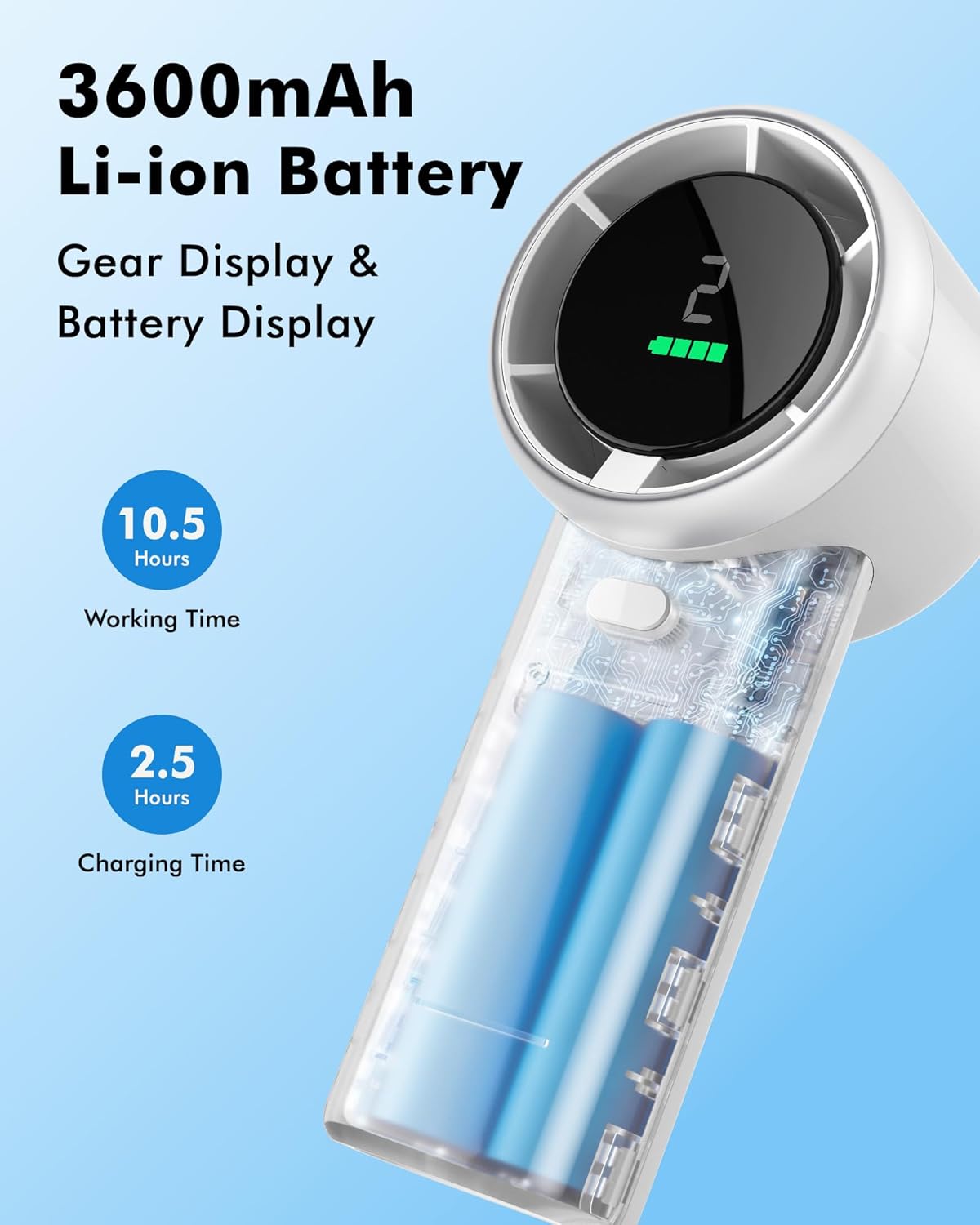
Figure 4: The fan's 3600mAh Li-ion battery and digital display.
Operating Instructions
The WHATOOK Portable Fan features a simple one-button control for ease of use.
- Power On/Off: Press and hold the power button (located on the handle) for 2 seconds to turn the fan on or off.
- Adjust Fan Speed: Once the fan is on, short press the power button to cycle through the 5 available speed settings. The digital display will show the current speed level (1-5).
- Digital Display: The display shows the current fan speed (1-5) and the remaining battery level.

Figure 5: The WHATOOK Portable Fan in operation, displaying speed and battery.

Figure 6: The fan is suitable for various scenarios, providing personal cooling wherever needed.
Charging Instructions
To charge your WHATOOK Portable Fan:
- Locate the Type C charging port on the fan's handle.
- Insert the provided Type C 2A cable into the fan's charging port.
- Connect the other end of the USB cable to a compatible USB power source (e.g., a 5V/2A wall adapter, power bank, or computer USB port).
- The digital display will show the charging progress. A full charge typically takes approximately 2.5 hours to reach 80% capacity.
- Once fully charged, disconnect the charging cable.
A fully charged fan can provide 6-10 hours of continuous use, depending on the selected speed setting.
Maintenance
To ensure the longevity and optimal performance of your fan, follow these maintenance guidelines:
- Cleaning: Use a soft, dry cloth to wipe the exterior of the fan. Do not use abrasive cleaners or immerse the fan in water.
- Storage: When not in use for extended periods, store the fan in a cool, dry place away from direct sunlight and extreme temperatures.
- Battery Care: To preserve battery life, avoid fully discharging the battery frequently. Recharge the fan when the battery indicator is low.
Troubleshooting
| Problem | Possible Cause | Solution |
|---|---|---|
| Fan does not turn on. | Battery is depleted. | Charge the fan using the provided Type C cable. |
| Fan produces weak airflow. | Low battery level or fan is on a low speed setting. | Recharge the fan or increase the speed setting by short pressing the power button. |
| Fan makes unusual noise. | Obstruction in the fan blades or internal issue. | Turn off the fan and check for any obstructions. If the issue persists, contact customer support. |
| Charging is slow or not working. | Faulty cable, adapter, or charging port. | Ensure you are using the original Type C 2A cable and a compatible power adapter. Try a different cable or adapter. |
Specifications
| Feature | Detail |
|---|---|
| Brand | WHATOOK |
| Model Name | WHATOOK Portable Fan (LH2203) |
| Color | White |
| Power Source | Battery Powered (2 Lithium Ion batteries included) |
| Battery Capacity | 3600mAh (implied from 10.5 hours working time and 2.5 hours charging time in images) |
| Working Time | Up to 10.5 hours (depending on speed setting) |
| Charging Time | Approx. 2.5 hours (for 80% charge) |
| Max Wind Speed | 8.5 m/s |
| Motor Speed | Up to 13,500 RPM |
| Number of Speed Levels | 5 |
| Control Method | Touch (One-button control) |
| Product Dimensions | 1.97"D x 2.35"W x 5.5"H |
| Item Weight | 7.8 ounces |
| Blade Material | Plastic |

Figure 7: Detailed specifications comparison.
Warranty and Support
For warranty information or technical support, please contact WHATOOK customer service through the retailer where the product was purchased or visit the official WHATOOK brand store online. Please retain your proof of purchase for any warranty claims.
For further assistance, you may refer to the WHATOOK store on Amazon: WHATOOK Store
Ask a question about this manual
Ask about setup, troubleshooting, compatibility, parts, safety, or missing instructions. Manuals+ will review the question and use this page’s manual context to help answer it.