
Topyond Topyondods2w34yzc
Topyond Ebike LCD Display User Manual
Model: Topyondods2w34yzc
1. Introduction
The Topyond Ebike LCD Display is designed to provide essential real-time information for your electric bike or scooter. This display meter allows you to monitor speed, distance traveled, battery level, and other critical performance metrics, enabling informed decisions during your ride. Crafted from high-quality ABS material, it ensures durability and resistance to wear and tear. Its compact design with a 22.5mm diameter ensures broad compatibility and ease of installation across various electric scooter and bike models.
2. Safety Information
- Always ensure the display is securely mounted before riding.
- Do not attempt to disassemble or modify the display, as this may void the warranty and cause damage.
- Keep the display clean and free from excessive moisture. While waterproof, prolonged submersion is not recommended.
- Avoid extreme temperatures, both hot and cold, to ensure optimal performance and longevity.
- If any unusual behavior or error codes appear, refer to the troubleshooting section or contact support.
3. Package Contents
Please verify that all items are present in your package:
- 1 x Topyond Electric Bike LCD Display Meter
- 1 x User Manual
4. Product Overview
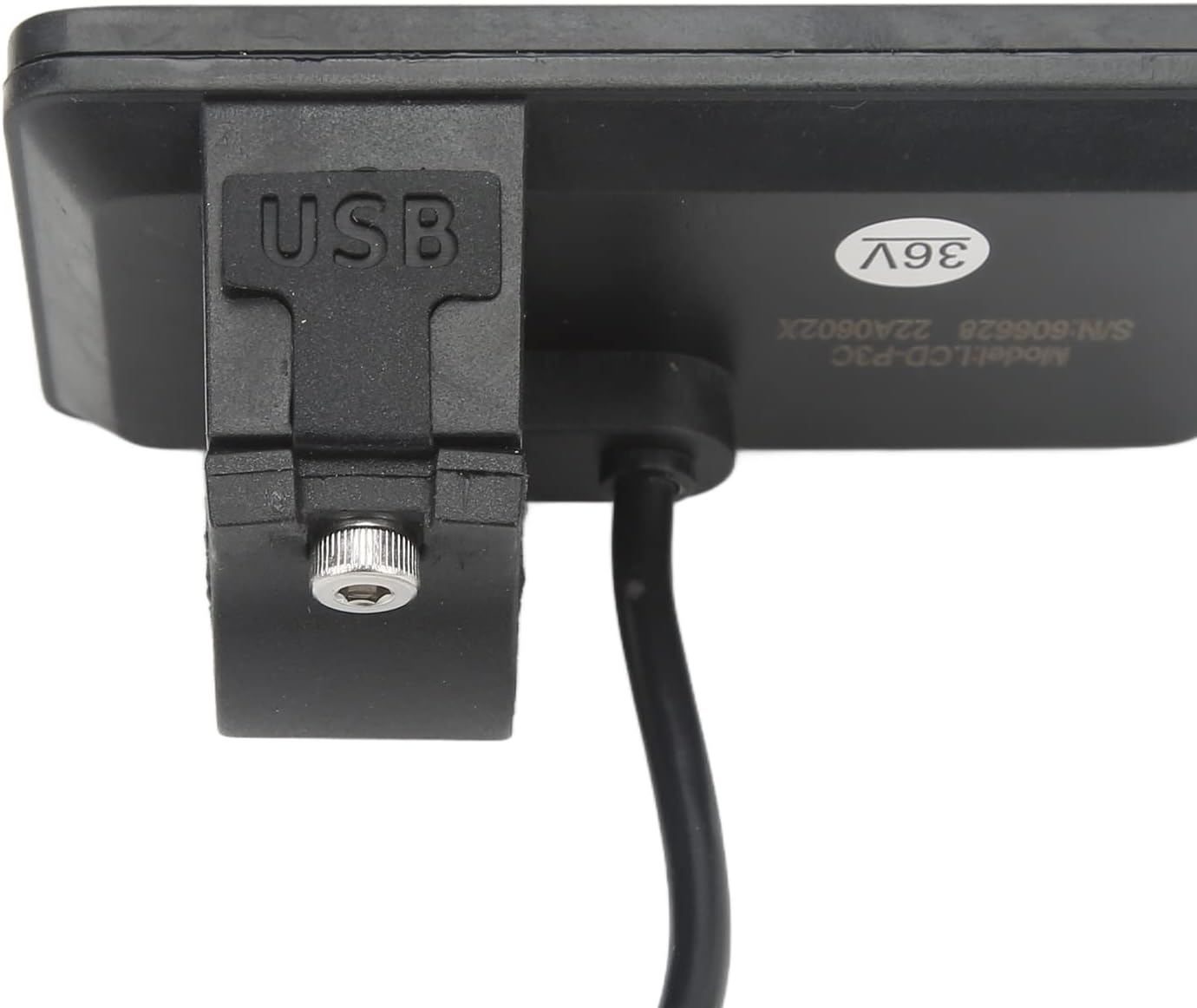
The Topyond Ebike LCD Display features a clear screen and intuitive button layout for easy operation. Below are images illustrating the display from various angles, highlighting its design and key features.


5. Setup and Installation
The Topyond Ebike LCD Display is designed for easy installation on handlebars with a 22.5mm diameter. Follow these steps to properly install your display:
- Choose Location: Select a suitable position on your ebike's handlebar, typically near the grip, ensuring it does not obstruct braking or shifting.
- Mount the Display: Loosen the screw on the display's mounting bracket. Place the display on the handlebar and tighten the screw until it is secure. Ensure the display is oriented correctly for optimal viewing.
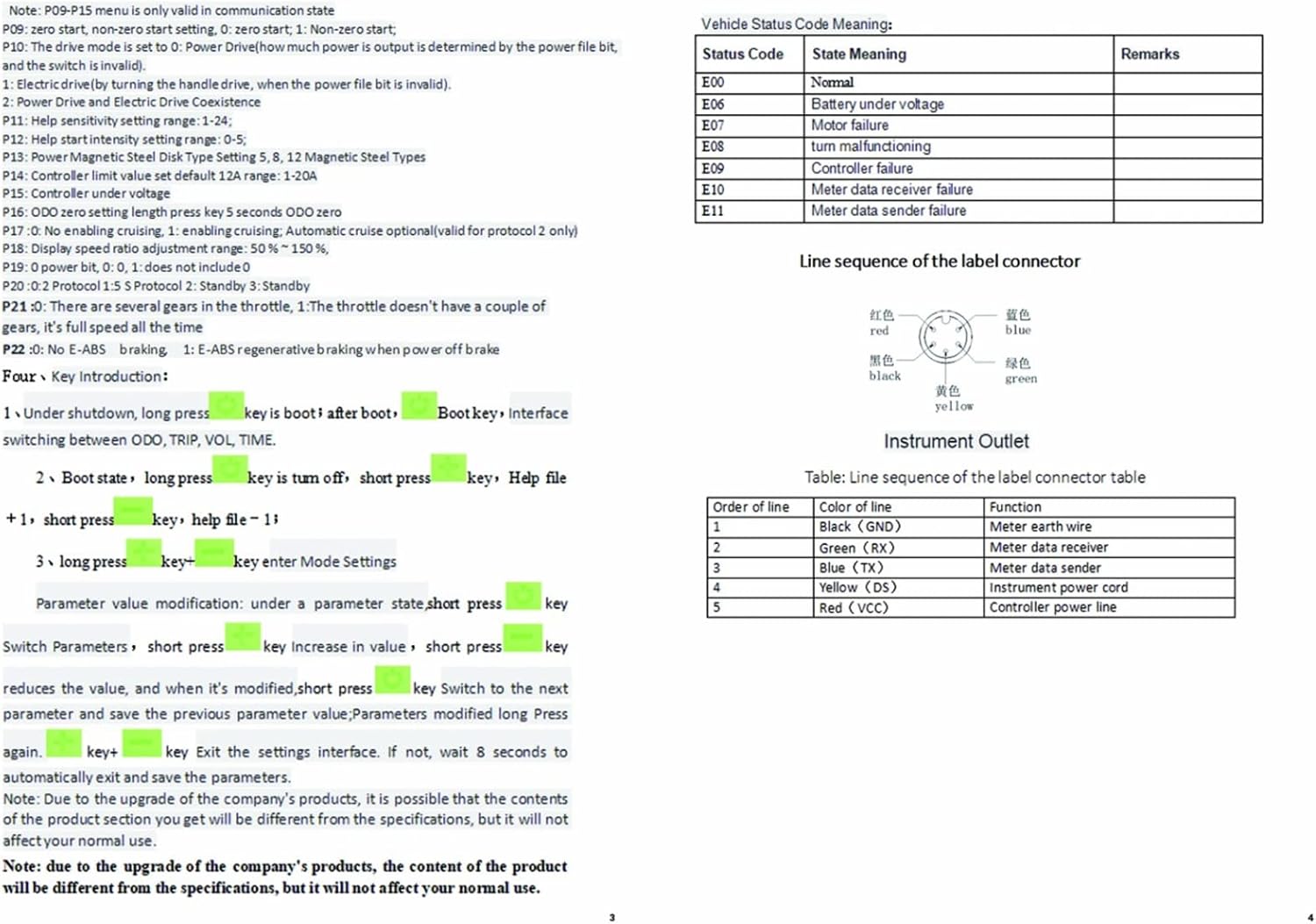
- Connect Cables: Connect the display's cable to the corresponding connector on your ebike's controller or wiring harness. Ensure the 5-pin connector is firmly seated. The line sequence of the label connector is typically: Red (VCC), Black (GND), Blue (TX), Green (RX), Yellow (DS).
- Test Functionality: After installation, turn on your ebike to verify the display powers on and shows information correctly.

6. Operating Instructions
The Topyond Ebike LCD Display provides various functions and settings to enhance your riding experience. Familiarize yourself with the buttons and display information.
6.1. Button Functions
- Power Button (Middle): Press and hold to turn the display ON/OFF. Short press to switch between ODO (Odometer), TRIP (Trip Distance), VOL (Voltage), and TIME.
- '+' Button (Top): Short press to increase parameter values or navigate menus.
- '-' Button (Bottom): Short press to decrease parameter values or navigate menus.
- Entering Settings: To enter the settings menu, press and hold the '+' and '-' buttons simultaneously.
6.2. Display Functions (LCD-930 Hand Control Panel)
The display provides comprehensive information at a glance:
- Speed Display: Shows current speed (AVG: average speed, MAX: maximum speed).
- Power Indicator: Battery level display.
- Fault Indication: Displays error codes if issues occur.
- Total Mileage (ODO): Cumulative distance traveled.
- Single Mileage (TRIP): Distance for the current ride.
- Single Boot Time (TIME): Duration of the current ride.
- Battery Voltage (VOL): Current battery voltage.
- DST: Distance.
- Endurance: Estimated remaining range.
6.3. Settings and Parameters (P09-P15 Menu)
To access and modify advanced settings, enter the P09-P15 menu by holding the '+' and '-' buttons. Use '+' and '-' to navigate and change values, and the Power button to confirm or exit.

- P01: Backlight Brightness: Adjusts display backlight (Level 1-3).
- P02: Mileage Unit: 0 for KM, 1 for MILE.
- P03: Voltage Level: Sets the battery voltage (24V, 36V, 48V, 60V). Default is 36V.
- P04: Dormancy Time: Sets the time until the display enters sleep mode (0: no dormancy, 1-60 minutes).
- P05: Help File: 0, 3 file mode.
- P06: Wheel Diameter: Sets the wheel diameter in inches for accurate speed and distance readings.
- P07: Speed Gauge Magnetic Steel Number: Sets the number of magnetic steel poles for the speed sensor.
- P08: Speed Limit: Sets the maximum speed (0-100km/h).
- P09: Zero Start/Non-Zero Start: 0 for zero start, 1 for non-zero start.
- P10: Drive Mode: 0 for power drive, 1 for electric drive (throttle), 2 for power drive and electric drive coexistence.
- P11: Help Sensitivity Setting Range: 1-24.
- P12: Help Start Intensity Setting Range: 0-5.
- P13: Power Magnetic Steel Disk Type Setting: 5, 8, 12 Magnetic Steel Types.
- P14: Controller Limit Value Set Default: 12A range: 1-20A.
- P15: Controller Under Voltage.
7. Maintenance
Proper maintenance ensures the longevity and optimal performance of your Topyond Ebike LCD Display.
- Cleaning: Use a soft, damp cloth to wipe the display screen and body. Avoid abrasive cleaners or solvents that could damage the ABS material or screen.
- Water Exposure: While the display is waterproof, avoid high-pressure water jets directly on the unit. Dry any moisture promptly after exposure to rain.
- Storage: When not in use for extended periods, store the ebike and display in a cool, dry place away from direct sunlight and extreme temperatures.
- Cable Inspection: Periodically check the connection cables for any signs of wear, fraying, or damage. Ensure connections remain secure.
8. Troubleshooting
If you encounter issues with your Topyond Ebike LCD Display, refer to the common problems and their solutions below. The display may show specific error codes to help diagnose the problem.
8.1. Vehicle Status Code Meanings
| Status Code | State Meaning | Remarks |
|---|---|---|
| E00 | Normal | No error detected. |
| E06 | Battery under voltage | Check battery charge level. |
| E07 | Motor failure | Inspect motor connections and functionality. |
| E08 | Turn mal-functioning | Check throttle or pedal assist sensor. |
| E09 | Controller failure | Inspect controller connections and unit. |
| E10 | Meter data receiver failure | Check display cable connection. |
| E11 | Meter data sender failure | Check display cable connection. |
8.2. General Troubleshooting Tips
- Display Not Turning On: Ensure the battery is charged and properly connected. Check all cable connections between the display and the ebike's system.
- Incorrect Readings: Verify that the wheel diameter (P06) and magnetic steel number (P07) settings are correctly configured in the display's parameters.
- Buttons Unresponsive: Check for any physical obstructions or debris around the buttons. If the issue persists, a factory reset (if available) or professional inspection may be needed.
9. Specifications
Detailed technical specifications for the Topyond Ebike LCD Display:
| Feature | Specification |
|---|---|
| Item Type | Electric Bike LCD Display Meter |
| Material | ABS |
| Weight | Approx. 0.1 Kilograms (95g/3.35oz) |
| Color | Black |
| Diameter (for installation) | Approx. 22.5mm / 0.89in |
| Voltage Compatibility | Default 36V, Universal for 24V, 36V, 48V, 60V |
| Item Package Dimensions (L x W x H) | 4.29 x 3.39 x 2.8 inches |
| Manufacturer | Topyond |
| Part Number | Topyondods2w34yzc |
| Date First Available | January 22, 2024 |

10. Warranty and Support
Topyond is committed to providing high-quality products. For any questions, technical assistance, or warranty claims, please refer to the contact information provided with your purchase or visit the official Topyond store on Amazon. Please retain your proof of purchase for warranty purposes.
Ask a question about this manual
Ask about setup, troubleshooting, compatibility, parts, safety, or missing instructions. Manuals+ will review the question and use this page’s manual context to help answer it.