
1. Introduction
Thank you for choosing the TDLOL Portable Rechargeable Battery Powered Fan X23. This versatile device combines a powerful fan with an integrated LED light, designed for both indoor and outdoor use. Its portable and cordless design makes it ideal for camping, travel, beach trips, and emergency situations. Please read this manual thoroughly before use to ensure proper operation and maintenance.
2. Safety Information
- Do not insert fingers or any objects into the fan grill when the fan is operating.
- Keep the device away from water or excessive moisture.
- Do not disassemble or attempt to repair the device yourself. Contact customer support if service is required.
- Use only the provided charging cable or a compatible USB-C cable for charging.
- Keep out of reach of children.
- Avoid prolonged exposure to direct sunlight or high temperatures.
3. Package Contents
Verify that all items are present in the package:
- TDLOL Portable Rechargeable Fan X23
- USB Charging Cable (Type-C)
- Instruction Manual
4. Product Overview
The TDLOL X23 fan is designed for portability and multi-functionality. It features a 270° pivot head, a 360° rotating hook, multiple fan speeds, and adjustable LED light brightness.

Image: The TDLOL Portable Rechargeable Fan X23, showcasing its compact design, LED light, and integrated hook.
Key Features:
- 270° Manual Pivot: Adjust the fan head vertically to direct airflow.
- 360° Rotating Hook: Easily hang the fan in tents, on branches, or other suitable locations.
- 4 Wind Speeds: Select from low, medium, high, and super high settings.
- 3 LED Light Brightness Modes: Provides soft, non-dazzling illumination for various needs.
- USB-C Charging & Power Bank Function: Recharge the fan and use it to charge other devices.
- Low Noise Operation: Operates quietly at less than 28 dB.
- Compact & Lightweight Design: Easy to carry and store.
5. Setup
Initial Charging:
- Before first use, fully charge the fan.
- Connect the provided USB-C cable to the charging port on the back of the fan.
- Connect the other end of the cable to a USB power adapter (not included) or a compatible USB port.
- The battery indicator lights will show the charging status. All lights will be solid when fully charged.
Positioning the Fan:
- Desktop Use: Place the fan on a flat, stable surface. Adjust the fan head by manually pivoting it up to 270° to achieve the desired angle.
- Hanging Use: Extend the integrated 360° rotating hook located on the top of the fan. Hang the fan from a tent ceiling, branch, or other secure fixture.

Image: The fan demonstrating its 270° manual pivot capability, allowing for flexible airflow direction.
6. Operating Instructions
Fan Operation:
- Locate the fan speed switch button on the front panel.
- Press the button once for Low speed.
- Press again for Medium speed.
- Press a third time for High speed.
- Press a fourth time for Super High speed.
- Press a fifth time to turn the fan off.

Image: Visual representation of the four fan speed settings: Low, Medium, High, and Super High.
LED Light Operation:
- Locate the light switch button on the front panel.
- Press the button once for Low brightness (Mode 1).
- Press again for Medium brightness (Mode 2).
- Press a third time for High brightness (Mode 3).
- Press a fourth time to turn the LED light off.
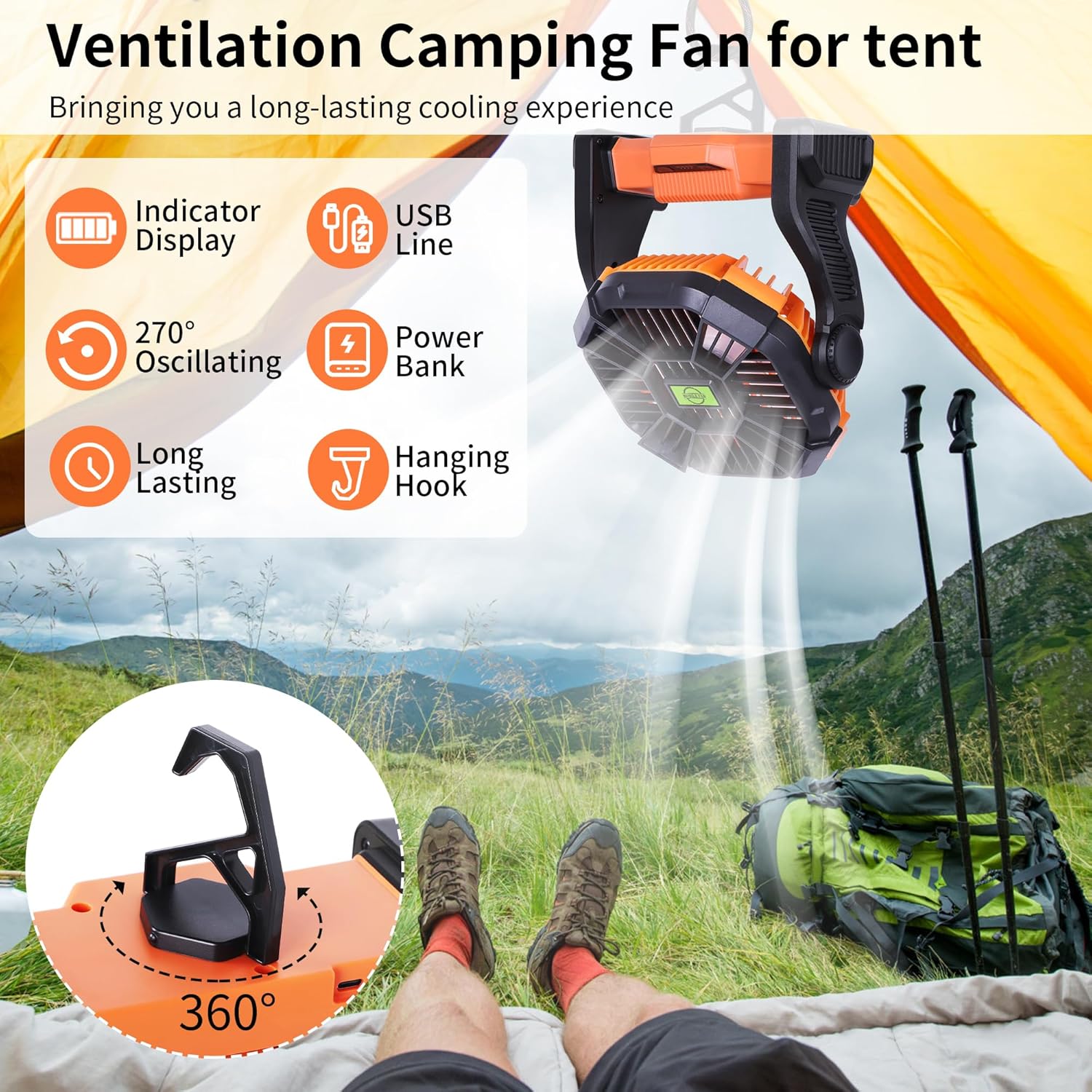
Image: The fan displaying its three LED light brightness modes, suitable for various lighting needs.
Power Bank Function:
The fan can be used as a power bank to charge other USB-powered devices.
- Connect your device's charging cable to the USB output interface on the fan.
- The fan will automatically begin charging your device.

Image: The fan's USB output port, illustrating its capability to charge external devices.
7. Maintenance
- Cleaning: Ensure the fan is turned off and unplugged before cleaning. Use a soft, dry cloth to wipe down the exterior. For the fan blades, carefully remove the front grill (if detachable) and wipe the blades with a damp cloth. Ensure all parts are dry before reassembling and using.
- Storage: Store the fan in a cool, dry place away from direct sunlight when not in use for extended periods.
- Battery Care: To prolong battery life, avoid fully discharging the battery frequently. Recharge the fan regularly, even if not in active use.
8. Troubleshooting
| Problem | Possible Cause | Solution |
|---|---|---|
| Fan does not turn on | Low battery; Power button not pressed correctly | Charge the fan; Ensure the power button is pressed firmly. |
| LED light does not turn on | Low battery; Light button not pressed correctly | Charge the fan; Ensure the light button is pressed firmly. |
| Weak airflow | Low speed setting; Obstruction in front/back grill | Increase fan speed; Clear any obstructions. |
| Device not charging from fan (power bank function) | Fan battery low; Incorrect cable; Device not compatible | Ensure fan is sufficiently charged; Use a compatible charging cable; Check device compatibility. |
9. Specifications
| Feature | Detail |
|---|---|
| Brand | TDLOL |
| Model Name | X23 |
| Power Source | Battery Powered |
| Electric Fan Design | Table Fan |
| Special Features | LED Light, Lightweight, Portable, Quiet Operation, Rechargeable |
| Noise Level | 28 Decibels |
| Number of Power Levels | 4 (Fan Speeds) |
| Voltage | 5 Volts |
| Wattage | 10 watts |
| Item Weight | 1.9 Pounds |
| Product Dimensions | 1"D x 1"W x 1"H |
| Batteries | 1 Lithium Metal battery (included) |
| Control Method | Push Button |
| Indoor/Outdoor Usage | Indoor, Outdoor |
10. Official Product Videos
Portable, Cordless, and Powerful Fan and Light
Video: A detailed overview of the fan's portability, cordless operation, and powerful airflow, highlighting its integrated light feature. Creator: Amy Boysel.
Portable Rechargeable Camping Fan with Light
Video: Demonstrates the fan's use as a portable camping fan with an integrated light, suitable for outdoor environments. Creator: DaveMadeMeBuyIt.
My Thoughts on This Rechargeable Fan
Video: A personal review highlighting the features and benefits of the rechargeable fan. Creator: Audrey Pauleus.
Multi-use Must Have: Keeps You Cool, Charged, and Lit!
Video: Showcasing the fan's multiple uses, including cooling, device charging, and lighting. Creator: Amanda McCartney.
11. Warranty and Support
For warranty information or technical support, please refer to the contact details provided on the product packaging or visit the official TDLOL website. Keep your purchase receipt as proof of purchase for any warranty claims.