
Introduction
This manual provides detailed instructions for the proper use and care of your Citizen Eco-Drive Rolan Watch, Model BU2112-06E. Please read this manual thoroughly to ensure correct operation and to maximize the lifespan of your timepiece. The Citizen Eco-Drive technology harnesses light energy, eliminating the need for battery replacement.
Watch Components
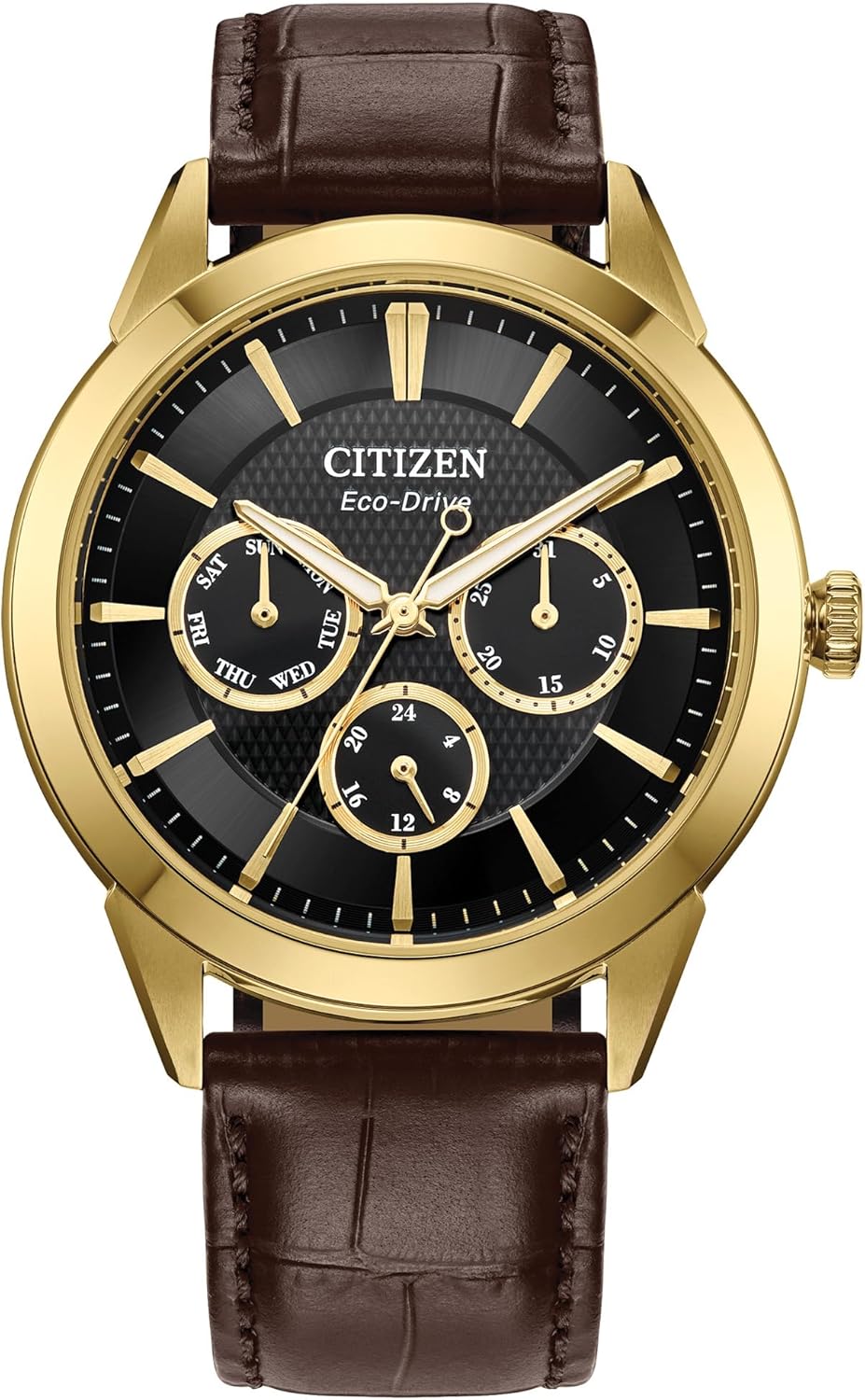
Image: Front view of the Citizen Eco-Drive Rolan watch, highlighting its black dial with three sub-dials, gold-tone stainless steel case, and brown leather strap. The watch features day, date, and 24-hour indicators.
- Crown: Used for setting time, day, and date.
- Dial: Displays hours, minutes, seconds, day, date, and 24-hour time.
- Sub-dials: Indicate day of the week, date, and 24-hour time.
- Strap: Brown leather strap with a deployment clasp.
Setup
1. Initial Charging (Eco-Drive)
Your Eco-Drive watch is powered by light. Before initial use, or if the watch has stopped, ensure it is fully charged. Expose the watch dial to bright light (natural sunlight or fluorescent lamp) for several hours. A full charge can take approximately 8-10 hours in direct sunlight or significantly longer under indoor lighting. The second hand will move normally when sufficiently charged.
2. Setting the Time and Calendar
- Pull out the crown to position 2 (the outermost position). The second hand will stop.
- Rotate the crown to set the hour and minute hands. When setting the minute hand, advance it a few minutes past the desired time and then turn it back to the exact time. Ensure the 24-hour sub-dial is also correctly aligned with AM/PM.
- Push the crown in to position 1 (middle position).
- Rotate the crown to set the day and date. Turn the crown clockwise to adjust the date and counter-clockwise to adjust the day. Avoid setting the date between 9:00 PM and 1:00 AM, as this may interfere with the automatic date change mechanism.
- Push the crown back in to position 0 (normal position) to start the watch.
3. Adjusting the Leather Strap
The brown leather strap features a deployment clasp for secure wearing. To adjust the fit, locate the spring bar on the clasp that connects to the strap. Use a small tool to compress the spring bar and slide the clasp along the strap to the desired position. Ensure the clasp closes securely once adjusted.
Operating Your Watch
Timekeeping
Once set, your watch will accurately display the current time, day, and date. The 24-hour sub-dial provides an additional reference for military time or distinguishing between AM/PM hours.

Image: A lifestyle image of the Citizen Eco-Drive Rolan watch being worn on a wrist, demonstrating its appearance during daily activities.
Water Resistance
This watch is water resistant up to 100 meters (10 BAR). This means it is suitable for swimming, showering, and snorkeling. However, it is not suitable for scuba diving. Always ensure the crown is fully pushed in to position 0 before exposing the watch to water. Do not operate the crown while the watch is wet or submerged.
Maintenance
Charging Guidelines
To maintain optimal performance, ensure your Eco-Drive watch receives sufficient light exposure. Avoid prolonged storage in dark places. If the watch stops, recharge it promptly. The power reserve can last for several months in complete darkness once fully charged.
Cleaning
Wipe the watch case and crystal with a soft, dry cloth. For the leather strap, use a slightly damp cloth to clean and then dry thoroughly. Avoid using harsh chemicals or abrasive materials, as these can damage the watch's finish or the leather.
Storage
When not wearing the watch, store it in a location where it can receive some light, or periodically expose it to light to maintain its charge. Avoid extreme temperatures, direct sunlight for extended periods (which can fade the strap), and strong magnetic fields.

Image: The back of the Citizen Eco-Drive Rolan watch is shown, revealing the stainless steel case back engraved with 'CITIZEN', 'ECO-DRIVE', 'BASE ST. STEEL', 'SAPPHIRE', 'W.R.10BAR', and the model/movement number '8729-0092Y01'.
Troubleshooting
- Watch has stopped or second hand moves irregularly: This indicates insufficient charge. Expose the watch to bright light for several hours until the second hand resumes normal one-second intervals.
- Time or date is incorrect: Refer to the "Setting the Time and Calendar" section under Setup to re-adjust. Ensure the crown is fully pushed in after setting.
- Condensation inside the crystal: This may indicate a breach in water resistance. Avoid further water exposure and contact Citizen customer support for inspection.
Specifications

Image: This image shows the side profile of the Citizen Eco-Drive Rolan watch, illustrating the gold-tone case thickness and the textured crown used for adjustments.
| Feature | Detail |
|---|---|
| Model Number | BU2112-06E |
| Movement | Eco-Drive (Caliber 8729) |
| Case Material | Gold-tone Stainless Steel |
| Case Diameter | 40mm |
| Dial Color | Black |
| Strap Material | Brown Leather |
| Water Resistance | 100 meters (10 BAR) |
| Functions | Hours, Minutes, Seconds, Day, Date, 24-hour time |
Warranty Information
Your Citizen Eco-Drive watch is covered by a limited warranty. Please refer to the warranty card included with your purchase for specific terms, conditions, and duration. Retain your proof of purchase for warranty claims.
Customer Support
For further assistance, service, or inquiries regarding your Citizen watch, please visit the official Citizen website or contact their customer service department.
Citizen Official Website: www.citizenwatch.com


