
NOYAFA NF-859G
NOYAFA NF-859G Network Cable Tester User Manual
Model: NF-859G | Brand: NOYAFA
Introduction
The NOYAFA NF-859G is a versatile network cable tester designed for comprehensive network cable testing. It integrates multiple functions including wire detection, alignment testing, crimping testing, PoE detection, visual fault location (VFL), and an LED flashlight. This manual provides detailed instructions for the proper setup, operation, maintenance, and troubleshooting of your device.
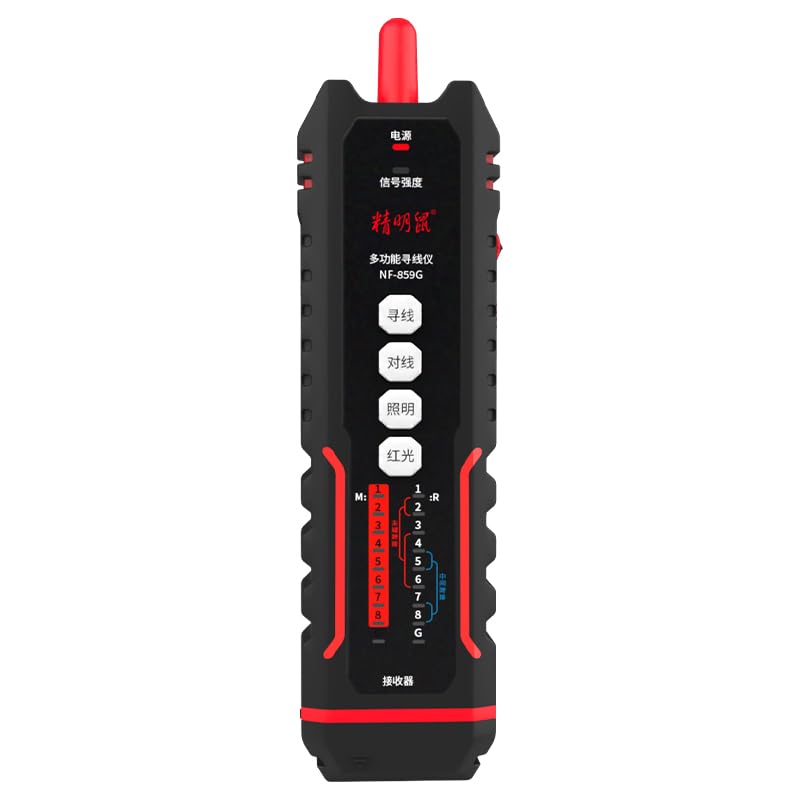
Image: The NOYAFA NF-859G Network Cable Tester, showing the main unit and the receiver.
Setup
Unpacking and Initial Inspection
Carefully unpack the NOYAFA NF-859G Network Cable Tester. Verify that all components are present and undamaged. The package should include:
- Main Tester Unit
- Receiver (auxiliary machine)
- User Manual (this document)
- Note: Batteries are not included and must be purchased separately.
Battery Installation
- Locate the battery compartment on the main tester unit and the receiver.
- Open the battery compartment cover.
- Insert the required batteries, ensuring correct polarity (+/-). The device uses a 3.7V lithium polymer battery.
- Close the battery compartment cover securely.
Operating Instructions
The NOYAFA NF-859G offers various testing modes. Familiarize yourself with the device's interface before operation.
Wire Detection Function
This function allows for tracing and locating cables. It supports both anti-interference mode and ordinary mode.
- Connect the cable to be traced to the main unit's appropriate port (RJ45/RJ11).
- Select the wire detection mode on the main unit.
- Use the receiver to trace the cable. The receiver will emit an audible signal when near the cable.
- Switch between anti-interference mode and ordinary mode as needed for optimal tracing in different environments.
Alignment Test (Cable Mapping)
Perform local and remote alignment tests to check for open circuits, short circuits, cross-overs, and split pairs in network cables.
- For local alignment test, connect both ends of the cable to the main unit.
- For remote alignment test, connect one end of the cable to the main unit and the other end to the receiver.
- Initiate the alignment test. The display will show the wiring status of the cable.
Crimping Test
Verify the proper crimping of RJ11 and RJ45 connectors.
- Insert the crimped RJ11 or RJ45 connector into the corresponding port on the main unit.
- Select the crimping test function. The device will indicate if the crimping is correct or if there are faults.
PoE (Power over Ethernet) Detection
Identify the power supply wire core and detect mid-span or end-span PoE configurations.
- Connect the network cable with PoE to the main unit.
- Activate the PoE detection function. The device will display information about the PoE type and power status.
Visual Fault Locator (VFL)
The integrated 20mw red light function helps locate breaks and bends in fiber optic cables.
- Connect the fiber optic cable to the VFL port.
- Activate the VFL. A red laser light will be emitted.
- Observe the cable for light leakage, which indicates a fault.
- Caution: Avoid direct eye exposure to the laser light.
LED Flashlight
The built-in LED flashlight provides illumination in dark working environments.
- Press the dedicated flashlight button to turn it on or off.
Maintenance
Proper maintenance ensures the longevity and accuracy of your NOYAFA NF-859G Network Cable Tester.
- Cleaning: Use a soft, dry cloth to clean the device. Do not use abrasive cleaners or solvents.
- Storage: Store the device in a cool, dry place away from direct sunlight and extreme temperatures. If storing for extended periods, remove the batteries to prevent leakage.
- Battery Replacement: Replace batteries when the low battery indicator appears. Always use the specified battery type (3.7V lithium polymer).
- Handling: Avoid dropping the device or subjecting it to strong impacts.
Troubleshooting
This section addresses common issues you might encounter with your NOYAFA NF-859G.
| Problem | Possible Cause | Solution |
|---|---|---|
| Device does not power on. | Low or dead batteries; incorrect battery installation. | Check battery indicator. Replace batteries or ensure they are installed with correct polarity. |
| Inaccurate cable test results. | Damaged test cable; incorrect test mode selected; dirty connectors. | Use a known good test cable. Ensure the correct test mode (e.g., alignment test) is selected. Clean connectors. |
| Wire tracing signal is weak or absent. | Cable is shielded; interference from other cables; low battery on receiver. | Switch to anti-interference mode. Ensure receiver batteries are charged. Try tracing in a less congested area. |
| VFL red light is dim or not working. | Low battery; VFL port obstruction; internal fault. | Check battery level. Ensure VFL port is clean and unobstructed. If problem persists, contact support. |
Specifications
Key technical specifications for the NOYAFA NF-859G Network Cable Tester:
- Model Number: NF-859G
- Brand: NOYAFA
- Generic Name: Network Cable Tester
- Connectivity Technology: Ethernet
- Power Source: Battery Powered (3.7V lithium polymer battery)
- Included Components: Main Tester Unit, Receiver (auxiliary machine)
- VFL Output Power: 20mw (Red Light Function)
- Wire Detection Modes: Anti-interference mode, Ordinary mode
- Supported Connectors: RJ45, RJ11
- Supported Cable Types: CAT5, CAT6, CAT5E, CAT6A
- Item Weight: 420 g
- Package Dimensions: 28.8 x 16.6 x 5.3 cm
- Color: Black
- Manufacturer: NOYAFA
Warranty and Support
For warranty information or technical support, please refer to the official NOYAFA website or contact your local distributor. Keep your purchase receipt as proof of purchase for warranty claims.
Manufacturer: NOYAFA
Date First Available: 22 September 2024
For further assistance, please visit the NOYAFA Brand Store on Amazon.
Ask a question about this manual
Ask about setup, troubleshooting, compatibility, parts, safety, or missing instructions. Manuals+ will review the question and use this page’s manual context to help answer it.