
1. Introduction
This manual provides detailed instructions for the installation, operation, and maintenance of your Soundstream BX-10MX Digital Bass Reconstruction Processor. The BX-10MX is designed to enhance the low-frequency output of your car audio system, providing a richer and more impactful bass experience. Please read this manual thoroughly before installation and use to ensure proper function and longevity of the device.
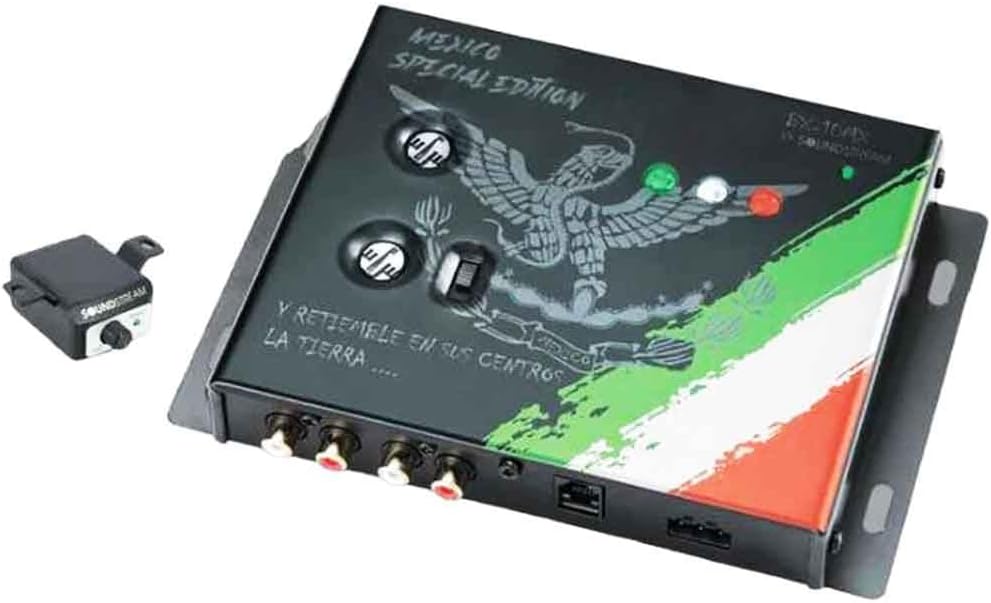
Image 1.1: The Soundstream BX-10MX Digital Bass Reconstruction Processor main unit. This image displays the top view of the processor, featuring the "Mexico Special Edition" branding, control knobs, and input/output ports.
2. Key Features
- Digital Bass Reconstruction: Enhances low-frequency signals for improved bass response.
- Dash Mount Remote Gain Control: Allows convenient adjustment of bass levels from the driver's seat.
- Max Bass Control: Provides precise adjustment over the bass output.
- PWM High Head Room Power Supply: Ensures stable and efficient power delivery.
- Wide Frequency Response: Operates within 10Hz to 100kHz.
- Lighted Display: Offers visual feedback for settings.
- Parametric Bass Control: Enables fine-tuning of bass frequency and width.
- PFM Subsonic Filter: Protects subwoofers from damaging ultra-low frequencies.
- Balanced Inputs: Reduces noise and interference.
- High Output Level: Up to 13.5 Volts.
- Low Total Harmonic Distortion (THD): 0.003%.
- High Signal-to-Noise Ratio (S/N Ratio): 130 dB.
- Excellent Balanced Input Noise Rejection: 60 dB.
3. Package Contents
Upon opening the package, verify that all components are present and undamaged. The standard package for the Soundstream BX-10MX includes:
- Soundstream BX-10MX Digital Bass Reconstruction Processor Unit
- Dash Mount Remote Gain Control
- Remote Control Cable
- Mounting Hardware (screws, brackets)
- User Manual (this document)

Image 3.1: The Soundstream BX-10MX product packaging. This image shows the retail box, which includes the main processor unit and the remote gain control.

Image 3.2: The dash mount remote gain control and its connecting cable for the Soundstream BX-10MX. This remote allows for convenient adjustment of bass levels.
4. Setup and Installation
Proper installation is crucial for optimal performance. If you are unsure about any steps, consult a professional car audio installer.
4.1 Safety Precautions
- Disconnect the vehicle's negative battery terminal before starting any electrical work.
- Ensure all wiring is properly insulated to prevent short circuits.
- Mount the unit securely to avoid movement during vehicle operation.
- Avoid installing the unit in areas exposed to excessive heat, moisture, or direct sunlight.
4.2 Mounting the Unit
- Choose a suitable, dry, and well-ventilated location for the processor, such as under a seat or in the trunk.
- Use the provided mounting hardware to secure the unit firmly.
4.3 Wiring Connections
The BX-10MX requires power, ground, remote turn-on, and audio input/output connections.
- Power (B+): Connect to a constant +12V source from the vehicle's battery, fused appropriately.
- Ground (GND): Connect to a clean, bare metal chassis ground point in the vehicle.
- Remote (REM): Connect to the remote turn-on output of your head unit or another switched +12V source.
- Audio Input (RCA): Connect the RCA outputs from your head unit or signal processor to the BX-10MX's input.
- Audio Output (RCA): Connect the RCA outputs from the BX-10MX to your amplifier's inputs.
- Remote Gain Control: Connect the remote control cable to the dedicated port on the BX-10MX and mount the remote in an accessible location on your dashboard.
5. Operating Instructions
Once installed, the BX-10MX allows for precise control over your system's bass response.
5.1 Initial Setup
- Start with all controls on the BX-10MX set to their minimum or neutral positions.
- Play a familiar piece of music with good bass content.
- Gradually adjust the main bass control on the BX-10MX to your desired level.
5.2 Controls and Adjustments
- Bass Restoration: This control adjusts the amount of bass enhancement applied to the audio signal. Increase for more pronounced bass.
- Parametric Bass Control:
- Frequency: Selects the center frequency where the bass enhancement will be most prominent.
- Width: Adjusts the Q-factor or bandwidth of the bass enhancement, determining how wide or narrow the affected frequency range is.
- PFM Subsonic Filter: This filter removes frequencies below a certain point, protecting your subwoofers from playing frequencies they cannot reproduce efficiently, which can cause damage. Adjust according to your subwoofer's capabilities.
- Dash Mount Remote Gain Control: This knob provides convenient, real-time adjustment of the overall bass output level from your listening position.
- Output Level: Ensure the output level is set appropriately to match the input sensitivity of your amplifier, avoiding clipping or distortion. The BX-10MX can output up to 13.5 Volts.
6. Maintenance
The Soundstream BX-10MX is designed for reliable operation with minimal maintenance.
- Keep the unit clean by wiping it with a soft, dry cloth. Avoid using harsh chemicals or abrasive cleaners.
- Ensure proper ventilation around the unit to prevent overheating.
- Periodically check all wiring connections to ensure they are secure and free from corrosion.
7. Troubleshooting
If you experience issues with your BX-10MX, refer to the following troubleshooting guide.
| Problem | Possible Cause | Solution |
|---|---|---|
| No Power | Blown fuse, loose power/ground/remote wire, no remote signal. | Check fuse, verify all power connections, ensure remote wire receives +12V when head unit is on. |
| No Bass Enhancement | Bass restoration control set too low, incorrect input/output connections, amplifier settings. | Increase bass restoration control, verify RCA connections, check amplifier gain and crossover settings. |
| Distorted Sound | Input/output levels too high, amplifier clipping, faulty wiring. | Reduce BX-10MX output level, adjust amplifier gain, inspect wiring for damage or shorts. |
| Noise/Hum | Poor grounding, RCA cable interference, power cable interference. | Ensure clean ground connection, route RCA cables away from power cables, use shielded RCA cables. |
| Remote Control Not Working | Damaged remote cable, faulty remote unit. | Check remote cable for damage, ensure it's securely plugged in at both ends. |
8. Specifications
| Feature | Specification |
|---|---|
| Frequency Response | 10Hz - 100kHz |
| Output Level | 13.5 Volts |
| Total Harmonic Distortion (THD) | 0.003% |
| Signal-to-Noise Ratio (S/N Ratio) | 130 dB |
| Balanced Input Noise Rejection | 60 dB |
| Item Weight | 1.81 pounds (0.82 kg) |
| Product Dimensions (L x W x H) | 10.5 x 8.5 x 2.5 inches (26.7 x 21.6 x 6.4 cm) |
| Model Number | BX-10MX |
| Manufacturer | Soundstream |
9. Warranty and Support
Soundstream products are designed and manufactured to the highest quality standards. For information regarding warranty coverage, terms, and conditions, please refer to the warranty card included with your product or visit the official Soundstream website.
For technical support, service inquiries, or to purchase replacement parts, please contact Soundstream customer service through their official website or authorized dealers.
Website: www.soundstream.com


