
1. Introduction
The SMSL DO300EX is a versatile MQA DAC, Bluetooth 5.1 balanced headphone amplifier, and preamplifier designed for high-fidelity audio systems. It integrates advanced audio technologies to deliver exceptional sound performance across various input and output options.
This manual provides detailed instructions for setting up, operating, and maintaining your DO300EX to ensure optimal performance and longevity.
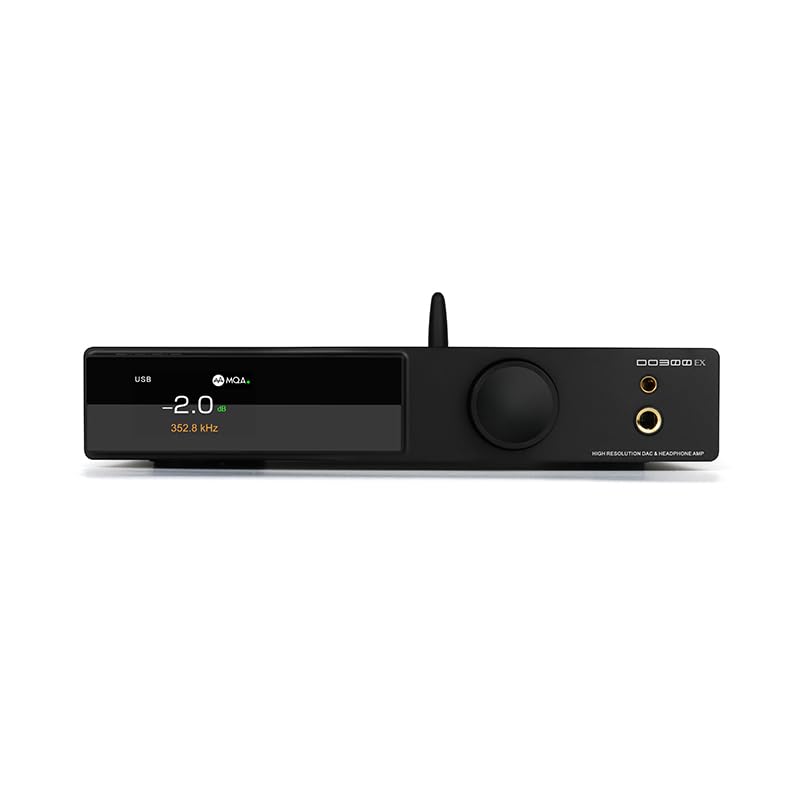
Figure 1: SMSL DO300EX MQA DAC Headphone Amplifier Preamplifier with included remote control.
2. Key Features
- Advanced DAC Chips: Equipped with AK4191+AK4499EX and XMOS XU-316 chips, supporting up to 32bit/768kHz PCM and DSD512.
- MQA & MQA-CD Decoding: Full support for MQA and MQA-CD audio signal decoding, restoring original studio sound quality.
- Multiple Inputs: Features USB, optical, coaxial, and I2S inputs for broad compatibility with various audio sources.
- Versatile Outputs: Offers 4.4mm and 6.35mm headphone outputs, alongside balanced XLR and RCA line outputs.
- High-Quality Display: Suspended display window with tempered glass, full-laminated color IPS display, and DOP independent display function.
- Premium Components: Constructed with chamfered high-grade aluminum, 9 high-end dual op amps, audiophile components, and a self-developed CK-03 clock processing circuit for reduced jitter.
- Bluetooth 5.1: Integrated Qualcomm Bluetooth 5.1 chip supporting LDAC 24bit/96kHz, APTX-HD, SBC, and AAC codecs.

Figure 2: Overview of the SMSL DO300EX highlighting its core features and technologies.
3. Setup Guide
3.1 Unpacking and Initial Inspection
Carefully remove the DO300EX from its packaging. Inspect the unit for any signs of damage. Ensure all accessories are present:
- SMSL DO300EX Unit
- AC Power Cable
- USB Cable
- Remote Control
- Bluetooth Antenna
- User Manual
- Warranty Card

Figure 3: Included accessories for the SMSL DO300EX.
3.2 Connecting Audio Sources and Outputs
The DO300EX offers a wide range of input and output options. Refer to the diagram below for proper connection guidance.

Figure 4: Detailed diagram of the input and output ports on the SMSL DO300EX, illustrating connections to various audio devices.
- Inputs: Connect your digital audio sources (PC, CD/DVD player, TV, other audio devices) to the USB, Optical, Coaxial, or I2S input ports. For Bluetooth, ensure the antenna is connected and pair your mobile device.
- Headphone Outputs: Use the 4.4mm balanced or 6.35mm single-ended jacks on the front panel for headphones.
- Line Outputs: Connect to a power amplifier or active speakers using the balanced XLR or unbalanced RCA outputs on the rear panel.
- Power: Connect the AC power cable to the DC 12V input on the rear panel and then to a power outlet.
4. Operating Instructions
4.1 Front Panel Controls
The front panel features a multi-functional knob and an IPS display for intuitive control and status monitoring.
- Multi-functional Knob: This knob controls volume, input selection, and menu settings. Rotate to adjust volume or navigate menus. Press to confirm selections or switch inputs.
- IPS Display: Shows current volume level, active input, sampling rate, and other operational parameters. Supports DOP independent display for decoding format.
- Headphone Jacks: 4.4mm balanced and 6.35mm single-ended outputs for direct headphone connection.

Figure 5: Front panel design of the SMSL DO300EX, highlighting the display and multi-functional knob.
4.2 Remote Control
The included remote control provides convenient access to all functions from a distance.

Figure 6: Layout of the full-function remote control for the SMSL DO300EX.
- Power ON/OFF: Turns the unit on or off.
- Volume +/-: Adjusts the output volume.
- Input Select: Cycles through available input sources.
- Menu/OK: Accesses the menu and confirms selections.
- Mute: Mutes or unmutes the audio output.
- FN (Define in the menu): Customizable function button.
4.3 MQA Playback
The DO300EX supports MQA and MQA-CD decoding. Ensure your audio source is providing a genuine MQA-CD signal and that the fiber optic or coaxial signal output by the CD player is unprocessed source code for optimal MQA experience.

Figure 7: MQA-CD decoding is supported via Coaxial and Optical inputs, ensuring high-quality audio playback.
5. Specifications
| Feature | Detail |
|---|---|
| Model | DO300EX |
| DAC Chips | AK4191 + AK4499EX |
| USB Chip | XMOS XU-316 |
| USB Sampling Rate | PCM 32bit/768kHz, DSD512 |
| Optical/Coaxial Sampling Rate | PCM 24bit/192kHz |
| Inputs | USB, Optical, Coaxial, I2S |
| Headphone Outputs | 4.4mm Balanced, 6.35mm Single-Ended |
| Line Outputs | XLR Balanced, RCA Unbalanced |
| Bluetooth Version | 5.1 (LDAC, APTX-HD, SBC, AAC) |
| Headphone Output Power (4.4mm) | 2570mW x 2 (32Ω/THD+N < 1%) |
| Headphone Output Power (6.35mm) | 640mW x 2 (32Ω/THD+N < 1%) |
| Dynamic Range (XLR) | 132dB |
| Dynamic Range (RCA) | 127dB |
| THD+N (XLR) | 0.00006% (-124dB) |
| Power Consumption | <20W |
| Standby Power | <0.5W |

Figure 8: Comprehensive product parameters and specifications for the SMSL DO300EX.
6. Maintenance
To ensure the longevity and optimal performance of your SMSL DO300EX, follow these maintenance guidelines:
- Cleaning: Use a soft, dry cloth to clean the exterior of the unit. Avoid using harsh chemicals or abrasive materials, which can damage the finish.
- Ventilation: Ensure the unit is placed in a well-ventilated area to prevent overheating. Do not block any ventilation openings.
- Power Off: Always power off the unit and disconnect it from the power source before cleaning or when not in use for extended periods.
- Environment: Avoid exposing the unit to extreme temperatures, humidity, or direct sunlight.
7. Troubleshooting
If you encounter any issues with your DO300EX, please refer to the following common troubleshooting steps:
- No Power:
- Check if the power cable is securely connected to both the unit and the power outlet.
- Ensure the power outlet is functional.
- No Sound Output:
- Verify that the correct input source is selected on the DO300EX.
- Check all audio cable connections (USB, Optical, Coaxial, I2S, XLR, RCA, headphone jacks).
- Ensure the volume is not muted or set too low.
- Confirm that your connected headphones or speakers are working correctly.
- Distorted Sound:
- Check the quality of your audio source and cables.
- Ensure the sampling rate settings on your source device match the capabilities of the DO300EX.
- Reduce the volume level to check if distortion is due to overdriving.
- Bluetooth Connection Issues:
- Ensure the Bluetooth antenna is properly installed.
- Verify that Bluetooth is enabled on your source device and the DO300EX is in pairing mode.
- Try unpairing and re-pairing the device.
If the issue persists after following these steps, please contact customer support.
8. Warranty and Support
The SMSL DO300EX comes with a 12-month warranty from the date of purchase. Additionally, the product can be returned within 30 days from the date of purchase if you are not satisfied.
For any questions or technical assistance, our customer service team provides 24-hour online support. Please feel free to contact us through the official channels provided with your product or on the manufacturer's website.
9. Product Videos
No official product videos specifically for the SMSL DO300EX were found from the seller in the provided data. The available videos are for a different product (Fosi Audio ZH3) and are therefore not included in this manual to maintain relevance and accuracy.


