
1. Product Overview
The Aokeo AK-49 Adjustable Microphone Arm is designed to provide a stable and flexible mounting solution for various microphones. Its compact suspension boom scissor arm allows for precise positioning, reducing vibration and optimizing your recording setup. The arm features adjustable joints and integrated cable management for a clean and efficient workspace.

Figure 1: Aokeo AK-49 Microphone Arm with desk clamp and various adapters.
2. What's in the Box
- Microphone Stand (x1)
- Stand Base (Desk Clamp) (x1)
- 5/8" Adapter (x1)
- 3/8" Adapter (x1)
- Washer Nut (x1)
- Cable (x1)
- Clip-on Cable Management Holders (x6)

Figure 2: Detailed view of the microphone arm components and accessories.
3. Installation Guide
Follow these steps to correctly install your Aokeo AK-49 Microphone Arm:
- Attach the Desk Clamp: Place the stand base (desk clamp) on the edge of your table. Rotate the screw to tighten it securely to the desk.
- Insert the Microphone Stand: Insert the main pole of the microphone stand into the hole on the tightened desk clamp. Rotate the nut on the clamp to fix the stand in place.
- Adjust Arm Angle: Rotate the screws on the arm joints to adjust the stand's angle to a suitable position. Each joint can be adjusted up to 180 degrees.
- Attach Microphone Adapter: The arm comes with a detachable 5/8" adapter and a 3/8" adapter. Choose the appropriate adapter for your microphone and screw it onto the end of the arm.
- Install Microphone: Carefully screw your microphone onto the attached adapter.
- Cable Management: Utilize the integrated storage cable design and clip-on cable management holders to route your microphone cable along the arm for a neat setup.

Figure 3: Installation steps for securing the desk clamp and main pole.

Figure 4: Installation steps for arm adjustment, microphone attachment, and cable routing.
4. Operating Instructions
4.1 Adjusting the Microphone Arm
The Aokeo AK-49 arm offers flexible adjustment to suit your needs. To change the angle of the arm, simply loosen the knob on the microphone arm joint. Once the desired position is achieved, tighten the knob to secure the arm. Each joint allows for 180° adjustment, and the base offers 360° rotation, ensuring your microphone remains stable and prevents vibration.

Figure 5: Flexible adjustment capabilities of the microphone arm.
4.2 Cable Management
Maintain a tidy workspace using the integrated cable management system. The arm features channels and clip-on holders to neatly tuck away your microphone cable, preventing clutter and ensuring smooth movement of the arm.
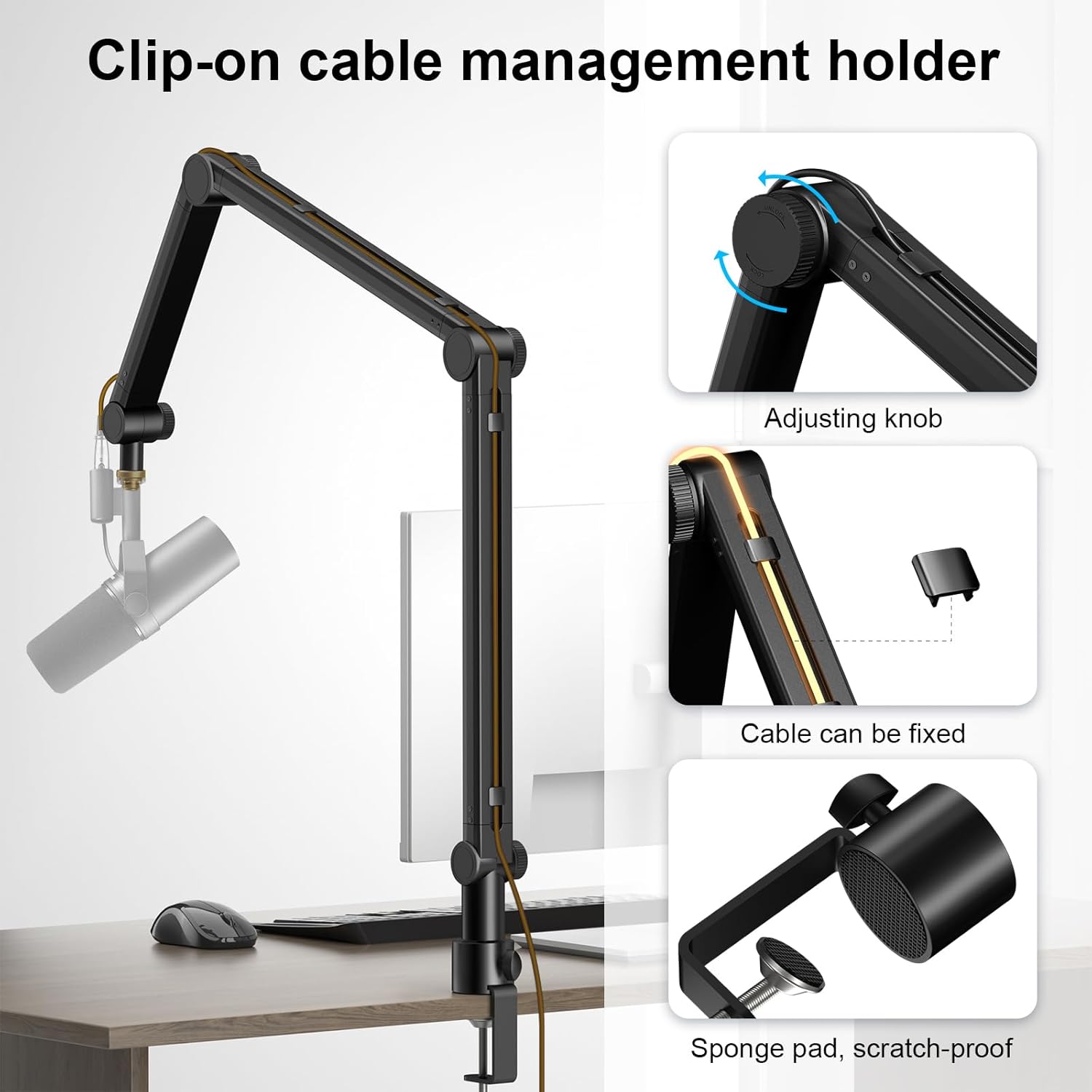
Figure 6: Detail of cable management and adjustment knob.
4.3 Microphone Compatibility
The Aokeo AK-49 is designed for broad compatibility with various microphones, including popular models like Blue Yeti, Snowball iCE, HyperX QuadCast, SoloCast, and Elgato Wave. The included 5/8" and 3/8" adapters ensure a secure fit for most standard microphones.

Figure 7: Microphone compatibility and adapter usage.
5. Maintenance
- Regularly check all screws and clamps to ensure they are tight and secure.
- Wipe the arm with a soft, dry cloth to remove dust and debris. Avoid using harsh chemicals.
- Ensure cables are properly routed and not pinched by the arm's joints.
6. Troubleshooting
- Arm sagging or not holding position: Ensure all adjustment knobs and the desk clamp are tightened sufficiently. The arm has a strong carrying capacity of 4.4 pounds (2 kg).
- Microphone unstable: Verify that the microphone is securely screwed onto the adapter and that the adapter is tight on the arm.
- Cables interfering with movement: Re-route cables using the integrated channels and clip-on holders to prevent snagging.
7. Specifications
| Feature | Detail |
|---|---|
| Model Number | AK-49 |
| Material | Metal |
| Item Weight | 3.08 pounds (1.4 Kilograms) |
| Package Dimensions | 17.4 x 7.83 x 2.83 inches |
| Connector Type | Locking Clamp |
| Adjustability | Three adjustable arms, 180° joint adjustment, 360° base rotation |

Figure 8: Product dimensions and key features.
8. Warranty and Support
For warranty information or technical support, please refer to the product packaging or contact Aokeo customer service directly. Keep your purchase receipt for any warranty claims.