
1. Safety Information
Please read and understand all safety information before assembling and using this chair. Failure to follow these instructions may result in injury or damage to the product.
- Maximum Weight Capacity: Do not exceed the maximum weight capacity of 500 pounds (227 kg).
- Assembly: Always assemble the chair strictly according to the provided instructions. Ensure all parts are securely fastened before use.
- Adjustable Features: Exercise caution when using adjustable and reclining features to prevent pinching or injury.
- Stability: Do not stand on the chair. Avoid leaning excessively to one side, which could cause the chair to tip over.
- Children: Keep children away from the chair during assembly. This product contains small parts that could be a choking hazard.
2. Package Contents
Verify that all components are present and undamaged before beginning assembly. If any parts are missing or damaged, please contact customer support.
- 1x High Back Office Chair (disassembled components)
- 1x Assembly Tools (Allen wrench, screws, etc.)
- 1x Assembly Instruction (this document)
3. Assembly Instructions
The VECELO Ergonomic Office Chair is designed for straightforward assembly. Follow these steps carefully to ensure a secure and functional chair.
- Attach the Casters: Insert the five casters into the holes at the end of each leg of the chair base. Push firmly until they click into place.
- Insert the Gas Lift: Place the gas lift cylinder into the center hole of the assembled chair base.
- Attach the Mechanism: Secure the seat plate mechanism to the underside of the seat cushion using the provided screws. Ensure the front of the mechanism faces the front of the seat.
- Connect Seat to Gas Lift: Carefully place the assembled seat onto the gas lift cylinder, ensuring it is centered and stable.
- Attach the Backrest: Align the backrest with the mounting points on the seat mechanism and secure it with the designated screws.
- Install Armrests: Attach the armrests to the sides of the seat using the provided screws.
- Adjust Headrest: Slide the headrest into its designated slot at the top of the backrest.
- Final Check: Once assembled, sit on the chair to ensure all components are properly seated and stable. Test all adjustment functions.
For visual guidance, please refer to the official product video below.
Video Description: This official VECELO video demonstrates the assembly process and key adjustable features of the Swivel Ergonomic High Back Mesh Office Chair. It provides a visual guide to help users set up their chair correctly and understand its functionalities.
4. Operating Instructions
The VECELO Ergonomic Office Chair offers multiple adjustment features to customize your seating experience for optimal comfort and support.
4.1. Seat Height Adjustment
To adjust the seat height (range: 16.8"-20"), locate the lever on the right side beneath the seat. Pull the lever upwards while seated to lower the seat, or pull the lever upwards while standing to raise the seat. Release the lever at the desired height.
4.2. Backrest Tilt Function
The backrest can recline between 90° and 135°. To adjust the tilt, pull out the lever on the left side beneath the seat. Lean back to the desired angle and push the lever back in to lock the position. The chair can lock at 90°, 101°, and 135°.
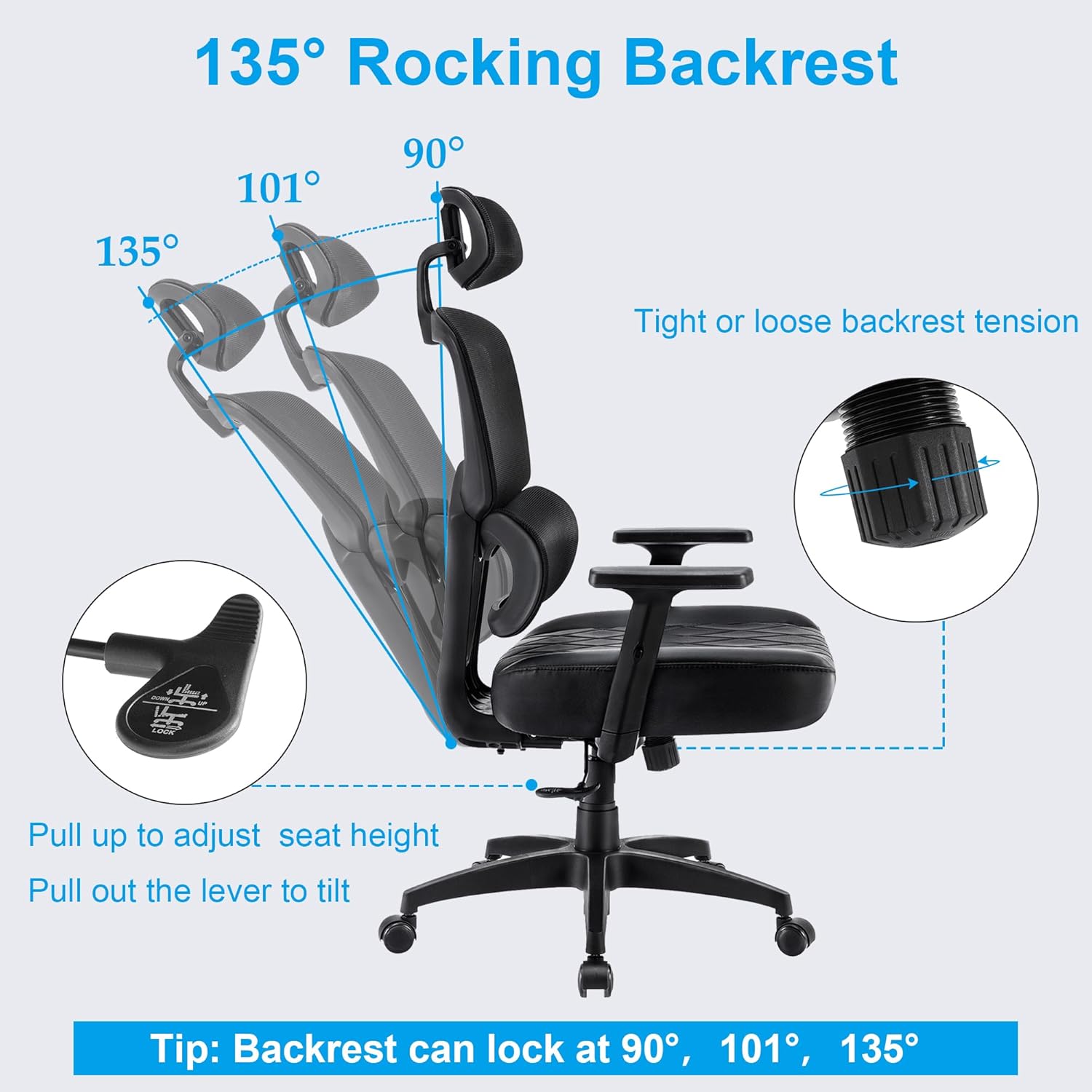
Image Description: A diagram illustrating the 135° rocking backrest feature, showing the chair tilting from 90° to 135°. It highlights the lever for seat height adjustment and the lever for tilt control, along with an illustration of backrest tension adjustment.
4.3. Adjustable Headrest
The headrest offers multiple adjustments for neck support:
- Height Adjustment: The headrest can be adjusted up and down by 5 cm (approximately 2 inches).
- Forward/Backward Adjustment: It can be adjusted forward/backward by 3 cm (approximately 1.2 inches).
- Rotation: The headrest can rotate 45 degrees to fit the curve of your cervical spine.

Image Description: A close-up view of the adjustable headrest, demonstrating its ability to move up and down by 3.15 inches and rotate 45 degrees. The image emphasizes its function in effectively supporting the head and relaxing the neck.
4.4. Adjustable Armrests
The armrests can be adjusted in height by 7 cm (approximately 2.7 inches) to provide optimal support for your shoulders and elbows, enhancing work efficiency.
4.5. Lumbar Support
The chair features a curved lumbar support designed to provide solid support and ensure a snug fit without suspending the spine, promoting an energized posture.
5. Maintenance
Proper maintenance will extend the life and appearance of your VECELO office chair.
- Cleaning: For the mesh backrest and PU seat, wipe with a soft, damp cloth. Avoid harsh chemicals or abrasive cleaners, as these can damage the materials.
- Inspection: Periodically check all screws and bolts to ensure they are tight. Re-tighten if necessary.
- Casters: Keep the casters clean from hair and debris to ensure smooth movement and prevent floor damage.
- Avoid Direct Sunlight: Prolonged exposure to direct sunlight can cause the materials to fade or degrade.
6. Troubleshooting
If you encounter any issues with your VECELO office chair, refer to the following common solutions:
- Chair Squeaks: Check all bolted connections and tighten any loose screws. A small amount of silicone lubricant can be applied to moving parts if the squeaking persists.
- Difficulty Adjusting Height: Ensure the gas lift lever is fully engaged or disengaged. If the gas lift is unresponsive, it may need replacement.
- Chair Feels Unstable: Verify that all casters are fully inserted into the base and that the base itself is not damaged. Ensure all assembly screws are tightened.
- Casters Not Rolling Smoothly: Remove any hair or debris from the caster wheels. If a caster is damaged, it may need replacement.
If these steps do not resolve the issue, please contact VECELO customer support for further assistance.
7. Specifications
| Feature | Specification |
|---|---|
| Product Name | Ergonomic Office Chair |
| Model Number | KHD-OC18-BLK |
| Color | Dark Black |
| Back Style | High Back |
| Materials | Mesh, PU, Sponge, Nylon, Metal |
| Foot Material | Nylon |
| Seat Dimensions (L x D) | 20.5" x 20.1" |
| Backrest Dimensions (L x H) | 18.5" x 28.4" |
| Tilt Function Range | 90° - 135° |
| Adjustable Seat Height | 16.8" - 20" |
| Adjustable Armrest Height | 7 cm (approx. 2.7") |
| Adjustable Headrest Height | 5 cm (approx. 2") |
| Adjustable Headrest Rotation | 45° |
| Maximum Weight Capacity | 500 lbs (227 kg) |
| Product Dimensions (D x W x H) | 26" x 28" x 43.9"-46.9" |
| Product Weight | 32.6 lbs (14.8 kg) |

Image Description: A detailed diagram illustrating the product dimensions of the VECELO office chair, including seat width, seat depth, backrest height, and overall height and width from both front and side perspectives.
8. Warranty and Customer Support
VECELO is committed to providing high-quality products and excellent customer service. While specific warranty details are not provided in this manual, we encourage you to retain your proof of purchase for any warranty claims.
If you have any questions, concerns, or require assistance with your VECELO office chair, please do not hesitate to contact VECELO customer support. Our team is ready to provide speedy and thoughtful service to address any issues you may encounter.
For support, please visit the official VECELO store or contact us through the platform where you purchased the product.
Online Support: VECELO Official Store