
1. Introduction
This manual provides comprehensive instructions for the safe and effective use of your DCH CS-ART822RX 6800mAh Lithium-ion Battery Replacement. Please read this manual thoroughly before installation and operation to ensure optimal performance and longevity of the battery.
2. Safety Information
WARNING: To reduce the risk of fire or burns, read instructions in the operating guide before using the battery.
- Do not attempt to disassemble, open, or service the battery pack.
- Replace only with the battery pack designated for this product.
- Do not crush, puncture, short external contacts, or dispose of in fire or water.
- Do not store above 60°C (140°F).
- New battery packs must be fully charged before use.
CAUTION: Warranty void if label is removed.

Image: The battery's warning label, indicating safety precautions and specifications. It shows "Model No.: CS-ART822RX", "Part No.: BPB044S, ARCT00830N", "Rating: 7.4VDC = 6800mAh / 50.32Wh", and "Lithium-ion Battery Pack".
3. Compatibility
This DCH battery replacement is designed for specific Arris cable modem models and battery part numbers. Please verify compatibility before installation.
Compatible Arris Modem Models:
- TM7, TM504G, TM822G, TM502H
- TG862G, TM602G, TM722G, TM608G
- TG16x2G, TM6, WBM760A, TM702G
- TM8, TM802G, TG862
Compatible Battery Part Numbers:
- ARCT00830
- BPB044H
- BPB044S
- ARCT00830N
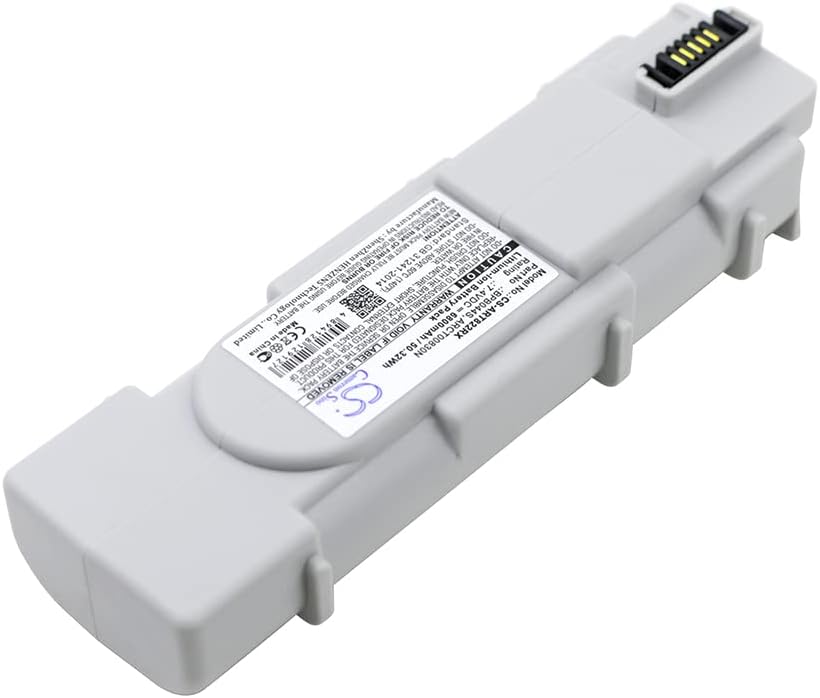
Image: The DCH CS-ART822RX battery replacement, illustrating its physical form factor and connector end.
4. Setup and Installation
Follow these steps to safely install the DCH CS-ART822RX battery replacement into your compatible Arris modem.
- Power Off Device: Ensure your Arris modem is completely powered off and unplugged from the wall outlet.
- Locate Battery Compartment: Identify the battery compartment on your Arris modem. This is typically on the bottom or back panel. Refer to your modem's original user manual if you cannot locate it.
- Remove Old Battery: Open the battery compartment cover. Carefully disconnect the old battery's connector and remove the battery.
- Insert New Battery: Align the DCH CS-ART822RX battery replacement with the compartment. Ensure the connector is oriented correctly. Gently push the battery into place until it sits securely.
- Connect Battery: Firmly connect the battery's cable to the modem's battery port.
- Close Compartment: Replace the battery compartment cover, ensuring it is securely latched or screwed into place.
- Initial Charge: Plug your Arris modem back into the power outlet. Allow the new battery to fully charge before its first use. This may take several hours.

Image: A side profile of the DCH CS-ART822RX battery, highlighting its design for secure fitment within a device.
5. Operating Instructions
Once installed and fully charged, the DCH CS-ART822RX battery provides backup power to your Arris modem during power outages.
- Normal Operation: When the modem is connected to AC power, the battery will remain charged and ready.
- Power Outage: In the event of a power failure, the modem will automatically switch to battery power, allowing continued operation for a limited time.
- Battery Indicator: Refer to your Arris modem's indicator lights for battery status (e.g., charging, fully charged, low battery).

Image: An alternative side view of the DCH CS-ART822RX battery, providing a complete visual understanding of its form.
6. Maintenance
Proper maintenance ensures the longevity and reliability of your battery.
- Regular Charging: Keep the modem plugged into AC power to ensure the battery remains fully charged.
- Avoid Extreme Temperatures: Do not expose the battery or modem to extreme heat or cold, as this can degrade battery performance.
- Storage: If storing the battery for an extended period, ensure it is partially charged (around 50%) and stored in a cool, dry place. Recharge every 3-6 months to prevent deep discharge.
- Cleaning: Keep the battery and its contacts clean and free from dust. Use a dry, soft cloth for cleaning.
Disposal: Dispose of old batteries responsibly according to local regulations. Do not dispose of in household waste or fire.
7. Troubleshooting
| Problem | Possible Cause | Solution |
|---|---|---|
| Battery not charging | Battery not properly connected; Modem not receiving AC power; Faulty battery or modem. | Check battery connection; Verify modem is plugged in and receiving power; Contact support if issue persists. |
| Short backup time | Battery not fully charged; Battery degradation over time. | Ensure battery is fully charged; Consider replacing battery if it's old and capacity has significantly reduced. |
| Modem not turning on with battery power | Battery not installed correctly; Battery completely discharged; Incompatible battery. | Re-install battery, ensuring secure connection; Charge battery fully; Verify battery model compatibility. |
8. Specifications
- Model Number: CS-ART822RX
- Part Numbers: ARCT00830, BPB044H, BPB044S, ARCT00830N
- Battery Type: Lithium-ion
- Capacity: 6800mAh
- Watt-Hours (Wh): 50.32Wh
- Voltage: 7.4V
- Dimensions: 144.6 x 46.65 x 30.76mm (5.69 x 1.84 x 1.21 inches)
- Weight: 395.3g (0.87 lbs)
- Manufacturer: DCH
Note: Specifications are subject to change without prior notice.
9. Warranty and Support
This DCH battery replacement comes with a manufacturer's warranty. Please refer to the product packaging or contact your retailer for specific warranty terms and conditions.
For technical assistance or inquiries, please contact DCH customer support. When contacting support, please have your product model number (CS-ART822RX) and purchase information available.
Manufacturer: DCH
Manufactured by: Shenzhen HENZENS Technology Co., Limited
Website: www.cameronsino.com
GTIN/UPC: 768718804043

