
BAOFENG K5PLUS
BAOFENG K5PLUS Tri-Band Ham Radio User Manual
Model: K5PLUS | Brand: BAOFENG
1. Introduction
The BAOFENG K5PLUS is an advanced tri-band ham radio designed for reliable long-range communication. It features a 1.77-inch color large screen display for enhanced visibility, a one-touch frequency finder button for quick frequency copying, and versatile charging options including USB-C. This manual provides comprehensive instructions for setup, operation, and maintenance of your K5PLUS radio.

Figure 1.1: BAOFENG K5PLUS radio with included accessories, including the main unit, antenna, and USB-C charging cable.
2. What's in the Box
Upon unboxing your BAOFENG K5PLUS, please verify that all the following items are included:
- Portable Radio K5PLUS Unit
- 2500mAh Rechargeable Li-ion Battery
- Desktop Charger (Charging Base)
- Extra Type-C Charging Cable
- Original Earpieces
- Belt Clip
- Rope (Lanyard)
- Users Manual (this document)
3. Product Overview
The K5PLUS features a robust design with an intuitive interface. Key components and their functions are outlined below.

Figure 3.1: Labeled diagram of the BAOFENG K5PLUS radio, highlighting the antenna, knob (ON/OFF/volume), flashlight, battery remove button, SK-side Key1 (radio, alarm), PTT key, LED indicator, MONI key, A/B key, keypad, battery contacts, LCD, VFO/MR, SP&MIC, speaker, BAND key, and Battery Pack.
Key Features:
- 1.77-inch Color Large Screen Display: Provides clear visibility, especially in low-light conditions.
- Tri-Band Operation: Supports VHF (136-174 MHz), VHF2 (216-225 MHz), and UHF (400-480 MHz) frequencies.
- High Power Output: Selectable high, middle, or low power settings for various communication needs.
- One-Touch Frequency Finder Button: Quickly copies frequencies from other radios (2-second copy).
- 999 Channels: Ample storage for your preferred frequencies.
- USB-C Charging: Convenient direct charging via USB-C port on the battery pack.
- NOAA Weather: Access to 10 NOAA weather stations for critical weather broadcasts.
- Built-in LED Flashlight: Provides illumination for various situations.
- VOX Function: Voice-activated transmission for hands-free operation.
- FM Radio: Listen to FM broadcast stations.
- DTMF, CTCSS, DCS, TOT, Scramble Functions: Advanced communication features.

Figure 3.2: Visual representation of key features including One Touch Frequency Finder, 999 Channels, High Power, 2500mAh battery, Tri-Band, NOAA Weather, High Gain Antenna, Type-C Fast Charging, LED Flashlight, Vox Function, FM Radio, and 1.77" Color Large Screen.
4. Setup
4.1 Battery Installation
- Align the battery pack with the grooves on the back of the radio.
- Slide the battery pack upwards until it clicks securely into place.
- To remove, press the Battery Remove Button (located on the top rear of the radio) and slide the battery pack downwards.
4.2 Charging the Battery
The K5PLUS offers two convenient charging methods:
- Desktop Charger: Place the radio (with battery installed) into the desktop charging base. Ensure the charging contacts align. The indicator light on the charger will show charging status.
- USB-C Direct Charging: Connect the provided Type-C charging cable to the USB-C port on the bottom of the battery pack and to a compatible USB power source (e.g., wall adapter, power bank, car charger).

Figure 4.1: The two available charging methods: using the included desktop charging base or directly via the USB-C port on the battery pack.
4.3 Attaching the Antenna
Screw the antenna clockwise onto the antenna connector at the top of the radio until it is finger-tight. Do not overtighten.
5. Operating Instructions
5.1 Power On/Off and Volume Control
Rotate the knob (ON/OFF/volume) clockwise to power on the radio. Continue rotating to increase the volume. Rotate counter-clockwise to decrease volume and power off.
5.2 Display and Interface
The 1.77-inch color large screen display provides clear information. The display shows current frequencies, channel numbers, battery status, signal strength, and other operational indicators. The color display improves visibility, especially at night.

Figure 5.1: The 1.77-inch color large screen display of the K5PLUS, designed for improved visibility in various lighting conditions.
5.3 Frequency and Channel Selection
- VFO Mode (Frequency Mode): Press the VFO/MR button to switch to VFO mode. Use the keypad to directly input frequencies or the up/down arrow keys to adjust.
- Channel Mode (Memory Mode): Press the VFO/MR button again to switch to Channel mode. Use the up/down arrow keys to select stored channels.
- Band Selection: Press the BAND button to cycle through the available frequency bands (VHF, VHF2, UHF).
5.4 One-Touch Frequency Finder (Copy Function)
This feature allows for quick copying of frequencies from another radio.
- Press and hold the BAND key to enter the scanning mode. "Scanning SEARCH..." will be displayed.
- Press and hold the other walkie-talkie's transmitting frequency. When the K5PLUS finds the frequency, press MENU to confirm.
- Switch to channel mode, and the display will show the other person's frequency. You can now communicate.
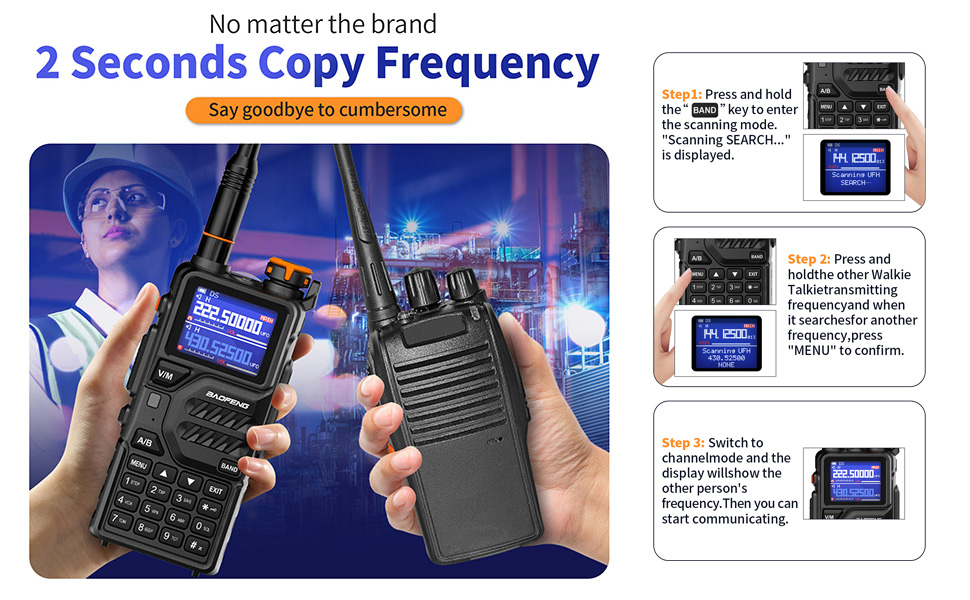
Figure 5.2: Step-by-step guide for using the 2-second frequency copy function.
5.5 Transmitting and Receiving
- To transmit, press and hold the PTT (Push-To-Talk) key on the side of the radio. Speak clearly into the microphone.
- Release the PTT key to receive.
- Adjust the power output (High, Middle, Low) via the menu settings to conserve battery or extend range.

Figure 5.3: The K5PLUS supports Tri-Power selection (High, Middle, Low) for optimized communication range and battery efficiency.
5.6 NOAA Weather and FM Radio
- NOAA Weather: The radio can receive broadcasts from 10 NOAA weather stations, providing timely hazard weather information.
- FM Radio: The K5PLUS includes an FM radio function for entertainment.

Figure 5.4: The K5PLUS provides access to 10 NOAA weather stations for emergency preparedness and includes an FM radio for general listening.
6. Main Functions
- DTMF (Dual-Tone Multi-Frequency): Used for signaling and control functions.
- VOX (Voice Operated Exchange): Enables hands-free transmission when voice is detected.
- Alarm Function: Activates an alarm signal for emergency situations.
- LED Flashlight: Located at the top of the radio, activated via a side key.
- Scan: Scans through frequencies or channels to find active transmissions.
- CTCSS (Continuous Tone-Coded Squelch System) and DCS (Digitally Coded Squelch): Sub-audible tones used to filter out unwanted communications.
- TOT (Time-Out Timer): Prevents continuous transmission by limiting transmit time.
- Scramble Functions: Encrypts voice for private communication.
7. Maintenance
- Cleaning: Wipe the radio with a soft, damp cloth. Do not use harsh chemicals or solvents.
- Battery Care: To prolong battery life, avoid overcharging or completely discharging the battery. Store in a cool, dry place when not in use for extended periods.
- Antenna: Ensure the antenna is securely attached. Avoid bending or stressing the antenna excessively.
- Water Resistance: The BAOFENG K5PLUS is Not Water Resistant. Avoid exposure to water or high humidity.
8. Troubleshooting
| Problem | Possible Cause | Solution |
|---|---|---|
| Radio does not power on. | Battery is low or not installed correctly. | Charge the battery or re-install it securely. |
| Cannot transmit or receive. | Incorrect frequency/channel, low battery, or antenna issue. | Verify frequency/channel, charge battery, check antenna connection. |
| Poor audio quality. | Weak signal, incorrect squelch setting, or damaged earpiece/speaker. | Move closer to transmitting radio, adjust squelch, test with different earpieces. |
| Difficulty programming channels. | Software compatibility or user error. | Ensure you are using the latest version of CHIRP software (model: K5-Plus). Refer to programming guides online or contact support. |
9. Specifications
| Feature | Detail |
|---|---|
| Model Number | K5PLUS |
| Brand | BAOFENG |
| Item Weight | 1.39 pounds |
| Package Dimensions | 7.91 x 4.8 x 4.21 inches |
| Country of Origin | China |
| Batteries | 1 Lithium Ion battery required (included) |
| Number of Channels | 999 |
| Frequency Range | 136-174 MHz (VHF), 216-225 MHz (VHF2), 400-480 MHz (UHF) |
| Talking Range Maximum | 10 Kilometer |
| Tuner Technology | FM |
| Voltage | 3.7 Volts |
| Water Resistance Level | Not Water Resistant |
| Date First Available | January 12, 2024 |
| Manufacturer | Fujian Baofeng Electronic Co., Ltd. |
10. Warranty and Support
Warranty: The manufacturer provides a 30-day return policy and a 12-month warranty for the BAOFENG K5PLUS. Please retain your proof of purchase for warranty claims.
Support: If you have any questions or require assistance with your K5PLUS walkie-talkie, please reach out to the seller or manufacturer for support.
Related documentsK5PLUS


Ask a question about this manual
Ask about setup, troubleshooting, compatibility, parts, safety, or missing instructions. Manuals+ will review the question and use this page’s manual context to help answer it.