
1. Introduction
Thank you for choosing the DeerRun BA06 Walking Pad Treadmill. This manual provides essential information for the safe and efficient use of your new fitness equipment. Please read all instructions carefully before operation and retain this manual for future reference.
Important Safety Information
- Always consult with a healthcare professional before starting any new exercise program.
- Ensure the treadmill is placed on a flat, stable surface away from water and heat sources.
- Keep children and pets away from the treadmill during operation.
- Wear appropriate athletic footwear.
- Do not operate the treadmill if it is damaged or malfunctioning.
- The maximum user weight capacity for this treadmill is 300 lbs (136 kg).
2. Product Overview
The DeerRun BA06 Walking Pad Treadmill is designed for home use, offering a compact and convenient way to stay active. It features smart control options, a clear LED display, and a quiet motor for an optimal workout experience.
Key Features
- APP-Controlled Workouts & Community Engagement: Control your walking pad via the PitPat app, track progress, participate in challenges, and connect with a fitness community.
- Dynamic LED Display & Remote Control: Monitor speed, time, distance, and calories. Adjust speed and stop the treadmill with the included remote control.
- Quiet and Powerful Performance: Equipped with a 2.5HP motor, supporting users up to 300 lbs, with ultra-quiet operation and speeds from 0.6 to 3.8 mph.
- Secure and Comfortable Stride: Features a 15.48" x 39.48" non-slip running belt with shock absorption, supported by a robust steel frame.
- Space-Efficient Design: Compact and lightweight with built-in wheels for easy movement and storage under desks, sofas, or beds.
Included Components
Your DeerRun BA06 Walking Pad Treadmill package includes the following items:
- Treadmill Base
- Motor Housing
- Remote Control
- Power Cord
- Lubricating Oil
- L-shaped Wrench
- Screwdriver
- User Manual

Figure 2.1: Included Components
3. Setup
The DeerRun BA06 Walking Pad Treadmill requires no assembly. Follow these steps to prepare your treadmill for first use:
- Unpack the Treadmill: Carefully remove the treadmill and all accessories from the packaging. Retain the original packaging for potential future returns or transport.
- Choose a Location: Place the treadmill on a firm, level surface. Ensure there is adequate clear space around the treadmill (at least 2 feet on all sides and 6 feet behind) for safe operation.
- Connect Power: Plug the power cord into the treadmill's power input port, then plug the other end into a grounded electrical outlet. Ensure the power switch on the treadmill is in the 'ON' position.
- Initial Inspection: Before starting, visually inspect the running belt for any debris or damage. Ensure the belt is centered and tensioned correctly.
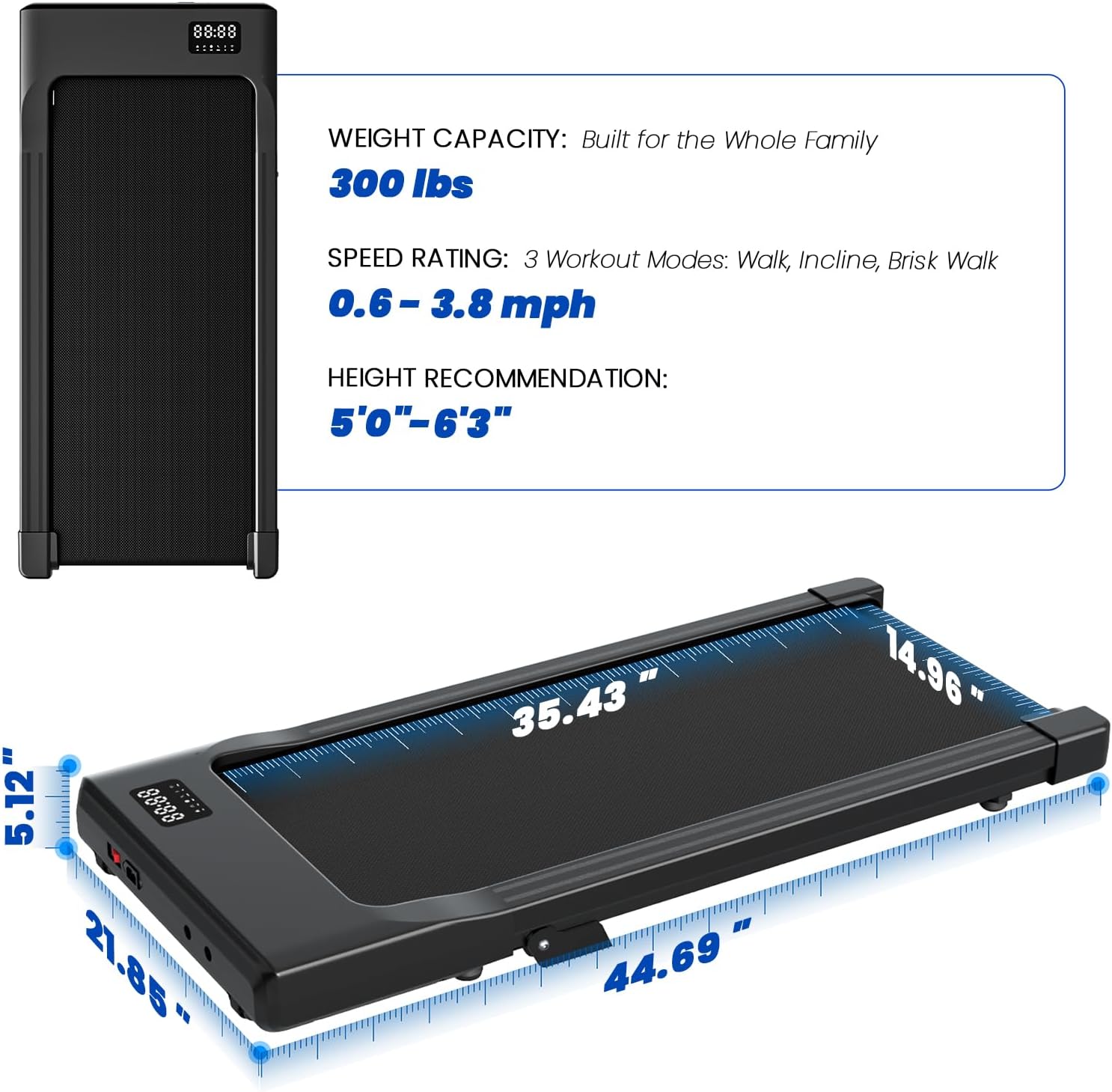
Figure 3.1: DeerRun Walking Pad Treadmill Ready for Use
4. Operating Instructions
Using the Remote Control
The included remote control allows for easy adjustment of your workout settings.
- Power On/Off: Press the power button on the treadmill or the remote to turn the unit on or off.
- Start/Stop: Press the 'Play/Pause' button on the remote to start or pause the treadmill. The treadmill will typically start with a 3-second countdown.
- Adjust Speed: Use the '+' and '-' buttons on the remote to increase or decrease the walking speed. The speed range is 0.6 to 3.8 mph.
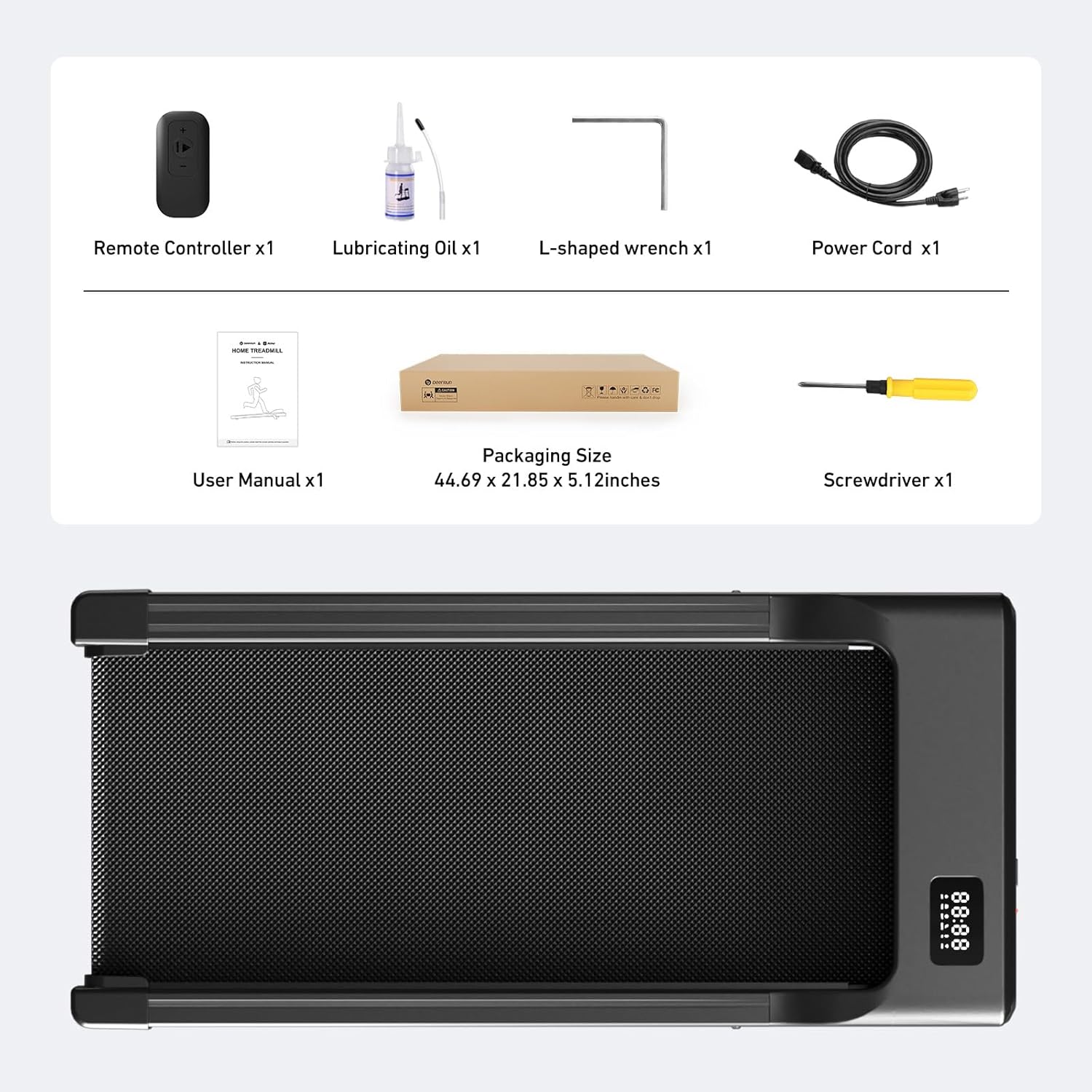
Figure 4.1: Operating with Remote Control
Using the PitPat App
Enhance your workout experience by connecting your treadmill to the PitPat app.
- Download the App: Search for 'PitPat' in your device's app store and install it.
- Connect to Treadmill: Open the app and follow the on-screen instructions to pair your device with the DeerRun BA06 treadmill via Bluetooth.
- Control and Track: Use the app to start/stop the treadmill, adjust speed, monitor your workout data (steps, calories, distance, time), and access various training programs and challenges.

Figure 4.2: App Control Interface
LED Display Information
The integrated LED display cycles through various workout metrics:
- Speed: Current walking/jogging speed (mph).
- Time: Duration of your workout.
- Distance: Total distance covered.
- Calories: Estimated calories burned.
General Operation Tips
- Always step onto the treadmill when it is stationary or moving at a very low speed.
- Maintain a comfortable pace and adjust speed gradually.
- If you feel unwell, stop the treadmill immediately.
Video 4.3: DeerRun Walking Pad in Use (including incline demonstration)
5. Maintenance
Regular maintenance ensures the longevity and optimal performance of your DeerRun BA06 Walking Pad Treadmill.
Cleaning
- Exterior: Wipe down the treadmill's exterior with a soft, damp cloth after each use. Avoid abrasive cleaners.
- Running Belt: Periodically clean the running belt to remove dust and debris. Ensure the treadmill is unplugged before cleaning.
Lubrication
The running belt requires lubrication to reduce friction and extend its lifespan. Use the provided lubricating oil or a compatible silicone-based treadmill lubricant.
- Frequency: Lubricate the belt every 3-6 months, or after approximately 100 hours of use, depending on usage.
- Application: Lift the edge of the running belt and apply a small amount of lubricant evenly along the center of the deck. Run the treadmill at a low speed for a few minutes to distribute the oil.
Storage
The compact design and built-in wheels make storing your treadmill easy.
- Moving: Tilt the treadmill and use the transport wheels to move it to your desired storage location.
- Placement: Store it upright against a wall or horizontally under a bed or sofa.

Figure 5.1: Easy Storage of the Walking Pad
6. Troubleshooting
If you encounter any issues with your DeerRun BA06 Walking Pad Treadmill, please refer to the following common problems and solutions:
| Problem | Possible Cause | Solution |
|---|---|---|
| Treadmill does not power on. | Power cord not connected, power switch off, circuit breaker tripped. | Ensure power cord is securely plugged in, power switch is ON, and check your household circuit breaker. |
| Belt stops or slips during use. | Belt too loose, insufficient lubrication, motor overload. | Adjust belt tension (refer to maintenance section), apply lubricant, ensure user weight is within limits. |
| Unusual noise during operation. | Loose components, belt friction, motor issue. | Check for loose screws and tighten. Lubricate the belt. If noise persists, contact customer support. |
| Remote control not responding. | Battery low or depleted, remote not paired. | Replace remote battery. Refer to the pairing instructions in the app or contact support for remote pairing. |
If the problem persists after attempting these solutions, please contact DeerRun Customer Support.
7. Specifications
Below are the technical specifications for the DeerRun BA06 Walking Pad Treadmill:
| Feature | Detail |
|---|---|
| Model Number | BA06 |
| Brand | DeerRun |
| Product Dimensions (L x W x H) | 132D x 62.5W x 16.5H Centimetres (52 x 24.6 x 6.5 inches) |
| Item Weight | 38.34 Pounds (17.39 kg) |
| Material | Alloy Steel |
| Maximum Horsepower | 2.5 HP |
| Speed Range | 0.6 - 3.8 Miles per Hour |
| Maximum Weight Recommendation | 300 lbs (113.4 kg) |
| Running Belt Dimensions (L x W) | 39.8 x 15.4 Inches (101 x 39 cm) |
| Display Type | LED |
| Control Program Name | PitPat |
| Assembly Required | No |

Figure 7.1: Product Dimensions and Capacity
8. Warranty and Support
DeerRun is committed to customer satisfaction. Your BA06 Walking Pad Treadmill comes with a comprehensive 12-month warranty from the date of purchase.
Customer Support
For any questions, assistance, or warranty claims, please contact our dedicated support team:
- Email: support@deerruntreadmill.com
- Phone: +1 888-589-0777
Our online support is available 24/7 to provide the assistance you need. Please keep your original packaging for hassle-free returns or service if required.


