
1. Overview
The LEM Products MaxVac 500 is a heavy-duty aluminum vacuum sealer designed for efficient food preservation. It is suitable for hunters, food processors, chefs, and culinary enthusiasts. This unit features a powerful 21Hg (462w) vacuum pump and a 14-inch seal bar with a 1/4-inch wide seal, ensuring effective and consistent sealing. The built-in cooling fan allows for continuous operation, capable of making up to 500 consecutive seals (approximately 5 hours of use) without requiring a cool-down period. Its user-friendly design includes a one-hand locking lid mechanism for easy operation and a removable roll storage and cutter for creating custom-sized bags.
Key features include:
- Heavy-Duty Construction: Made from durable aluminum for longevity and continuous use.
- Efficient Sealing: Powerful pump and wide seal bar ensure tight, consistent seals.
- Continuous Operation: Built-in cooling fan supports up to 500 consecutive seals.
- User-Friendly: One-hand locking mechanism and intuitive controls.
- Customizable Bags: Removable roll material holder and cutter for custom bag sizes.
- Versatile: External vacuum hose port for canister sealing (hose not included).
2. Setup
2.1 Unpacking
Carefully remove the MaxVac 500 from its packaging. Inspect the unit for any signs of damage. Retain all packaging materials for future storage or shipping.
2.2 Component Identification
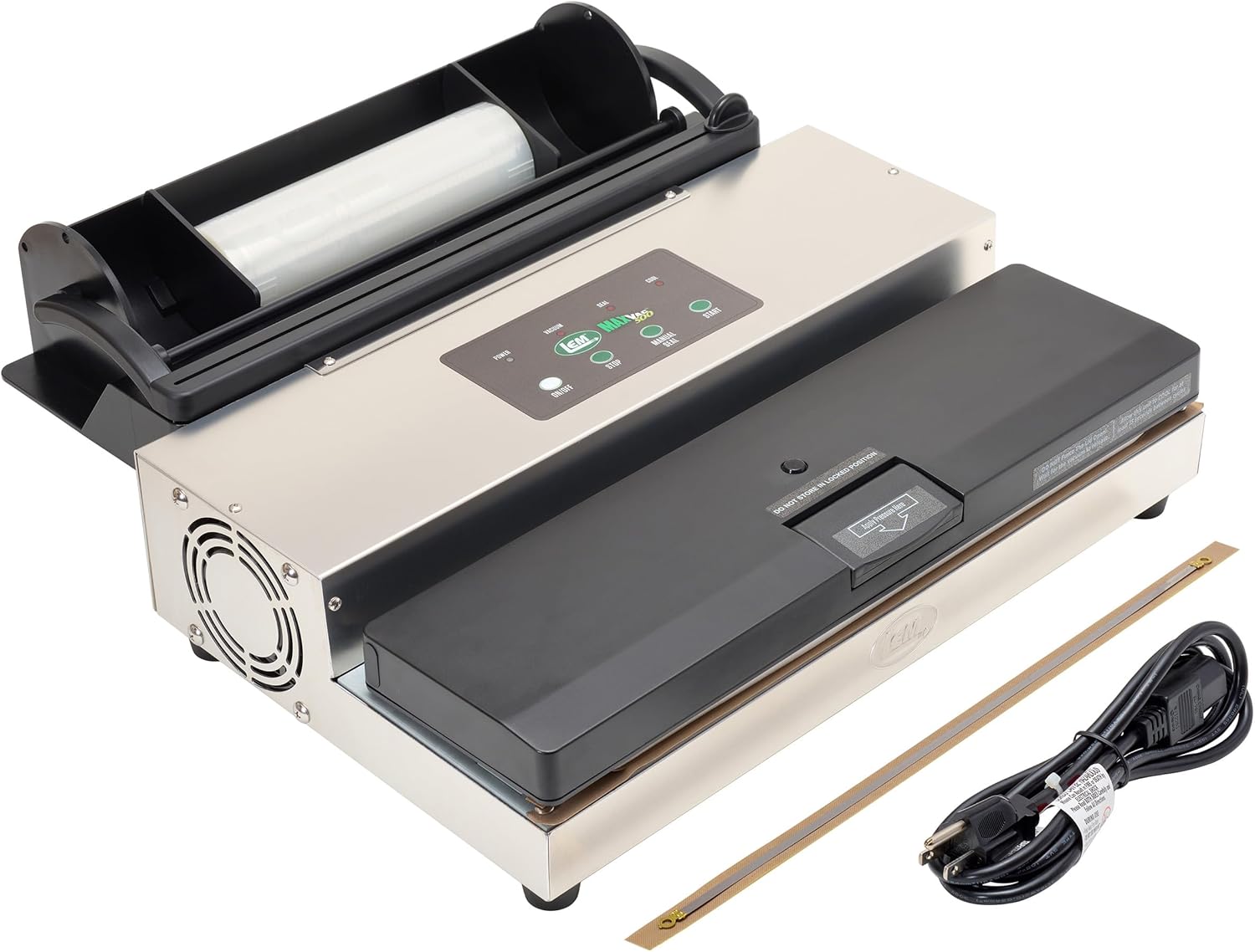
Figure 1: Top view of the LEM MaxVac 500 Vacuum Sealer.

Figure 2: Control panel with indicators for Power, Vacuum, Seal, and Cool, along with On/Off, Stop, Manual Seal, and Auto Vac/Seal buttons.

Figure 3: The MaxVac 500 showing the integrated bag roll holder and cutter.
Familiarize yourself with the main components:
- Control Panel: Located on the top of the unit, featuring buttons for On/Off, Stop, Manual Seal, and Auto Vac/Seal, along with indicator lights.
- Lid and Latch: The main lid covers the vacuum channel and seal bar. It features a one-hand locking mechanism.
- Vacuum Channel: The area where the open end of the bag is placed for vacuuming.
- Seal Bar: Heats to create a strong, airtight seal.
- Integrated Roll Holder and Cutter: Located at the rear of the unit, designed to hold a roll of bag material and cut custom-sized bags.
- Canister Port: An external port for connecting a vacuum hose to seal canisters (hose not included).
2.3 Power Connection
Connect the provided power cord to the unit and then to a standard electrical outlet. Ensure the unit is placed on a stable, flat surface.
3. Operating Instructions
3.1 Preparing Bags from Roll Material
- Open the lid of the integrated roll holder at the rear of the unit.
- Place a roll of LEM vacuum bag material into the holder.
- Pull the bag material forward, over the cutting blade, to the desired length.
- Close the lid and slide the cutter across the material to create a custom-sized bag.
- Place one end of the cut material into the vacuum channel and press the 'Manual Seal' button to create the bottom seal of your bag.

Figure 4: Preparing a custom-sized bag using the integrated roll holder and cutter.
3.2 Vacuum Sealing Bags
- Place the food item into the prepared bag. Ensure the open end of the bag is clean and free of food debris or moisture, as this can affect the seal.
- Lay the open end of the bag flat into the vacuum channel. Ensure the bag is centered and smooth, without wrinkles.
- Close the lid and press down firmly until the one-hand locking mechanism engages.
- For automatic vacuum and seal, press the 'Auto Vac/Seal' button. The unit will automatically remove air and then seal the bag.
- For manual control, press the 'Vacuum' button to start vacuuming. Once the desired vacuum level is reached, press the 'Manual Seal' button to seal the bag.
- Wait for the 'Cool' indicator light to turn off before opening the lid. This ensures the seal has properly set.
- Once the 'Cool' light is off, release the locking mechanism and remove the sealed bag.

Figure 5: Filling a vacuum sealer bag with food.

Figure 6: Operating the vacuum sealer.

Figure 7: A perfectly vacuum-sealed bag.
3.3 Using the Canister Port
The MaxVac 500 includes an external vacuum hose port located under the lid for sealing canisters. To use this feature:
- Ensure the unit is powered on.
- Connect an external vacuum hose (not included) to the canister port on the unit and to the port on your vacuum-sealable canister.
- Follow the instructions provided with your canister for proper sealing. The unit will draw air from the canister.
- Once vacuuming is complete, remove the hose.
4. Maintenance
4.1 Cleaning
- Always unplug the unit before cleaning.
- Wipe the exterior of the unit with a damp cloth. Do not immerse the unit in water.
- Clean the vacuum channel and seal bar area with a soft, damp cloth to remove any food particles or moisture.
- Ensure the seal bar and vacuum channel are completely dry before next use.
4.2 Storage
Store the MaxVac 500 in a clean, dry place. Do not store the lid in a locked position for extended periods, as this can compress the gaskets and affect sealing performance over time.
5. Troubleshooting
| Problem | Possible Cause | Solution |
|---|---|---|
| Unit does not power on | No power supply | Check power cord connection and electrical outlet. |
| Bag does not vacuum properly | Bag not correctly placed in vacuum channel; Food debris/moisture on bag opening; Gaskets are dirty or damaged; Lid not properly latched. | Ensure bag opening is flat and clean in the vacuum channel. Clean bag opening. Inspect and clean gaskets. Press lid firmly until latched. |
| Bag does not seal | Seal bar is dirty or damaged; Bag material is incorrect type or damaged; Unit overheated. | Clean seal bar. Use appropriate heat-sealable vacuum bags. Allow unit to cool down if used for extended periods. |
| Vacuum is weak or inconsistent | Gaskets are dirty, damaged, or worn; Vacuum pump issue. | Inspect and clean/replace gaskets. Contact customer support if pump issue is suspected. |
6. Specifications
| Feature | Specification |
|---|---|
| Brand | LEM |
| Model Number | 1253 |
| Material | Aluminum |
| Color | Silver and Black |
| Product Dimensions (L x W x H) | 20"L x 9"W x 22"H |
| Item Weight | 14.44 Pounds |
| Power Source | AC Power |
| Operation Mode | Automatic |
| Wattage | 462 watts |
| Vacuum Pump | 21Hg |
| Seal Bar Width | 14 inches |
| Seal Width | 1/4 inch |
| Included Components | Vacuum Sealer, 8" x 25' roll of bag material |
7. Warranty and Support
The LEM Products MaxVac 500 comes with a two-year factory warranty. For any questions or assistance, lifetime customer support is available. Replacement parts for a variety of LEM products, both past and present, are also carried by the manufacturer.
For support, please refer to the contact information provided in your product packaging or visit the official LEM Products website.
8. Product Videos
Official video demonstrating the features and operation of the LEM MaxVac series, including the MaxVac 500, highlighting its robust design, control panel, integrated roll holder, and canister port.


