
DREAME H13 Pro
dreame H13 Pro Wet and Dry Vacuum Cleaner User Manual
Model: H13 Pro
Introduction
This manual provides essential information for the safe and efficient operation, maintenance, and troubleshooting of your dreame H13 Pro Wet and Dry Vacuum Cleaner. Please read this manual thoroughly before first use and retain it for future reference.

Figure 1: Dreame H13 Pro Wet and Dry Vacuum Cleaner and included accessories.
Setup and Assembly
Before using your dreame H13 Pro, ensure all components are present and assembled correctly.
Package Contents

Figure 2: Detailed view of all components included with the Dreame H13 Pro.
Verify that your package contains the following items:
- Main Body
- Handle
- Charging Base
- Cleaning Brush
- Replacement Filter
- Cleaning Solution
- Solid Waste Filter Container
- Spare Brush Roller
Initial Setup Steps
- Assemble the Handle: Insert the handle into the main body until it clicks securely into place.
- Charge the Device: Place the vacuum cleaner on the charging base. Ensure the charging contacts align. The display will indicate charging status. A full charge provides up to 40 minutes of runtime.
- Fill the Clean Water Tank: Locate the clean water tank (usually the upper tank). Fill it with clean water, and if desired, add the recommended amount of Dreame cleaning solution.
- Install the Dirty Water Tank: Ensure the dirty water tank (lower tank) and its filter are correctly installed and empty before use.
Operating Instructions
The dreame H13 Pro offers multiple cleaning modes and features for various cleaning needs.
Powering On and Mode Selection
Press the power button on the handle to turn on the device. The intelligent display will show the current mode and battery level. You can switch between modes using the mode selection button.

Figure 3: The intelligent LED display indicates dirt levels (Red: Heavy, Orange: Medium, Green: Light) and current mode.
- Auto Mode: Automatically adjusts suction power and water flow based on detected dirt levels. Ideal for general cleaning.
- Suction Mode: Designed for wet messes and spills, providing powerful suction to remove liquids without scrubbing.
- Ultra Mode: Provides enhanced cleaning for a deeper level of hygiene.
- Turbo Mode: For heavy dirt and stubborn messes, offering maximum suction and brush rotation.
GlideWheel™ Power System
The GlideWheel™ Power System features two rear motors that assist in moving the vacuum cleaner forward and backward, reducing user effort and making maneuverability smooth, even with its robust build.

Figure 4: The GlideWheel™ Power System provides effortless movement.
Edge-to-Edge Cleaning
The brush head is designed to clean thoroughly along baseboards, into tight corners, and around furniture legs, ensuring comprehensive floor coverage.

Figure 5: The vacuum's design allows for effective edge-to-edge cleaning.
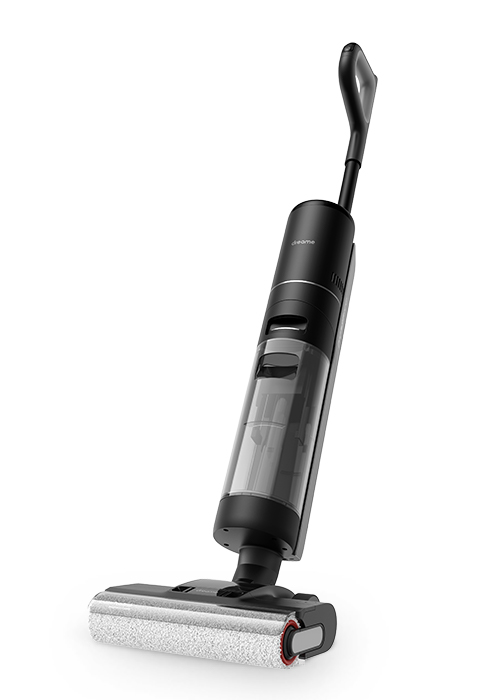
Figure 6: Illustrations of the vacuum's ability to clean various hard-to-reach areas.
LED-Lit Brush Head
The integrated LED lights on the brush head illuminate the cleaning path, making hidden dirt, dust, and debris visible, ensuring no spot is missed.

Figure 7: The LED-lit brush head enhances visibility during cleaning.
Runtime
The dreame H13 Pro provides up to 40 minutes of continuous cleaning on a single charge, allowing you to clean large areas without interruption.

Figure 8: Runtime and tank capacities for efficient cleaning.
Maintenance and Cleaning
Regular maintenance ensures optimal performance and longevity of your dreame H13 Pro.
Thorough Self-Cleaning Cycle
After each use, place the vacuum cleaner on its charging base and initiate the self-cleaning cycle. This feature cleans the brush roller automatically.
- 140°F (60°C) Hot Water Brush Wash: The self-cleaning cycle uses 140°F (60°C) hot water to thoroughly wash the brush roller, effectively removing grease, sticky residue, and odors.
- Dual-Rotation Self-Cleaning: The brush rotates both clockwise and and counter-clockwise during the self-cleaning process, mimicking hand washing to detangle hair and prevent buildup.
- 30-Minute Hot Air Drying: Following the wash, the brush roller is dried with 60°C hot air for 30 minutes, preventing mildew and odors and ensuring the brush is fresh for the next use.

Figure 9: The self-cleaning process includes hot water wash and hot air drying.

Figure 10: Close-up of the hot water wash and hot air drying for the brush roller.
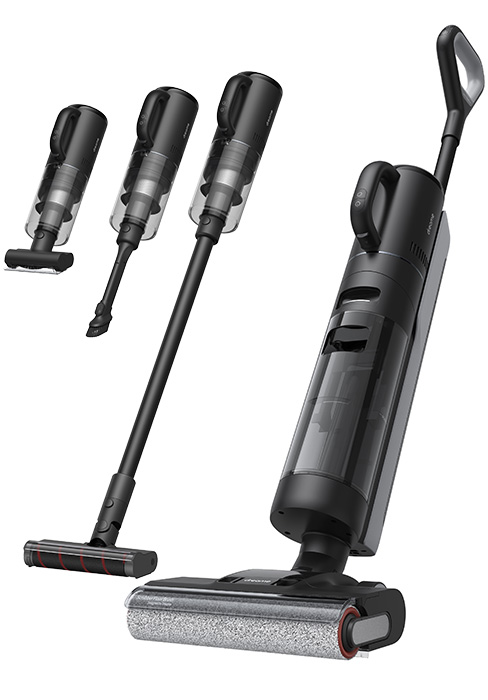
Figure 11: The dual-rotation mechanism helps prevent hair tangles during self-cleaning.
Emptying and Cleaning Tanks
Regularly empty and rinse the dirty water tank to prevent odors and maintain hygiene. The solid waste filter container should also be cleaned.

Figure 12: Removing and emptying the solid waste filter container.
Troubleshooting
If you encounter issues with your dreame H13 Pro, refer to the following common problems and solutions:
| Problem | Possible Cause | Solution |
|---|---|---|
| No power/Does not turn on | Low battery; Not properly charged | Ensure the device is fully charged on the charging base. Check power connection to the base. |
| Poor suction | Dirty water tank full; Clogged brush roller/hose; Filter needs cleaning/replacement | Empty dirty water tank. Check for blockages in the brush roller area and hose. Clean or replace the filter. |
| Water not dispensing | Clean water tank empty; Nozzle/water pipe clogged | Refill clean water tank. Check for blockages in the water dispensing system. |
| Brush roller not spinning | Hair/debris tangled in brush; Brush not properly installed | Remove and clean the brush roller, ensuring all hair is removed. Reinstall the brush roller correctly. |
| Unpleasant odor | Dirty water tank not emptied/cleaned; Brush roller not dried properly | Empty and thoroughly clean the dirty water tank. Run the self-cleaning cycle with hot water wash and hot air drying. |
If the problem persists after attempting these solutions, please contact Dreame customer support.
Product Specifications
| Feature | Specification |
|---|---|
| Brand | DREAME |
| Model | H13 Pro |
| Suction Power | 18,000 Pa |
| Brush Mop RPM | 520 RPM |
| Rated Power | 352 watts |
| Voltage | 220 Volts |
| Clean Water Tank Capacity | 900 ml |
| Used Water Tank Capacity | 700 ml |
| Runtime | Up to 40 minutes |
| Noise Level | 70 dB |
| Brush Wash Temperature | 140°F (60°C) |
| Hot Air Drying Duration | 30 minutes |
| Item Weight | 5.6 kg |
| Special Features | 140°F Hot Water Brush Washing, GlideWheel™ Power System, LED-Lit Brush Head, 18,000 Pa Powerful Suction, Easy Forth and Back Move, 30 mins Hot Air Drying, Dual Rotation Self-Cleaning |
| Surface Recommendation | Hard Floor |
| Cordless | Yes |
Official Product Video
Watch the official product video for a visual guide on the features and operation of the dreame H13 Pro Wet and Dry Vacuum Cleaner.
Video 1: Official demonstration of the Dreame H13 Pro's features and cleaning capabilities.
Warranty and Support
For warranty information, technical support, or service inquiries, please refer to the official Dreame website or contact their customer service directly. Keep your purchase receipt as proof of purchase for warranty claims.
You can also visit the official Dreame store on Amazon for more product information and support: Dreame Store
Related Documents - H13 Pro
 |
Dreame H13 Pro Wet and Dry Vacuum User Manual - Comprehensive Guide Explore the Dreame H13 Pro Wet and Dry Vacuum with this official user manual. Learn about its features, operation, maintenance, and troubleshooting for effective cleaning of both wet and dry messes. Visit global.dreametech.com for more information. |
 |
Dreame H13 Pro Wet and Dry Vacuum User Manual Comprehensive user manual for the Dreame H13 Pro Wet and Dry Vacuum, covering safety instructions, product overview, installation, usage, maintenance, and troubleshooting. Includes specifications and error solutions. |
 |
Dreame H13 FlexReach Wet and Dry Vacuum User Manual User manual for the Dreame H13 FlexReach Wet and Dry Vacuum. Learn about setup, operation, maintenance, and troubleshooting for this efficient floor cleaning appliance. |
 |
Dreame H13 Pro Wet and Dry Vacuum User Manual User manual for the Dreame H13 Pro Wet and Dry Vacuum, providing safety instructions, product overview, installation guide, usage instructions, maintenance tips, and troubleshooting. |
 |
Dreame H14 Dual Wet and Dry Vacuum User Manual | Setup, Operation, and Troubleshooting Comprehensive user manual for the Dreame H14 Dual Wet and Dry Vacuum. Includes setup, operation, safety instructions, maintenance, troubleshooting, and specifications. Learn how to effectively use and care for your Dreame floor cleaner. |
 |
Dreame H13 Pro Wet and Dry Vacuum User Manual Comprehensive user manual for the Dreame H13 Pro Wet and Dry Vacuum, covering setup, operation, maintenance, troubleshooting, and safety instructions. |
Ask a question about this manual
Ask about setup, troubleshooting, compatibility, parts, safety, or missing instructions. Manuals+ will review the question and use this page’s manual context to help answer it.