
1. Introduction
This manual provides detailed instructions for the safe and efficient use of your TARARIUM USB Rechargeable Aquarium Air Pump, model SB-518. This compact and versatile air pump is designed to provide essential aeration for various aquatic environments, including aquariums, live bait buckets, and during power outages. It features a rechargeable battery, dual operating modes, and a quiet design.

Image: Overview of the TARARIUM USB Rechargeable Aquarium Air Pump SB-518 kit in an aquarium setup.
2. What's Included
The package for your SB-518 air pump includes the following components:
- 1 x Air Pump (Model SB-518)
- 1 x Instruction Manual
- 1 x Airline Tubing (approximately 39.3 inches / 1 meter)
- 1 x USB Power Cord (approximately 36.6 inches / 0.93 meters)
- 1 x Check Valve
- 1 x Air Stone
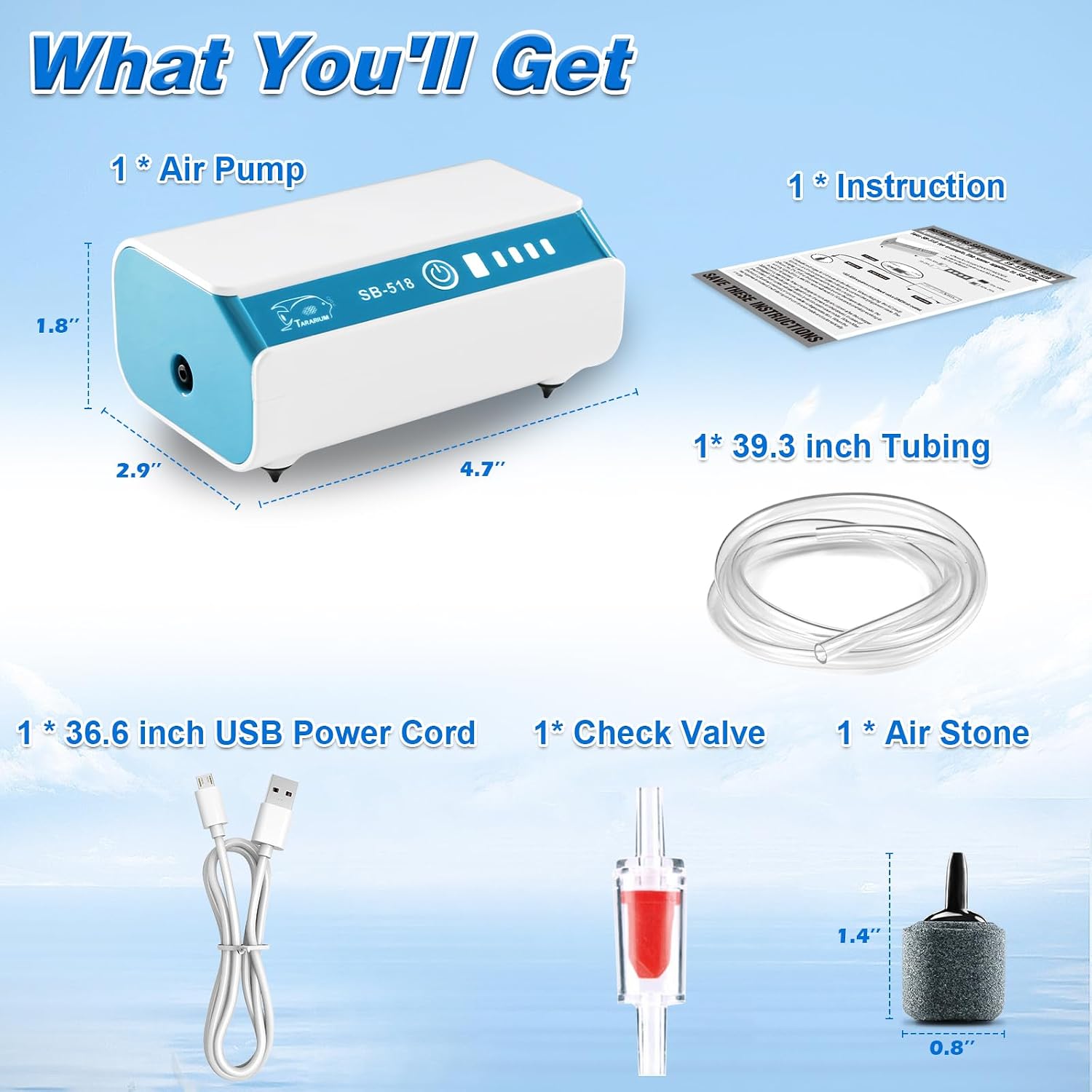
Image: All components included in the SB-518 package: air pump, instruction manual, tubing, USB cable, check valve, and air stone.
3. Product Features & Details
The TARARIUM SB-518 air pump offers several key features for reliable aeration:
- Dual Operating Modes: Choose between continuous operation or an intermittent mode (10 seconds on, 10 seconds off) to conserve battery life.
- Rechargeable Battery: Equipped with a built-in lithium-iron battery, providing up to 22-45 hours of continuous operation on a full charge.
- AC/DC Automatic Switch: The pump automatically switches to battery power during a power outage, ensuring continuous aeration.
- Quiet Operation: Designed with rubber foot pads to minimize noise, operating at less than 45 dB.
- Compact and Portable: Ideal for various uses including aquariums, outdoor fishing, live bait buckets, and during transport.
- Easy Charging: Rechargeable via a standard USB cable using a wall charger, power bank, computer, or car charger.

Image: Product details highlighting the ON/OFF/MODES switch, battery indicator, charging/plug port, shock absorption soft foot pads, and reliable backup air source metal clip.

Image: The SB-518 air pump demonstrating its quiet operation with noise levels below 45 dB, thanks to its rubber foot pads.


Images: Details of the metal clip, USB charging port, battery indicator, and lightweight design.
4. Setup Instructions
- Connect Tubing: Insert one end of the airline tubing firmly into the air outlet port on the side of the air pump.
- Attach Air Stone: Connect the other end of the airline tubing to the air stone. Ensure a snug fit.
- Install Check Valve (Crucial for Safety): If the air pump will be placed below the water surface level of your aquarium or container, a check valve MUST be installed in the airline tubing. This prevents water from siphoning back into the pump during a power outage, which can cause damage. Cut the airline tubing and insert the check valve, ensuring the "Air IN" side faces the pump and "Air OUT" side faces the air stone.
- Position Air Stone: Place the air stone at the bottom of your aquarium or container.
- Position Air Pump: Place the air pump in a stable location. If using for a bait bucket or during transport, utilize the metal clip on the back of the pump to secure it to the edge of the container.
Video: A demonstration of the TARARIUM air pump setup, including connecting the tubing, air stone, and check valve, and showing its operation in an aquarium. This video is provided by Fairyna, the seller.

Image: Important precautions for use, illustrating the correct installation of a check valve when the air pump is positioned below the water surface to prevent back-siphoning.
5. Operating Instructions
- Power On/Off: Press the power button once to turn the air pump on. The battery indicator lights will illuminate.
- Continuous Mode: Upon initial power-on, the pump will operate in continuous mode, providing constant aeration.
- Intermittent Mode: Press the power button a second time to switch to intermittent mode. In this mode, the pump will work for 10 seconds and then rest for 10 seconds, cycling continuously. This mode extends battery life.
- Power Off: Press the power button a third time to turn the air pump off.
- Battery Indicator: The LED lights on the pump indicate the remaining battery charge.
- 4 lights: 75%-100% charge
- 3 lights: 50%-75% charge
- 2 lights: 25%-50% charge
- 1 light: 0%-25% charge (recharge soon)
Video: A short demonstration of the air pump's continuous and intermittent operating modes, showing the effect on aeration in a small tank. This video is provided by Fairyna, the seller.


Images: Visual representation of the continuous and intermittent operating modes.
6. Charging and Power Management
The SB-518 air pump is designed for flexible power options:
- Charging: Connect the provided USB cable to the charging port on the pump and to a USB power source (e.g., wall adapter, power bank, computer, car charger). The battery indicator lights will flash during charging and remain solid when fully charged.
- Simultaneous Use: The pump can be used while it is charging or discharging.
- Power Outage Protection: When connected to AC power, the pump will automatically switch to its internal battery power if the AC power supply is interrupted, ensuring continuous aeration for your aquatic life.

Image: The SB-518 air pump can be charged using various USB power sources, making it highly portable and convenient.

Image: The air pump's automatic self-start feature ensures continuous operation during power failures.
7. Versatile Applications
The compact and portable design of the SB-518 air pump makes it suitable for a wide range of scenarios:
- Aquariums: Provides essential oxygen for fish and aquatic plants in small to medium-sized tanks.
- Outdoor Fishing: Keeps live bait fresh and active in bait buckets.
- Power Outages: Acts as a reliable backup air source for aquariums during electricity interruptions.
- Fish Transport: Ensures adequate oxygen supply when moving fish between locations.
- Hydroponics: Can be used to aerate nutrient solutions in small hydroponic setups.

Image: The air pump is suitable for diverse applications such as aerating fish tanks, use during outdoor fishing, and in hydroponic systems.

Image: Examples of the air pump's use in fish tanks, for outdoor fishing, in Deep Water Culture (DWC) hydroponics, and with bait buckets.
8. Maintenance
To ensure the longevity and optimal performance of your air pump:
- Clean Air Stone: Periodically clean the air stone to prevent clogging and maintain efficient bubble production. Rinse with clean water or gently brush away any buildup.
- Check Tubing: Inspect the airline tubing for kinks, blockages, or damage. Replace if necessary.
- Keep Dry: Ensure the air pump unit itself remains dry. Avoid submerging it in water.
- Store Properly: When not in use for extended periods, fully charge the battery and store the pump in a cool, dry place.
9. Troubleshooting
If you encounter issues with your air pump, consider the following:
- No Air Output:
- Check if the pump is powered on and the battery has sufficient charge.
- Ensure the airline tubing is not kinked or blocked.
- Verify the air stone is not clogged. Clean or replace if needed.
- Confirm the check valve is installed correctly and not blocked.
- Weak Air Output:
- Check battery level; recharge if low.
- Clean the air stone.
- Ensure tubing connections are secure and there are no air leaks.
- Pump Not Charging:
- Verify the USB cable is properly connected to both the pump and the power source.
- Try a different USB cable or power adapter.
- Ensure the power outlet is functional.
10. Specifications
| Feature | Specification |
|---|---|
| Brand | TARARIUM |
| Model | SB-518 |
| Power | 1W |
| Flow Rate | 47 GPH (Gallons Per Hour) |
| Air Pressure | 0.015 MPA (MegaPascals) / 2.18 PSI (Pounds per Square Inch) |
| Material | Plastic |
| Power Source | Battery Powered (Rechargeable Li-ion) |
| Operation Modes | Continuous / Intermittent (10s on, 10s off) |
| Battery Life (Full Charge) | Approx. 22-45 hours (depending on mode) |
| Noise Level | Less than 45 dB |
11. Warranty and Support
For warranty information or technical support, please refer to the contact details provided with your purchase or visit the official TARARIUM website. Keep your purchase receipt as proof of purchase for any warranty claims.