
1. Introduction
The ZOYI ZT-703S is a versatile 3-in-1 instrument combining the functionalities of an oscilloscope, a multimeter, and a signal generator. Designed for various applications including automotive diagnostics, industrial equipment maintenance, and circuit system analysis, it features a clear 3.5-inch IPS color display and offers high precision measurements. This manual provides essential information for the safe and effective operation of your device.
2. Safety Information
The ZT-703S is designed with user safety in mind. In multimeter mode, it complies with CAT III 1000V safety levels, and in oscilloscope mode, it meets CAT II 600V safety levels, adhering to CE certification requirements. It incorporates A/D high sampling conversion and 600mA-10A dual ceramic fuses for overload protection. The robust ABS+TPE dual injection molding process ensures durability and protection. Always observe standard safety precautions when working with electrical circuits and high voltages.
- Do not exceed the maximum input ratings for any function.
- Ensure test leads and probes are in good condition before use.
- Avoid operating the device in wet or damp environments.
- Always disconnect power to the circuit before making connections for resistance, capacitance, or continuity measurements.
3. Package Contents
The ZOYI ZT-703S package includes the following items:
- 1 ZOYI ZT-703S Oscilloscope Multimeter
- Test Leads (pair)
- Oscilloscope Probes (pair)
- USB Cable
- Carrying Case

Image: The ZOYI ZT-703S Oscilloscope Multimeter shown with its included accessories: test leads, oscilloscope probes, USB cable, and a carrying case.
4. Device Overview
The ZT-703S features a user-friendly interface centered around its 3.5-inch IPS color display. Key controls include a central MENU button, directional navigation buttons, and four function keys (F1-F4) whose labels change based on the active mode. Dedicated buttons for REL (Relative Measurement), AUTO RANGE, HOLD/SAVE, and MODE selection are also present. Input terminals for 10A, mA, COM (Common), and VΩHz- are located at the bottom of the device.
Image: Front view of the ZOYI ZT-703S Oscilloscope Multimeter, highlighting its 3.5-inch IPS color display, control buttons, and input terminals.
5. Setup
The ZT-703S is a battery-powered device. Ensure the internal battery is sufficiently charged before initial use. Use the provided USB cable to charge the device if necessary.
5.1 Initial Power-On
- Press and hold the power button (usually integrated with the MODE button or a dedicated button) until the display illuminates.
- Upon first power-on, you may be prompted to select a language. Use the directional buttons to navigate and the MENU button to confirm.
- Access the system settings via the MENU button to adjust backlight brightness and set the auto-shutdown time according to your preference.
5.2 Connecting Test Leads/Probes
Connect the appropriate test leads or oscilloscope probes to the input terminals based on the measurement you intend to perform. Always ensure a secure connection.
6. Operating Instructions
6.1 Multimeter Mode
The multimeter mode offers 25000 counts and measures AC/DC Voltage (0-750V AC, 0-1000V DC), DC/AC Current (0-10.000A), Resistance (0-250.0MΩ), Capacitance (0-99.99mF), and Frequency (0-999.9kHz). It also supports diode and continuity measurements.
- Press the MODE button repeatedly until the multimeter interface is displayed.
- Use the function buttons (F1-F4) or directional pad to select specific measurement types (e.g., Voltage, Current, Resistance).
- Connect the test leads to the appropriate input terminals (e.g., VΩHz- and COM for voltage/resistance, 10A or mA and COM for current).
- Apply the test leads to the circuit or component under test. The measurement will be displayed on the screen.
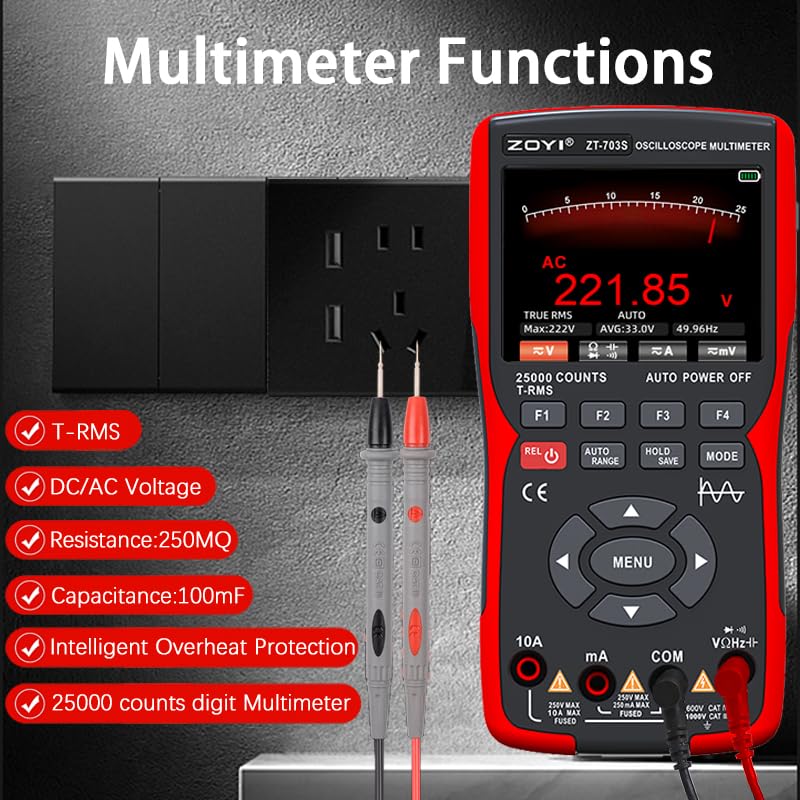
Image: The ZOYI ZT-703S display in multimeter mode, showing voltage measurement and available functions like T-RMS, DC/AC Voltage, Resistance, Capacitance, Frequency, Diode, and Continuity.
6.2 Oscilloscope Mode
The oscilloscope features a dual channel, 50MHz bandwidth, and a 280MSa/s real-time sampling rate. It supports automatic, normal, and single-time trigger modes, with a ±400V high voltage input capability. Vertical sensitivity ranges from 20mV/div to 10V/div, and the horizontal scanning range is 8ns/div to 20S/div, with a 128K record length and 20ppm time base accuracy.
- Press the MODE button to switch to oscilloscope mode.
- Connect the oscilloscope probes to the input terminals and to the circuit under test.
- Use the AUTO RANGE button for one-key automatic measurement to quickly obtain accurate waveforms.
- Adjust vertical (VOL/TIME) and horizontal (MOVE) scales using the corresponding buttons or menu options to fine-tune the waveform display.
- The device also includes a Signal Generator function to provide various frequency and waveform outputs for testing.
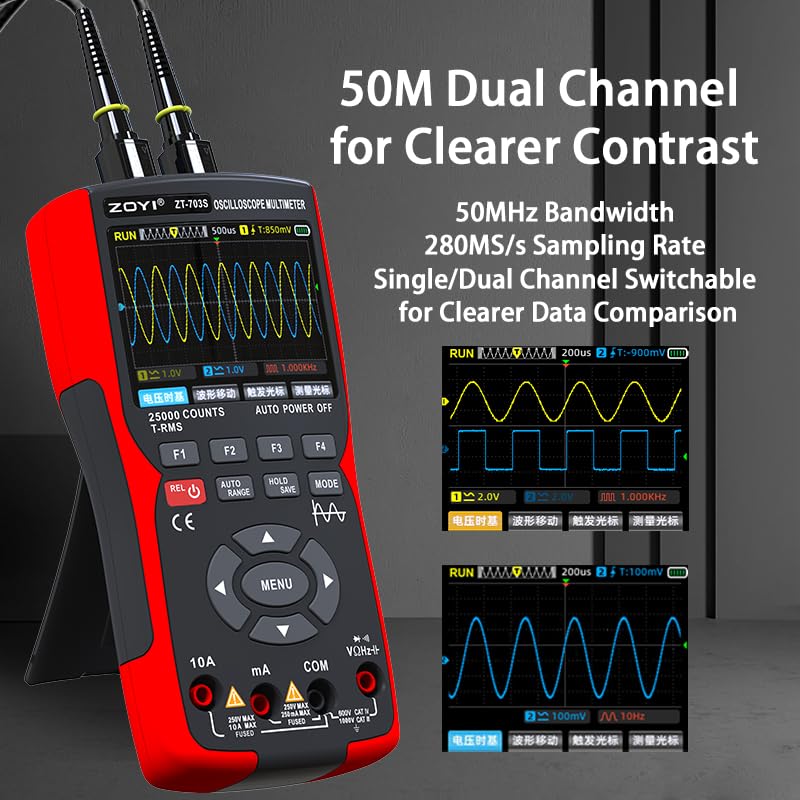
Image: The ZOYI ZT-703S display in dual-channel oscilloscope mode, illustrating waveform comparison and key parameters like bandwidth and sampling rate.
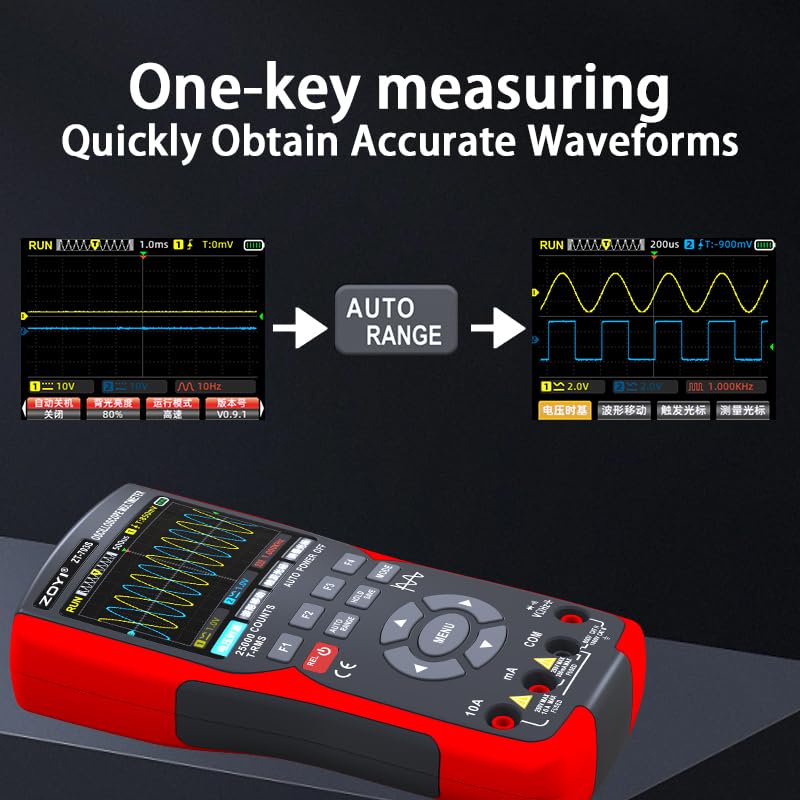
Image: A demonstration of the one-key automatic measurement feature in oscilloscope mode, showing the transition from an unscaled signal to an accurately displayed waveform.
6.3 Data Management
The device allows for data saving and export.
- To save measurement data, press the HOLD/SAVE button. Follow on-screen prompts to store the data.
- To export saved data, connect the device to a computer via the data transmission port (USB cable). The device will appear as a removable storage device, allowing you to transfer files for further analysis or record-keeping.
7. Maintenance
- Cleaning: Keep the device clean by wiping it with a dry, soft cloth. Avoid using abrasive cleaners, solvents, or harsh chemicals, as these can damage the casing or display.
- Battery Care: Ensure the internal battery is charged regularly, especially if the device is stored for extended periods. Avoid fully discharging the battery frequently to prolong its lifespan.
- Storage: Store the multimeter in a cool, dry place, away from direct sunlight, extreme temperatures, and high humidity. Use the provided carrying case for protection during transport and storage.
- Probe and Lead Inspection: Periodically inspect test leads and oscilloscope probes for any signs of damage, such as cracked insulation or exposed wires. Replace damaged accessories immediately to ensure safety and accurate measurements.
8. Troubleshooting
- Device does not power on: Check the battery charge level. Ensure the power button is pressed and held sufficiently. If the battery is completely drained, allow it to charge for a period before attempting to power on again.
- Inaccurate readings: Verify that test lead or probe connections are secure and correct for the selected measurement type. Ensure the correct measurement mode is selected. Check for damaged probes or leads. If possible, perform a self-calibration or zero adjustment as per advanced settings.
- No waveform displayed in oscilloscope mode: Check probe connections to both the device and the circuit. Adjust vertical and horizontal scales to ensure the waveform is within the display range. Verify trigger settings (level, mode). Use the AUTO RANGE function to attempt automatic waveform detection.
- Display is dim or unreadable: Adjust the backlight brightness in the system settings menu. Ensure the device is not exposed to excessively bright ambient light.
9. Specifications
| Feature | Specification |
|---|---|
| Model | ZT-703S |
| Display | 3.5-inch IPS Color Screen |
| Oscilloscope Bandwidth | 50MHz (Dual Channel) |
| Sampling Rate | 280MSa/s |
| Multimeter Counts | 25000 |
| AC Voltage Range | 0-750V |
| DC Voltage Range | 0-1000V |
| DC/AC Current Range | 0-10.000A |
| Resistance Range | 0-250.0MΩ |
| Capacitance Range | 0-99.99mF |
| Frequency Range | 0-999.9kHz |
| Input Voltage (Oscilloscope) | ±400V |
| Vertical Sensitivity | 20mV/div - 10V/div |
| Horizontal Scan Range | 8ns/div - 20S/div |
| Record Length | 128K |
| Time Base Accuracy | 20ppm |
| Safety Rating (Multimeter) | CAT III 1000V |
| Safety Rating (Oscilloscope) | CAT II 600V |
| Power Source | Battery Powered |
| Dimensions | 10.23 x 5.19 x 2.55 inches |
| Weight | 1.54 Pounds |
10. Warranty and Support
For warranty information, technical assistance, or any product-related inquiries, please contact the manufacturer, ZOTEK. Refer to the product packaging or the official ZOTEK website for specific contact details and the most up-to-date support information.
You can also visit the ZOTEK Store on Amazon for more product information and resources: ZOTEK Amazon Store


