
1. Introduction
This manual provides essential information for the proper installation, operation, and maintenance of your Calix 726GE-I Indoor Gigabit Optical Network Terminal (ONT). The 726GE-I is designed to deliver high-speed internet, voice, and video services over a fiber optic network. Please read this manual thoroughly before using the device to ensure optimal performance and safety.

Figure 1: Calix 726GE-I ONT with included AC power adapter.
2. Safety Information
Observe the following safety precautions to prevent injury and damage to the device:
- Electrical Safety: Use only the provided AC adapter (12VDC, 1.5A) with the device. Do not expose the device to water or excessive humidity. Ensure proper ventilation to prevent overheating.
- Laser Safety: This product contains a Class 1 Laser. Do not look directly into the optical port when the device is powered on or when the fiber optic cable is disconnected. Invisible laser radiation may be present.
- Handling: Handle the device with care. Avoid dropping or subjecting it to strong impacts.
- Placement: Place the device on a stable, flat surface away from direct sunlight, heat sources, and areas with high dust or moisture.

Figure 2: Optical port with Class 1 Laser Product warning label.
3. Product Overview
The Calix 726GE-I ONT features various ports and LED indicators for connectivity and status monitoring.
3.1. Front Panel Indicators

Figure 3: Front panel LED indicators.
- RF: Indicates the status of the RF video service.
- LAN 1-4: Indicate activity and link status for the respective Ethernet ports.
- Phone: Indicates the status of the voice service.
- WAN: Indicates the status of the Wide Area Network (fiber optic) connection.
- CPU: Indicates the operational status of the device's central processing unit.
- Power: Indicates if the device is receiving power.
3.2. Rear Panel Ports
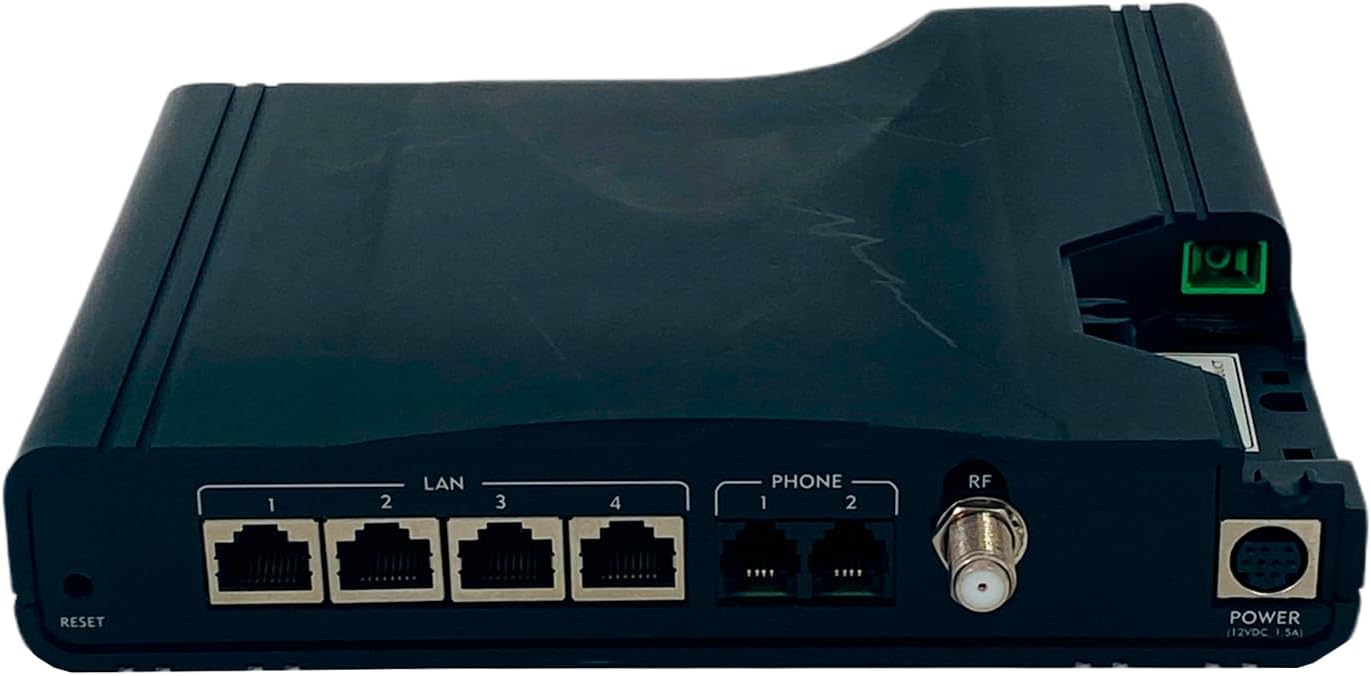
Figure 4: Rear panel connectivity ports.
- RESET: A recessed button used to reset the device to factory default settings.
- LAN 1-4: Four Gigabit Ethernet ports for connecting wired devices such as computers, routers, or network switches.
- PHONE 1-2: Two RJ-11 ports for connecting analog telephones or fax machines.
- RF: Coaxial F-connector for RF video output.
- POWER (12VDC, 1.5A): Power input port for connecting the AC adapter.
- Optical Port: Located on the side, this port is for connecting the fiber optic cable from your service provider. Caution: Class 1 Laser Product. Do not look directly into the port.
4. Setup Instructions
Follow these steps to set up your Calix 726GE-I ONT:
- Connect the Fiber Optic Cable: Carefully connect the fiber optic cable from your service provider to the optical port on the side of the ONT. Ensure the connector is clean and properly seated. WARNING: Do not look into the optical port.
- Connect the Power Adapter: Plug the provided AC power adapter into the POWER port on the rear of the ONT, then plug the other end into a standard electrical outlet. The Power LED on the front panel should illuminate.
- Connect Network Devices:
- For wired internet access, connect an Ethernet cable from any of the LAN 1-4 ports on the ONT to your computer or home router.
- For voice services, connect your analog telephone(s) to the PHONE 1 or PHONE 2 ports.
- If applicable, connect a coaxial cable from the RF port to your television or RF distribution system for video services.
- Verify Connection Status: Once powered on, allow a few minutes for the ONT to establish a connection with your service provider's network. Observe the LED indicators:
- The WAN LED should turn solid green, indicating a successful fiber connection.
- The CPU LED should be solid green, indicating normal operation.
- LAN LEDs will illuminate when a device is connected and active.
- Phone and RF LEDs will illuminate when their respective services are active.
5. Operating Instructions
The Calix 726GE-I ONT operates largely automatically once configured by your service provider. Here are some general operating guidelines:
- Power On/Off: To power off the device, simply disconnect the power adapter. Reconnect to power it on.
- LED Status Monitoring: Regularly check the LED indicators on the front panel to monitor the device's status. Refer to Section 3.1 for LED descriptions.
- Resetting the Device: In some troubleshooting scenarios, your service provider may instruct you to reset the device. Use a paperclip or similar pointed object to press and hold the recessed RESET button on the rear panel for approximately 10-15 seconds until the LEDs flash. This will restore the device to its factory default settings. Note: This may require re-provisioning by your service provider.
6. Maintenance
Minimal maintenance is required for the Calix 726GE-I ONT:
- Cleaning: Use a soft, dry cloth to clean the exterior of the device. Do not use liquid cleaners or aerosols.
- Ventilation: Ensure that the ventilation openings on the device are not blocked to prevent overheating.
- Cable Management: Keep cables neatly organized and avoid sharp bends, especially with the fiber optic cable.
7. Troubleshooting
If you encounter issues with your Calix 726GE-I ONT, try the following steps. For persistent problems, contact your Internet Service Provider (ISP).
| Problem | Possible Cause | Solution |
|---|---|---|
| No Power (Power LED Off) | Power adapter disconnected or faulty outlet. | Ensure power adapter is securely connected to the ONT and a working electrical outlet. Try a different outlet. |
| No Internet Connection (WAN LED Off or Blinking) | Fiber optic cable disconnected or service issue. | Check if the fiber optic cable is securely connected. Do not attempt to re-seat the fiber cable if you are unsure. Contact your ISP. |
| No Dial Tone (Phone LED Off) | Phone cable disconnected or voice service issue. | Ensure phone cables are securely connected. Contact your ISP. |
| Wired Device Not Connecting (LAN LED Off) | Ethernet cable disconnected or device issue. | Check Ethernet cable connection. Try a different LAN port or cable. Ensure the connected device is powered on. |
| Slow Internet Speed | Network congestion, service issue, or device configuration. | Restart the ONT by unplugging and replugging the power. If using a separate router, restart it as well. Contact your ISP if the issue persists. |
8. Specifications
Key technical specifications for the Calix 726GE-I ONT:
| Feature | Description |
|---|---|
| Model Number | 726GE-I |
| Manufacturer Part Number (MPN) | 380-00559 R13 |
| Brand | Calix |
| Connectivity Technology | Fiber Optic (WAN), RF, Ethernet (LAN), Phone (RJ-11) |
| Ethernet Ports | 4 x Gigabit Ethernet (RJ-45) |
| Phone Ports | 2 x RJ-11 |
| RF Port | 1 x Coaxial F-connector |
| Power Input | 12VDC, 1.5A |
| Included Components | Modem with Power Supply |
| Special Feature | Access Point Mode (Note: Functionality depends on ISP configuration) |
| Wireless Communication Standard | 802.11a (Note: This device primarily functions as an ONT; internal Wi-Fi capabilities may vary or be disabled by ISP.) |
| Frequency Band Class | Single-Band |

Figure 5: Device bottom label with model and regulatory details.
Relevant link: Calix Product Information
9. Warranty and Support
Warranty Information: Warranty coverage for the Calix 726GE-I ONT is typically provided by your Internet Service Provider (ISP) or the original vendor from whom you acquired the device. Please refer to your service agreement or purchase documentation for specific warranty terms and conditions. Calix, as the manufacturer, generally provides support to service providers, not directly to end-users.
Technical Support: For any technical issues, service disruptions, or questions regarding your Calix 726GE-I ONT, please contact your Internet Service Provider (ISP) directly. They are responsible for the installation, configuration, and ongoing support of the device as part of your service.

