
Introduction
This manual provides detailed instructions for the installation, operation, and maintenance of your Fanbulous 72-inch Large Ceiling Fan with Lights. Designed for both indoor and outdoor living spaces, this fan features a quiet DC motor, 6 adjustable speeds, reversible airflow, and a 3-color temperature LED light. Please read this manual thoroughly before installation and use to ensure safe and efficient operation.

Image: The Fanbulous 72-inch ceiling fan installed in a modern living room, with a hand holding the remote control in the foreground. Various fan components are shown on the right.
Safety Information
Always follow basic safety precautions when installing and operating electrical appliances to reduce the risk of fire, electric shock, and personal injury.
- Ensure power is disconnected at the circuit breaker before installation or maintenance.
- All wiring must be in accordance with national and local electrical codes.
- Consult a qualified electrician if you are unsure about wiring or installation.
- Mount the fan securely to a ceiling joist or a suitable support structure capable of supporting the fan's weight.
- Do not insert objects into the fan blades while the fan is operating.
- This fan is suitable for outdoor use in covered areas, such as patios.
Package Contents
Verify that all components are present before beginning installation:
- Ceiling Fan Motor Assembly
- Fan Blades (8 pieces, dual-color: Classic Black and Wood Grain)
- LED Light Kit
- Remote Control with Wall-Mounted Holder
- Down Rods (6-inch, 12-inch, and 23-inch options)
- Mounting Bracket and Hardware
- Instruction Manual
Specifications
| Feature | Detail |
|---|---|
| Brand | Fanbulous |
| Model Name | Y23FSD0048-3801 |
| Color | Classic Black |
| Product Dimensions | 71.71"D x 71.71"W x 15.76"H |
| Item Weight | 22.5 pounds |
| Power Source | AC |
| Wattage | 24 watts (LED Light) |
| Voltage | 110 Volts |
| Number of Blades | 8 |
| Blade Material | Engineered Wood |
| Speed Settings | 6 Levels |
| Noise Level | 35 dB |
| Light Type | LED (3 CCT, 2000LM) |
| Control Method | Remote |
| Indoor/Outdoor Usage | Outdoor (Covered) |
Setup and Installation
1. Choosing a Down Rod
The fan comes with three down rod options (6", 12", 23") to accommodate various ceiling heights. Select the appropriate length for optimal airflow and aesthetic appeal. A longer rod (e.g., 23") is recommended for higher ceilings to enhance air circulation.
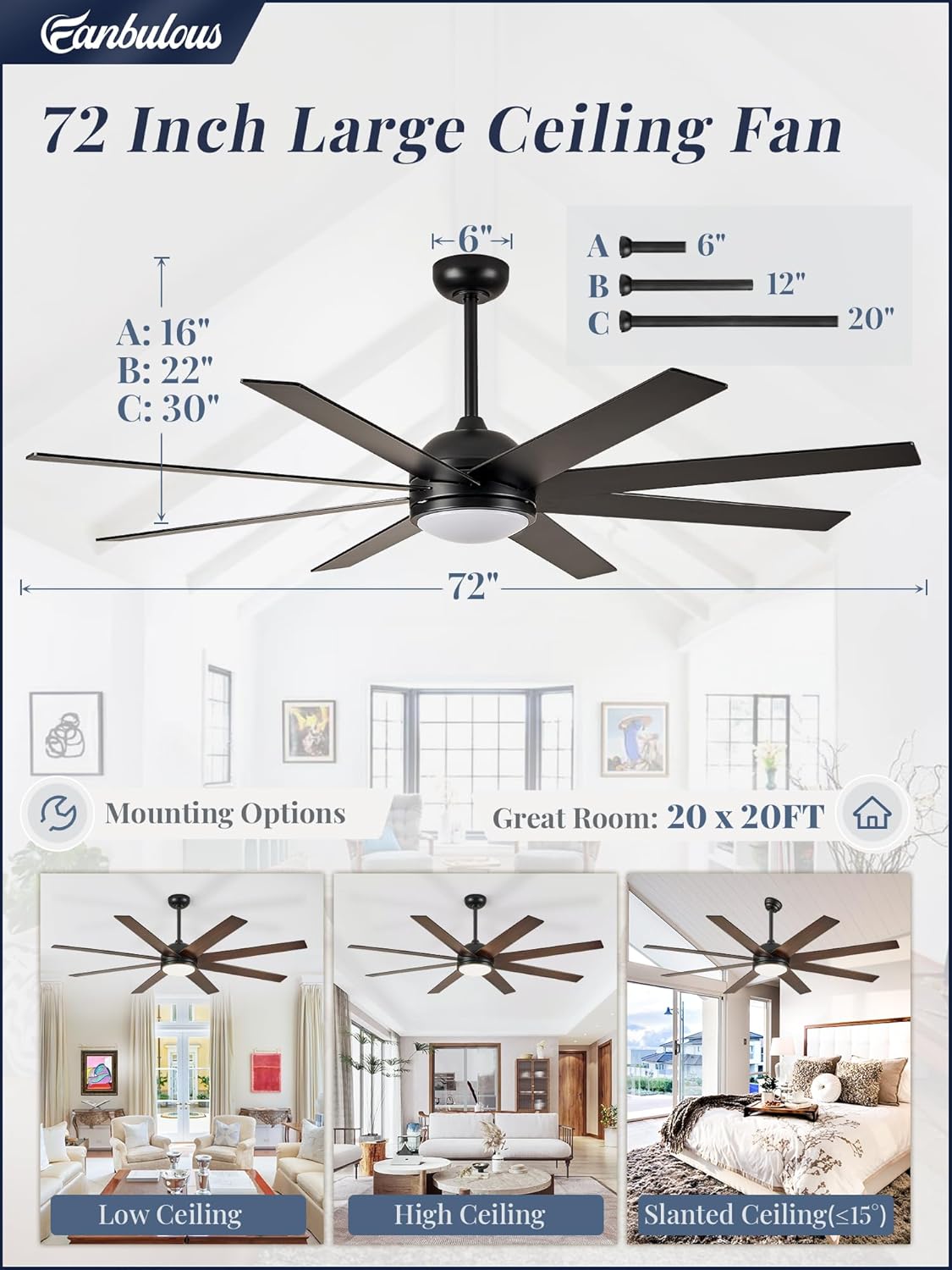
Image: A diagram illustrating the 72-inch fan's dimensions and the three available down rod lengths (6", 12", 23"). Examples of the fan installed in low, high, and slanted ceiling environments are also shown.
2. Blade Assembly
The fan blades are dual-colored, offering a Classic Black finish on one side and a Wood Grain finish on the other. Choose the side that best suits your decor. Attach each of the 8 blades securely to the motor assembly using the provided screws. Ensure proper alignment to prevent wobbling during operation.
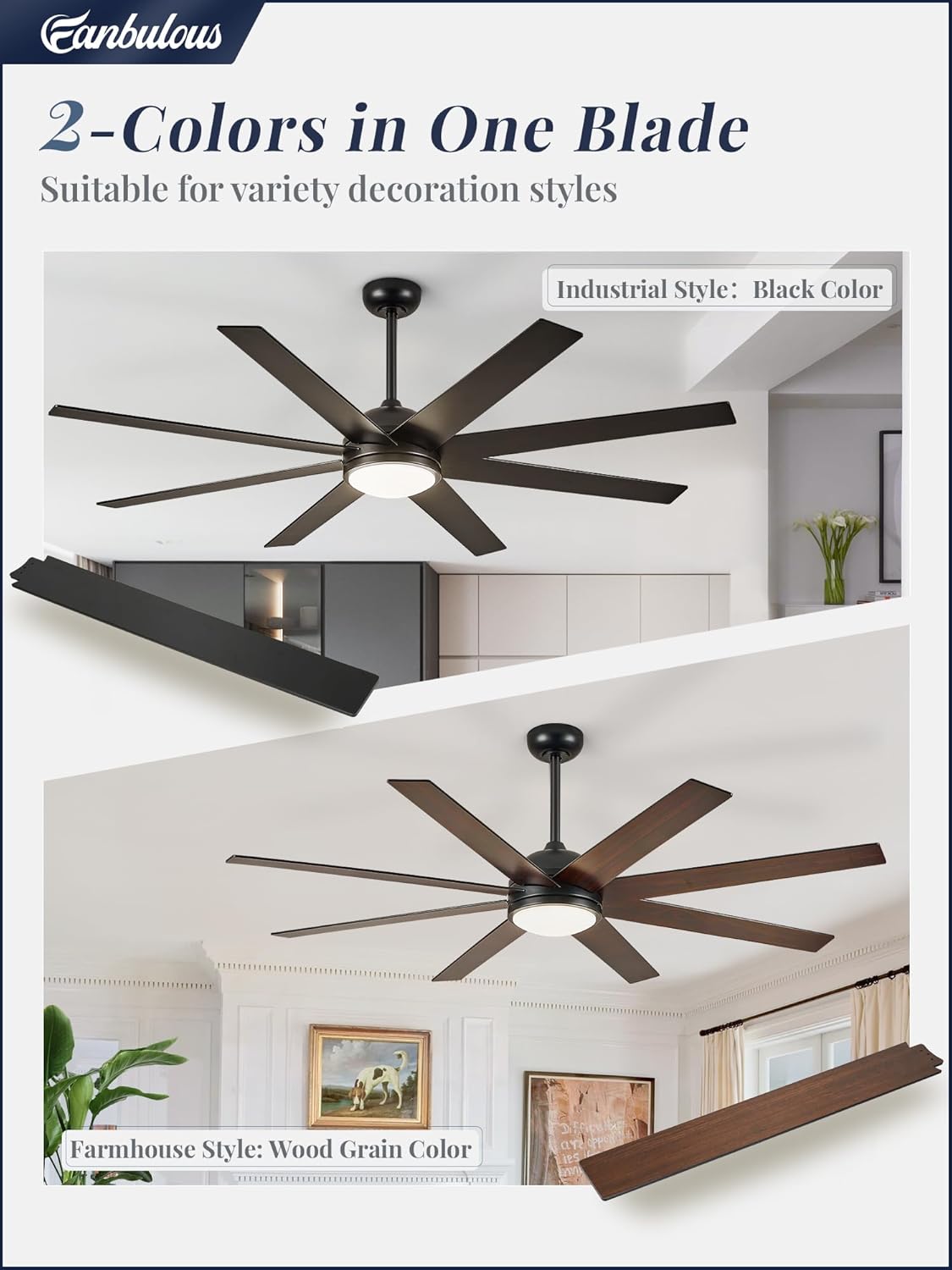
Image: A visual representation of the fan blades, highlighting their dual-color design with one side in black for an industrial style and the other in wood grain for a farmhouse style.
3. Electrical Wiring
Connect the fan's wiring to your household electrical system according to the provided wiring diagram in the separate installation guide. Ensure all connections are secure and properly insulated. If you are not confident with electrical work, it is highly recommended to consult a certified electrician.
Operating Instructions
Your Fanbulous ceiling fan is controlled by a convenient remote control.
1. Remote Control Functions
The remote allows full control over the fan's settings:
- Power Button: Turns the fan and light on/off.
- Fan Speed (1-6): Adjusts the fan speed from gentle breeze (1) to powerful airflow (6).
- Light On/Off: Toggles the light independently.
- Color Temperature (3CCT): Cycles through 3000K (Warm White), 4500K (Natural White), and 6500K (Cool White). The fan features a memory function that preserves your last light setting for 10 seconds after turning off.
- Reversible Fan Direction: Changes the blade rotation for summer (downward airflow) or winter (upward airflow) modes.
- Timer Settings (1H/4H/8H): Sets the fan to automatically turn off after 1, 4, or 8 hours.
- Mute Key: Silences remote beeps.
- Natural Wind Mode: Automatically varies fan speed to simulate a natural breeze.

Image: The remote control for the Fanbulous ceiling fan, detailing buttons for 6 wind speeds, 3 color temperatures, reversible DC motor, timer settings (1/4/8 hours), and natural wind mode.
2. Light Temperature Adjustment
The integrated 24W LED light provides 2000 lumens of brightness and offers three color temperature options to suit your preference and mood:
- 3000K: Warm, inviting light for relaxation.
- 4500K: Neutral, balanced light for general use.
- 6500K: Cool, bright light for task-oriented activities.

Image: The Fanbulous ceiling fan's light module demonstrating the three adjustable color temperatures: 3000K (warm), 4500K (neutral), and 6500K (cool), with details on power (24W) and brightness (2000LM).
3. Reversible Airflow for All Seasons
The reversible DC motor allows you to change the direction of the fan blades, optimizing comfort throughout the year:
- Summer Mode (Downward Airflow): Blades rotate counter-clockwise to create a downward breeze, providing a cooling effect.
- Winter Mode (Upward Airflow): Blades rotate clockwise to draw cool air up towards the ceiling, circulating warm air downwards and helping to distribute heat more evenly.
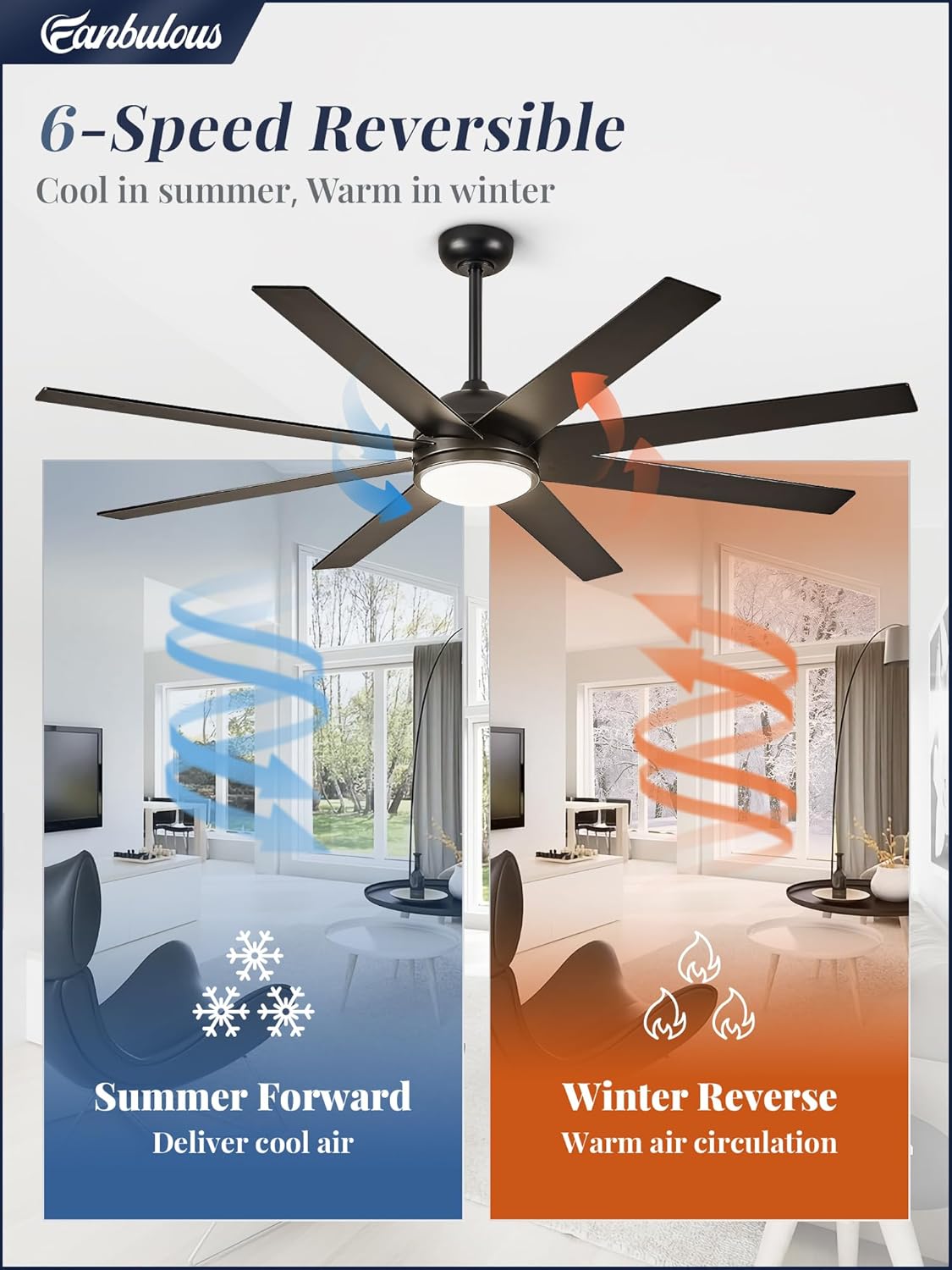
Image: A split image showing the Fanbulous ceiling fan's reversible function. The left side depicts "Summer Forward" with blue arrows indicating downward airflow for cooling. The right side shows "Winter Reverse" with orange arrows indicating upward airflow for warm air circulation.
4. Quiet Operation
The advanced energy-saving DC motor operates quietly, with a noise level of approximately 35 dB, ensuring minimal disturbance in your living environment.
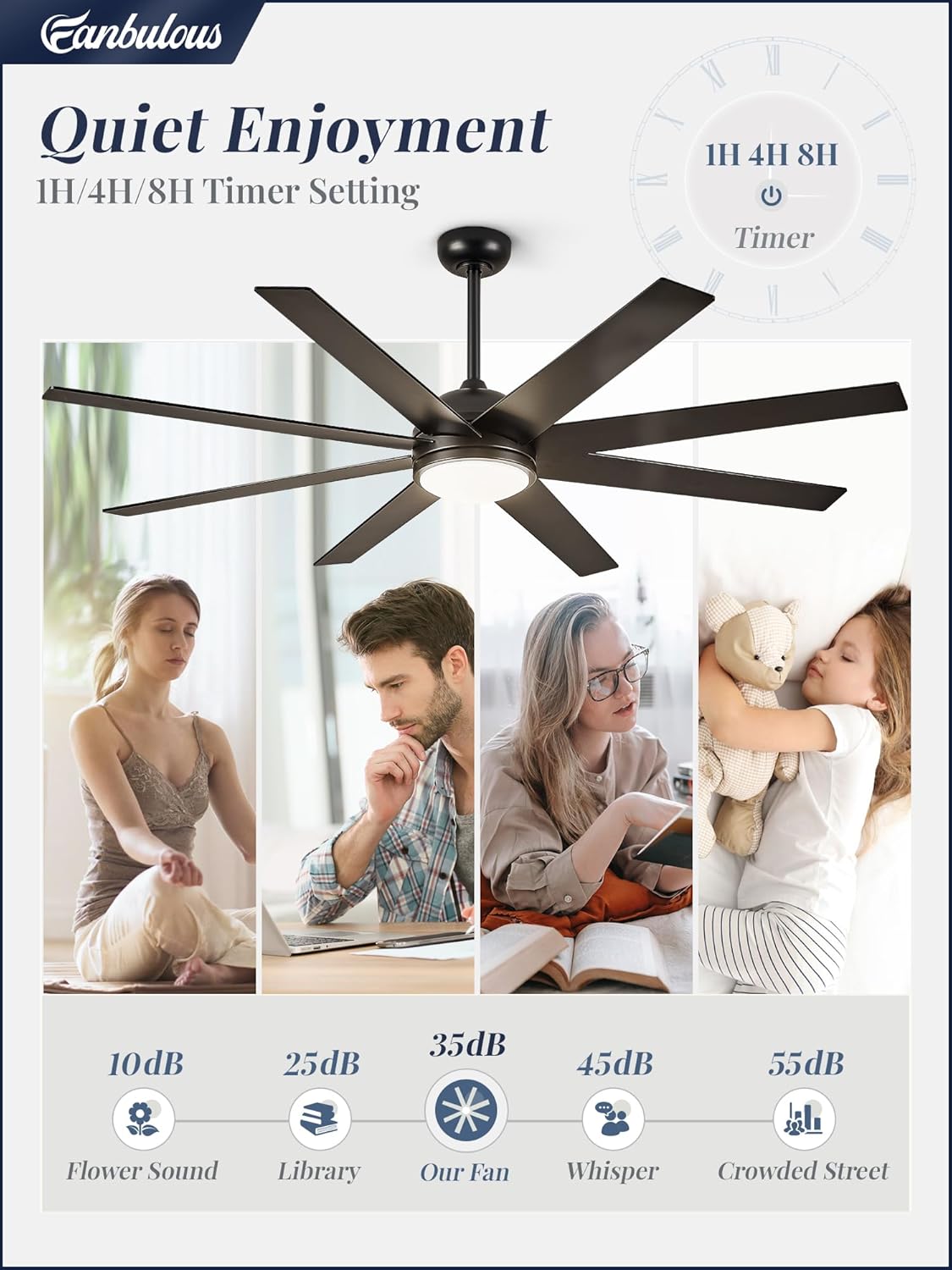
Image: An infographic titled "Quiet Enjoyment" illustrating the fan's 35dB noise level in comparison to other common sounds like flower sound (10dB), library (25dB), whisper (45dB), and crowded street (55dB). It also highlights the 1H/4H/8H timer settings.
Maintenance
Regular maintenance helps prolong the life and efficiency of your ceiling fan.
- Cleaning: To avoid scratching the finish, clean the fan with a soft, damp cloth. Do not use abrasive cleaners or solvents.
- Blade Inspection: Periodically check the blade attachments for tightness. Loose blades can cause wobbling and noise.
- Light Kit: The LED light kit is designed for long-term use and typically does not require bulb replacement.
Troubleshooting
If you encounter issues with your Fanbulous ceiling fan, refer to the following common problems and solutions:
| Problem | Possible Cause | Solution |
|---|---|---|
| Fan does not start | No power supply; Loose wiring; Remote control battery low. | Check circuit breaker; Verify all wire connections; Replace remote control batteries. |
| Fan wobbles | Loose blades; Improperly balanced blades; Loose mounting bracket. | Ensure all blade screws are tight; Use the included balancing kit if necessary; Tighten mounting bracket screws. |
| Light does not work | Loose wire connection to light kit; Faulty LED driver. | Check light kit wiring; Contact customer support if LED driver is suspected. |
| Remote control not responding | Battery low or dead; Remote not paired with fan. | Replace batteries; Refer to the remote pairing instructions in the full manual. |
For issues not listed here, or if troubleshooting steps do not resolve the problem, please contact Fanbulous customer support.
Warranty and Customer Support
Fanbulous offers a 2-year customer support for this product. We are dedicated to providing a quality product and ensuring your satisfaction. For any concerns, technical assistance, or warranty claims, please contact our customer support team through the vendor's contact information provided at the point of purchase or on the official Fanbulous website.

