
LIGE SML1-C Pro
LIGE Smart Watch User Manual
Model: SML1-C Pro
1. Product Overview
The LIGE Smart Watch is a versatile wearable device designed to enhance your daily life with advanced features for communication, fitness tracking, and health monitoring. It boasts a vibrant 1.43-inch AMOLED display, robust battery life, and a durable IP68 waterproof rating, making it suitable for various activities.
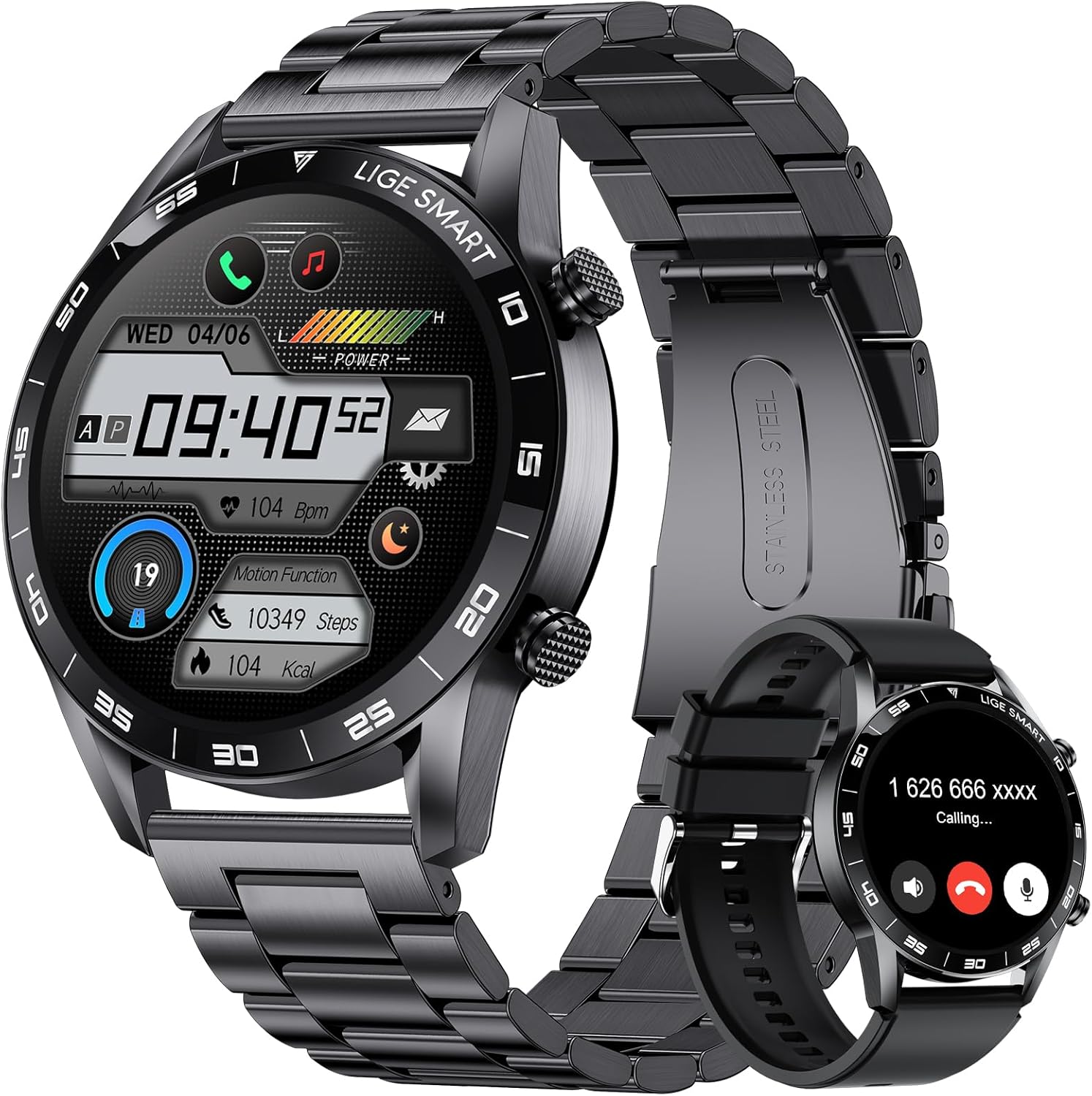
Figure 1: LIGE Smart Watch (SML1-C Pro) with both metal and silicone band options.
Key Features:
- 1.43" AMOLED Display: High-resolution (466*466) ultra-clear IPS screen with Always-on Display functionality.
- Bluetooth Call & Smart Reminder: Make/answer calls directly from the watch, receive message notifications, and utilize an AI voice assistant.
- 113 Exercise Modes: Comprehensive tracking for various indoor and outdoor sports, including heart rate, blood oxygen, steps, distance, and calories.
- 24h Activity Tracker: Monitors heart rate, blood oxygen, sleep, mood, stress, and breath rate.
- IP68 Waterproof: Suitable for daily activities like hand washing and rain exposure.
- Long Battery Life: 400mAh battery provides 5-7 days of daily use and up to 30 days of standby time.
- Additional Functions: Includes weather forecast, music playback, camera control, alarm clock, stopwatch, sedentary reminder, drinking water reminder, breathing training, and find phone/watch.
2. What's in the Box
Upon unboxing your LIGE Smart Watch, please verify that all the following components are included:
- 1 x LIGE Smart Watch (SML1-C Pro)
- 1 x Steel Band
- 1 x Silicone Strap
- 1 x Magnetic Charging Cable
- 1 x Steel Band Adjustment Tool
- 1 x Instruction Manual
3. Initial Setup
To begin using your LIGE Smart Watch, follow these steps for initial charging, app installation, and device pairing.
3.1 Charging the Device
Before first use, fully charge your smartwatch. Connect the magnetic charging cable to the charging points on the back of the watch and plug the USB end into a compatible power adapter (not included).

Figure 2: Smartwatch connected to its magnetic charging cable, indicating full charge.
3.2 App Installation and Pairing
The LIGE Smart Watch requires the 'GloryFit' application for full functionality and data synchronization. The app is compatible with Android 5.0+ and iOS 9.0+ devices.
- Download GloryFit App: Scan the QR code displayed on the watch (if available) or search for 'GloryFit' in your smartphone's app store (Google Play Store for Android, Apple App Store for iOS).
- Install and Open: Install the app and open it. You may choose to log in as a guest or register an account.
- Grant Permissions: Allow necessary permissions, including Bluetooth access, for the app to function correctly.
- Enable Bluetooth: Ensure Bluetooth is enabled on your smartphone.
- Add Device: In the GloryFit app, navigate to the device section and select 'Add a new device'. The app will search for nearby smartwatches.
- Pair Device: Select 'SML1 PRO' from the list of found devices. Confirm the pairing request on both your phone and the watch.
- Allow Notifications: Grant the app permission to receive notifications from your phone for features like call and message alerts.
Video 1: Demonstrates the process of installing the GloryFit app and pairing the LIGE Smart Watch with a smartphone, including granting necessary permissions.
4. Operating Your Smart Watch
This section covers the primary functions and how to navigate your LIGE Smart Watch.
4.1 Display and Watch Faces
The 1.43-inch AMOLED screen offers clear visuals and responsive touch control. You can customize your watch face to suit your style or display relevant information.
- Switching Watch Faces: Swipe left or right on the watch screen to cycle through pre-installed watch faces. More watch faces are available for download via the GloryFit app.
- Always-on Display: The watch supports low-power Always-on Display for convenient time checking.

Figure 3: Various watch face options and screen display types available on the LIGE Smart Watch.
4.2 Bluetooth Calling and Notifications
With Bluetooth connectivity, you can manage calls and receive notifications directly on your wrist.
- Making/Answering Calls: Use the built-in speaker and microphone to make or answer calls directly from the watch. You can dial numbers or select from up to 70 saved contacts.
- AI Voice Assistant: Activate the AI voice assistant to perform tasks like checking weather, setting alarms, or initiating calls.
- Smart Notifications: Receive alerts for incoming calls, SMS messages, and app notifications (e.g., Instagram, Facebook, Twitter, WhatsApp) directly on your watch. Configure app notifications within the GloryFit app.

Figure 4: Illustration of Bluetooth call functionality and message notifications on the smartwatch.
4.3 Health Monitoring
The smartwatch provides continuous health data tracking to help you stay informed about your well-being.
- Heart Rate Monitoring: Tracks your heart rate throughout the day.
- Blood Oxygen (SpO2) Monitoring: Measures your blood oxygen levels.
- Sleep Tracking: Monitors your sleep patterns, including deep sleep, light sleep, and awake time.
- Mood & Stress Monitoring: Provides insights into your emotional state and stress levels.
- Breathing Training: Guided breathing exercises to help reduce stress.

Figure 5: Visual representation of the smartwatch's 24-hour health monitoring capabilities.
4.4 Sports Modes
The LIGE Smart Watch supports 113 built-in exercise modes to accurately track your workout data.
- Activity Tracking: Records steps, distance, and calories burned.
- Sport Recognition: Features automatic sport recognition reminders.
- Customization: Adjust the order of exercise modes in the app according to your preference.

Figure 6: Overview of the extensive range of sports modes and fitness tracking metrics.
4.5 Other Practical Functions
Beyond health and fitness, the smartwatch offers several convenient tools:
- Music Playback: Control music playing on your connected smartphone.
- Camera Control: Remotely trigger your smartphone's camera.
- Weather Forecast: Get real-time weather updates, including UV and humidity.
- Alarms, Stopwatch, Timer: Essential time management tools.
- Sedentary & Drinking Reminders: Prompts to move or hydrate throughout the day.
- Find Phone/Watch: Helps locate your paired device.
- Calculator: A basic calculator function on your wrist.

Figure 7: A collage illustrating the smartwatch's practical features, such as stopwatch, breathing exercises, music control, and weather updates.
5. Battery Management
The LIGE Smart Watch is equipped with a 400mAh battery designed for extended use.
- Battery Life: Expect 5-7 days of typical daily use and up to 30 days of standby time on a full charge.
- Charging Time: A full charge typically takes approximately 2.5 hours.
- Charging Indicator: The watch display will show charging progress.
6. Care and Maintenance
To ensure the longevity and optimal performance of your LIGE Smart Watch, follow these care guidelines:
- Water Resistance: The watch is IP68 waterproof, meaning it can withstand splashes, rain, and brief immersion. However, it is not recommended for hot showers, saunas, or diving. Avoid prolonged exposure to water.
- Cleaning: Regularly clean the watch and strap with a soft, dry cloth. If necessary, use a slightly damp cloth and dry thoroughly.
- Avoid Chemicals: Do not expose the watch to strong chemicals, detergents, or solvents, as these can damage the materials.
- Temperature: Avoid extreme temperatures (hot or cold) and sudden temperature changes, which can affect battery life and internal components.
- Impact: While rugged, avoid dropping the watch or subjecting it to strong impacts.
7. Specifications
Detailed technical specifications for the LIGE Smart Watch (SML1-C Pro):
| Feature | Detail |
|---|---|
| Model Number | SML1-C Pro |
| Screen Size | 1.43 Inches AMOLED (466*466 pixels) |
| Product Dimensions | 1.77 x 1.77 x 0.47 inches |
| Item Weight | 3.53 ounces (100 Grams) |
| Battery Capacity | 400 Milliamp Hours (Lithium Polymer) |
| Connectivity Technology | Bluetooth (BLE5.2+BT3.0) |
| Operating System Compatibility | Android 5.0+, iOS 9.0+, HarmonyOS 2.0+ |
| Memory Storage Capacity | 256 MB |
| Waterproof Rating | IP68 |
| Manufacturer | LIGE |

Figure 8: Detailed dimensions and core technical specifications of the LIGE Smart Watch.
8. Troubleshooting
If you encounter issues with your LIGE Smart Watch, please refer to the following common troubleshooting tips:
- Device Not Pairing: Ensure Bluetooth is enabled on your phone and the watch is within range. Restart both devices and try pairing again. Check if the GloryFit app has all necessary permissions.
- Notifications Not Received: Verify that app notifications are enabled in both your phone's settings and within the GloryFit app. Ensure the watch is properly connected via Bluetooth.
- Inaccurate Data: Ensure the watch is worn snugly on your wrist. For health monitoring, avoid excessive movement during readings. Calibrate the app settings if necessary.
- Short Battery Life: Reduce screen brightness, disable unnecessary notifications, and limit continuous health monitoring if not required. Ensure background app refresh is managed on your phone.
- Watch Not Turning On/Charging: Ensure the charging cable is securely connected to both the watch and a working power source. Clean the charging contacts on the watch and cable.
For persistent issues, please contact customer support.
9. Warranty and Support
LIGE is committed to providing high-quality products and customer satisfaction.
- Warranty: Your LIGE Smart Watch comes with a 2-year product warranty, covering replacement, return, or repair services for quality problems.
- Customer Service: If you experience any quality problems, connection failures, or dissatisfaction with your purchase, please contact LIGE customer service for assistance.
Related documentsSML1-C Pro


Ask a question about this manual
Ask about setup, troubleshooting, compatibility, parts, safety, or missing instructions. Manuals+ will review the question and use this page’s manual context to help answer it.