
1. Introduction
The Tadeto Dual Laser Measuring Tool SW-GT60 is an advanced bilateral laser distance meter designed for precise and efficient measurements. This device features dual lasers for simultaneous two-directional measurement, a backlit LCD display, and multiple measurement modes including length, area, volume, and angle. It is equipped with a rechargeable battery and supports various units (Ft/In/M). This manual provides essential information for the safe and effective operation of your device.
2. Safety Information
Please read and understand all safety instructions before using this product. Failure to follow these instructions may result in laser radiation exposure, electric shock, fire, or serious injury.
- This product is a Class II laser product with an output of less than 1mW.
- DO NOT stare directly into the laser beam.
- DO NOT aim the laser beam at people or animals.
- Avoid direct eye exposure to the laser beam.
- Keep the device out of reach of children.
- Use only the specified charging cable and power source.
- Do not attempt to modify or disassemble the device.
3. Package Contents
Verify that all items are present in your package:
- 1x Tadeto Dual Laser Measuring Instrument (SW-GT60)
- 1x USB Type-C Charging Cable
- 1x Carrying Bag
- 1x Hand Strap
- 1x Instruction Manual (this document)
- 1x Warranty Certificate
4. Product Overview
The Tadeto SW-GT60 features a robust design with intuitive controls and a clear display.

Figure 4.1: Side view of the Tadeto SW-GT60, highlighting the Type-C charging port.

Figure 4.2: Front view of the Tadeto SW-GT60, showing the large color backlit screen and control buttons.
Key Components:
- Dual Laser Emitters: For bilateral measurement.
- Large Color Backlit LCD Display: Provides clear readings in various lighting conditions.
- Control Buttons: Intuitive buttons for power, measurement, function selection, unit change, data record, and clear.
- Type-C Charging Port: For convenient recharging.
- 1/4" Copper Nut: For tripod mounting.
- Strong Magnetic Attraction: Allows attachment to metal surfaces for stable measurements.
5. Setup
5.1 Charging the Device
The Tadeto SW-GT60 is equipped with an 850mAh rechargeable lithium-ion battery. Before first use, fully charge the device.
- Connect the provided Type-C charging cable to the device's charging port.
- Connect the other end of the cable to a standard USB power adapter (not included) or a computer's USB port.
- The battery indicator on the display will show charging status. A full charge allows for over 8000 measurements.
5.2 Power On/Off
- To Power On: Press the MEAS button.
- To Power Off: Press and hold the OFF/CLEAR button for a few seconds. The device will also automatically power off after a period of inactivity to conserve battery.
6. Operating Instructions
6.1 Basic Measurement (Dual Laser)
The unique dual laser design allows for measurements from the center of the device, extending in two directions simultaneously.

Figure 6.1: The dual laser system measures distances in two directions from the device's position.
- Ensure the device is powered on.
- Position the device between the two points you wish to measure.
- Press the MEAS button. The device will emit two laser beams and display the total distance between the two points.
6.2 Measurement Modes
The device offers nine different measurement modes. Press the FUN/RECORD button repeatedly to cycle through the available modes.
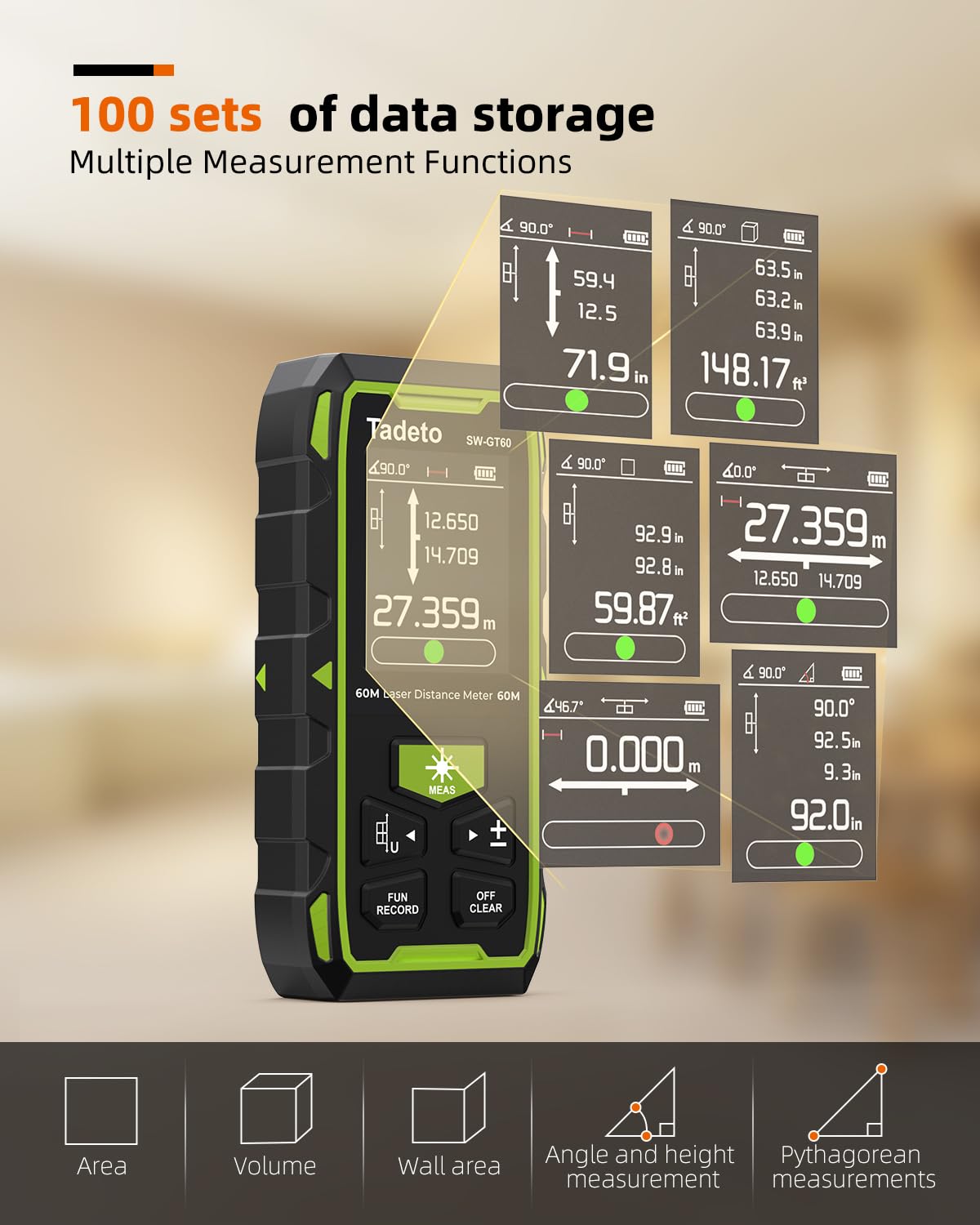
Figure 6.2: The display illustrates various measurement functions including Area, Volume, Wall Area, Angle, and Pythagorean measurements, along with data storage.
- Distance Measurement: Standard length measurement.
- Area Measurement: Calculate the area of a surface.
- Volume Measurement: Calculate the volume of a space.
- Angle Measurement: Measure angles using the electronic angle function.
- Wall Area Measurement: Specialized mode for calculating wall areas.
- Indirect Measurement (Pythagorean): For measuring inaccessible heights or distances.
6.3 Unit Switching
Press the U button to cycle through measurement units: Feet (Ft), Inches (In), and Meters (M).
6.4 Data Record
The device can store up to 100 sets of measurement data. To access stored data, press and hold the FUN/RECORD button. Use the arrow buttons to navigate through the records.
6.5 Automatic Rotating Screen & Screen Lock
The display automatically rotates for optimal viewing regardless of the device's orientation.
Figure 6.3: The device's screen automatically rotates. Press and hold the +/- button to lock the screen orientation.
To lock the screen's orientation, press and hold the +/- button.
6.6 Electronic Angle Function
The integrated electronic angle function provides real-time angle measurements, replacing traditional bubble levels for quicker and more intuitive results.

Figure 6.4: The display shows the electronic angle measurement, indicating a 46.7 degree angle.
Activate this mode via the FUN/RECORD button. The display will show the current angle relative to the horizontal plane.
6.7 Muti-Benchmark Measurement Setting
The device allows for setting different measurement benchmarks (e.g., front edge, rear edge, tripod mount) to suit various measurement scenarios. Refer to the on-screen icons to select the appropriate benchmark for your measurement.
7. Maintenance
Proper maintenance ensures the longevity and accuracy of your device.

Figure 7.1: The device features strong magnetic attraction, a 1/4" copper nut for tripod mounting, and an IP54 dustproof rating.
- Cleaning: Use a soft, damp cloth to clean the device. Do not use abrasive cleaners or solvents. Ensure the laser lenses are clean and free of dust for accurate measurements.
- Storage: Store the device in its carrying bag in a cool, dry place when not in use. Avoid extreme temperatures and direct sunlight.
- Battery: Recharge the battery regularly, even if the device is not used frequently, to maintain battery health.
- Durability: The device features an IP54 rating, making it dustproof and resistant to water splashes. However, it is not designed for submersion. The soft rubber material provides anti-vibration, anti-slip, and anti-fall protection.
8. Troubleshooting
If you encounter issues with your Tadeto SW-GT60, refer to the following common problems and solutions:
| Problem | Possible Cause | Solution |
|---|---|---|
| Device does not power on. | Low battery or device malfunction. | Charge the device fully. If problem persists, contact support. |
| Inaccurate measurements. | Dirty laser lenses, incorrect benchmark setting, or unsuitable measurement conditions (e.g., bright sunlight, reflective surfaces). | Clean laser lenses. Verify the correct benchmark is selected. Ensure stable measurement conditions. |
| Display is dim or unreadable. | Low battery or display settings. | Charge the device. The backlit screen should be clear even in bright conditions. |
| Cannot switch measurement units or modes. | Incorrect button press or temporary software glitch. | Ensure you are pressing the correct buttons (U for units, FUN/RECORD for modes). Try restarting the device. |
If the issue persists after attempting these solutions, please contact Tadeto customer support.
9. Specifications
| Feature | Specification |
|---|---|
| Model Number | SW-GT60 |
| Measuring Range | 393FT / 120M |
| Laser Class | Class II, <1mW output |
| Battery Type | 850mAh Rechargeable Lithium-ion |
| Charging Port | Type-C |
| Data Storage | Up to 100 sets |
| Units of Measurement | Feet (Ft), Inches (In), Meters (M) |
| IP Rating | IP54 (Dustproof, Splash-resistant) |
| Material | Acrylonitrile Butadiene Styrene (ABS) |
| Item Weight | 311 Grams |
| Item Dimensions (LxWxH) | 25 x 20 x 8 Centimeters |
| Color | Green |
| Country of Origin | China |
10. Warranty and Support
Your Tadeto Dual Laser Measuring Tool SW-GT60 comes with a manufacturer's warranty. Please refer to the included Warranty Certificate in your package for detailed terms and conditions.
For technical support, troubleshooting assistance, or warranty claims, please contact Tadeto customer service through the retailer where the product was purchased or visit the official Tadeto website for contact information.