1. Introduction
Welcome to the user manual for your new artfone C1 4G Senior Mobile Phone. This guide provides essential information for setting up, operating, and maintaining your device. Designed for ease of use, the artfone C1 4G features large buttons, a clear display, and an SOS emergency function, making it ideal for seniors. Please read this manual thoroughly to ensure proper usage and to fully utilize all features of your phone.
2. Package Contents
Please check the box for the following items:
- artfone C1 4G Mobile Phone
- Rechargeable Lithium-ion Battery (1800 mAh)
- European Charger
- USB Cable (Type-C)
- User Manual
If any items are missing or damaged, please contact your retailer.
3. Device Overview
Familiarize yourself with the main components of your artfone C1 4G phone.

Image 3.1: Front view of the artfone C1 4G Senior Mobile Phone, showing the display, large keypad, and call/end buttons.
- Display Screen: 1.8-inch color display for clear visibility.
- Keypad: Large, backlit buttons for easy dialing and navigation.
- Call/End Buttons: Green button to initiate calls, red button to end calls or power off.
- Navigation Keys: Up, Down, Left, Right, and OK button for menu navigation.
- SOS Button: Located on the back for emergency calls.
- Flashlight: Integrated flashlight, activated via a side button.
- Charging Port: USB Type-C port at the bottom.
- Speaker: High-volume speaker for clear audio.
4. Setup
4.1 Battery Installation
- Remove the back cover of the phone by gently prying it open from the notch.
- Insert the 1800 mAh Lithium-ion battery, ensuring the gold contacts align with the phone's terminals.
- Replace the back cover, pressing firmly until it clicks into place.

Image 4.1: Illustration of battery placement and the USB-C charging port. The phone uses an 1800 mAh battery for extended standby and talk time.
4.2 SIM Card Installation
The artfone C1 4G supports a single SIM card (standard size).
- With the battery removed, locate the SIM card slot.
- Carefully insert your 4G/3G/2G compatible SIM card into the designated slot, ensuring the cut corner is correctly oriented.
- (Optional) If using a MicroSD card for additional storage, insert it into the MicroSD card slot.
- Reinstall the battery and back cover.
4.3 Charging the Device
- Connect the USB Type-C cable to the charging port at the bottom of the phone.
- Connect the other end of the USB cable to the provided European charger.
- Plug the charger into a power outlet.
- The phone will indicate charging on the screen. Allow the phone to fully charge before first use (approximately 2-3 hours).
4.4 Initial Power On/Off
- To Power On: Press and hold the red "End Call" button until the screen lights up.
- To Power Off: Press and hold the red "End Call" button until the power-off options appear, then select "Power off" or continue holding until the device shuts down.
5. Basic Operation
5.1 Making and Receiving Calls
- To Make a Call:
- Enter the phone number using the keypad. The large font on the screen makes numbers easy to read.
- Press the green "Call" button to initiate the call.
- To Answer a Call: When the phone rings, press the green "Call" button.
- To End a Call: Press the red "End Call" button.

Image 5.1: The artfone C1 4G features a large font display and clear menu symbols for enhanced readability, making it user-friendly for seniors.
5.2 Sending and Receiving SMS Messages
- To Send an SMS:
- Navigate to the "Messages" menu.
- Select "Write Message".
- Use the keypad to type your message. The phone supports T9 predictive text input for faster typing. Press the '#' key to switch input methods.
- Enter the recipient's number or select from contacts.
- Send the message.
- To Read an SMS: New messages will be indicated on the screen. Navigate to the "Messages" menu and select "Inbox" to read them.

Image 5.2: This image illustrates the T9 predictive text input method for messages and the integrated flashlight feature.
5.3 Adjusting Volume
The phone features a high-volume speaker. You can adjust the call volume during a conversation using the side volume keys (if present) or through the phone's settings menu.

Image 5.3: The artfone C1 4G is equipped with a high-resolution speaker, ensuring clear and loud audio for calls and notifications.
5.4 Speed Dial Setup and Use
The phone allows you to set up to 8 speed dial contacts (keys 2-9).
- Go to "Settings" > "Speed Dial".
- Select a number key (2-9) and assign a contact from your phonebook or enter a new number.
- To use speed dial, long-press the assigned number key on the keypad.

Image 5.4: This image demonstrates the speed dial function, allowing users to quickly call pre-assigned contacts by long-pressing a number key.
5.5 SOS Emergency Function
The SOS button on the back of the phone is designed for emergencies. You can pre-set up to 5 emergency contact numbers and a text message.
- Setting up SOS Contacts:
- Go to "Settings" > "SOS Settings".
- Add up to 5 emergency contact numbers.
- (Optional) Customize the emergency text message.
- Using the SOS Function: In an emergency, press and hold the SOS button on the back of the phone for 3 seconds. The phone will automatically call the pre-set numbers in sequence and send the emergency text message until one contact answers.
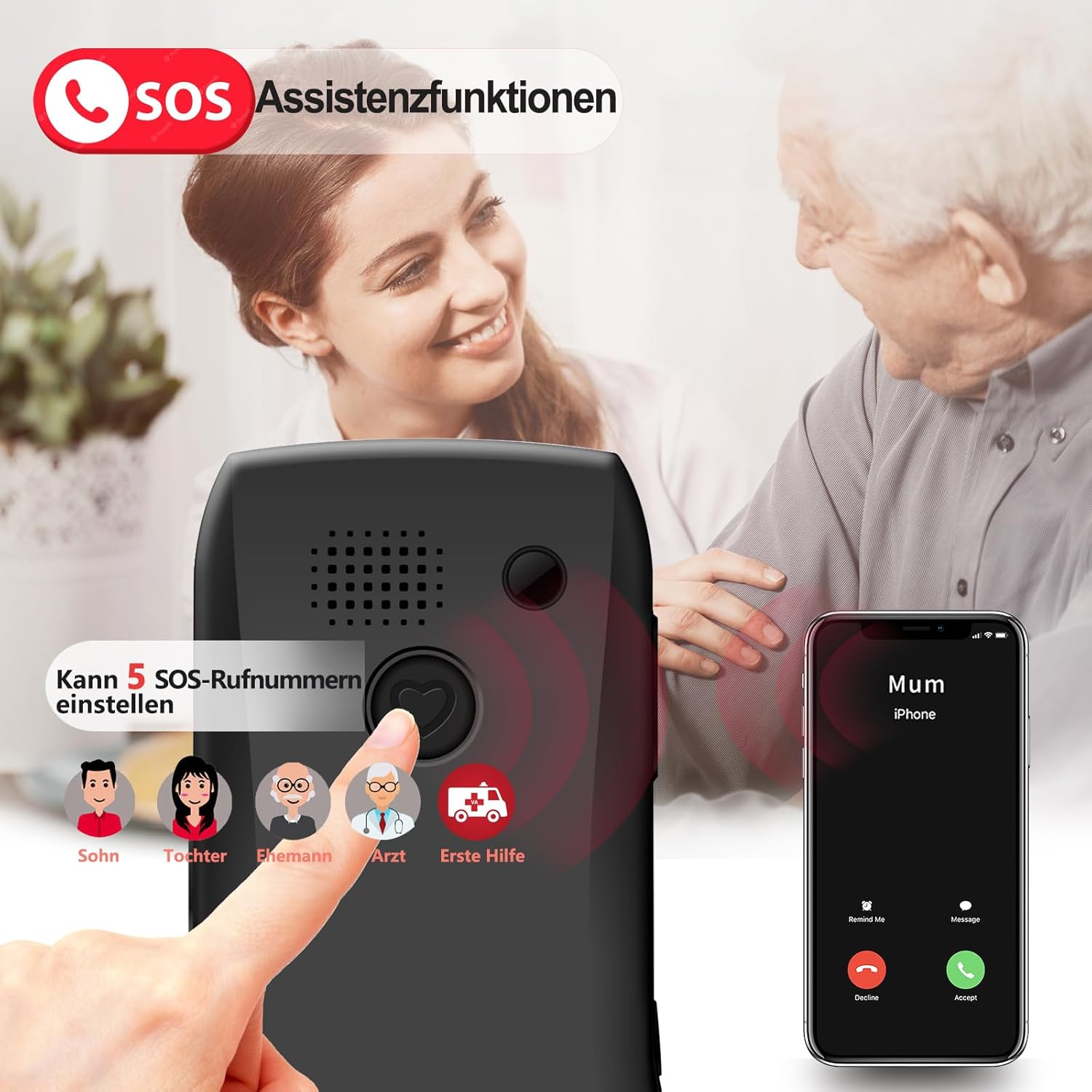
Image 5.5: The SOS assistance function, located on the back of the phone, allows users to quickly contact up to 5 pre-set emergency numbers by pressing and holding the button.

Image 5.6: A visual representation of the SOS button and the ability to configure up to 5 emergency contacts (Son, Daughter, Spouse, Doctor, Emergency Center).
6. Advanced Features
6.1 Flashlight
To activate the built-in flashlight, use the dedicated side button. Press once to turn on, press again to turn off.
6.2 FM Radio
The phone includes an FM radio. Access it through the main menu. You may need to connect headphones (not included) to act as an antenna for optimal reception.
6.3 Bluetooth
The artfone C1 4G supports Bluetooth connectivity for pairing with compatible devices such as headsets.
- Go to "Settings" > "Bluetooth".
- Turn Bluetooth "On".
- Search for available devices and pair with your desired accessory.
6.4 Alarm Clock, Calculator, Calendar
These standard utility functions can be accessed via the main menu.
- Alarm Clock: Set multiple alarms with customizable tones.
- Calculator: Perform basic arithmetic operations.
- Calendar: View dates and add reminders.
7. Maintenance
- Cleaning: Use a soft, dry cloth to clean the phone's screen and body. Avoid liquid cleaners or abrasive materials.
- Battery Care: To prolong battery life, avoid extreme temperatures. Do not leave the phone fully discharged for extended periods.
- Storage: Store the phone in a cool, dry place away from direct sunlight and moisture.
8. Troubleshooting
| Problem | Possible Solution |
|---|---|
| Phone does not power on. | Ensure the battery is correctly installed and charged. Connect the charger and try again. |
| Cannot make or receive calls. | Check if the SIM card is properly inserted and activated. Ensure you have network coverage (4G/3G/2G). |
| Poor call quality. | Move to an area with better network signal. Ensure the speaker is not obstructed. |
| SOS function not working. | Verify that emergency contacts are correctly set in the SOS settings. Ensure the phone has network signal. |
| Battery drains quickly. | Reduce screen brightness. Close unused applications. Limit background data usage (if applicable). |
If the problem persists, please contact customer support.
9. Specifications
- Model: artfone C1 4G
- Operating System: Nucleus OS
- Display: 1.8 inches, 240 x 320 resolution
- Network Technology: 4G, 3G, 2G
- Battery: 1800 mAh Lithium-ion (included)
- Talk Time: Up to 330 minutes
- Standby Time: Up to 12 days
- Internal Storage: 48 MB RAM, 32 GB (expandable via MicroSD)
- Connectivity: Bluetooth, USB Type-C
- Audio Jack: 3.5 mm
- Dimensions: 12.2 x 5.93 x 1.39 cm
- Weight: 200 grams
- Special Features: Large buttons, SOS button, T9 predictive text, Flashlight, FM Radio, Alarm, Calculator, Calendar.
10. Warranty and Support
Your artfone C1 4G Senior Mobile Phone comes with a standard manufacturer's warranty. Please refer to the warranty card included in your package for specific terms and conditions. For technical support, troubleshooting assistance, or warranty claims, please contact your point of purchase or visit the official artfone website.