
nuphy Air96 v2
NuPhy Air96 V2 Wireless Mechanical Keyboard User Manual
Model: Air96 v2 | Brand: NuPhy
Introduction
The NuPhy Air96 V2 is a versatile 100-key wireless mechanical keyboard designed for an efficient and comfortable typing experience. It features an ultra-slim profile, RGB backlighting, and multiple connectivity options, making it suitable for various operating systems and environments.
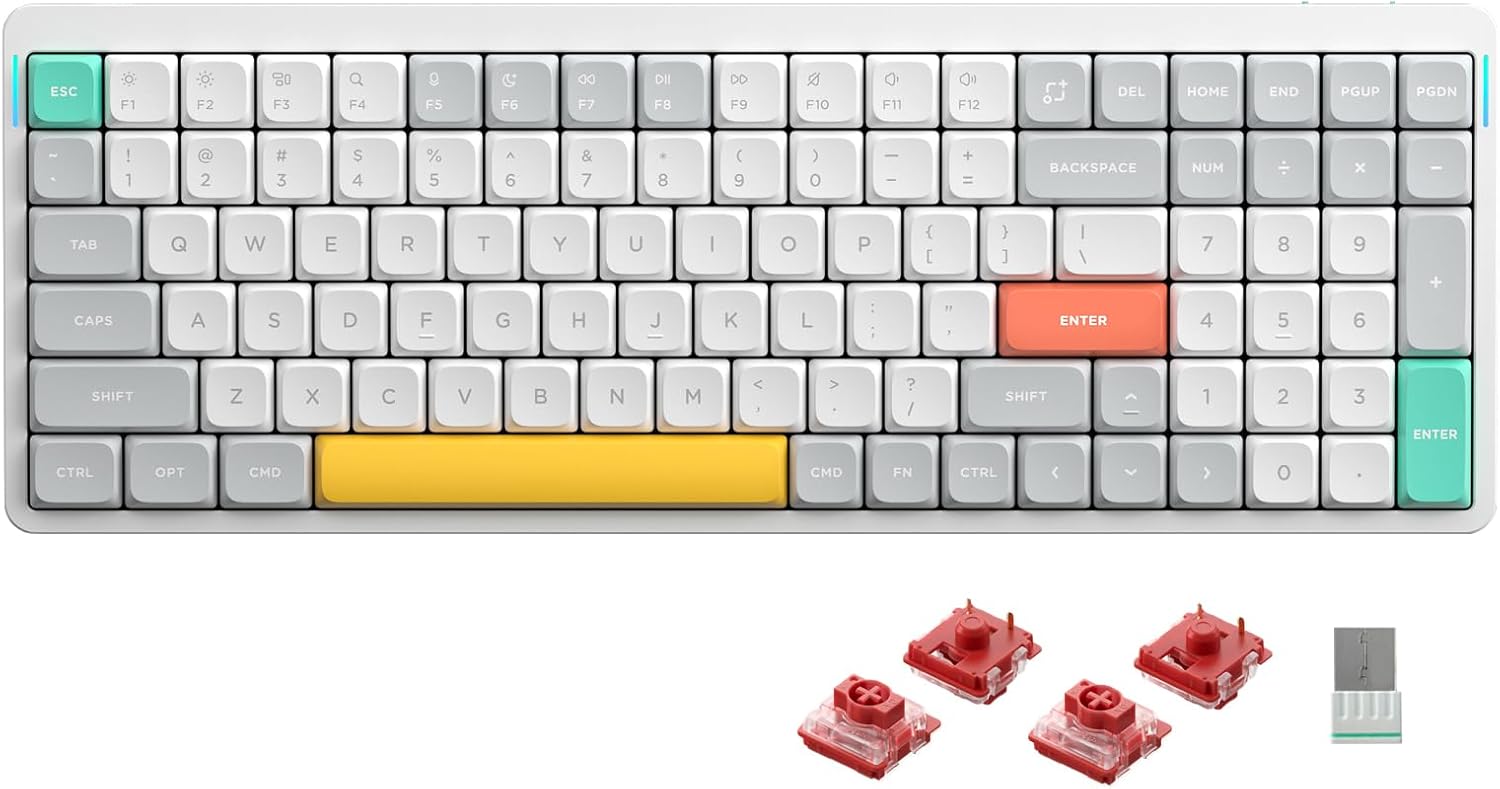
Figure 1: Top view of the NuPhy Air96 V2 Wireless Mechanical Keyboard in white with Gateron Cowberry switches.
Setup
Package Contents
- NuPhy Air96 V2 Keyboard
- USB-C Cable
- Two-tone PBT Keycaps (pre-installed)
- Extra Keycaps (for customization)
- Keycap/Switch Puller Tool
- Wireless 2.4GHz Receiver
Adjusting Keyboard Angle
The Air96 V2 features adjustable feet on the underside to change the typing angle. These feet offer two levels of inclination for ergonomic comfort.

Figure 2: Underside of the keyboard with adjustable feet for ergonomic positioning.

Figure 3: Side view illustrating the mode switches for Windows/Mac and connection type (Off/Wired/Wireless).
Connectivity Options
The Air96 V2 supports three connection modes:
- Wired (USB-C): Connect the keyboard directly to your device using the provided USB-C cable.
- 2.4GHz Wireless: Insert the 2.4GHz receiver into a USB port on your device. Switch the keyboard to 2.4GHz mode.
- Bluetooth 5.1: The keyboard can connect to up to 4 devices simultaneously via Bluetooth. Refer to your device's Bluetooth settings for pairing instructions.

Figure 4: Visual representation of the three available connection methods.
The keyboard is compatible with Windows, macOS, and Linux operating systems. Use the dedicated switch on the side of the keyboard to select the appropriate operating system mode (Win/Mac).

Figure 5: Keyboard compatibility across various operating systems.
Operating Instructions
Key Functions
The Air96 V2 features a 100-key layout, providing a compact yet full-featured typing experience. Standard alphanumeric keys, function row (F1-F12), navigation keys, and a numeric keypad are included.
RGB Backlighting
The keyboard is equipped with RGB backlighting. The console allows for adjustment of the keyboard's RGB backlighting effects and brightness. The LED light bar on the side of the keyboard indicates the current power level.
Polling Rate
Utilizing Nordic's NRF52810 SoC and STM32F072 MCU, the Air96 V2 achieves a polling rate of up to 1000Hz in wireless mode, minimizing latency for both gaming and office use.

Figure 6: Internal components contributing to the keyboard's high polling rate.
Customization
QMK/VIA Support
The Air96 V2 supports QMK/VIA, allowing users to fully define and customize key assignments, macros, and lighting effects according to their preferences. Software for QMK/VIA can be downloaded from the official NuPhy website.

Figure 7: Example of the VIA software interface for advanced keyboard customization.
Hot-Swappable Switches
The keyboard features hot-swappable mechanical switches, allowing users to easily replace switches with different models without soldering. This enables customization of typing feel and sound.

Figure 8: Gateron Brown 2.0 (Tactile, 55gf) switch details.

Figure 9: Gateron Red 2.0 (Linear, 45gf) switch details.

Figure 10: Gateron Blue 2.0 (Clicky, 65gf) switch details.
Additional switch types like Gateron Moss, Wisteria, Aloe, and Cowberry are also compatible and can be installed.

Figure 11: Included extra keycaps for aesthetic customization.
Maintenance
The Air96 V2 features durable PBT keycaps, known for their resistance to wear and shine over time. To clean the keyboard, gently wipe the keycaps and frame with a soft, damp cloth. For deeper cleaning or switch replacement, use the provided keycap/switch puller tool.
Avoid exposing the keyboard to excessive moisture or extreme temperatures. Store in a dry, cool environment when not in use.
Troubleshooting
Connectivity Issues
- Ensure the keyboard's mode switch is set correctly for your desired connection type (Wired, 2.4GHz, or Bluetooth).
- For 2.4GHz, verify the receiver is securely plugged into a USB port.
- For Bluetooth, ensure the keyboard is in pairing mode and visible to your device. Try re-pairing if connection is lost.
- Check battery level. A low battery can affect wireless performance.
Key Not Responding / Repeated Keys
- Ensure the keyboard is fully charged.
- If using wireless mode, try connecting via USB-C to rule out wireless interference.
- Carefully remove the affected keycap and switch using the provided tool. Re-seat the switch firmly. If the issue persists, consider replacing the switch.
Backlight Issues
- Adjust RGB settings via the console software.
- Ensure the keyboard is sufficiently charged, as low battery can dim or disable backlighting.
Specifications
| Feature | Detail |
|---|---|
| Model Number | Air96 v2 |
| Dimensions | 14.69 x 5.2 x 0.53 inches (373.4 x 132.5 x 13.5 mm) |
| Weight | 1.46 pounds (663 grams) |
| Battery Capacity | 4000mAh |
| Connectivity | Bluetooth 5.1, 2.4GHz Wireless, USB-C Wired |
| Polling Rate | Up to 1000Hz (wireless mode) |
| Keycaps | Double-shot PBT |
| Switches | Hot-swappable Gateron Low-Profile Mechanical Switches |
| Compatibility | Windows, macOS, Linux |
| Backlighting | RGB |

Figure 12: Detailed dimensions and specifications of the Air96 V2 keyboard.
Warranty and Support
For product support, troubleshooting assistance, or warranty inquiries, please visit the official NuPhy website or contact their customer service. Keep your purchase receipt for warranty validation.
The product includes a USB-C cable and two-tone PBT keycaps as standard accessories.
Related documentsAir96 v2


Ask a question about this manual
Ask about setup, troubleshooting, compatibility, parts, safety, or missing instructions. Manuals+ will review the question and use this page’s manual context to help answer it.