
HOCO EQ4
HOCO EQ4 TWS Open Ear Air Conduction True Wireless Earphones User Manual
Model: EQ4
Introduction
Thank you for choosing the HOCO EQ4 TWS Open Ear Air Conduction True Wireless Earphones. These earphones are designed to provide a comfortable listening experience while maintaining awareness of your surroundings. This manual will guide you through the setup, operation, and maintenance of your new device.
What's in the Box
- 1 Pair of HOCO EQ4 TWS Earbuds
- 1 Charging Case
- 1 Type-C Charging Cable
- 1 User Manual (This document)
- 1 Warranty Card

Image: HOCO EQ4 TWS Earphones and their charging case, showcasing the open-ear design and the compact charging solution.
Product Overview

Image: Diagram illustrating the touch control areas on the HOCO EQ4 earphones for functions like play/pause, track skipping, and voice assistant activation. Also highlights 12h single headset battery life, 36h total working time, Hi-Fi sound quality, BT 5.3, leader-follower switching, magnetic switch, and touch control.

Image: Visual representation of the HOCO EQ4's 12-hour battery life and its fully open-ear design, showing how it sits comfortably without entering the ear canal.

Image: Display of HOCO EQ4 earphones in white, black, and blue, along with key battery specifications: 2 recharges from case, 12h single headset battery, 36h total working time, and 300h standby time.

Image: Information graphic detailing Bluetooth 5.3 connectivity and a table of product parameters including BT specification, speaker size, headset battery, case battery, use time, standby time, product net weight, single headset weight, product size, and available colors.
Setup
1. Charging the Earphones and Case
Before first use, fully charge the earphones and the charging case.
- Place the earphones into the charging case. Ensure they are correctly seated.
- Connect the Type-C charging cable to the charging port on the case and the other end to a USB power source (e.g., wall adapter, computer USB port).
- The charging indicator lights on the case will show the charging status.
- Headphone charging time is approximately 1.5 hours.
- Charging time for the charging case is approximately 2 hours.
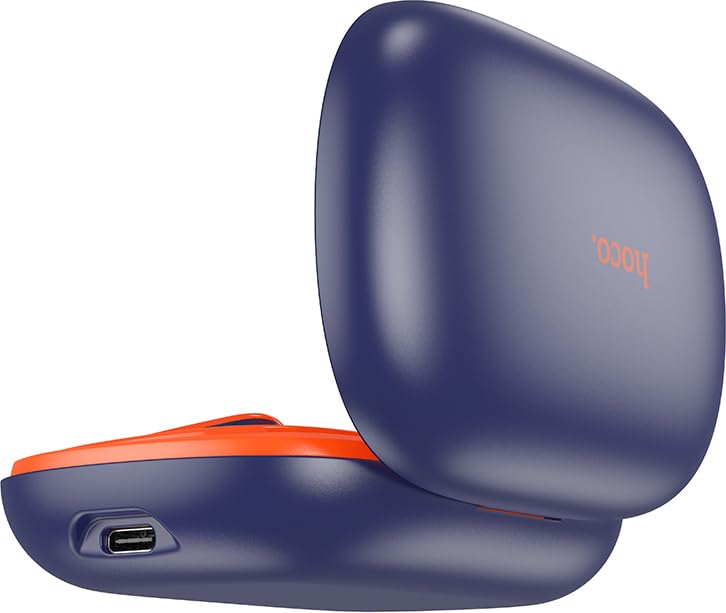
Image: Close-up of the HOCO EQ4 charging case, highlighting the Type-C charging port located on the side.
2. Pairing with Your Device
The earphones support automatic pairing for convenience.
- Open the charging case cover. The earphones will automatically power on and enter pairing mode.
- On your smartphone, tablet, or other Bluetooth-enabled device, go to the Bluetooth settings.
- Search for available devices and select "HOCO EQ4" (or similar name) from the list.
- Once connected, you will hear a confirmation tone, and the earphones will be ready for use.
- After initial pairing, the earphones will automatically connect to the last paired device when the case is opened.
Operating Instructions
The HOCO EQ4 earphones feature touch controls for easy management of music and calls.
Power On/Off
- Power On: Open the charging case cover. The earphones will power on automatically.
- Power Off: Place the earphones back into the charging compartment and close the cover. They will power off automatically.
Music Playback
- Play/Pause: Tap the touch area on either earbud once.
- Next Track: Double tap the touch area on the right earbud.
- Previous Track: Triple tap the touch area on the left earbud.
Call Management
- Answer/End Call: Tap the touch area on either earbud once.
- Reject Call: Press and hold the touch area on either earbud for 2 seconds.
Voice Assistant
- Activate Voice Assistant: Long press the touch area on either earbud for 2 seconds.
Maintenance
Cleaning
- Regularly clean the earphones and charging case with a soft, dry, lint-free cloth.
- Do not use abrasive cleaners, alcohol, or chemical solvents.
- Ensure charging contacts on both earphones and case are clean and free of debris.
Storage
- When not in use, store the earphones in their charging case to protect them and keep them charged.
- Store in a cool, dry place, away from extreme temperatures and direct sunlight.
Troubleshooting
| Problem | Possible Solution |
|---|---|
| Earphones do not power on. | Ensure the earphones are charged. Place them in the charging case and charge the case. |
| Cannot pair with device. |
|
| No sound or low volume. |
|
| Intermittent connection. |
|
Specifications
| Model Name | HOCO EQ4 TWS Open Ear Air Conduction True Wireless Earphones |
| Bluetooth Version | 5.3 |
| Bluetooth Chip | Jerry AC6973D4 |
| Transmission Range | 10 meters |
| Speaker Driver | 14mm Dynamic Driver |
| Impedance | 32 Ω ± 15% |
| Frequency Response | 20~20000 Hz |
| Sensitivity | 98 dB ± 3 dB |
| Headphone Battery Capacity | 110 mAh (each) |
| Charging Case Battery Capacity | 500 mAh |
| Music Playback Time | Up to 12 hours (at 80% volume) |
| Talk Time | Up to 12 hours |
| Headphone Standby Time | 300 hours |
| Headphone Charging Time | Approx. 1.5 hours |
| Case Charging Time | Approx. 2 hours |
| Control Method | Touch Control |
| Water Resistance Level | Water Resistant |
| Product Dimensions | 98 x 66.5 x 30 mm (Case) |
| Product Net Weight | 87g (Total) |
| Single Earbud Net Weight | 10g |
Warranty and Support
Warranty Information
The HOCO EQ4 TWS Open Ear Air Conduction True Wireless Earphones come with a 1-Year Warranty from the date of purchase. Please refer to the included Warranty Card for detailed terms and conditions.
Customer Support
For any technical assistance, troubleshooting, or warranty claims, please contact your retailer or the HOCO customer support channel specified on the product packaging or official HOCO website. Keep your purchase receipt and warranty card handy for faster service.
Related documentsEQ4


Ask a question about this manual
Ask about setup, troubleshooting, compatibility, parts, safety, or missing instructions. Manuals+ will review the question and use this page’s manual context to help answer it.