
Introduction
The Akko MOD007B HE PC is a high-performance gaming keyboard featuring magnetic switches, an 8K Hz polling rate, and advanced customization options like Rapid Trigger and Dynamic Keystrokes. This manual provides detailed instructions for setting up, operating, maintaining, and troubleshooting your keyboard to ensure optimal performance and longevity.

Figure 1: Akko MOD007B HE PC Gaming Keyboard, Creamy Yellow Magnetic Switch Anniversary Version.
Setup
Package Contents
- Akko MOD007B HE PC Gaming Keyboard
- USB Cable
- User Manual (this document)
- Keycap and Switch Puller
- USB 2.4GHz Receiver
Connectivity Options
Your Akko MOD007B HE PC keyboard supports three modes of connection: Wired (USB Type-C), 2.4GHz Wireless, and Bluetooth 5.0. The keyboard is equipped with a 3000mAh battery for extended wireless use.

Figure 2: Multi-device connectivity options.
Switching Modes:
- Wired Mode: Press Fn + U. Ensure the power switch under the Caps Lock keycap is in the appropriate position for wired Windows devices (center position).
- 2.4GHz Wireless Mode: Press Fn + Y. Insert the 2.4GHz USB receiver into your device. Ensure the power switch under the Caps Lock keycap is in the bottom position to enable battery power for wireless use.
- Bluetooth Mode: The keyboard can connect to up to three Bluetooth devices. Press Fn + E for Device 1, Fn + R for Device 2, and Fn + T for Device 3. Ensure the power switch under the Caps Lock keycap is in the bottom position.
Power Switch Location:
The power switch is located underneath the Caps Lock keycap. Use the included keycap puller to carefully remove the Caps Lock keycap to access the switch. There are three positions:
- Top Position: For Apple devices (Mac/MacBook/iMac) and enables wireless power.
- Center Position: Wired mode for Windows devices; battery/power supply is disabled.
- Bottom Position: Enables battery/power supply for both wired and wireless modes.
Checking Battery Level:
To check the keyboard's battery level, press and hold Fn + Spacebar.
Operating Your Keyboard
The Akko MOD007B HE PC keyboard offers a range of advanced features designed to enhance your gaming and typing experience.

Figure 3: Overview of keyboard features.
Magnetic Switches and Customization
The keyboard utilizes magnetic switches, allowing for precise control over actuation and deactivation points.

Figure 4: Magnetic Switch Components.
Rapid Trigger (RT):
Rapid Trigger technology eliminates delay by instantly activating and deactivating keys with minimal travel. This feature is ideal for fast-paced gaming, offering 0.1mm precision. You can customize the actuation and reset distances via the Akko software.
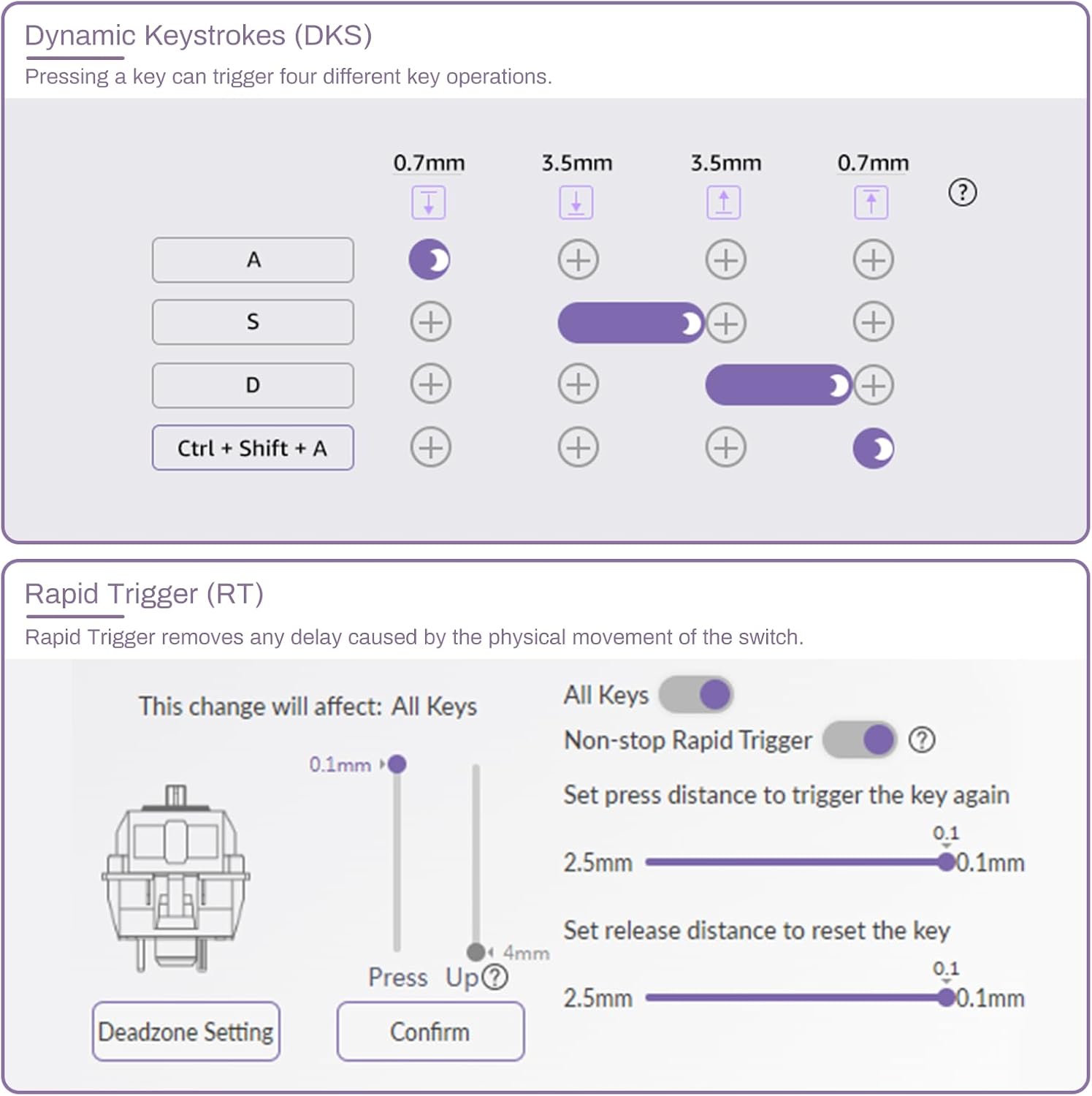
Figure 5: Akko Software Interface for RT and DKS.
Dynamic Keystrokes (DKS):
DKS allows a single key to bind up to four distinct operations based on the analog keypress depth. For example, a light press can trigger one action, while a deeper press triggers another. Partial release and complete release can also activate unique actions.
8K Hz Polling Rate:
Experience near-zero latency with the keyboard's global 8000Hz polling rate, ensuring rapid data transmission between the keyboard and your device.
Additional Features
- Gamepad Mode: Switch the keyboard to act as a joystick for racing games or other applications requiring analog input. Preset and customizable analog input response curves are available.
- On-board Memory: All customized settings are stored directly on the keyboard's hardware, eliminating the need to run software in the background after initial configuration.
- RGB Backlighting: The keyboard features customizable RGB backlighting. The knob on the top right can be used to control volume or RGB brightness by pressing it.
- Hot-Swappable Switches: The keyboard supports hot-swappable switches, allowing you to easily change out magnetic switches without soldering.
- Anniversary Edition Keycaps: The keyboard comes with Akko's limited edition 7th-Anniversary PBT keycaps, crafted with 5-sided dye-sublimation in the OEM profile for durability and aesthetic appeal.

Figure 6: PBT Dye-Sub Keycaps in OEM Profile.
Maintenance
Cleaning Your Keyboard
- General Cleaning: Use a soft, dry cloth to wipe down the keyboard surface. For dust and debris between keycaps, use compressed air.
- Keycap Cleaning: Keycaps can be removed for deeper cleaning. Use a mild soap solution and a soft brush, then rinse thoroughly and ensure they are completely dry before reattaching.
Keycap Handling
When removing or installing keycaps, always use the provided keycap puller. Be gentle to avoid scratching the sides of the keycaps, especially the Caps Lock key when accessing the power switch.
Troubleshooting
Common Issues and Solutions
| Issue | Possible Cause | Solution |
|---|---|---|
| Keyboard not responding/connecting. | Incorrect mode, low battery, loose connection, driver issue. |
|
| Ghost keystrokes or keys not registering after software update. | Magnetic switch calibration required. | Open the Akko software and calibrate the magnetic keys through the "About" section. |
| Intermittent key function. | Loose switch, software glitch, specific key issue. |
|
| RGB lighting not working or incorrect. | Software settings, brightness level. |
|
Specifications
| Feature | Detail |
|---|---|
| Brand | Akko |
| Model Number | 007 PC |
| Connectivity Technology | Bluetooth, 2.4G, USB-C |
| Keyboard Description | Gaming |
| Recommended Uses For Product | Gaming |
| Special Feature | Hot-Swappable, Rapid Trigger, Dynamic Keystrokes, 8K Polling Rate, On-board Memory |
| Color | Anniversary Version (Creamy Yellow Magnetic Switch) |
| Number of Keys | 104 |
| Keyboard Backlighting | RGB |
| Style | Modern |
| Package Dimensions | 17.91 x 10.63 x 4.65 inches |
| Item Weight | 3.58 pounds |
| Batteries | 1 Lithium Ion battery required (included) |
| First Available Date | December 19, 2023 |
Official Product Video
Official product video showcasing the Akko 7th Anniversary MOD007B HE PC keyboard, highlighting its design and features.
Warranty and Support
For detailed warranty information and technical support, please refer to the official Akko website or contact their customer service directly. Keep your purchase receipt for warranty claims.
You may also consider purchasing extended protection plans for your product. Details on available plans can be found where you purchased the product.
Akko Official Store: Visit Akko Store on Amazon


