
roborock Roborock Qrevo MaxV
Roborock Qrevo MaxV Robot Vacuum and Mop User Manual
Model: Roborock Qrevo MaxV
Brand: roborock
1. Setup
1.1 Unboxing Your Roborock Qrevo MaxV
Carefully open the packaging and remove all components. Ensure all items listed in the packing list are present before discarding packaging materials.

Figure 1: Roborock Qrevo MaxV Robot Vacuum and Multifunctional Dock.
The package includes the robot vacuum, the multifunctional dock, mop pads, a power cable, and a disposable dust bag. Refer to the unboxing video for a visual guide on unpacking and identifying all components.
Video 1: Unboxing the Roborock Qrevo MaxV. This video demonstrates the unpacking process and identifies all included components.
1.2 Dock Setup and Placement
Place the Multifunctional Dock 2.0 on a hard, flat surface against a wall, ensuring there is adequate space around it for the robot to maneuver. Avoid placing it near heat sources, direct sunlight, or in areas prone to water spills. Attach the removable dock base securely to the main dock unit.
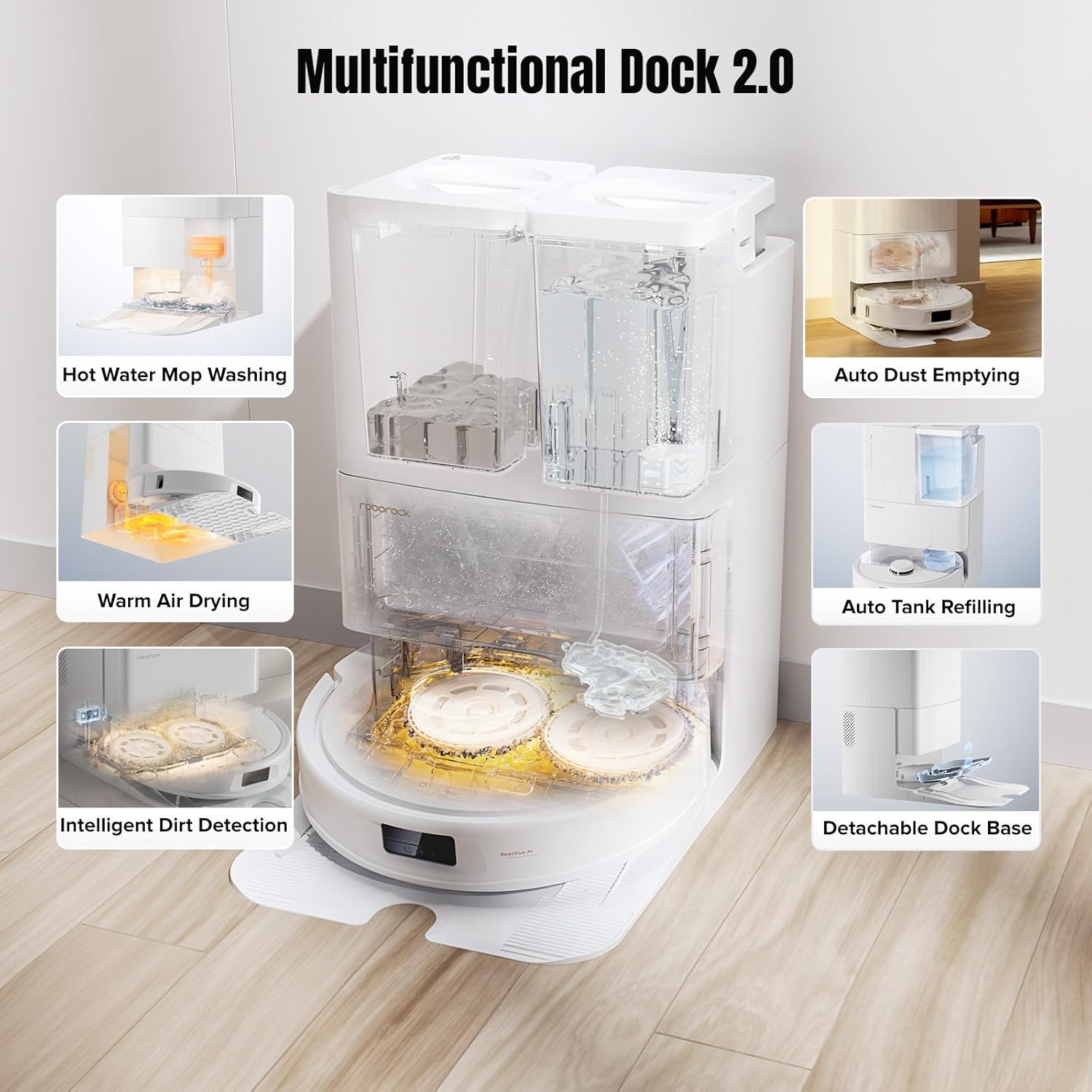
Figure 2: The Multifunctional Dock 2.0 with its various features highlighted, including hot water mop washing, auto dust emptying, and intelligent dirt detection.
Plug the power cable into the dock and ensure it is securely connected to a power outlet. Tidy away any excess cable to prevent entanglement. Fill the clean water tank with clean water and, if desired, add the recommended Roborock cleaning solution. Insert the clean water tank and dirty water tank into their respective slots in the dock.
Video 2: Demonstration of how the Roborock Dock operates, including water tank management and self-cleaning functions.
1.3 Robot Preparation
Remove all packing materials from the robot vacuum, including any protective films or foam inserts. Attach the two rotating mop pads to the bottom of the robot. Ensure they are securely fastened. Place the robot onto the dock to begin initial charging. The robot will automatically power on and begin charging.
2. Operating
2.1 Basic Controls and Cleaning Modes
Once fully charged, the robot is ready for operation. You can initiate cleaning via the Roborock app, the built-in voice assistant, or the physical buttons on the robot. The robot supports various cleaning modes:
- Vacuum Only: For dry debris collection.
- Mop Only: For wet mopping.
- Vacuum and Mop: Simultaneous cleaning for efficiency.

Figure 3: Illustrates the powerful 7000Pa suction and the 10mm auto mop lifting feature for seamless transitions between hard floors and carpets.
2.2 Smart Features
- FlexiArm Design Edge Mopping: The robot extends its mop to reach edges and corners, ensuring comprehensive cleaning coverage.
- Reactive AI Obstacle Recognition: Equipped with structured light and RGB cameras, the robot identifies and navigates around up to 62 different object types, including pets.
- Built-in Voice Assistant: Activate cleaning tasks with simple voice commands by saying "Hello, Rocky," even without a Wi-Fi connection.
- Video Call Feature: Engage in real-time video calls and two-way voice communication with your pets or monitor your home remotely.
- Advanced App Control: Utilize the upgraded Roborock app for 3D mapping, customized cleaning solutions, temporary cleaning, and intelligent restricted areas.

Figure 4: Shows the dual spinning mops and the FlexiArm design for enhanced edge cleaning.

Figure 5: Demonstrates the robot's LiDAR navigation and its ability to recognize and avoid obstacles.

Figure 6: Illustrates the voice command capabilities of the built-in intelligent voice assistant.

Figure 7: Shows the video call feature allowing interaction with pets or remote home monitoring.

Figure 8: Depicts the various functionalities available through the Roborock mobile application.
3. Maintenance
Regular maintenance ensures optimal performance and longevity of your Roborock Qrevo MaxV.
3.1 Dustbin and Filter Cleaning
The robot's dustbin is auto-emptying into the dock's disposable dust bag. However, the robot's internal filter should be rinsed regularly. The dock's removable tray should also be cleaned periodically to prevent buildup.
Video 3: Instructions on how to clean the dustbin and filter of the robot vacuum.
3.2 Brush Cleaning
Regularly check the main brush and side brush for tangled hair or debris. Use the provided cleaning tool to cut and remove any wrapped hair. The main brush is designed for easy removal and reinstallation.
Video 4: Detailed guide on maintenance and servicing of the robot, including brush cleaning.
3.3 Wheel Cleaning
Inspect the drive wheels and omni-directional wheel for any trapped debris or hair. Clean them as needed to ensure smooth movement and prevent damage.
3.4 Sensor Cleaning
Wipe all sensors (cliff sensors, wall sensors, obstacle avoidance sensors) with a dry, lint-free cloth. Clean monthly to ensure accurate navigation and obstacle detection.
4. Troubleshooting
If your robot is unresponsive or experiencing issues, try the following steps:
- Robot Unresponsive: If the robot does not respond to commands, try resetting it.
- Navigation Issues: Ensure all sensors are clean and free from obstructions. Check the app for any detected obstacles or restricted areas.
- Cleaning Performance: Verify that the mop pads are clean and properly installed. Check the dustbin and filter for clogs. Ensure the water tanks are filled correctly.
Video 5: Instructions on how to reset the Roborock Qrevo Series robot.
5. Specifications
| Feature | Specification |
|---|---|
| Brand | roborock |
| Model Name | Roborock Qrevo MaxV |
| Special Feature | Robot Vacuum and Mop, FlexiArm Design, 7000Pa Suction, Self-Emptying |
| Color | White |
| Product Dimensions | 23.43"L x 16.65"W x 17.2"H |
| Battery Life | 180 minutes |
| Voltage | 110 Volts |
| Item Weight | 35 pounds |
| Control Method | App |
| Compatible Devices | Smartphones, Amazon Echo, Google Home, Smartwatches |
6. Warranty and Support
The Roborock Qrevo MaxV comes with a standard manufacturer's warranty. Please refer to the warranty card included in your packaging for specific terms and conditions. For technical support, troubleshooting assistance, or warranty claims, please visit the official Roborock website or contact their customer service directly.
Related documentsRoborock Qrevo MaxV


Ask a question about this manual
Ask about setup, troubleshooting, compatibility, parts, safety, or missing instructions. Manuals+ will review the question and use this page’s manual context to help answer it.