
1. Introduction
The HEXEH TC55H is an advanced motion controller designed for CNC applications, supporting 1, 2, 3, or 4 feeding axes and 1 analog spindle. It features 16 input ports and 8 output ports, enabling comprehensive control over various machinery. The controller supports importing G-code files from a USB disk and can display a boot picture. It also includes a function to save current coordinates after power loss, ensuring operational continuity.
This manual provides essential information for the proper installation, operation, and maintenance of your TC55H motion controller. Please read it thoroughly before use to ensure safe and efficient operation.
2. Safety Information
Always observe the following safety precautions to prevent injury or damage to the equipment:
- Ensure the power supply is disconnected before performing any wiring or maintenance.
- Verify all wiring connections are correct and secure to prevent short circuits or component damage.
- Operate the controller within its specified voltage and current ratings.
- Avoid exposing the controller to moisture, dust, or extreme temperatures.
- Only qualified personnel should install and service this equipment.
3. Product Overview
The TC55H motion controller features a robust design with a user-friendly interface. Key components include a 3.5-inch color LCD screen, a manual pulse generator (MPG), and a comprehensive keypad for input and control.

Figure 3.1: Front panel of the TC55H controller, showing the LCD screen, MPG dial, and control keypad.

Figure 3.2: Key features of the TC55H controller, including the 3.5-inch color LCD screen (320*240 resolution), USB port for program import, and durable metal protection buttons.
The controller's side and rear panels house various input/output terminals for connecting to motors, power supplies, and other peripheral devices.

Figure 3.3: Angled view of the TC55H controller, illustrating its compact design and accessible connection points.
4. Technical Specifications
The following table outlines the technical specifications for the TC55H motion controller:
| Feature | Specification |
|---|---|
| Model | TC55H |
| Minimum Data Unit | 0.001 mm |
| Maximum Data Size | ±99999.999 mm |
| Maximum Speed | 9000 mm/min (pulse is 0.001mm) |
| Maximum Pulse Output Frequency | 150 KHz |
| Controlled Axes | 1-4 (X, Y, Z, C) |
| Interpolation | X, Y, Z, C axis for linear interpolation; X, Y for circular interpolation |
| Electric Gear | Numerator: 1-99999, Denominator: 1-99999 |
| USB | Program and boot picture import |
| I/O Port | Isolated I/O port |
| Maximum Program Lines | 1000 |
| Maximum Programs | 99 |
| RAM | 128 MB |
| External Manual Operation | Motor clockwise/counter-clockwise spinning, start, pause, alert, stop |
| Supported Codes | G code and M code |
| MPG | One panel MPG |
| LCD Screen | 3.5 inch color LCD, pixel 320*240 |
| Analog Spindle Output | 0-10V analog spindle |
| Motor Support | Servo and stepper motor |
| Measurement Systems | Metric system, round, division, degree, inch, etc. |
| USB Power | Supports USB connecting computer as power supply |
5. Setup
5.1 Power Supply
The TC55H motion controller utilizes a dual isolation power supply. The control voltage and working voltage are isolated to enhance anti-interference performance. The circuit incorporates anti-reverse connection measures to prevent damage from incorrect wiring. Two power sources are connected to a 24V switching power supply.
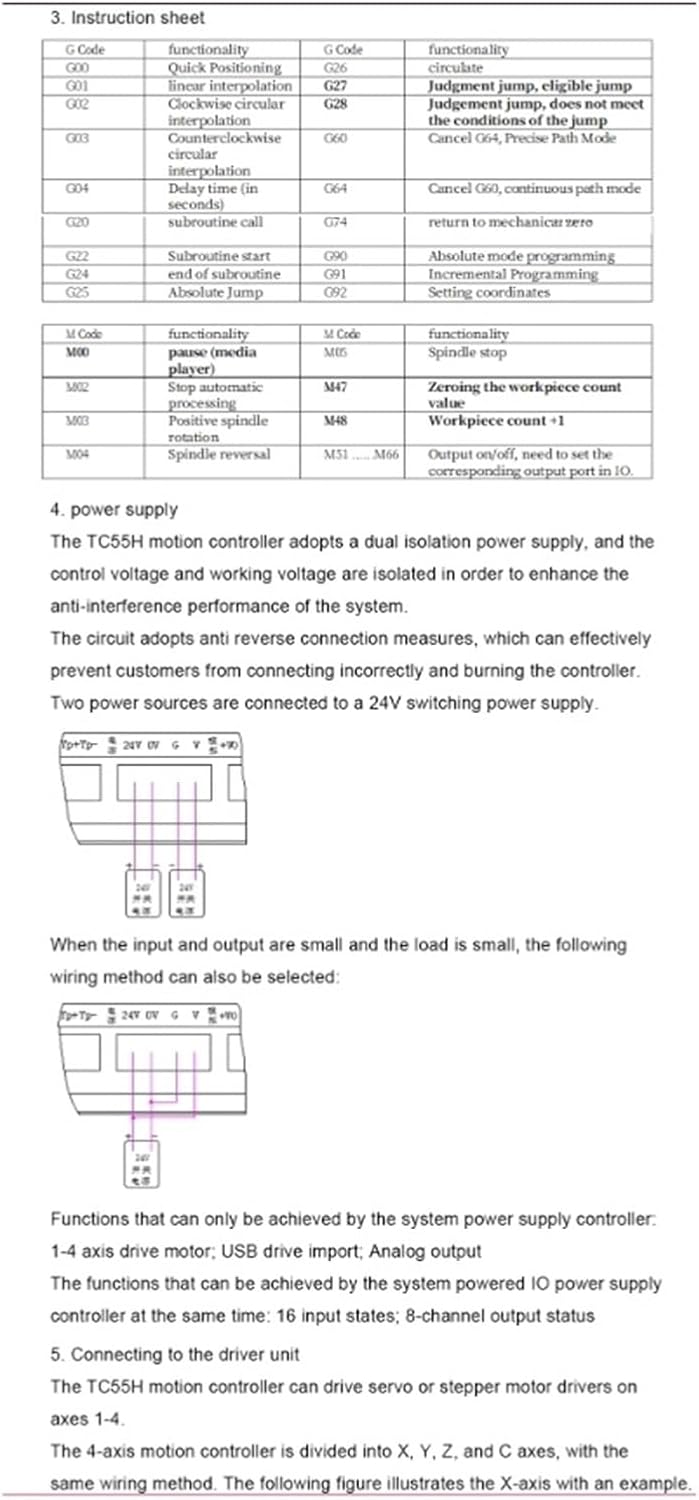
Figure 5.1: Power supply wiring diagram for the TC55H controller. Two 24V switching power supplies are shown connected to the controller's power inputs.
For scenarios where the input and output are small, and the load is minimal, a simplified wiring method can be used:

Figure 5.2: Simplified power supply wiring for low load applications, using a single 24V power supply.
5.2 Connecting to the Driver Unit
The TC55H motion controller can drive servo or stepper motor drivers on axes 1-4. The 4-axis motion controller is divided into X, Y, Z, and C axes. The following figure illustrates the X-axis connection as an example.

Figure 5.3: Rear panel of the TC55H controller with terminal blocks for input, output, and axis connections.
| Controller Definition | Stepper/Servo Interface Definition |
|---|---|
| Xp+ | PUL+ |
| Xp- | PUL- |
| Xd+ | DIR+/SIGN+ |
| Xd- | DIR-/SIGN- |
| Yp+, Yp-, Yd+, Yd- | Corresponding PUL+/-, DIR+/- for Y-axis |
| Zp+, Zp-, Zd+, Zd- | Corresponding PUL+/-, DIR+/- for Z-axis |
| Cp+, Cp-, Cd+, Cd- | Corresponding PUL+/-, DIR+/- for C-axis |
The functions that can be achieved by the system powered IO power supply controller at the same time include 16 input states and 8 channel output status.
6. Operating Instructions
6.1 G-Code and M-Code Functions
The TC55H controller supports a range of G-codes and M-codes for precise machine control. Below are some common codes and their functionalities:
| G Code | Functionality | G Code | Functionality |
|---|---|---|---|
| G00 | Quick Positioning | G06 | Judgment jump, eligible jump |
| G01 | Linear Interpolation | G25 | Judgment jump, does not meet the conditions of the jump |
| G02 | Clockwise circular interpolation | G28 | Cancel G04, Precise Path Mode |
| G03 | Counterclockwise circular interpolation | G60 | Cancel G60, continuous path mode |
| G04 | Dwell time (in seconds) | G74 | Return to mechanical zero |
| G20 | Subroutine start | G90 | Absolute mode programming |
| G21 | Subroutine end | G91 | Incremental Programming |
| G22 | Absolute Jump | G92 | Setting coordinates |
| M Code | Functionality | M Code | Functionality |
|---|---|---|---|
| M00 | Pause (media player) | M05 | Spindle stop |
| M02 | Stop automatic processing | M47 | Zeroing the workpiece count +1 |
| M03 | Positive spindle rotation | M48 | Workpiece count -1 |
| M04 | Spindle reversal | M51~M66 | Output on/off, need to set the corresponding output port in IO. |

Figure 6.1: Example of a G-code program displayed on the TC55H controller screen.
6.2 Program Import via USB
G-code programs can be imported into the TC55H controller using a USB disk. Connect the USB disk to the designated USB port on the controller. Navigate through the menu to select the program import function and choose the desired G-code file.
6.3 Manual Pulse Generator (MPG)
The integrated MPG allows for precise manual control of axis movement. Use the MPG dial to incrementally move the selected axis. The 'Feed' and 'x10/x100' buttons adjust the step size for finer or coarser control.
7. Maintenance
To ensure the longevity and optimal performance of your TC55H motion controller, follow these maintenance guidelines:
- Cleaning: Regularly clean the exterior of the controller with a soft, dry cloth. Avoid using harsh chemicals or abrasive materials.
- Environmental Control: Keep the controller in a clean, dry environment, free from excessive dust, moisture, and corrosive substances.
- Connection Checks: Periodically inspect all wiring connections to ensure they are secure and free from damage.
- Software Updates: Check the manufacturer's website for any available firmware updates to ensure your controller has the latest features and bug fixes.
8. Troubleshooting
If you encounter issues with your TC55H motion controller, consider the following basic troubleshooting steps:
- No Power: Verify that the power supply is correctly connected and providing the specified 24V. Check all power cables and connections.
- Axis Not Moving: Ensure motor drivers are correctly wired and powered. Check G-code for correct axis commands and limits. Verify the electric gear ratio settings.
- Program Not Loading: Confirm the USB disk is formatted correctly and the G-code file is valid. Ensure the file is placed in the root directory or a recognized folder on the USB disk.
- Incorrect Movement: Review the G-code program for errors. Check the unit settings (metric/inch) on the controller to match your program.
- Error Messages: Refer to the controller's display for any specific error codes or messages. Consult the manufacturer's support resources if the error persists.
9. Warranty and Support
Specific warranty details for the HEXEH TC55H motion controller are not provided in this manual. For warranty information, technical support, or service inquiries, please contact the manufacturer or your authorized dealer directly. Ensure you have your product model number (TC55H) and purchase details available when contacting support.