
Important Safety Instructions
Please read and understand all instructions before beginning installation. Failure to follow these instructions may result in electric shock, fire, or serious personal injury.
- Always turn off power at the main circuit breaker before installation or maintenance.
- Ensure all electrical connections comply with local codes and ordinances. If you are unsure, consult a qualified electrician.
- The fan must be mounted to a structurally sound ceiling capable of supporting the fan's weight.
- Do not bend the fan blades when installing or cleaning the fan.
- Keep children away from the fan during operation.
Package Contents
Verify all components are present before beginning installation.

The Fszdorj 20-inch Ceiling Fan with Light, shown with its remote control and a smartphone displaying the control app.
- Ceiling Fan Unit with Integrated Light
- Remote Control
- Mounting Bracket
- Hardware Pack (screws, wire nuts, etc.)
- User Manual
This video demonstrates the unboxing and initial setup of the Fszdorj 20-inch Ceiling Fan with Light, showing the contents of the package and how to prepare for installation.
Installation Guide
Pre-Installation Checklist
- Ensure power is OFF at the circuit breaker.
- Gather necessary tools: screwdriver, wire strippers, ladder, safety glasses.
- Confirm the mounting location is suitable and can support the fan's weight.
Mounting the Fan
- Remove the mounting bracket from the fan unit by unscrewing the retaining screws.
- Secure the mounting bracket to the ceiling junction box using the provided screws. Ensure it is firmly attached.
- Connect the electrical wires: Match the white wire from the fan to the white (neutral) wire from the ceiling, the black wire from the fan to the black (live) wire from the ceiling, and the green/yellow (ground) wire to the ground wire from the ceiling. Secure connections with wire nuts.
- Carefully lift the fan unit and align it with the mounting bracket. Secure the fan unit to the bracket using the retaining screws removed in step 1.
- Ensure all connections are secure and the fan is stable before restoring power.
This video provides a visual guide for the installation process of the Fszdorj 20-inch Ceiling Fan, including mounting the bracket and connecting electrical wires.
Operating Your Ceiling Fan
Remote Control & App Control
The Fszdorj ceiling fan offers versatile control options via both a dedicated remote control and a smartphone application (Bluetooth connectivity required). Both methods allow for independent control of the fan and light functions.

The included remote control and the smartphone app provide comprehensive control over all fan and light settings.
Functions accessible via remote/app include: light on/off, light color temperature adjustment, brightness dimming (10%-100%), fan speed adjustment (6 speeds), fan direction reversal, and timer settings.
Lighting Features
The integrated LED light offers stepless dimming and color temperature adjustment from warm light (3000K) to cool white (6500K). A revolutionary night light feature provides independent control with three preset colors: violet, warm blue, and soft warm, allowing for customized ambiance.
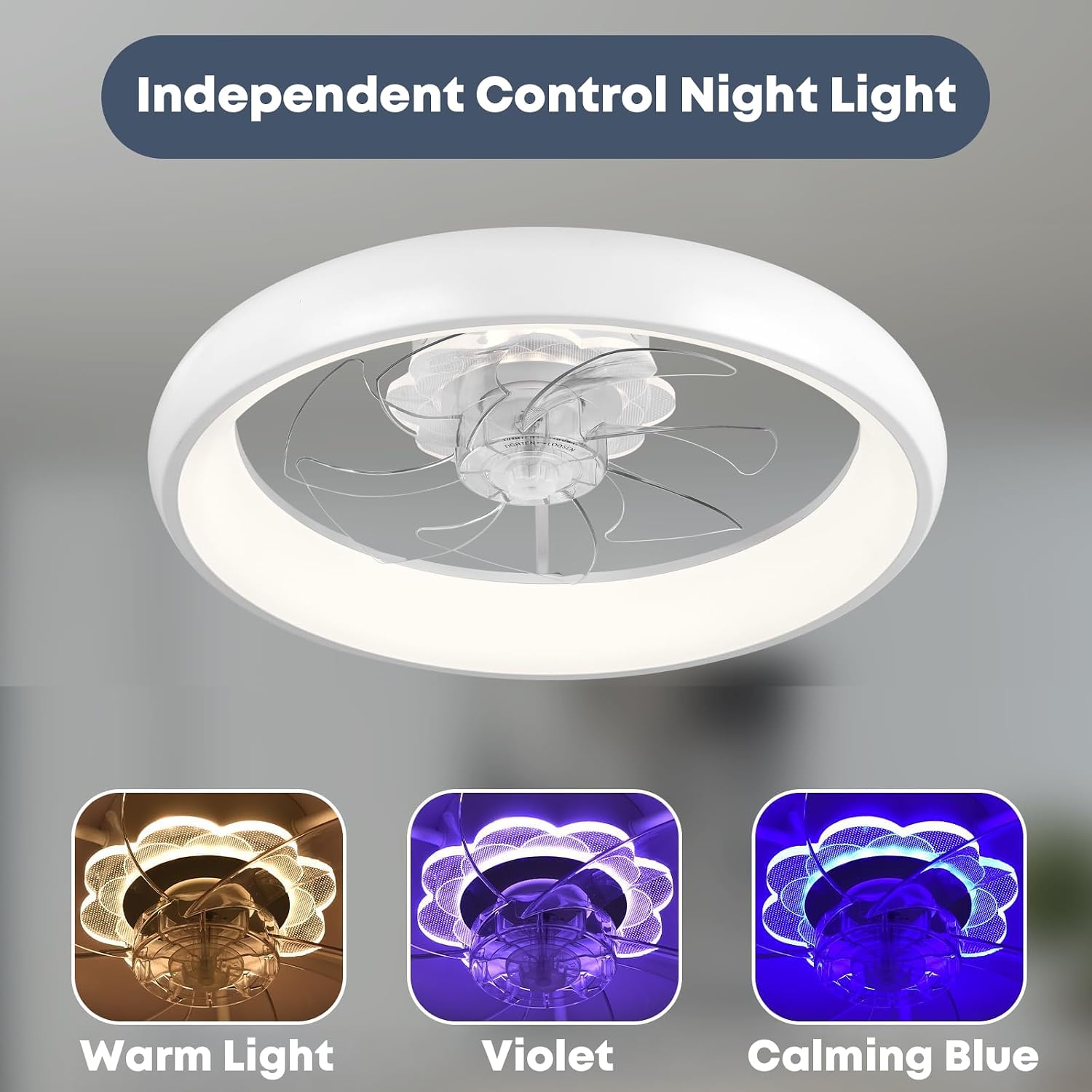
The independent night light offers three distinct color options: warm light, violet, and calming blue.

Adjust the main light's brightness from 0% to 100% and color temperature from 3000K (warm) to 6500K (cool).
Fan Speed & Direction
The quiet DC motor provides 6 adjustable fan speeds for optimal comfort. The fan also features a reversible airflow mode: downdraft for cooling in summer and updraft for enhanced air circulation in winter.

The fan operates quietly, providing soft to cool wind across 6 adjustable speeds.

Utilize the reversible motor for summer downdraft cooling or winter updraft air circulation.
This video demonstrates the various operational features of the Fszdorj 20-inch Ceiling Fan, including light adjustments, fan speeds, and directional airflow.
Care and Maintenance
- Cleaning: To clean the fan, wipe with a soft, damp cloth. Do not use abrasive cleaners or solvents.
- Light Source: The LED light source is integrated and non-removable. Do not attempt to replace it.
- Motor: The DC motor is designed for long-lasting, quiet operation and requires no lubrication.
- General: Periodically check all connections and screws to ensure they are secure.
Troubleshooting Guide
If you experience issues with your Fszdorj ceiling fan, refer to the common problems and solutions below:
| Problem | Possible Cause | Solution |
|---|---|---|
| Fan does not operate | No power supply; Loose wiring; Remote control battery low/dead. | Check circuit breaker; Ensure all wires are securely connected; Replace remote control batteries. |
| Light does not turn on | No power supply; Loose wiring; Light function off on remote/app. | Check power; Verify wiring connections; Ensure light is turned on via remote/app. |
| Fan makes excessive noise | Loose screws; Unbalanced blades (unlikely with this design); Obstruction. | Tighten all mounting screws; Check for any objects interfering with the fan. |
| Remote control not working | Battery low/dead; Remote not paired. | Replace batteries; Refer to pairing instructions in the full manual (if applicable). |
Product Specifications

Key dimensions and electrical specifications of the ceiling fan.
| Feature | Detail |
|---|---|
| Model Name | 1-F109 |
| Brand | Fszdorj |
| Color | White F109 |
| Material | Acrylic, Iron |
| Product Dimensions | 19.7"L x 19.7"W x 5.7"H |
| Power Source | Corded Electric |
| Voltage | 110 Volts |
| Wattage | 80 watts |
| Light Source Type | LED |
| Brightness | 3000K-6500K Lumen (adjustable) |
| Control Method | App, Remote |
| Special Features | Air Circulation, Color Changing, Dimmable, Remote & App, Timer |
Warranty and Support
Warranty Information
This Fszdorj ceiling fan comes with a 2-year warranty. Please retain your proof of purchase for warranty claims.
Customer Support
For any questions, technical assistance, or warranty inquiries, please contact Fszdorj customer service. Refer to the product packaging or the official Fszdorj store for the most current contact information.
