
1. Product Overview
The VGR V-208 Professional Cordless Pet Grooming Clippers are designed for efficient and quiet grooming of small and large dogs, cats, and other pets with various coat types, including thick and heavy coats. This device features advanced technology for a smooth and comfortable grooming experience.
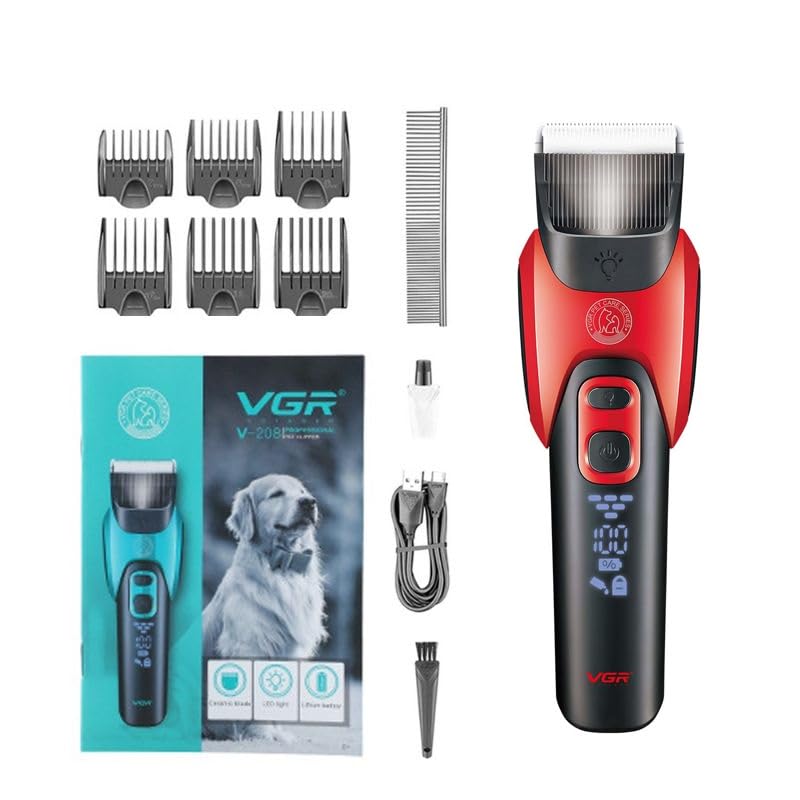
Image 1.1: VGR V-208 Professional Cordless Pet Grooming Clippers.
Key Features:
- Titanium-Ceramic Blade: Features a 30-tooth titanium-ceramic blade combined with a ceramic movable blade, designed for easily cutting double heavy coats. Offers smoother cutting and more uniform heat dissipation compared to traditional 24-tooth cutter heads.
- Low Noise & Low Vibration: Operates at approximately 50 dB to minimize stress and discomfort for pets during grooming.
- Powerful & Long-Lasting Battery: Equipped with a heavy-duty gear and a 2000 mAh high-capacity Li-ion battery, providing 180 minutes of runtime after a 3-hour charge. Features a two-speed rotary motor.
- LED Display: An LED screen shows the battery charge percentage, charging status, safe lock indicator, and oil reminder.
- Easy to Use and Clean: Designed for ease of use around small paw pads and can be charged via USB cable.

Image 1.2: Overview of the six core technologies, including high-quality ceramic stainless steel blade, strong power, low noise operation, R-type rounded bit, lighting design, and large capacity battery.
2. What's in the Box
Upon unboxing your VGR V-208 Pet Grooming Clippers, please ensure all the following components are present:
- 1 x VGR V-208 Pet Hair Trimmer
- 6 x Guide Combs (various lengths)
- 1 x USB Cable
- 1 x Oil Bottle (for blade lubrication)
- 1 x Cleaning Brush
- 1 x Grooming Comb
- 1 x User Manual (this document)

Image 2.1: The complete package contents, including the clipper, guide combs, USB cable, oil, and brush.
3. Setup
3.1 Charging the Clippers
- Connect the USB cable to the charging port on the clipper and to a compatible USB power adapter (not included) or a computer USB port.
- The LED display will show the charging status and battery percentage.
- A full charge typically takes 3 hours, providing up to 180 minutes of cordless operation. Ensure the clipper is fully charged before first use for optimal battery life.
3.2 Attaching Guide Combs
The VGR V-208 comes with 6 guide combs to adjust the trimming length. To attach a guide comb:
- Select the desired guide comb length.
- Align the comb with the clipper blade and slide it firmly until it clicks into place.
- To remove, gently push the comb upwards from the back while holding the clipper.
3.3 Initial Blade Oiling
Before first use, and after every cleaning, apply a few drops of the included lubricating oil to the blades. This ensures smooth operation and prolongs blade life. The LED display includes an oil indicator to remind you when to oil the blades.

Image 3.1: The clipper's LED display showing auxiliary light, load current, battery percentage, oil indicator, and safe lock function.
4. Operating Instructions
4.1 Powering On/Off
- To turn the clipper ON, press the power button once.
- To turn the clipper OFF, press the power button once again.
4.2 Safe Lock Function
To prevent accidental activation, the clipper features a safe lock function:
- To LOCK the clipper, long press the on/off button for 3 seconds. A lock icon will appear on the LED display.
- To UNLOCK the clipper, long press the on/off button for 3 seconds again. The lock icon will disappear.
4.3 Grooming Your Pet
Before grooming, ensure your pet's coat is clean, dry, and free of tangles. Use the included grooming comb to brush out any knots.
- Select the appropriate guide comb for the desired hair length.
- Hold the clipper firmly and begin trimming in the direction of hair growth.
- Use the LED auxiliary light for better visibility in dimly lit areas or for detailed work.
- Take breaks as needed to prevent the clipper from overheating and to keep your pet comfortable.

Image 4.1: Demonstrating the VGR V-208 clippers in use on a pet, highlighting the ergonomic design.

Image 4.2: A close-up view of the LED auxiliary light feature, illuminating the grooming area for precision.
Video 4.1: A short preview demonstrating the VGR V-208 Dog Clippers, showcasing its features and ease of use for pet grooming.
5. Maintenance
5.1 Cleaning the Blades
Regular cleaning is essential for optimal performance and hygiene:
- Ensure the clipper is turned off and unplugged before cleaning.
- Use the included cleaning brush to remove any trapped hair from the blades and inside the clipper head.
- For a more thorough clean, the blade assembly can be carefully detached (refer to specific instructions if provided in a separate diagram for blade removal).
- Do not rinse the entire clipper under water. The blades can be wiped with a damp cloth, then thoroughly dried.
5.2 Oiling the Blades
After each cleaning and before each grooming session, apply 1-2 drops of the provided lubricating oil to the blades. Turn the clipper on for a few seconds to allow the oil to distribute evenly. This reduces friction, prevents rust, and maintains cutting efficiency.
6. Troubleshooting
If you encounter issues with your VGR V-208 clippers, refer to the following common solutions:
| Problem | Possible Cause | Solution |
|---|---|---|
| Clipper does not turn on. | Low battery or safe lock engaged. | Charge the clipper fully. Long press the power button for 3 seconds to unlock. |
| Poor cutting performance or pulling hair. | Blades are dull, dirty, or not oiled. Hair is tangled. | Clean and oil the blades. Ensure pet's coat is clean and detangled before grooming. Consider blade replacement if blades are excessively dull. |
| Clipper gets hot during use. | Extended use or insufficient lubrication. | Take short breaks during long grooming sessions. Ensure blades are properly oiled. |
| LED display not working. | Device malfunction. | Contact customer support for assistance. |
If the problem persists after attempting these solutions, please contact VGR customer support.
7. Specifications
| Feature | Detail |
|---|---|
| Model Name | VGR V-208 |
| Blade Material | Titanium-Ceramic / Stainless Steel |
| Power Source | Battery Powered (Cordless) |
| Battery Type | 2000 mAh High Capacity Li-ion Battery |
| Charging Time | 3 hours |
| Runtime | Up to 180 minutes |
| Noise Level | Approximately 50 dB |
| Motor Type | Two-speed rotary motor |
| Guide Combs | 6 included |
| Item Weight | 820 Grams |
| Item Dimensions (L x W x H) | 23.5 x 13.6 x 7.2 Centimeters |
| Special Features | Cordless, Portable, Rechargeable, LED Display, LED Auxiliary Light, Safe Lock |
| Target Audience | Dogs, Cats (Small & Large) |
8. Warranty and Support
8.1 Manufacturer's Warranty
The VGR V-208 Pet Grooming Clippers come with a 1-year quality warranty against defects in materials and workmanship. This warranty is valid from the date of original purchase (invoice required) and applies only if purchased from the authorized seller "VGR INDIA". The warranty does not cover intentional or unintentional damage caused by the user.
8.2 Initiating a Warranty Claim
To initiate a warranty claim, please contact VGR INDIA customer service at WARRANTY@VGRINDIA.CO.IN. Provide a clear description of the problem, associated pictures, and a copy of your original purchase invoice. Once the claim is verified, VGR INDIA will, at its discretion, either repair or exchange the product if a repair is not possible. Customers are responsible for the cost of transporting the product to VGR INDIA, while VGR INDIA will cover the return shipping cost if a repair or exchange is performed under warranty.
8.3 Customer Support
For any questions, concerns, or technical assistance not covered in this manual, please contact VGR INDIA customer service. They aim to respond within 24 hours to provide a satisfactory resolution.