
1. Introduction
Thank you for choosing the VGR V-208 Professional Pet Grooming Clippers. This device is designed to provide a safe, efficient, and quiet grooming experience for your pets, including small and large dogs, cats, and other pets with various coat types. Please read this manual thoroughly before first use to ensure proper operation, maintenance, and to maximize the lifespan of your clippers.
2. Product Overview & Package Contents
The VGR V-208 pet grooming clipper features a titanium-ceramic blade, low noise operation, and a powerful motor for effective grooming. It is designed for cordless use with a long-lasting battery.
Package Contents:
- 1 x VGR V-208 Pet Hair Trimmer
- 6 x Guide Combs (various lengths)
- 1 x USB Charging Cable
- 1 x Lubricating Oil Bottle
- 1 x Cleaning Brush
- 1 x Hair Comb
- 1 x User Manual

Image 2.1: VGR V-208 Pet Grooming Clippers and included accessories.
3. Key Features
- Titanium-Ceramic Blade: Features a 30-tooth titanium-ceramic blade for smooth, efficient cutting, especially suitable for thick, curly, or long coats. This design promotes smoother cutting and more uniform heat dissipation compared to traditional blades.
- Low Noise & Low Vibration: Operates at approximately 50 dB, minimizing stress and anxiety for pets during grooming.
- Powerful Motor: Equipped with a heavy-duty, two-speed rotary motor providing substantial power and speed without excessive heat or noise.
- Long-Lasting Battery: Integrated 2000 mAh high-capacity Li-ion battery offers up to 180 minutes of continuous use after a 3-hour charge.
- LED Display: Provides real-time information on battery percentage, charging status, load current, and oil reminder.
- Safe Lock Function: Long-press the on/off button for 3 seconds to lock or unlock the clipper, preventing accidental activation.
- 6 Guide Combs: Allows for precise trimming lengths up to 20mm.
- USB Charging: Convenient charging via USB cable, compatible with various power sources.
- LED Auxiliary Light: Provides illumination for better visibility during grooming, especially in dimly lit areas or for detailed work.

Image 3.1: Detailed view of the clipper's LED display and functions.

Image 3.2: Illustration of the low-noise motor feature during operation.

Image 3.3: The LED auxiliary light feature for enhanced visibility.
4. Safety Instructions
- Always ensure the clipper is turned off before cleaning, attaching/detaching blades or combs, or performing maintenance.
- Keep the clipper away from water or damp environments. Do not use it while bathing your pet.
- Do not disassemble the clipper yourself. Contact customer support for repairs.
- Keep out of reach of children and pets when not in use.
- Use only the provided USB cable for charging.
- Regularly check the blades for damage. Do not use if blades are chipped or broken, as this may cause injury to your pet.
- Ensure your pet's coat is clean and dry before grooming to prevent blade dulling and ensure smooth operation.
- Avoid pressing the clipper too hard against your pet's skin.
- If the clipper becomes hot during prolonged use, turn it off and allow it to cool down before continuing.
5. Setup
- Initial Charge: Before first use, fully charge the clipper. Connect the USB charging cable to the clipper's charging port and plug the other end into a suitable USB power adapter (not included) or a computer USB port. The LED display will show charging progress. A full charge takes approximately 3 hours.
- Oiling the Blades: Apply 1-2 drops of the provided lubricating oil to the blades before each use. Turn on the clipper for a few seconds to distribute the oil evenly. This ensures smooth operation and extends blade life. The LED display will show an oil reminder icon when lubrication is needed.
- Attaching Guide Combs: Select the desired guide comb length. Align the comb with the clipper blade and slide it on until it clicks securely into place. Ensure it is firmly attached before starting grooming.
6. Operating Instructions
Before grooming, ensure your pet's coat is clean, dry, and free of tangles. Brushing your pet beforehand can help achieve a smoother cut.
- Turn On/Off: Press the power button to turn the clipper on. Press again to switch between the two speed settings. Long-press the power button for 3 seconds to activate or deactivate the safe lock function.
- Select Guide Comb: Choose an appropriate guide comb based on the desired hair length. Start with a longer comb if you are unsure, and you can always switch to a shorter one.
- Grooming Technique: Hold the clipper firmly and move it in the direction of hair growth. Use smooth, even strokes. For sensitive areas, exercise extra caution and use smaller, gentle movements.
- Monitor Pet's Comfort: Pay attention to your pet's reactions. If they show signs of discomfort or stress, take a break. The low noise design helps keep pets calm.
- Check Battery: The LED display shows the remaining battery percentage. Recharge the clipper when the battery is low to avoid interruptions during grooming.
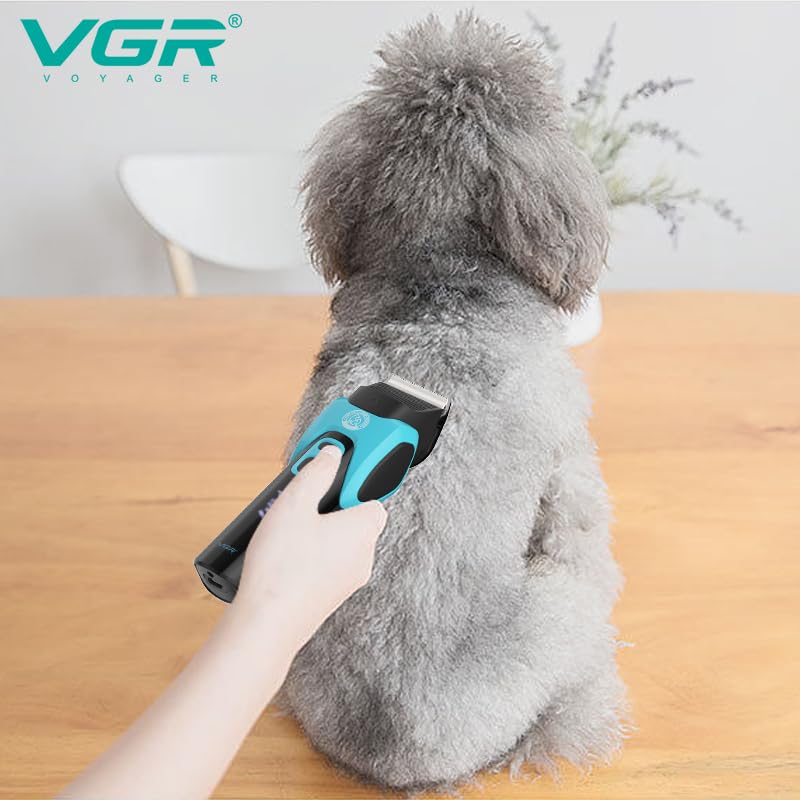
Image 6.1: Demonstrating the VGR V-208 clipper in use on a pet.

Image 6.2: Target audience for the VGR V-208 clippers.
7. Maintenance
7.1 Cleaning
- Turn Off: Always turn off the clipper and disconnect it from the power source before cleaning.
- Remove Hair: Use the provided cleaning brush to remove loose hair from the blades and inside the clipper head.
- Wipe Down: Use a soft, dry cloth to wipe the body of the clipper. Do not use harsh chemicals or abrasive cleaners.
- Blade Cleaning: The blades can be detached for thorough cleaning. Carefully push the blade unit forward to remove it. Clean any trapped hair and rinse the blade under running water if necessary (ensure it is completely dry before reattaching).
7.2 Oiling
After each cleaning and before each use, apply 1-2 drops of lubricating oil to the blades. This maintains cutting performance and prevents rust. Turn the clipper on for a few seconds to distribute the oil.
8. Troubleshooting
| Problem | Possible Cause | Solution |
|---|---|---|
| Clipper does not turn on | Battery is depleted; Safe lock is active; Device malfunction. | Charge the clipper; Long-press the power button for 3 seconds to deactivate safe lock; Contact customer support. |
| Clipper pulls hair or cuts poorly | Blades are dull or dirty; Insufficient oil; Pet's coat is tangled or wet. | Clean and oil the blades; Ensure pet's coat is clean, dry, and detangled; Consider blade replacement if dull. |
| Clipper gets hot quickly | Prolonged use; Blades are not properly oiled or are dirty. | Allow the clipper to cool down; Clean and oil the blades thoroughly. |
| Battery runtime is short | Battery not fully charged; Battery degradation over time. | Ensure a full 3-hour charge; Battery life naturally decreases over many charge cycles. |
9. Specifications
| Feature | Specification |
|---|---|
| Model Number | V-208 |
| Blade Material | Titanium-Ceramic |
| Power Source | Battery Powered (Cordless) |
| Battery Type | Li-ion |
| Battery Capacity | 2000 mAh |
| Charging Time | Approx. 3 hours |
| Runtime | Approx. 180 minutes |
| Noise Level | Approx. 50 dB |
| Dimensions (LxWxH) | 23.5 x 13.6 x 7.2 cm |
| Item Weight | 820 g |
| Target Audience | Dogs, Cats, Pets |
10. Warranty and Support
The VGR V-208 Professional Pet Grooming Clippers come with a 12-month quality warranty from the date of purchase. This warranty covers manufacturing defects and issues arising from normal use.
If you encounter any problems with your product or have questions regarding its operation or maintenance, please contact VGR customer service. Please retain your proof of purchase for warranty claims.
For support, refer to the contact information provided with your product packaging or visit the official VGR website.