
1. Introduction
Thank you for choosing the VGR V-115 Digital Display Professional Cordless Hair Clipper. This manual provides essential information for the safe and effective use of your new hair clipper. Please read these instructions carefully before first use and retain them for future reference.
2. Product Features
- Precise & Sharp Clipper Blades: Stainless steel blades are designed for smooth cutting and trimming of dry or wet, long or thick hair, preventing snagging or pulling. The blades are R-shaped for safety.
- IPX4 Waterproof: The hair clipper is rated IPX4, making it washable and easy to clean by rinsing the blades under running water for hygienic maintenance.
- Cordless/Corded Operation with Long Runtime: Equipped with a rechargeable 2000mAh Li-ion battery, the clipper provides up to 200 minutes of cordless operation after a full 3-hour charge. It can also be used corded for continuous power.
- Travel Lock: To activate the travel lock, long-press the on/off button for 3 seconds. Repeat the process to unlock.
- Powerful yet Quiet Motor with Turbo Function: Features a heavy-duty motor with a turbo function to adjust speed, allowing for efficient cutting through various hair types. The noise level is below 60 dB for quiet operation.
- Adjustable Hair Cutting Lengths: Trimming length can be adjusted using the integrated taper lever (0.5mm to 2.5mm) without guide combs. Four additional guide combs (3mm, 6mm, 9mm, 13mm) are included for varied lengths.
- LED Digital Display: An LED screen displays the remaining battery charge and indicates over-charge protection status.
3. Components and Package Contents
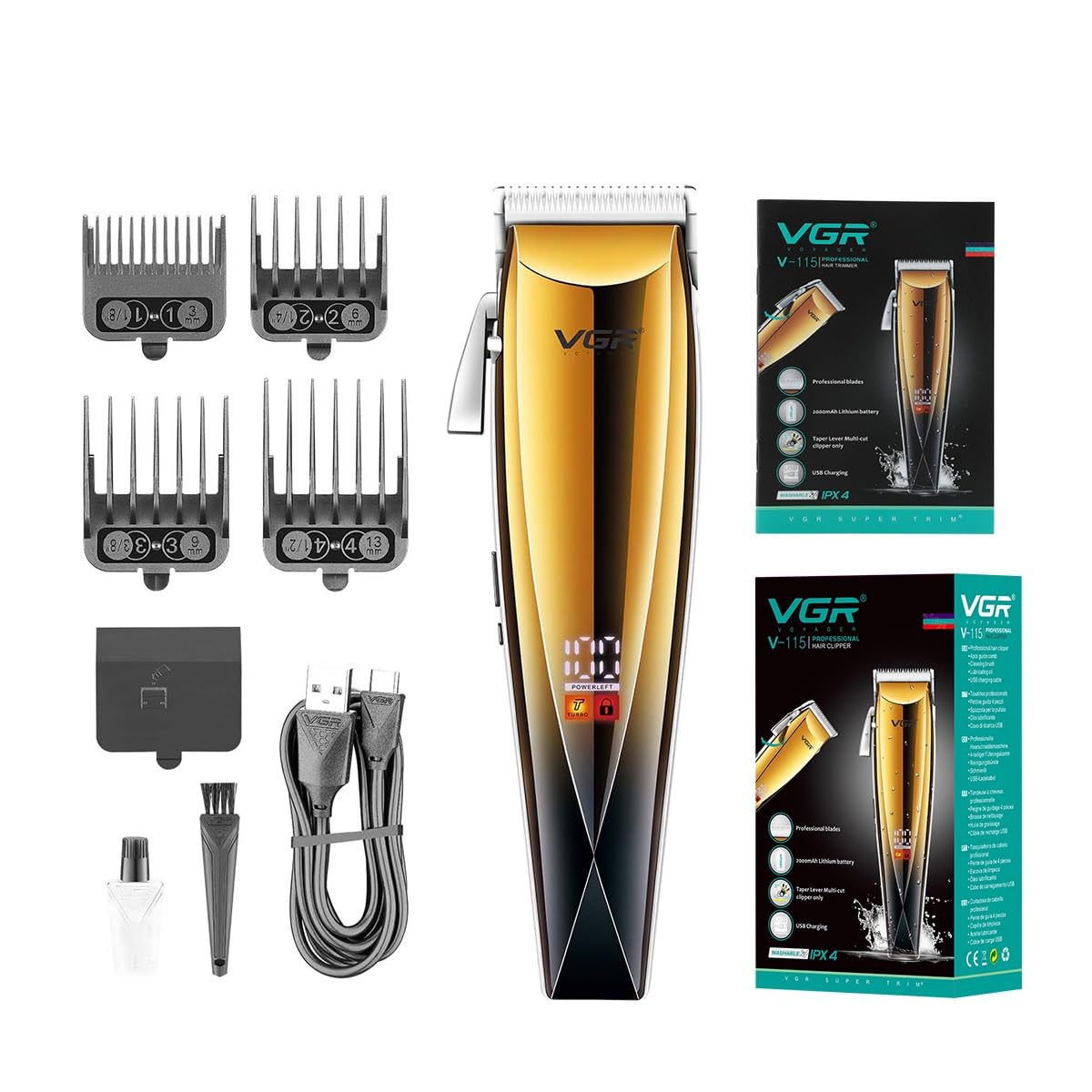
Image 1: VGR V-115 Hair Clipper with included accessories.
The VGR V-115 package typically includes:
- VGR V-115 Hair Clipper
- 4 Attachment Guide Combs (3mm, 6mm, 9mm, 13mm)
- USB Type-C Charging Cable
- Cleaning Brush
- Lubricating Oil
- User Manual
4. Setup and First Use
4.1 Charging the Clipper

Image 2: Illustration of 3-hour charge time for 200 minutes of work time.
- Before first use, fully charge the clipper for approximately 3 hours.
- Connect the USB Type-C charging cable to the clipper and a suitable USB power adapter (not included).
- The LED digital display will show the charging status. Once fully charged, the display will indicate 100%.
- A full charge provides up to 200 minutes of cordless operation.
4.2 Attaching Guide Combs

Image 3: Demonstrates guide comb attachment and other features.
- Ensure the clipper is turned off before attaching or removing guide combs.
- Align the desired guide comb with the clipper blade and push it firmly until it clicks into place.
- To remove, gently pull the comb away from the blade.
5. Operating Instructions
5.1 Turning On/Off
- Press the power button once to turn the clipper on.
- Press the power button again to turn the clipper off.
5.2 Adjusting Cutting Length (Taper Lever)

Image 4: Visual guide for adjusting the taper lever.
- The integrated taper lever on the side of the clipper allows for fine adjustment of cutting length from 0.5mm to 2.5mm without a guide comb.
- Move the lever up for a shorter cut and down for a longer cut.
5.3 Using Guide Combs
- For longer cutting lengths, attach one of the four provided guide combs (3mm, 6mm, 9mm, 13mm).
- Ensure the comb is securely attached before use.
5.4 Turbo Function
- Press the turbo button (usually indicated by a 'T' or similar icon) to activate increased motor speed for cutting thicker hair.
- Press again to deactivate.
5.5 Travel Lock
- To prevent accidental activation during travel, long-press the on/off button for 3 seconds to engage the travel lock.
- The LED display may show a lock icon.
- To unlock, long-press the on/off button for another 3 seconds.
6. Maintenance and Cleaning
6.1 Cleaning the Blades

Image 5: The IPX4 waterproof design allows for easy cleaning.
- Ensure the clipper is turned off and unplugged before cleaning.
- Remove any attached guide comb.
- Use the provided cleaning brush to remove loose hairs from the blades.
- Since the clipper is IPX4 waterproof, you can rinse the blades under running water. Do not submerge the entire unit.
- Allow the blades to air dry completely before reattaching any combs or storing.
6.2 Lubricating the Blades

Image 6: The stainless steel blades require regular lubrication.
- After every few uses or after cleaning with water, apply a small drop of the provided lubricating oil to the blades.
- Turn the clipper on for a few seconds to distribute the oil evenly.
- Wipe off any excess oil. Regular lubrication ensures optimal cutting performance and extends blade life.
7. Troubleshooting
| Problem | Possible Cause | Solution |
|---|---|---|
| Clipper does not turn on. | Battery is depleted; Travel lock is engaged. | Charge the clipper; Long-press the power button for 3 seconds to disengage travel lock. |
| Poor cutting performance or snagging. | Blades are dull or dirty; Insufficient lubrication; Hair is too thick for current speed. | Clean and lubricate blades; Activate turbo function for thicker hair. |
| Clipper gets hot during use. | Prolonged use; Blades need lubrication. | Allow clipper to cool down; Lubricate blades. |
8. Specifications
- Model Name: VGR V-115
- Power Source: Battery Powered (Cordless/Corded)
- Battery Type: 2000mAh Lithium Ion (included)
- Charge Time: Approximately 3 hours
- Runtime: Up to 200 minutes
- Waterproof Rating: IPX4
- Blade Material: Stainless Steel
- Adjustable Cutting Lengths: 0.5mm - 2.5mm (taper lever), 3mm, 6mm, 9mm, 13mm (guide combs)
- Product Dimensions: 23.5 x 13.5 x 7.2 cm
- Item Weight: 700 g
- Manufacturer: Ningbo VGR Electric Appliance Co., Ltd., Yiwu Gemei Electric Appliance Co. Ltd
9. Warranty and Support
VGR offers a 1-year quality warranty against defects in materials and workmanship from the date of original purchase (invoice required). This warranty does not cover intentional or unintentional damage by the user.
To initiate a warranty claim, contact VGR customer service at WARRANTY@VGRINDIA.CO.IN with a clear description of the problem, associated pictures, and a copy of your original invoice. Upon verification, the company will, at its discretion, repair or exchange the product. Customers are responsible for the cost of transporting the product to the service center, while the company will cover the return transport cost if a repair or exchange is deemed necessary.


