
TAGRY X08
TAGRY X08 True Wireless Earbuds User Manual
Model: X08 | Brand: TAGRY
Introduction
Welcome to the user manual for your TAGRY X08 True Wireless Earbuds. These earbuds are designed to provide a superior audio experience with advanced features such as an LED power display, wireless charging, and IPX5 waterproofing. This manual will guide you through the setup, operation, and maintenance of your new earbuds to ensure optimal performance and longevity.
Setup
1. What's in the Box
- TAGRY X08 True Wireless Earbuds (2 sets: Ocean Blue and Purple)
- Wireless Charging Case
- USB-C Charging Cable (not explicitly listed but implied for USB-C charging)
- Multiple Sizes of Ear Tips (implied by 'three different sizes of ear tips' in feature bullets)
2. Charging the Earbuds and Case
Before first use, fully charge the earbuds and the charging case. The charging case features a dual digital LED power display to show the power level for both the charging case and the individual earbuds.

The charging case supports both wireless charging and USB-C cable charging for convenience.

The dual digital LED display shows the battery percentage of the case and the charging status of each earbud.
- Wireless Charging: Place the charging case on a compatible wireless charging pad. The LED display will indicate charging progress.
- USB-C Charging: Connect the provided USB-C cable to the charging port on the case and a power source. The LED display will show the battery level increasing from 1 to 100.
- When earbuds are placed in the case, they will begin charging automatically. Each earbud can last 6 hours on a single charge, and the 470mAh charging case provides an additional 4 full charges, totaling up to 60 hours of playback.
3. First-Time Pairing
The TAGRY X08 earbuds utilize a Hall switch for quick pairing.
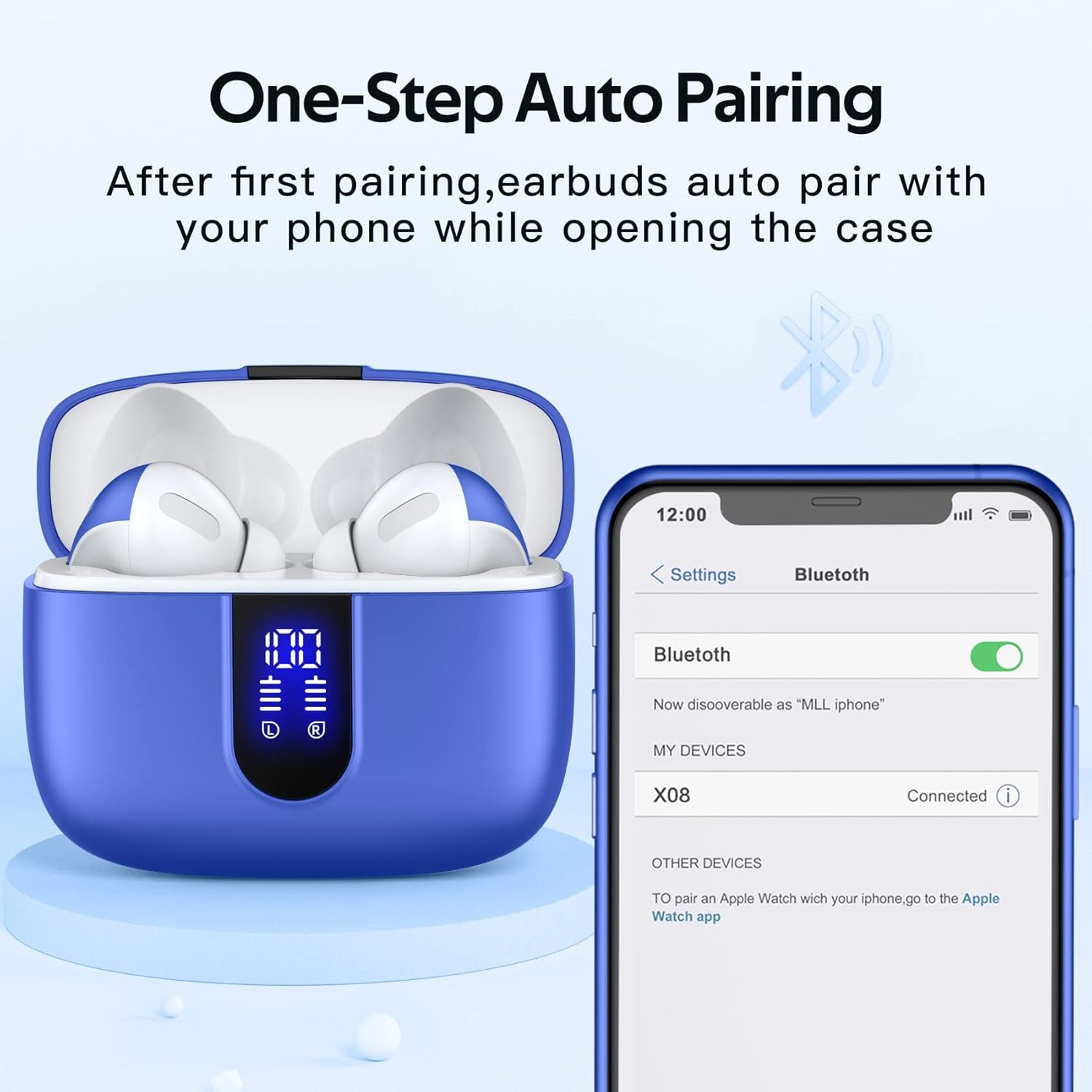
After the initial pairing, the earbuds will automatically connect to your device when the charging case is opened.
- Ensure your device's Bluetooth is turned on.
- Open the charging case. The earbuds will automatically enter pairing mode.
- On your device, search for "X08" in the Bluetooth settings and select it to connect.
- Once connected, the earbuds will automatically pair with your device each time you open the charging case.
Operating
1. Wearing the Earbuds
The TAGRY X08 earbuds are designed for ergonomic comfort and a secure fit. They come with three different sizes of ear tips to ensure suitability for most ear canals.

The earbuds are designed to fit comfortably and securely in the ear, suitable for various activities.
- Gently insert each earbud into the corresponding ear (L for left, R for right).
- Adjust the earbud until it feels snug and comfortable. A proper fit ensures optimal sound quality and prevents them from falling out during movement.
2. Smart Touch Controls
Control your music, calls, and voice assistant directly from the earbuds using the intuitive touch controls. There is no need to adjust through your mobile phone.

A visual guide to the touch controls for managing audio playback, calls, and voice assistant.
- Play/Pause: Single tap on either earbud.
- Volume +: Tap and hold the right earbud.
- Volume -: Tap and hold the left earbud.
- Next Track: Double tap the right earbud.
- Previous Track: Double tap the left earbud.
- Answer Call: Single tap on either earbud.
- Hang Up Call: Tap and hold either earbud during a call.
- Voice Assistant: Triple tap on either earbud.
3. Sound Quality and Call Features
The TAGRY X08 earbuds are equipped with 13mm speakers and triple-layer composite diaphragms to deliver powerful bass, stunning treble, and clear mids, catering to sound and music enthusiasts.

An exploded view of the earbud's internal structure, emphasizing the 13mm speaker for high-quality audio.
- Stereo and Mono Mode: The earbuds support both twin stereo mode for immersive listening and mono mode, allowing you to use a single earbud while the other charges or for sharing.
- Clear Calls: Each earbud has a built-in microphone. CVC noise reduction technology ensures your voice is heard clearly during phone calls, minimizing background noise.
Maintenance
1. Waterproof Rating
The TAGRY X08 wireless headphones are rated IPX5 waterproof. The nano-coating on the earbuds' surface prevents water and sweat from penetrating, making them suitable for sports and daily use. Avoid submerging the earbuds in water.
2. Cleaning
- Regularly clean the earbuds and charging case with a soft, dry, lint-free cloth.
- Remove ear tips and clean them separately with mild soap and water if necessary, ensuring they are completely dry before reattaching.
- Gently clean the charging contacts on both the earbuds and inside the case to ensure proper charging.
3. Storage
When not in use, store the earbuds in their charging case to protect them from dust, damage, and to keep them charged for your next use. Store in a cool, dry place away from extreme temperatures.
Troubleshooting
- Earbuds not pairing: Ensure both earbuds are charged. Place them back in the case, close it, then open it again to re-initiate pairing mode. Check your device's Bluetooth settings and try reconnecting.
- Only one earbud working: Ensure both earbuds are charged. Try placing both back in the case, closing it, and then taking them out again. Sometimes a simple reset can resolve this.
- Charging issues: Clean the charging contacts on both the earbuds and inside the case. Ensure the USB-C cable is securely connected or the wireless charging pad is properly aligned.
- Low volume or poor sound quality: Ensure the earbuds are properly seated in your ears. Try different sizes of ear tips for a better seal. Clean any debris from the earbud speakers.
- Earbuds falling out: Experiment with the different ear tip sizes provided to find the most secure and comfortable fit for your ears.
If issues persist, refer to the support section for further assistance.
Specifications
| Feature | Detail |
|---|---|
| Model Name | X08 |
| Brand | TAGRY |
| Connectivity Technology | Wireless (Bluetooth) |
| Bluetooth Version | 5.3 |
| Ear Placement | In Ear |
| Form Factor | In Ear |
| Battery Life (Earbuds) | 6 Hours (single charge) |
| Total Playback Time | Up to 60 Hours (with charging case) |
| Charging Time | 1.2 Hours |
| Charging Case Battery Capacity | 470mAh |
| Waterproof Rating | IPX5 |
| Audio Driver Size | 13 Millimeters |
| Frequency Range | 20 Hz to 20,000 Hz |
| Control Type | Touch, Voice Control |
| Earbud Weight (single) | 0.14oz |
| Earbud Dimensions | 1.57*0.78*0.59in |
| Charging Case Dimensions | 2.56*2.16*1in |
| Carrying Case Material | Plastic |
Warranty and Support
1. Return Policy
This product is subject to a 30-day return policy for refund or replacement, as per the purchase terms.
2. Customer Support
For any product inquiries, technical support, or warranty claims, please visit the official TAGRY Store on Amazon or contact the seller directly through your purchase platform. Keep your purchase receipt or order number handy for faster service.
TAGRY Store Link: https://www.amazon.com/stores/TAGRY/page/B804BE9C-9D7C-43A3-AA31-FD0EBCEF1BF4
Related documentsX08


Ask a question about this manual
Ask about setup, troubleshooting, compatibility, parts, safety, or missing instructions. Manuals+ will review the question and use this page’s manual context to help answer it.