
1. Introduction
The Minolta MN4KPRO-KIT is a versatile 4K camcorder designed for capturing high-quality video and still images. This manual provides essential information for the proper setup, operation, and maintenance of your device and its included accessories. Please read this manual thoroughly before using the camera to ensure optimal performance and longevity.
2. What's in the Box
Verify that all items are present in your package:
- Minolta MN4KPRO Camcorder
- Lens Hood
- LED Video Light
- External Stereo Microphone
- Handheld Stabilizer
- Lithium-Ion Battery (3100mAh)
- Remote Control
- USB Cable
- HDMI Cable
- AC Adaptor
- 32GB Memory Card
- Carrying Bag
- User Manual (this document)
- Warranty Card
3. Product Overview
Familiarize yourself with the main components and included accessories of your Minolta MN4KPRO-KIT camcorder.
Camcorder and Key Features
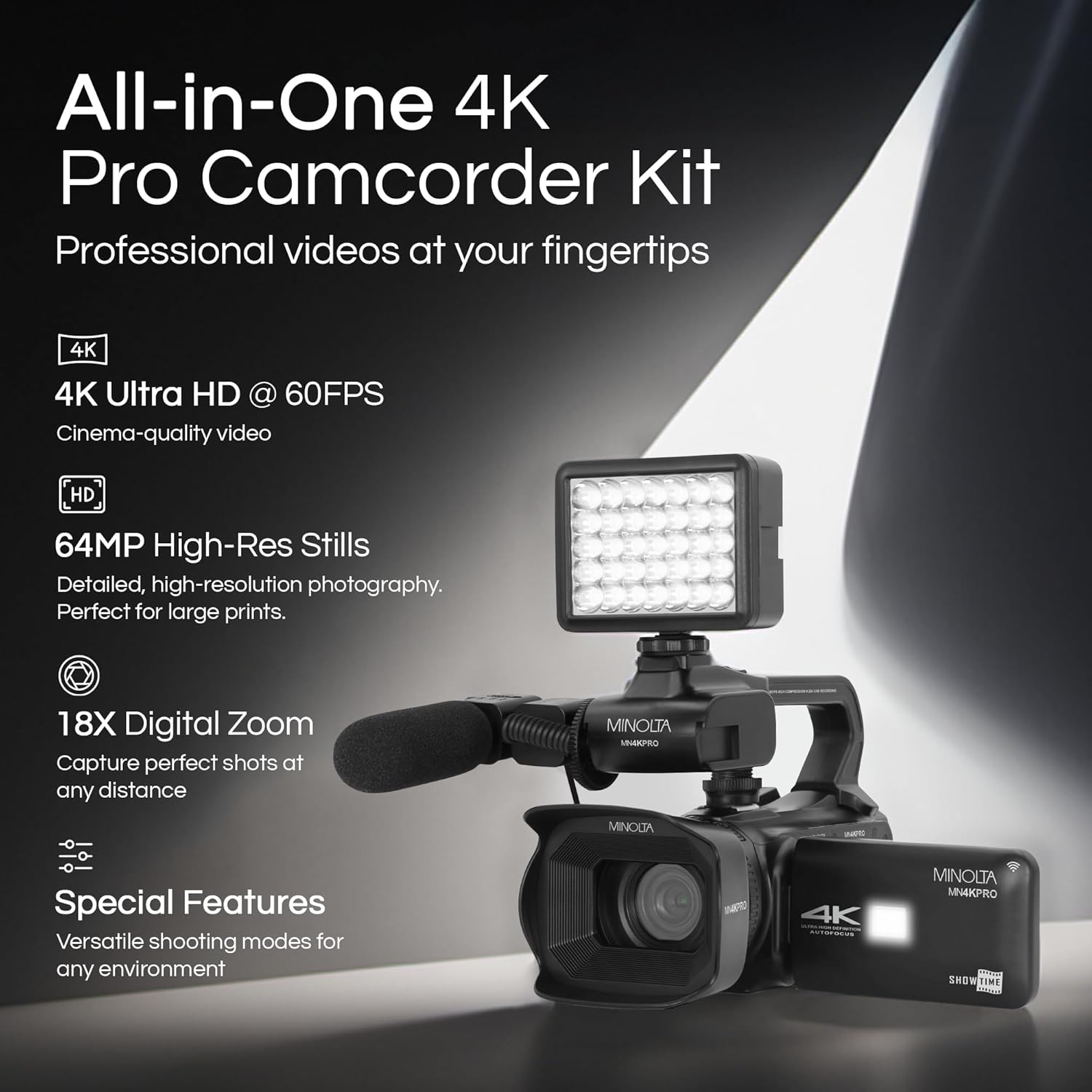
Image: The Minolta MN4KPRO-KIT camcorder shown with the LED video light and external stereo microphone attached. This image highlights the camera's ability to record 4K Ultra HD video at 60FPS, capture 64MP high-resolution stills, and features 18x digital zoom.

Image: The Minolta MN4KPRO-KIT camcorder with its 4-inch IPS high-resolution touchscreen display open, showing a live preview. This image emphasizes the 4.0-inch LCD touchscreen, autofocus capability, and built-in Wi-Fi for app control.
Included Accessories

Image: The Minolta MN4KPRO-KIT camcorder with its key accessories highlighted: the handheld stabilizer, integrated LED light, long-lasting 3100mAh battery, and external stereo microphone. This visual guide demonstrates how these components enhance the camera's functionality.
4. Setup
4.1. Charging the Battery
- Insert the included 3100mAh Lithium-Ion battery into the camcorder's battery compartment.
- Connect the AC adaptor to the camcorder and a power outlet.
- Allow the battery to fully charge before first use. The charging indicator light will typically change color or turn off when charging is complete.
4.2. Inserting the Memory Card
- Locate the SD card slot on the camcorder.
- Insert the included 32GB SD memory card with the metal contacts facing the correct direction (refer to the diagram near the slot).
- Push the card gently until it clicks into place. To remove, push again until it springs out.
4.3. Attaching Accessories
The MN4KPRO-KIT includes several accessories to enhance your recording experience:
- External Stereo Microphone: Mount the microphone onto the camera's hot shoe and connect its cable to the microphone input port.
- LED Video Light: Mount the LED light onto the camera's hot shoe. Ensure it is charged or has fresh batteries if applicable.
- Handheld Stabilizer: Attach the camcorder to the stabilizer's mounting screw for improved shot stability.
- Lens Hood: Attach the lens hood to the front of the lens to reduce glare and protect the lens.
5. Operating Instructions
5.1. Power On/Off
Locate the power button, typically near the battery compartment or on the side of the camera. Press and hold to power on or off.
5.2. Basic Recording
- Video Recording: Press the record button to start and stop 4K Ultra HD video capture at 60 frames per second.
- Still Images: Switch to photo mode and press the shutter button to capture 64MP still images.
5.3. Using the 4-inch Touchscreen
The 4-inch IPS touchscreen allows for intuitive navigation of menus, adjustment of settings, and playback of recorded content. Tap icons to select options and swipe to navigate.
5.4. Autofocus and Digital Zoom
The camcorder features autofocus for clear subject capture. Use the zoom controls (typically a rocker switch) to engage the 18x digital zoom. Note that digital zoom may reduce image quality at higher magnifications.
5.5. Wi-Fi Connectivity
Enable Wi-Fi in the camera's settings to connect to your smartphone via a dedicated app. This allows for wireless control, live preview, and file transfer.
5.6. Creative Modes
Explore various shooting modes to add dynamic effects to your content:
- Time Lapse: Capture a sequence of images over time and combine them into a sped-up video.
- Slow Motion: Record video at a higher frame rate to play back in slow motion.
- Interval Shooting: Take photos at set intervals.
- Long Exposure: Capture images with extended shutter times for artistic effects.
- Self Timer: Set a delay before the camera takes a photo or starts recording.
6. Maintenance
6.1. Cleaning the Camera
- Use a soft, lint-free cloth to clean the camera body.
- For the lens, use a specialized lens cleaning solution and cloth. Avoid touching the lens surface with your fingers.
- Keep the touchscreen clean with a microfiber cloth.
6.2. Battery Care
- Store batteries in a cool, dry place when not in use.
- Avoid fully discharging the battery frequently to prolong its lifespan.
- Do not expose batteries to extreme temperatures.
6.3. Storage
When storing the camcorder for extended periods, remove the battery and store the camera in its carrying bag in a dry, dust-free environment.
7. Troubleshooting
If you encounter issues with your Minolta MN4KPRO-KIT, refer to the following common solutions:
- Camera not powering on: Ensure the battery is fully charged and correctly inserted. Try charging the battery for a longer period.
- Poor image/video quality: Check that the lens is clean and free from smudges. Ensure you are recording in appropriate lighting conditions. Digital zoom at high levels can reduce clarity.
- Autofocus issues: Ensure there is sufficient light for the autofocus system to work effectively. Try manually focusing if the autofocus struggles in specific conditions.
- Memory card error: Ensure the memory card is correctly inserted and not full. Try formatting the card (this will erase all data, so back up first). Use a compatible SD card (C10 speed class recommended).
- Wi-Fi connection problems: Ensure Wi-Fi is enabled on both the camera and your smartphone. Restart both devices and try reconnecting.
8. Specifications
Key technical specifications for the Minolta MN4KPRO-KIT camcorder:
| Brand | Minolta |
| Model Number | MN4KPRO-KIT |
| Video Capture Resolution | 4K (3840 Pixels), 2.7K |
| Effective Still Resolution | 64 MP |
| Photo Sensor Technology | CMOS |
| Digital Zoom | 18x |
| Screen Size | 4 Inches (Touchscreen) |
| Connectivity Technology | Wi-Fi |
| Flash Memory Type | SD (C10 Speed Class) |
| Battery | 1 Lithium Ion (3100mAh) |
| Image Stabilization | Digital |
| Focus Type | Auto Focus |
| Video Capture Format | MP4 |
| Supported Audio Format | AAC, MP3 |
| Item Weight | 4.05 Pounds |
| Item Dimensions (D x W x H) | 7"D x 3.22"W x 3.56"H |
9. Warranty and Support
9.1. Warranty Information
This Minolta MN4KPRO-KIT camcorder comes with a Limited 1 Year Manufacturer Warranty. Please refer to the included Warranty Card for detailed terms and conditions.
9.2. Customer Support
For further assistance, technical support, or warranty claims, please contact Minolta customer service. Contact details can typically be found on the manufacturer's official website or on the warranty card provided with your product.


