Introduction
Thank you for choosing the Fuzion Digital Pocket Scale FZ-200 Pro. This precision scale is designed for accurate measurements of small items, offering a capacity of 200g with 0.01g readability. Its compact and portable design makes it suitable for various applications, including weighing jewelry, food, herbs, and coins. Please read this manual carefully to ensure proper use and maintenance of your scale.

Setup
1. Battery Installation
The Fuzion Digital Pocket Scale requires 2 AAA batteries (included). To install:
- Open the battery compartment cover located on the underside of the scale.
- Insert the 2 AAA batteries, ensuring correct polarity (+/-).
- Close the battery compartment cover securely.
2. Initial Placement
Place the scale on a flat, stable, and vibration-free surface to ensure accurate readings.
3. Calibration
Your scale comes pre-calibrated. However, periodic calibration is recommended for optimal accuracy. A 100g calibration weight is included with your scale. To calibrate:
- Turn the scale ON by pressing the ON/OFF button.
- Press and hold the MODE button until the display shows "CAL".
- Press the MODE button again. The display will flash "200.00g".
- Place the required 200g calibration weight (not included, but a 100g weight is provided for general use) on the center of the weighing platform.
- The display will show "PASS" when calibration is complete. Remove the weight.

Operation
1. Power On/Off
Press the ON/OFF button to turn the scale on or off. The scale features an auto-off function to conserve battery power.
2. Weighing Items
Place the item(s) gently on the center of the stainless steel weighing platform. The weight will be displayed on the LCD screen.

3. Tare Function
The Tare function allows you to subtract the weight of a container, so you only measure the net weight of its contents.
- Turn on the scale.
- Place an empty container on the weighing platform.
- Press the TARE button. The display will reset to zero.
- Add the items you wish to weigh into the container. The display will show the net weight of the items.

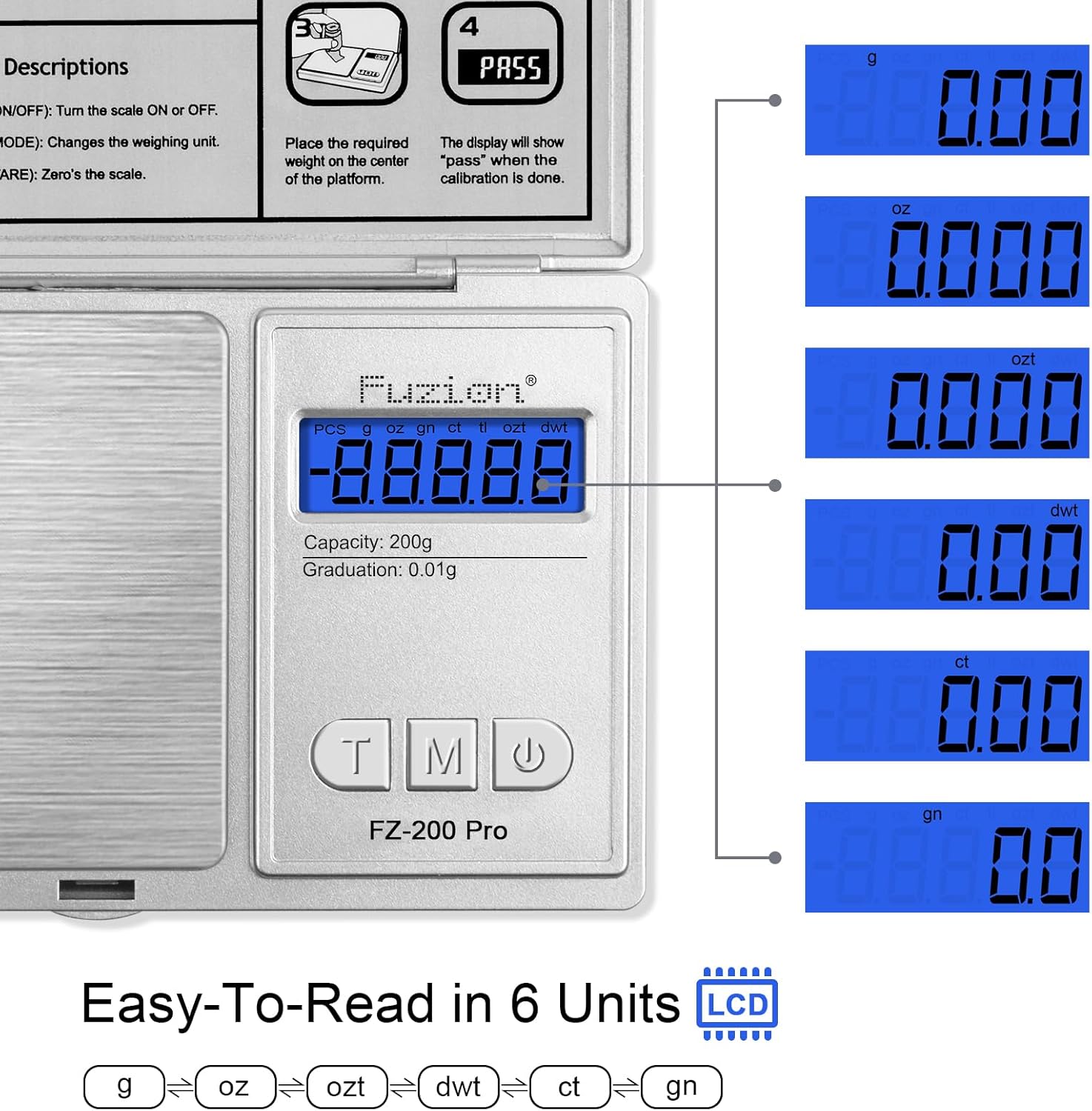
4. Changing Units
The scale supports 6 units of measurement. To change the weighing unit:
- Press the MODE button to cycle through the available units: Grams (g), Ounces (oz), Grains (gn), Troy Ounces (ozt), Pennyweights (dwt), and Carats (ct).
Maintenance
- Keep the scale clean. Wipe the surface with a soft, damp cloth. Avoid abrasive cleaners or harsh chemicals.
- Do not immerse the scale in water.
- Store the scale in a dry, cool place.
- Protect the scale from strong impacts or vibrations.
- If the scale will not be used for an extended period, remove the batteries to prevent leakage.
Troubleshooting
| Problem | Possible Cause | Solution |
|---|---|---|
| Inaccurate readings | Scale not on a flat surface, needs calibration, low battery, or overloaded. | Place on a stable surface. Perform calibration. Replace batteries. Do not exceed maximum capacity (200g). |
| Display shows "Lo" | Low battery power. | Replace the AAA batteries. |
| Display shows "O_Ld" | Scale is overloaded. | Remove the item immediately. Do not exceed 200g. |
| Scale does not turn on | Batteries incorrectly installed or dead. | Check battery polarity or replace with new AAA batteries. |
Specifications
- Brand: Fuzion
- Model: FZ-200 Pro
- Capacity: 200 Grams
- Readability: 0.01 Grams
- Permissible Error: +/- 0.03g
- Units of Measurement: Grams (g), Ounces (oz), Grains (gn), Troy Ounces (ozt), Pennyweights (dwt), Carats (ct)
- Display Type: Back-lit LCD
- Material: Stainless Steel platform, durable ABS flip cover
- Power: 2 x AAA batteries (included)
- Special Features: Auto Shut Off, Tare Function
- Product Dimensions: 5 x 3 x 0.7 inches
- Item Weight: 8.4 ounces (0.24 Kilograms)
- Recommended Uses: Food, Coins, Jewelry, Herbs, Gemstones
- UPC: 628719230251
Warranty and Support
Fuzion offers a Two Years Warranty and Lifetime Support for this digital pocket scale. For any concerns or assistance, please contact the Fuzion support team. We are committed to providing full-day service to address your needs.
For support, please visit the official Fuzion website or refer to the contact information provided with your product packaging.


