
1. Introduction and Overview
The Waterdrop CoreRO Countertop Reverse Osmosis System WD-C1H is designed to provide clean, healthy, and great-tasting water directly from your countertop. This advanced system incorporates a 6-stage filtration process, including a 0.0001µm Reverse Osmosis (RO) membrane, to effectively reduce a wide range of contaminants. Additionally, it features an instant heating function with multiple temperature options for various beverage preparations.
Key features include:
- Advanced Filtration: Certified by SGS and IAPMO R&T, the system reduces TDS, PFOA, PFOS, chlorine, fluoride, arsenic, lead, and other harmful substances.
- Instant Hot Water: Provides hot water in just 3 seconds, perfect for tea, coffee, and baby formula.
- Smart Digital Display: Monitors filter life and allows selection of water volume and temperature.
- No Installation Required: Compact, plug-and-play design suitable for kitchens, offices, or bedrooms.
- Efficient Water Usage: Features a 3:1 pure water to drain ratio for water conservation.
- Long-lasting Filter: Durable filter lasts up to 12 months with easy 3-second replacement.

Image: The Waterdrop CoreRO system on a kitchen countertop, highlighting its compact design and ease of use.
2. Safety Information
Your Waterdrop CoreRO system is designed with safety in mind and has undergone rigorous testing and certification. It is certified by SGS and IAPMO R&T against NSF/ANSI 372 standards, ensuring lead-free components (≤0.25% lead). The product also complies with CE and FCC regulations.
- Always use the appliance with a stable power source as specified.
- Do not immerse the unit in water or other liquids.
- Keep out of reach of children. Utilize the child lock feature during operation.
- Ensure proper ventilation around the unit.
- Do not attempt to repair or modify the appliance yourself. Contact customer support for assistance.

Image: Display of safety certifications for the Waterdrop CoreRO system, including SGS, IAPMO R&T, CE, and FCC.
3. Product Components
The Waterdrop CoreRO system comes with the following components:
- Waterdrop CoreRO Countertop RO System Unit
- Replacement Filter (pre-installed or separate)
- Raw Water Tank (for unfiltered tap water)
- Pure Water Tank (for filtered water)
- Power Cable

Image: An illustration showing the internal structure and components of the Waterdrop CoreRO system, including the raw water tank, pure water tank, and filter.
4. Setup Instructions
The Waterdrop CoreRO system is designed for easy, no-installation setup. Follow these steps to get started:
- Unpack: Carefully remove all components from the packaging.
- Placement: Place the main unit on a stable, flat countertop surface, ensuring adequate space around it for ventilation.
- Clean Tanks: Before first use, wash the raw water tank and pure water tank with clean water.
- Install Filter: If the filter is not pre-installed, insert it into its designated slot according to the markings. Ensure it clicks securely into place.
- Fill Raw Water Tank: Fill the raw water tank with tap water and place it back into the unit.
- Connect Power: Plug the power cable into the unit and then into a standard electrical outlet.
- Initial Flush: The system may perform an initial flush cycle. Follow any on-screen prompts. It is recommended to discard the first few liters of filtered water to ensure optimal performance and taste.

Image: The Waterdrop CoreRO system displayed on a countertop, illustrating its compact size and placement flexibility.
5. Operating Instructions
The Waterdrop CoreRO system features an intuitive digital display and touch controls for easy operation.
5.1 Digital Display and Controls

Image: A close-up view of the digital touch screen display, showing various icons and settings.
The digital screen provides information and allows you to control the following functions:
- Temperature Display: Shows the selected water temperature.
- Water Volume Display: Shows the selected water dispensing volume.
- Favorite Mode: Allows you to save and quickly select your preferred temperature and volume settings.
- Filter Life Indicator: Displays the remaining lifespan of the filter.
- Flush Function: Initiates a flushing cycle for filter maintenance.
- Child Lock: Activates or deactivates the child safety lock.
5.2 Dispensing Water
- Place Container: Position your cup or container under the dispenser spout.
- Select Temperature: Use the touch controls to select your desired water temperature (e.g., room temperature, 45°C, 65°C, 85°C, 95°C).
- Select Volume: Choose the desired water volume (e.g., 150ml, 250ml, 350ml, 500ml, or continuous dispense).
- Dispense: Press the dispense button. For hot water, the system will heat instantly and dispense.
- Child Lock: If the child lock is active, you may need to press and hold the child lock button before dispensing hot water.

Image: A hand holding a glass under the dispenser, illustrating the water dispensing process.
6. Maintenance
Regular maintenance ensures optimal performance and longevity of your Waterdrop CoreRO system.
6.1 Filter Replacement
The filter typically lasts for 12 months, but this may vary depending on water quality and usage. The digital display will indicate when a filter change is needed.
- Power Off: Unplug the unit from the power outlet.
- Remove Old Filter: Locate the filter compartment. Twist and pull out the old filter cartridge.
- Insert New Filter: Remove the new filter from its packaging. Align it with the slot and push it in, then twist to secure it. The replacement process takes approximately 3 seconds.
- Reset Filter Life: Plug the unit back in. Follow the on-screen instructions to reset the filter life indicator.
- Flush New Filter: Perform a flush cycle as indicated in the operating instructions to prepare the new filter for use.
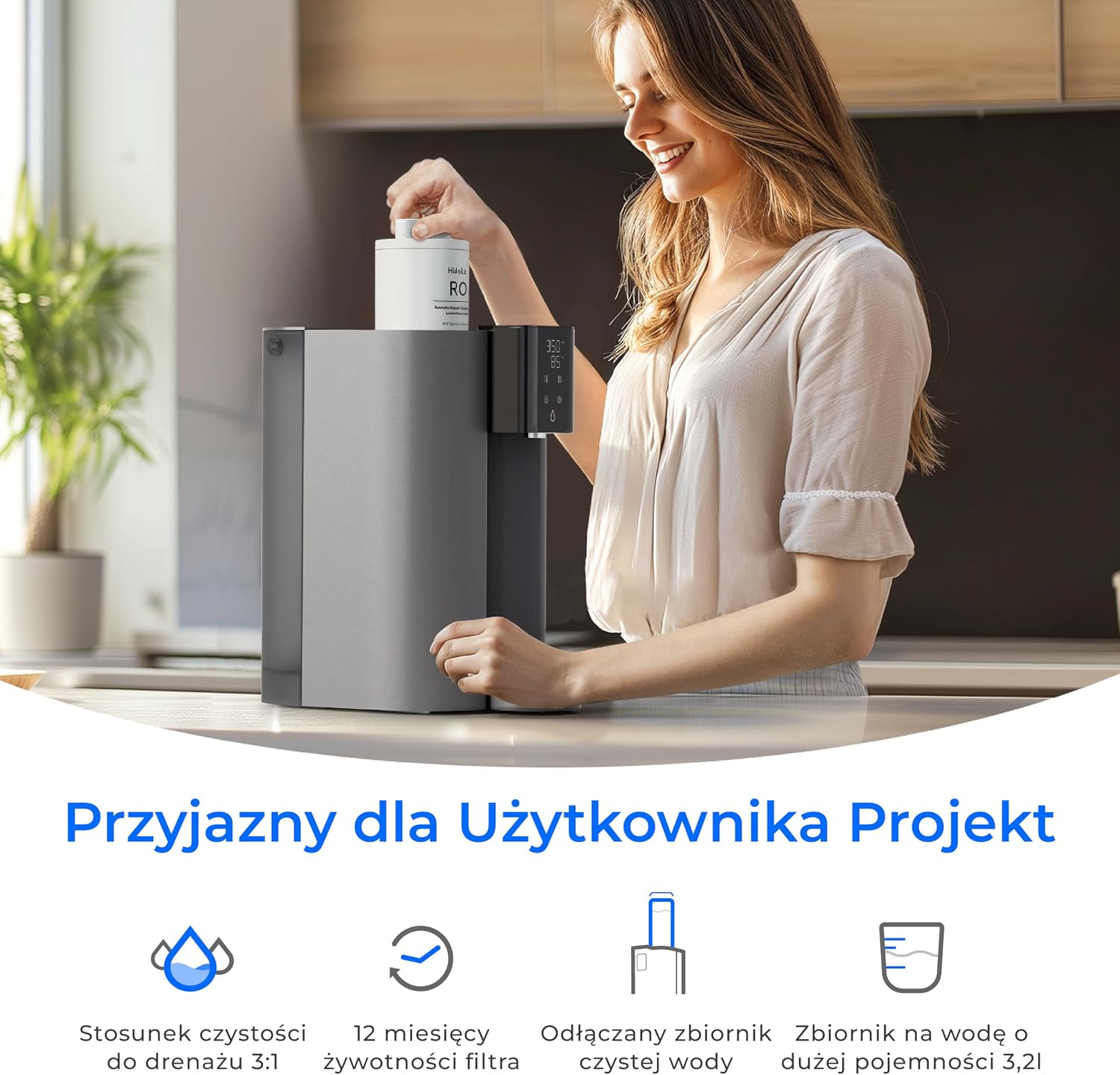
Image: A person demonstrating the quick and easy filter replacement process for the Waterdrop CoreRO system.
6.2 Cleaning the System
Regularly clean the raw water tank and pure water tank to prevent buildup and maintain water quality.
- Unplug: Always unplug the unit before cleaning.
- Empty Tanks: Remove and empty both the raw water and pure water tanks.
- Wash Tanks: Wash the tanks with mild soap and warm water. Rinse thoroughly to remove all soap residue.
- Wipe Exterior: Wipe the exterior of the unit with a soft, damp cloth. Do not use abrasive cleaners or solvents.
- Dry: Ensure all parts are completely dry before reassembling and plugging in the unit.
7. Troubleshooting
If you encounter any issues with your Waterdrop CoreRO system, refer to the following troubleshooting guide:
| Problem | Possible Cause | Solution |
|---|---|---|
| No water dispensing | Unit unplugged; Raw water tank empty; Child lock active (for hot water) | Ensure power is connected; Refill raw water tank; Deactivate child lock. |
| Slow filtration or low water flow | Filter nearing end of life or clogged; Air in the system | Check filter life indicator and replace if necessary; Perform a flush cycle. |
| Unusual taste or odor in water | Filter needs replacement; Tanks require cleaning | Replace the filter; Clean both raw and pure water tanks thoroughly. |
| Water leakage | Tanks not properly seated; Loose connections | Ensure tanks are correctly inserted; Check all connections for tightness. If leakage persists, contact support. |
| Hot water not dispensing | Child lock active; Heating element issue | Deactivate child lock; If problem persists, contact customer support. |
If the problem persists after attempting these solutions, please contact Waterdrop customer support for further assistance.
8. Specifications
Detailed technical specifications for the Waterdrop CoreRO Countertop Reverse Osmosis System WD-C1H:
| Feature | Specification |
|---|---|
| Brand | Waterdrop |
| Model Name | CoreRO |
| Model Number | WD-C1H |
| Product Dimensions (L x W x H) | 40 cm x 27.7 cm x 43.2 cm |
| Item Weight | 6.35 Kilograms |
| Capacity | 3.2 Liters (Raw Water Tank) |
| Material | Reverse Osmosis Membrane, Carbon Block, PP Cotton |
| Purification Method | Reverse Osmosis |
| Installation Type | Countertop Mount |
| Power Source | Corded Electric |
| Lower Temperature Range | 5 Degrees Celsius |
| Upper Temperature Range | 38 Degrees Celsius (for ambient water input) |
| Maximum Supported Water TDS Level | 2000 ppm |
| Filter Lifespan | 365 Days (approx. 12 months) |
| Year of Manufacture | 2021 |
9. Warranty and Support
Waterdrop products are manufactured to high-quality standards and are backed by a manufacturer's warranty. For specific warranty details, including coverage period and terms, please refer to the warranty card included with your product or visit the official Waterdrop website.
For technical support, troubleshooting assistance, or to inquire about replacement parts and filters, please contact Waterdrop customer service. Contact information can typically be found on the product packaging, the official Waterdrop website, or through your retailer.
When contacting support, please have your model number (WD-C1H) and purchase date available to expedite service.


