1. Introduction
This user manual provides essential information for the safe and effective operation of your LASER TREE K40 Laser Module. The K40 is a high-power 40W+ optical output diode laser head designed for precision cutting and engraving tasks. Please read this manual thoroughly before installation and use to ensure optimal performance and safety.

Figure 1.1: LASER TREE K40 Laser Module with included accessories.
2. Safety Information
The LASER TREE K40 is a Class 4 laser product. Improper use can result in serious injury, including permanent eye damage, skin burns, and fire. Always adhere to the following safety precautions:
- Eye Protection: Always wear certified laser safety goggles (OD6+ for 450nm blue laser) when the laser is in operation. Never look directly at the laser beam or its reflection.
- Skin Protection: Avoid direct exposure of skin to the laser beam.
- Ventilation: Ensure adequate ventilation in the work area to dissipate fumes and smoke generated during cutting and engraving. Some materials can produce toxic fumes.
- Fire Hazard: Laser cutting and engraving can ignite flammable materials. Always supervise the machine during operation and have fire suppression equipment readily available.
- Work Area: Operate the laser in a controlled environment, away from children and pets. Ensure the work surface is non-flammable.
- Power Supply: Use only the provided power adapter or a compatible power supply that meets the module's specifications.
- Emergency Stop: Familiarize yourself with the emergency stop procedure for your laser engraver machine.
- Temperature Monitoring: The module features a temperature display and alarm. If the working temperature exceeds 55°C, an alarm will sound. Discontinue operation and allow the module to cool down.
3. Package Contents
Verify that all items listed below are included in your package:

Figure 3.1: Contents of the LT-K40 package.
- LASER TREE K40 Laser Module
- Driver Adapter & 30cm Input Cable
- Spare Protective Lens
- Power Cable
- 24V6A Power Adapter
- Adjusting Screw M4*20
- Sliding Plate
- Air Tube
- 60cm Adapter Cable
- 2mm L-wrench
- 2.5mm Flat Screwdriver
4. Product Features
The LASER TREE K40 laser module offers advanced features for superior performance:
- 40W+ Optical Output: True 40W+ (40000mW) output for powerful cutting, achieved by eight high-performance fast-axis compression diodes.
- Built-in Air Assist: Improves cutting performance by reducing air resistance, leading to cleaner cuts with fewer burn marks.
- Dual Fan Cooling: Ensures excellent heat dissipation, improving stability and extending the laser head's service life.
- Red Cross Positioning Cursor: Located at the bottom (offset X: 0mm, Y: -21mm) for quick and accurate starting point location.
- Integrated Dovetail Guide Design: Ensures smooth movement and stability, with a 115mm guide rail length.
- Focus Slider Structure: Upgraded for smoother adjustment, allowing precise focusing.
- Wide Compatibility: Compatible with TTL/PWM-controlled DIY machines, laser engraver cutter machines, CNC laser machines, and 3D printers via an adapter board and multi-hole sliding bracket.
- Temperature Display & Alarm: Monitors working temperature and alerts if it exceeds 55°C to protect the module.
- Flame-resistant Optical Glass: Anti-blue light view window protects eyes from blue light and is resistant to flames.
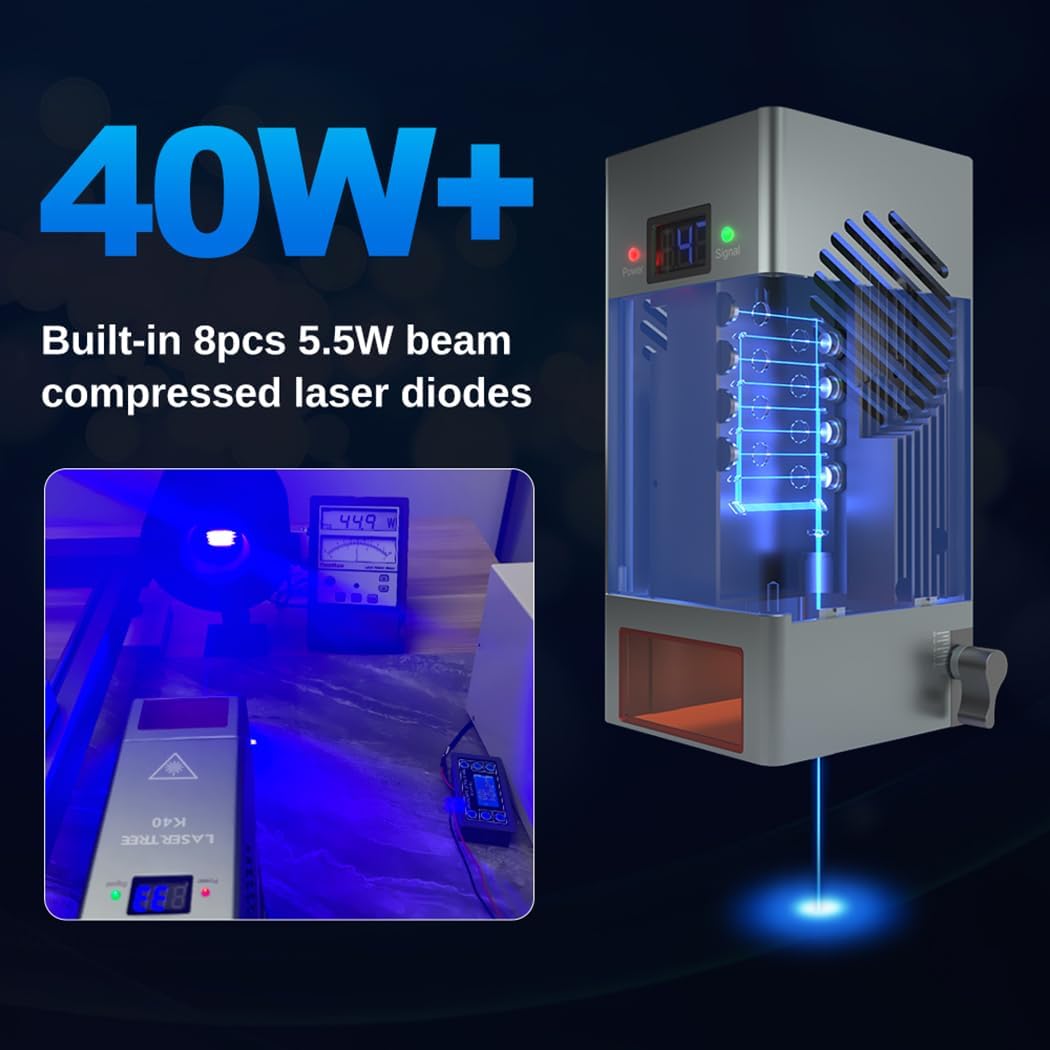
Figure 4.1: The K40 module features 40W+ optical output from eight 5.5W beam compressed laser diodes.
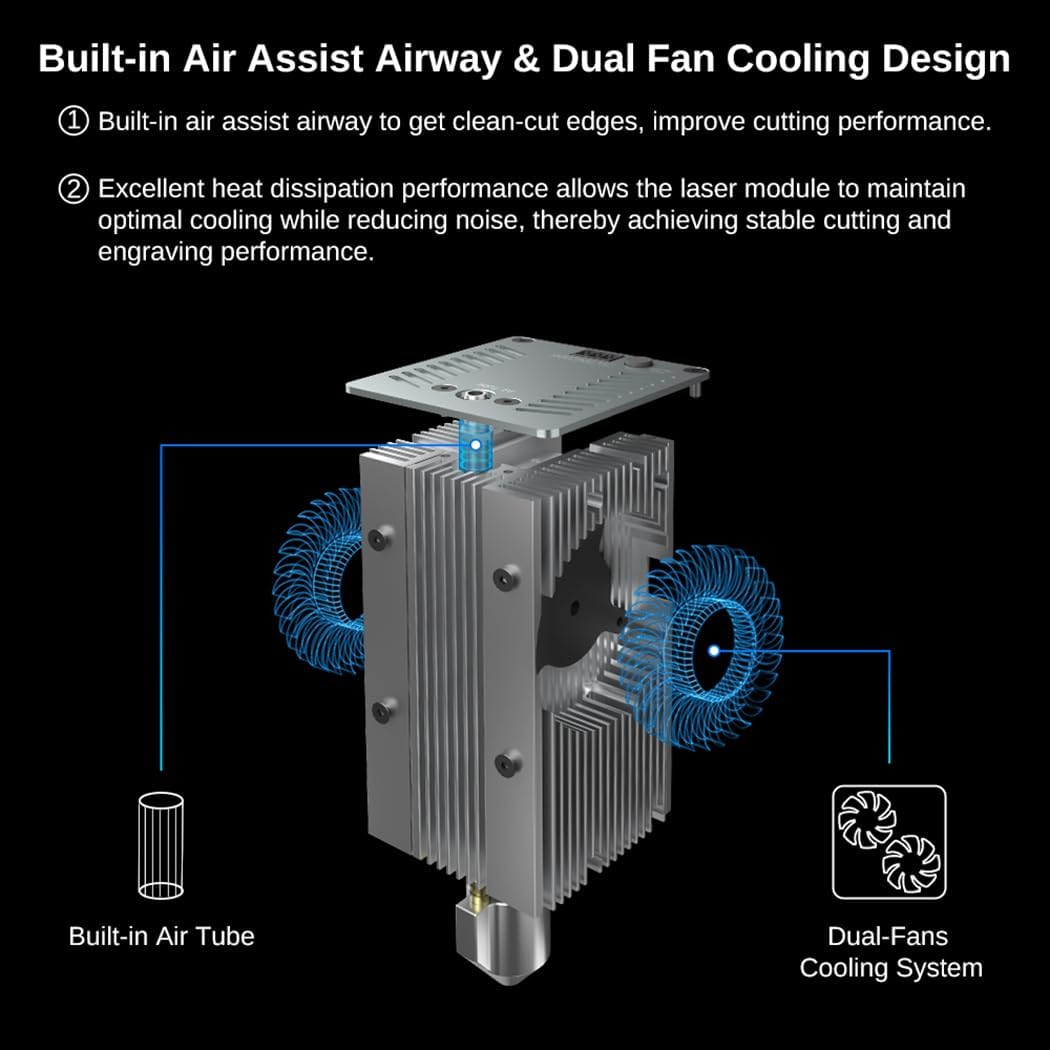
Figure 4.2: Internal structure showing built-in air assist and dual fan cooling for optimal performance and heat dissipation.

Figure 4.3: The module includes a temperature display and an over-temperature alarm switch for safety and longevity.

Figure 4.4: The laser view window is made of flame-resistant optical glass, providing anti-blue light protection.
5. Setup
5.1 Installation
The K40 laser module is designed for easy integration with various laser engraver machines. It features an integrated dovetail guide and a sliding bracket with multiple holes for installation compatibility.

Figure 5.1: The integrated dovetail guide and multi-hole sliding plate facilitate easy and adjustable installation.
5.2 Electrical Connection
The module includes a driver adapter for electrical compatibility. Power and signal LED indicators help verify correct connections. Ensure your machine supports TTL/PWM control.
5.3 Focusing the Laser
Accurate focusing is crucial for optimal cutting and engraving results. The K40 features a focus slider structure and a red cross positioning cursor to assist with this process.

Figure 5.2: Reference settings for adjusting the fixed focus lever based on material thickness. For example, to cut 12mm material, the focus should be 6mm lower than the material surface.

Figure 5.3: The red cross line helps precisely locate the starting point for engraving or cutting.
Video 5.1: Demonstrates the focus adjustment process and material positioning using the K40 laser module. This video also shows various cutting and engraving applications.
6. Operating Instructions
The K40 laser module is designed for high-efficiency cutting and engraving across a variety of materials.
6.1 Cutting Performance
The 40W+ optical power allows for significant cutting capabilities:
- Cuts 30mm pinewood in one pass.
- Cuts 15mm acrylic in one pass.
- Cuts 30mm plywood in one pass.
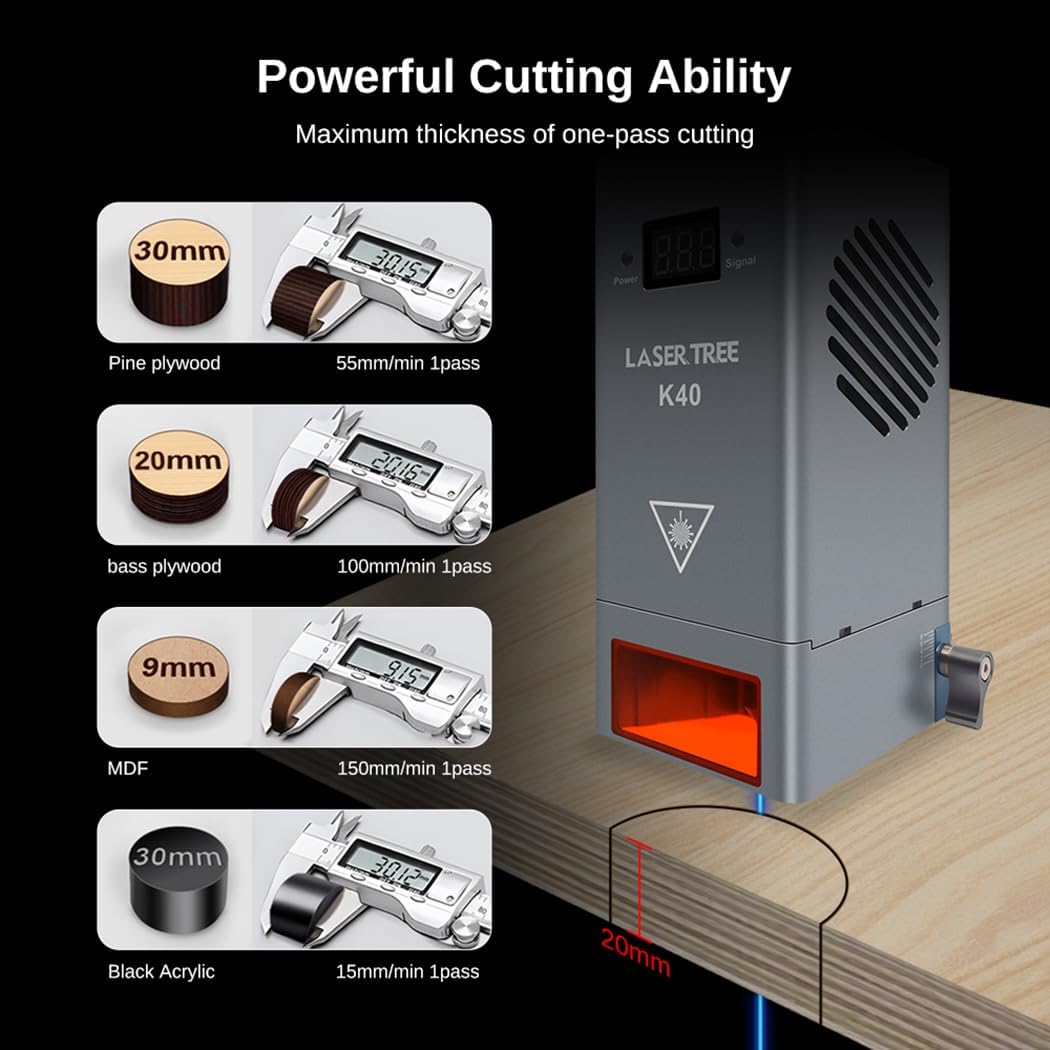
Figure 6.1: Examples of maximum thickness for one-pass cutting on various materials like pine plywood, bass plywood, MDF, and black acrylic.
Video 6.1: Shows the 40W Diode laser module cutting 30mm pinewood in a single pass, demonstrating its powerful cutting capability.
6.2 Engraving Speed
The K40 module offers high engraving speeds, significantly reducing project completion times.

Figure 6.2: Comparison illustrating the K40's engraving speed of 20000mm/min compared to other modules at 10000mm/min.
6.3 Material Compatibility
The K40 supports a wide range of materials for both cutting and engraving, including various woods, acrylics, and other craft materials.

Figure 6.3: Examples of intricate designs and objects created using the K40 for laser cutting projects.

Figure 6.4: Examples of detailed engravings on various surfaces, showcasing the module's versatility for engraving projects.
7. Maintenance
Regular maintenance ensures the longevity and optimal performance of your laser module:
- Lens Cleaning: The module features an easy-to-change protection window design. Clean or replace the lens when it becomes contaminated or dusty to maintain laser beam quality.
- Air Assist Nozzle: Periodically check and clean the air assist nozzle to ensure unobstructed airflow and efficient debris removal during operation.
- Cooling Fans: Ensure the dual cooling fans are free from dust and debris to maintain effective heat dissipation. Clean as necessary.

Figure 7.1: The easy-to-change protection window design allows for simple cleaning and replacement of the focus lens and copper core protection lens.
8. Troubleshooting
If you encounter issues with your LASER TREE K40 module, refer to the following common problems and solutions:
| Problem | Possible Cause | Solution |
|---|---|---|
| Laser not firing or weak output | Incorrect wiring; Insufficient power supply; Dirty or damaged lens; Incorrect focus; Software settings. | Check all electrical connections; Ensure power supply meets requirements; Clean or replace the protective lens; Adjust laser focus; Verify software power/speed settings. |
| Over-temperature alarm sounds | Excessive working temperature; Obstructed cooling fans. | Stop operation immediately and allow the module to cool down; Ensure cooling fans are clear and functioning properly; Reduce laser power or increase air assist if consistently overheating. |
| Inaccurate positioning or engraving | Incorrect red cross offset setting; Loose mounting; Machine calibration issues. | Verify the red cross positioning cursor offset (X: 0mm, Y: -21mm) in your software; Ensure the module is securely mounted; Calibrate your laser engraver machine if necessary. |
| Poor cutting quality (burn marks, incomplete cuts) | Incorrect focus; Insufficient air assist; Incorrect speed/power settings for material. | Adjust laser focus precisely; Ensure air assist is connected and functioning; Optimize speed and power settings for the specific material being processed. |
9. Specifications
| Attribute | Detail |
|---|---|
| Brand | LASER TREE |
| Model Number | LT-K40 1 |
| Optical Output Power | 40W+ (40000mW) |
| Laser Type | Diode Laser (8x 5.5W beam compressed diodes) |
| Laser Class | Class 4 |
| Product Dimensions | 5.68 x 2.4 x 2.4 inches |
| Item Weight | 5.02 pounds |
| Operation Mode | Automatic |
| Compatibility | TTL/PWM-controlled DIY machines, laser engraver cutter machines, CNC laser machines, 3D printers |
| Cooling System | Dual Fan Cooling |
| Safety Features | Temperature Display & Alarm, Flame-resistant Optical Glass View Window |
10. Warranty and Support
LASER TREE is committed to providing high-quality products and comprehensive customer support.
- Warranty: The LASER TREE K40 Laser Module comes with a 12-month warranty from the date of purchase. This warranty covers manufacturing defects and malfunctions under normal use. Please retain your proof of purchase for warranty claims.
- Technical Support: For technical assistance, troubleshooting, or any questions regarding your laser module, please contact LASER TREE customer support. Refer to the official LASER TREE website or your purchase platform for the most current contact information.
- Online Resources: Additional resources, including FAQs and updated drivers, may be available on the LASER TREE official website.


