
1. Product Overview
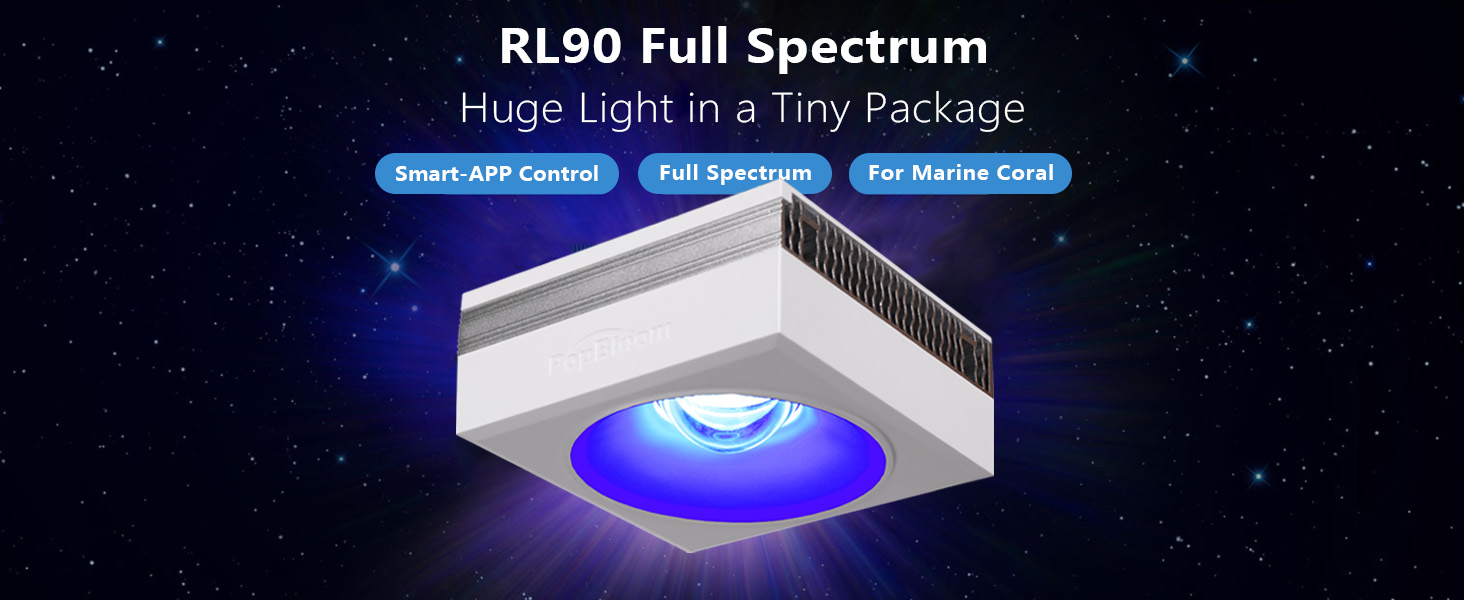
The PopBloom RL90 Full Spectrum LED Aquarium Light is designed for marine reef tanks, providing optimal lighting for hard and soft corals (SPS/LPS). It features a full color spectrum, efficient cooling, and smart app control for customizable lighting schedules and intensity.
This manual provides detailed instructions for the installation, operation, and maintenance of your RL90 LED aquarium light system.
2. What's in the Box
Verify that all components are present in your package:
- 4x RL90 Light Units
- 4x Hang Kits
- 4x Power Plugs
- 4x Power Supplies
- 1x User Manual

3. Specifications
| Feature | Detail |
|---|---|
| Model Number | RF90-H-4-US |
| Color | White |
| Material | Aluminum |
| Light Source Type | Light Emitting Diode (LED) |
| Power Source | Corded Electric |
| Mounting Type | Hanging |
| LED Array Power (per light) | 90W |
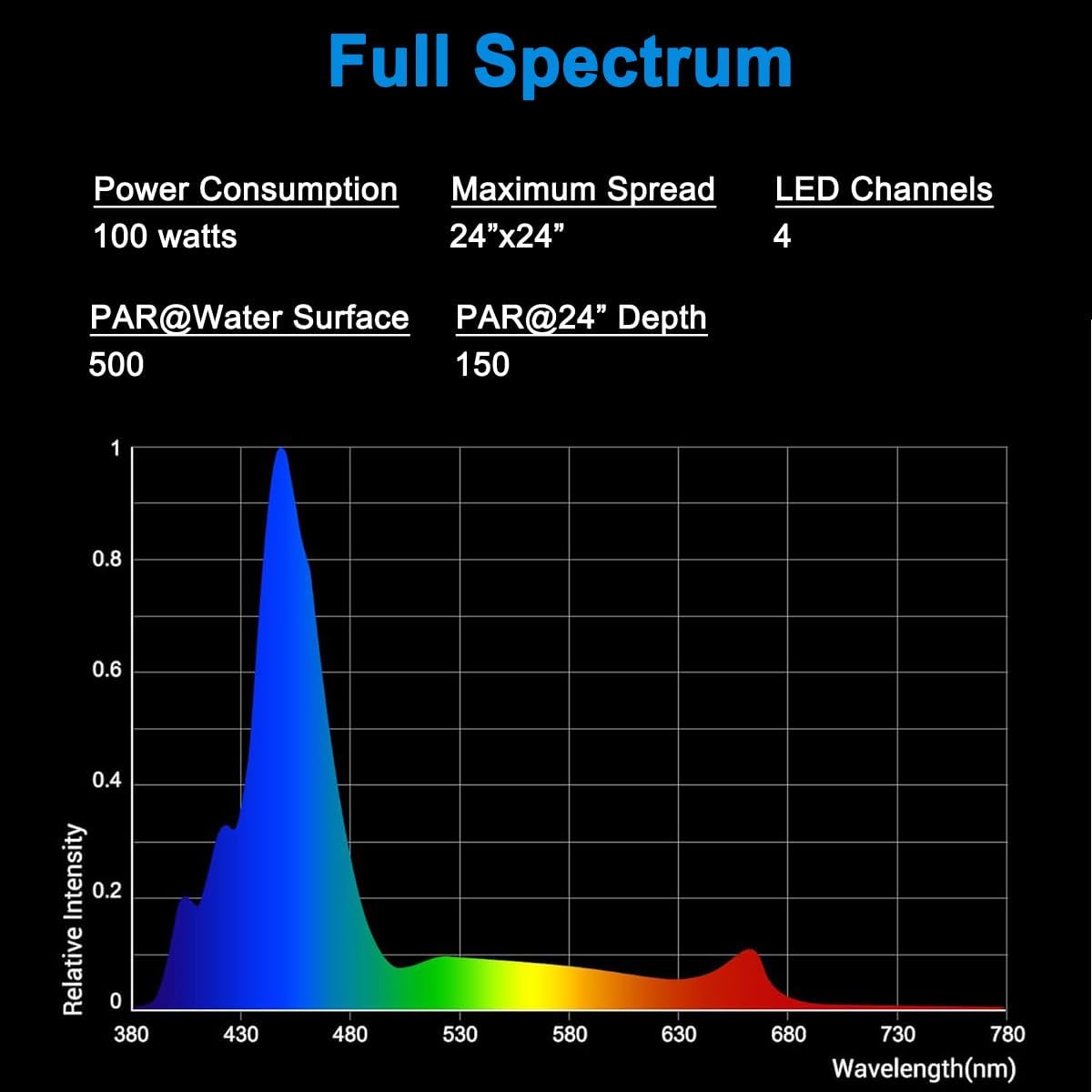
| PAR Value (Water Surface) | 500 |
| PAR Value (60cm depth) | 150 |
| Channels | 4 Dimmable and Programmable Channels |
| Dimensions (L x W x H) | 4.7"L x 4.7"W x 2.2"H (12cm x 12cm x 5.5cm) |


4. Setup and Installation
4.1 Mounting Options
The PopBloom RL90 lights can be installed using a hang kit or an arm kit (sold separately). This package includes the hang kit.
4.1.1 Using the Hang Kit
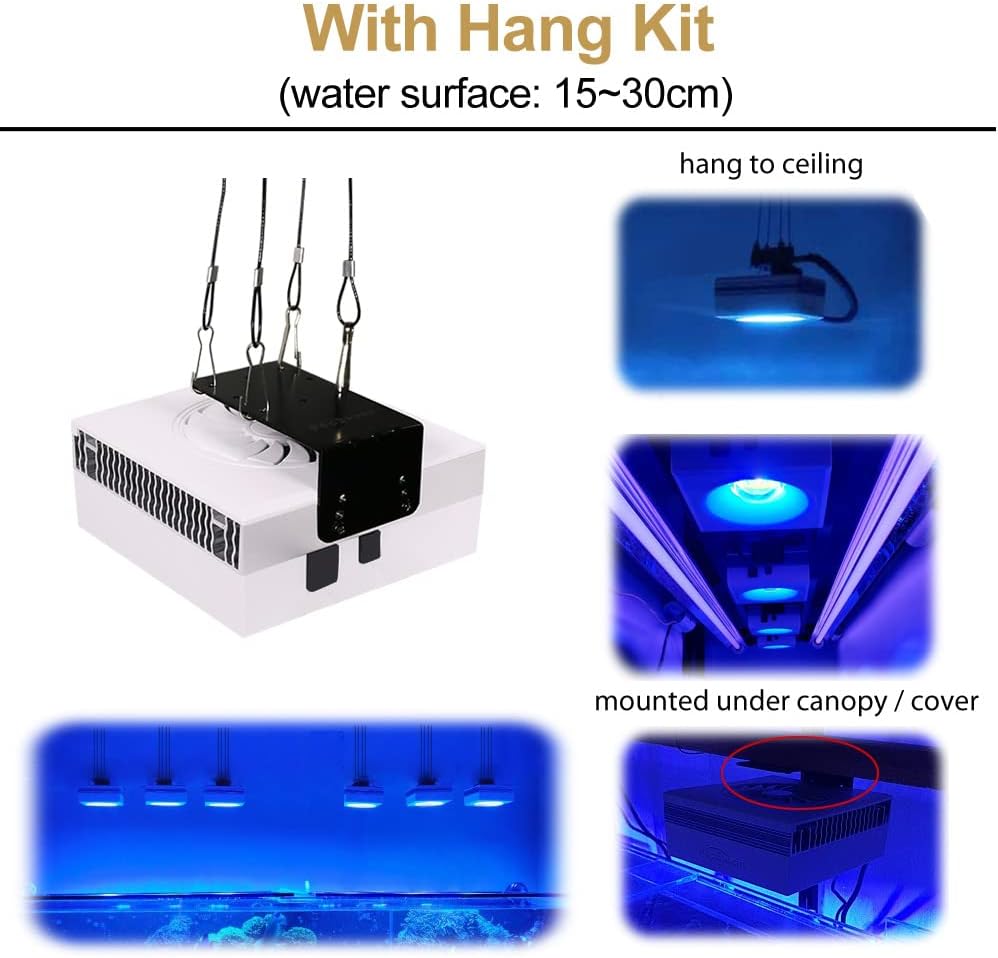
Attach the hang kit to the top of the light unit. The light can then be suspended from the ceiling or mounted under a canopy/cover. Ensure the light is positioned 15-30cm above the water surface for optimal performance.
4.1.2 Other Mounting Options (Arm Kit, Pendant)
Other mounting options like the arm kit or pendant solution are available separately. The arm kit can be adjusted for tank widths of 12-25cm and heights of 20-35cm, suitable for rimless or rimmed tanks. The pendant solution allows hanging multiple RL90 units over larger tanks.

4.2 Power Connection
Connect each RL90 light unit to its dedicated power supply and then to a power outlet. Ensure all connections are secure before powering on the units.
5. Operating Instructions: Smart App Control
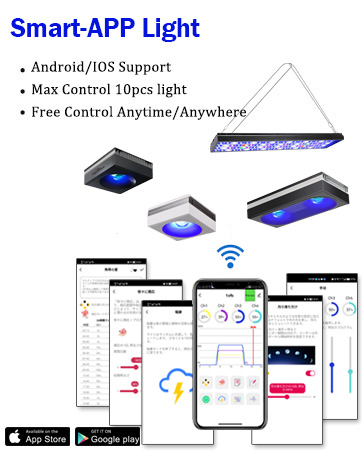
The PopBloom RL90 lights are controlled via a smart application, allowing for flexible programming and adjustment.
5.1 App Download and Installation
- Ensure your phone's Wi-Fi and Bluetooth are turned on.
- Open the "Smart Life" app and tap "Add Device". The app will automatically search for nearby PopBloom lamps.
- Select the discovered lamps and enter your Wi-Fi network information. Double-check the password for accuracy.
- Wait for the lamps to connect. Once connected, you can name each lamp for easy identification (e.g., "left", "right").

You can also find the app at: https://smartapp.tuya.com/smartlife
5.2 Group Control
To control multiple lights simultaneously, create a group within the app:
- From the device list, select one of your connected lights.
- Navigate to the settings or options menu (often represented by three dots or a gear icon).
- Select "Create Group" and choose the lights you wish to include in the group.
- Name your group (e.g., "Main Tank Lights") and save. You can now control all lights in the group together.
5.3 Channel Adjustment and Programming
The RL90 features 4 dimmable and programmable channels, allowing precise control over light intensity and spectrum. These channels can be operated together or independently.
- Channel 1: 10W 8000K White
- Channel 2: 5W Moonlight
- Channel 3: 65W REEF GROW Blue
- Channel 4: 10W Growth Red
The app provides various programming options, including:
- Manual Quick Set: Adjust individual channel intensity with sliders.
- Custom Programs: Create detailed daily schedules with varying intensities for each channel to simulate natural light cycles (sunrise, sunset, lunar cycle).
- Special Effects: Simulate lightning or other weather conditions.
5.4 Video Tutorial: Smart App Programming
For a visual guide on how to program your PopBloom RL90 smart Wi-Fi light using the app, please watch the following video:
6. Light Performance and Features
6.1 Full Spectrum Output
The RL90 provides a full color spectrum, including popular blue, red, green, and Violet+UV wavelengths. This spectrum is designed to promote optimal coral growth and enhance coloration, creating a natural shimmer effect in the aquarium.
6.2 PAR Value and Distribution
The RL90 is scientifically engineered to balance PAR/Lumen output and coverage, suitable for tanks up to 30 inches deep. It provides ideal PAR values throughout the aquarium, minimizing hotspots and ensuring uniform illumination for coral growth.
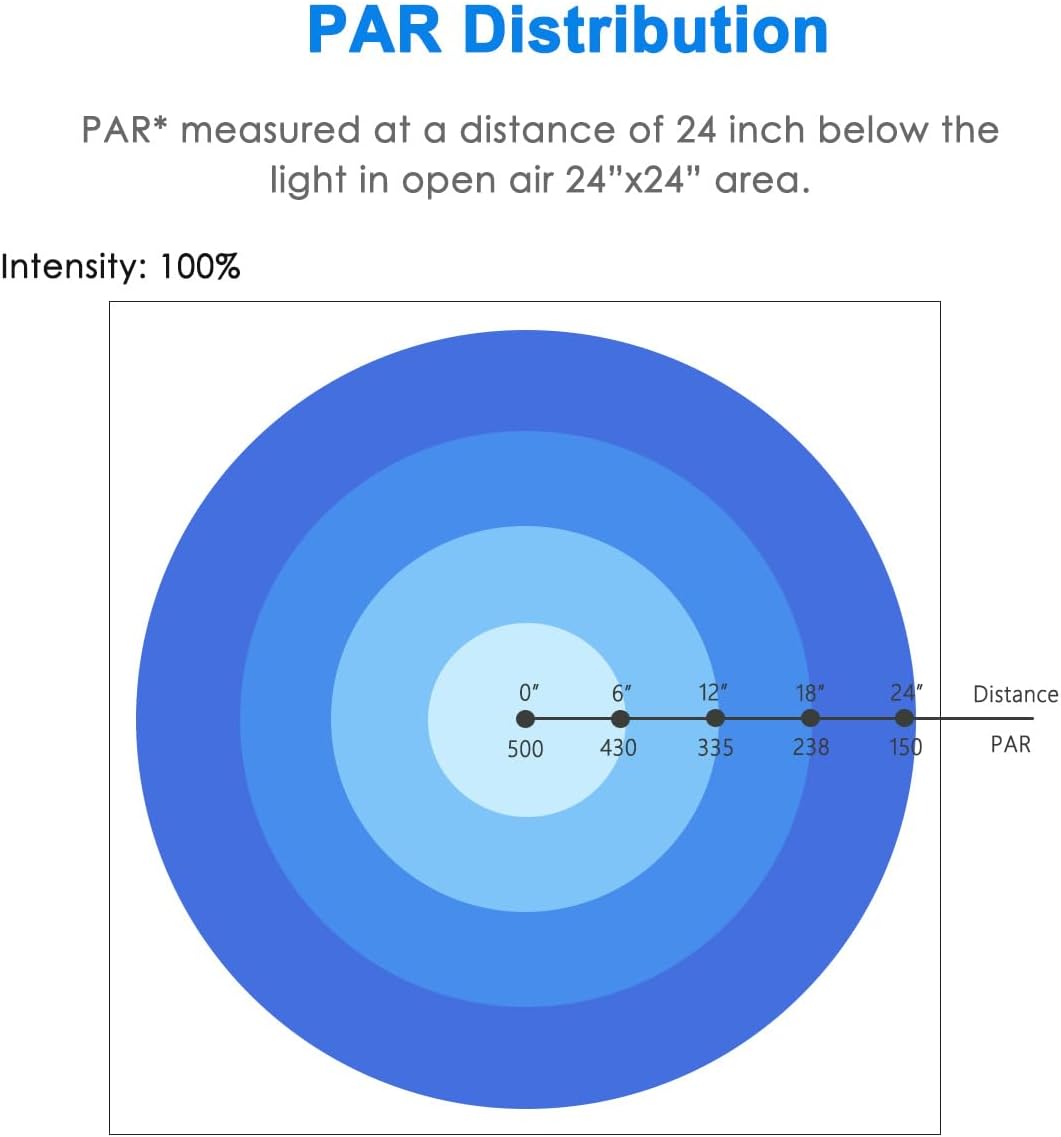

6.3 Glare-proof Recessed Lens and HD Power
The RL90 features a glare-proof recessed lens design, providing homogeneous light with a gentle shimmer. This design helps achieve a balance of power and spread, reaching up to 80cm deep with high uniformity. The HD Power feature dynamically adjusts power across channels, borrowing power from unused colors to provide the most vivid spectrum.


7. Maintenance
Regular maintenance ensures the longevity and optimal performance of your PopBloom RL90 LED aquarium light.
- Cleaning: Periodically wipe the light unit and lens with a soft, damp cloth to remove salt creep, dust, and water spots. Ensure the unit is unplugged before cleaning. Do not use abrasive cleaners or solvents.
- Cooling System: The RL90 uses a smart cooling fan and cold forging heat sink. Ensure the fan vents are not obstructed to maintain efficient cooling and extend LED lifespan.
- Power Connections: Regularly check power plugs and connections for any signs of wear or corrosion.
8. Troubleshooting
If you encounter issues with your PopBloom RL90 LED aquarium light, refer to the following common troubleshooting steps:
| Problem | Possible Cause | Solution |
|---|---|---|
| Light not turning on | No power supply; loose connection; faulty power adapter. | Check if the power plug is securely connected to the outlet and the light unit. Verify the power adapter is functioning. Try a different outlet. |
| App cannot connect to light | Wi-Fi/Bluetooth off; incorrect Wi-Fi password; light not in pairing mode; app issues. | Ensure phone Wi-Fi and Bluetooth are enabled. Re-enter Wi-Fi password carefully. Power cycle the light unit to re-enter pairing mode. Restart the app. Ensure your Wi-Fi is 2.4GHz. |
| Inconsistent light output | Incorrect app settings; dust/salt creep on lens; cooling issues. | Check app programming for schedules or manual settings. Clean the light lens. Ensure cooling vents are clear. |
| Light overheating | Obstructed cooling vents; fan malfunction. | Clear any obstructions from the cooling vents. Contact support if the fan is not operating. |
If the problem persists after trying these steps, please contact PopBloom customer support for further assistance.
9. Warranty and Support
9.1 Manufacturer Warranty
The PopBloom RL90 LED Aquarium Light comes with a 3-year manufacturer warranty. Please retain your proof of purchase for warranty claims.
9.2 Customer Support
For any questions, technical support, or warranty inquiries, please contact PopBloom customer service through the retailer where you purchased the product or visit the official PopBloom website for contact information.
