
Anker A2741011
Anker 30W 2-Port USB-C Car Charger User Manual
Model: A2741011
Introduction
Thank you for choosing the Anker 30W 2-Port USB-C Car Charger. This manual provides essential information for the safe and efficient use of your new car charger. Please read it thoroughly before operation and retain it for future reference.
This compact and powerful car charger is designed to provide rapid charging for a wide range of mobile devices, including smartphones, tablets, and other USB-powered gadgets, directly from your vehicle's 12V accessory outlet.
Safety Information
- Do not expose the charger to liquids, extreme temperatures, or direct sunlight.
- Do not disassemble, modify, or attempt to repair the charger. This will void the warranty and may cause damage or injury.
- Keep out of reach of children.
- Ensure the charger is fully inserted into the vehicle's 12V accessory outlet.
- Unplug the charger when not in use or when leaving the vehicle for extended periods.
- Avoid using damaged cables or adapters with the charger.
Package Contents
- Anker Car Charger (30W, 2 Ports)
- Welcome Guide
Note: A USB cable is not included with the charger and must be purchased separately.
Product Overview
The Anker 30W 2-Port USB-C Car Charger features a sleek, compact design with two charging ports: one USB-C port and one USB-A port, allowing for simultaneous charging of two devices.

Figure 1: Front view of the Anker 30W 2-Port USB-C Car Charger, showcasing its compact design and dual ports.

Figure 2: The charger's ultra-compact dimensions (2.15 x 0.94 x 0.95 inches) are highlighted, demonstrating its small footprint comparable to a US quarter.
Setup
To set up your Anker Car Charger:
- Locate the 12V accessory outlet (cigarette lighter socket) in your vehicle.
- Insert the Anker Car Charger firmly into the 12V accessory outlet until it is securely seated. The charger is designed with an extended connector and improved grip for stable power, even on rough roads.
- Once inserted, the charger is ready for use. Note that this product does not include an LED status indicator light.

Figure 3: The car charger securely inserted into a vehicle's power outlet, illustrating its stable connection for uninterrupted power.
Operating Instructions
The Anker 30W 2-Port USB-C Car Charger is equipped with PowerIQ 3.0 technology for optimized charging.
- Single Device Charging: For the fastest charging, especially for high-power devices like iPhone 15/15 Pro, use the 30W USB-C port. This port offers charging speeds up to 3 times faster than standard 5W chargers.
- Dual Device Charging: To charge two devices simultaneously, connect one device to the USB-C port and another to the USB-A port. The charger intelligently distributes power to both devices.
- Universal Compatibility: This charger is compatible with a wide range of devices, including iPhone 16/15/14/13/12 Series, Samsung Galaxy S25/S24/S23/S22/S21 Series, iPad Pro, iPad Air, iPad, iPad mini, and AirPods.

Figure 4: An iPhone connected to the USB-C port of the Anker car charger, illustrating its 3X faster charging capability.

Figure 5: The car charger in use, simultaneously charging a smartphone via the USB-C port and another device via the USB-A port, demonstrating its dual-device charging capability.

Figure 6: A visual representation of the charger's universal compatibility with various Apple and Samsung devices, including iPhones, iPads, and Galaxy phones.
Maintenance
- Clean the charger with a dry, soft cloth. Do not use abrasive cleaners or solvents.
- Store the charger in a cool, dry place when not in use.
- Regularly check the ports for dust or debris and clean if necessary to ensure optimal connection.
Troubleshooting
Device Not Charging:
- Ensure the car charger is fully and securely inserted into the 12V accessory outlet.
- Check if the vehicle's accessory outlet is receiving power (e.g., by testing with another device).
- Verify that the charging cable is not damaged and is properly connected to both the charger and your device.
- Try a different charging cable or device to isolate the issue.
Slow Charging:
- Ensure you are using a high-quality charging cable that supports fast charging.
- For optimal performance with high-power devices, use the single USB-C port.
- Confirm your device supports the fast charging protocols provided by the charger (e.g., PowerIQ 3.0).
Charger Overheating:
- The charger is equipped with MultiProtect technology for safety, including over-temperature protection.
- If the charger feels excessively hot, disconnect it immediately and allow it to cool down.
- Ensure proper ventilation around the charger and avoid covering it.
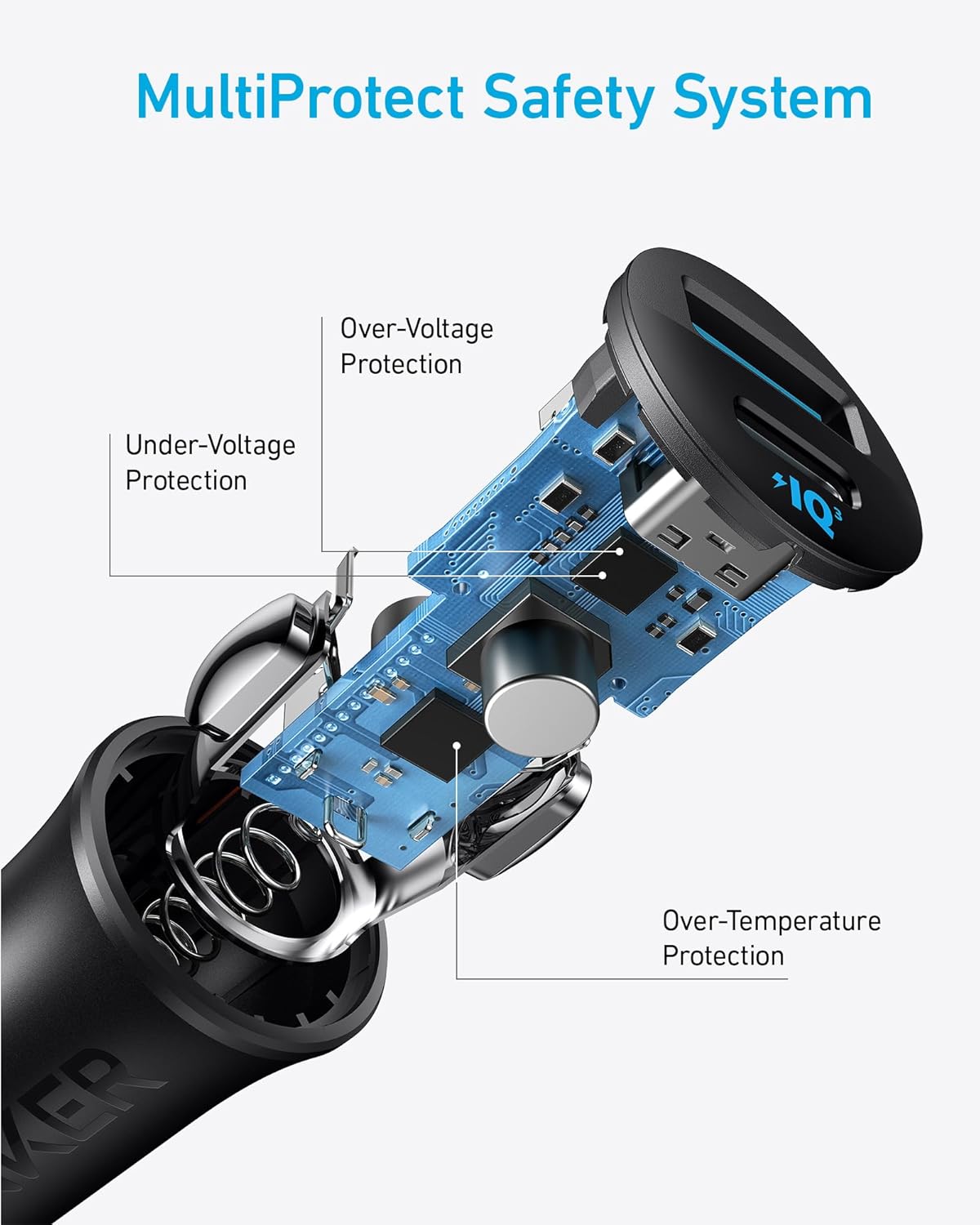
Figure 7: Diagram illustrating Anker's MultiProtect Safety System, which includes safeguards against over-voltage, under-voltage, over-current, and over-temperature.
Specifications
| Feature | Detail |
|---|---|
| Model Number | A2741011 |
| Product Dimensions | 2.15 x 0.94 x 0.95 inches |
| Item Weight | 0.519 ounces |
| Input Voltage | 240 Volts |
| Amperage | 9 Amps |
| Connectivity Technology | USB |
| Connector Type | 2-Pin |
| Special Feature | Fast Charging |
| Color | Black |
Warranty and Support
Anker provides an 18-month warranty for this product, covering manufacturing defects from the date of purchase. Please retain your proof of purchase for warranty claims.
For technical support, troubleshooting assistance, or warranty inquiries, please contact Anker customer service. Refer to the welcome guide included in your package for contact details or visit the official Anker website.
You can also find the official User Guide (PDF) here.
Related documentsA2741011


Ask a question about this manual
Ask about setup, troubleshooting, compatibility, parts, safety, or missing instructions. Manuals+ will review the question and use this page’s manual context to help answer it.